
Avianca Lifemiles Amex Elite review: Worth $249?


Choosing the right airline credit card usually comes down to how often you fly with that carrier and its partners — and Avianca’s two cards are no exception.

If you regularly book Avianca or Star Alliance award flights, it’s worth considering both the Avianca Lifemiles American Express® Card and the Avianca Lifemiles American Express® Elite Card.

The Elite Card may catch your eye with its earning rates and built-in Lifemiles+ Lite membership. However, despite its $249 annual fee (see rates and fees), it doesn’t necessarily deliver enough value to justify the cost for most travelers.

Card rating*: ⭐⭐⭐

*Card rating is based on the opinion of TPG’s editors and is not influenced by the card issuer.

Avianca Lifemiles Amex Elite: The basics

The Avianca Lifemiles Amex Elite Card looks like a step up from the cheaper $99 Avianca Lifemiles American Express Card (see rates and fees). It earns more on Avianca purchases, adds redemption perks and includes ongoing benefits through a Lifemiles+ Lite membership.

In practice, though, this card feels more like a niche option for frequent Lifemiles users than a well-rounded mid-tier airline card.

Just like the cheaper $99 version, you’ll receive Avianca Silver status, which includes:

  • Avianca lounge access twice per year
  • Extra-legroom seat selection
  • Select upgrade options
  • An extra checked bag (excludes Basic and Light fares)
  • Priority check-in and boarding (Group B)

Reward your inbox with the TPG Daily newsletter

Join over 700,000 readers for breaking news, in-depth guides and exclusive deals from TPG’s experts

Avianca narrowbody plane
ZACH GRIFF/THE POINTS GUY

The Elite Card’s main differentiator is its built-in Lifemiles+ Lite membership, which offers:

  • 500 bonus miles per month (6,000 per year)
  • An up to 25% discount on Avianca award flights
  • A 10% discount on Star Alliance award redemptions

These perks can be valuable, but only if you’re actively redeeming Lifemiles.

Like the lower-fee card, there are no foreign transaction fees (see rates and fees for the Avianca Lifemiles Amex Elite; see rates and fees for the Avianca Lifemiles Amex), and the card is issued by Cardless on the American Express network.

Avianca Lifemiles Amex Elite pros and cons

Pros Cons

  • Complimentary Avianca Silver status (also available on the lower-fee Avianca Amex Card)
  • Star Alliance Silver benefits, including priority waitlist and priority standby
  • Monthly bonus miles and redemption discounts through Lifemiles+
  • Solid earning on Avianca and Lifemiles purchases
  • No foreign transaction fees

  • Same Silver status as the lower-fee card
  • Not a great fit for those who fly Avianca infrequently
  • Offers little if you already have Avianca Gold or Diamond status
  • Limited benefits when flying Star Alliance partners
  • Weak everyday earning rates
  • Benefits are highly dependent on using Lifemiles regularly

Avianca Lifemiles Amex Elite benefits

The biggest driver of value on the Avianca Lifemiles Amex Elite isn’t the elite status — it’s the Lifemiles+ Lite membership. You’ll receive 500 miles each month, which adds up to 6,000 miles per year. Based on TPG’s April 2026 valuations, that’s worth $84 per year.

That alone won’t come close to offsetting the card’s $249 annual fee, but the additional perks — particularly the 10% rebate on Star Alliance redemptions — can be meaningful if you redeem miles regularly.

There’s also an up to 25% discount on Avianca award flights, which can help stretch your miles further — though this is most useful if you’re actually flying Avianca rather than booking partner awards.

When it comes to status, Avianca Silver can be useful if you don’t already have elite status with a Star Alliance airline. You’ll get basic benefits like priority boarding and priority wait-listing.

Avianca VIP Lounge in Miami International Airport (MIA). GISELLE GOMEZ/THE POINTS GUY

You’ll receive two Avianca lounge visits per year with this card. That said, how useful this benefit is depends heavily on where you’re traveling.

For example, Avianca’s Miami International Airport (MIA) lounge is also part of the Priority Pass network, meaning you may already have access through another card. And outside of Avianca-operated lounges, you won’t get broader lounge access like you would with premium travel cards.

As with the lower-fee version, this card’s benefits are primarily tied to Avianca flights. When flying other Star Alliance airlines like United Airlines or Air Canada, the value of Silver status is fairly limited. That’s ultimately the issue — you’re paying a lot without getting meaningfully strong benefits.

How to earn and use your rewards

How to earn your rewards

The Avianca Lifemiles Amex Elite earns:

  • 3 miles per dollar spent on Avianca and Lifemiles purchases
  • 2 miles per dollar spent on dining and travel
  • 1 mile per dollar spent on everything else

These rates are fairly standard for an airline card. As is usually the case, I don’t recommend putting much everyday spending on this card. You’ll generally get more value from a transferable points card that offers greater flexibility.

That said, there is one area where this card stands out: buying Lifemiles.
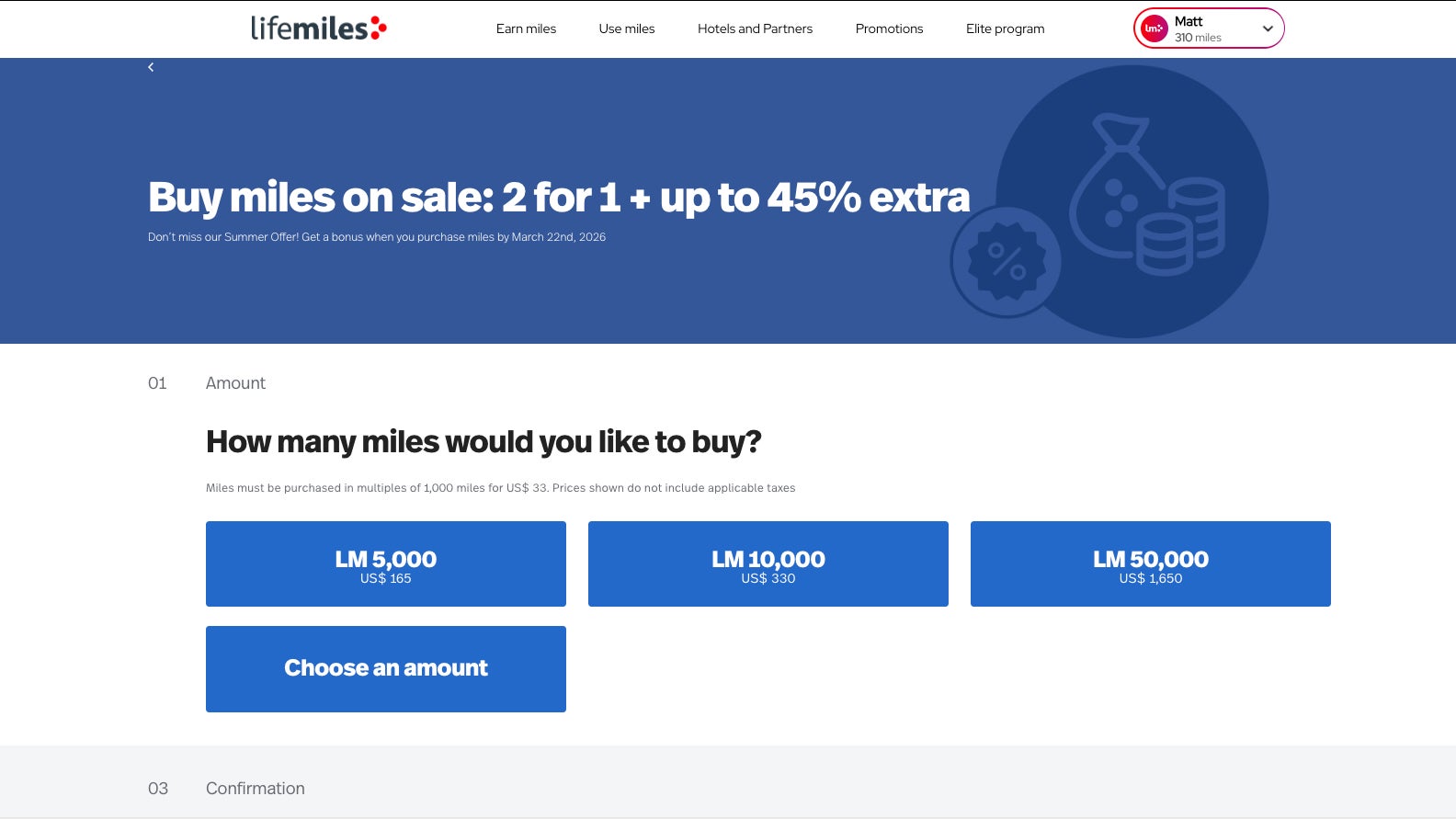
Buy Lifmiles screenshot
LIFEMILES

Lifemiles frequently runs promotions offering bonus miles, making it relatively easy to build a balance for premium cabin redemptions. Earning 3 miles per dollar spent on those purchases can make this card useful if you regularly top up your account.

The card also includes a “double miles” feature through Lifemiles+, which matches miles earned each statement cycle — but only up to 1,000 bonus miles per month. It’s a nice perk, though it doesn’t dramatically change the overall earning potential.

How to redeem Avianca Lifemiles

Avianca Lifemiles are most valuable when redeemed for flights on Star Alliance partners, including United, Air Canada and Lufthansa.

One of the strengths of the program is that it often offers competitive award pricing with relatively low taxes and fees, making it a strong option for booking premium cabin flights.

For example, you could fly Swiss business class from Newark to Zurich for 69,000 Lifemiles plus just $29 in taxes. (You could then use cash to upgrade to first class at check-in, like I did.)

Swiss 777 business class
Swiss business class. ETHAN STEINBERG/THE POINTS GUY

The Elite Card’s 10% rebate on Star Alliance redemptions is one of its most compelling perks and can provide ongoing value if you redeem frequently. You would save almost 7,000 Lifemiles on the flight to Switzerland highlighted above.

If you’re only redeeming occasionally, though, this perk alone is unlikely to justify the higher annual fee.

Potential drawbacks to the Avianca Lifemiles Amex Elite

The Avianca Lifemiles Amex Elite lacks several benefits that are standard on similarly priced airline cards, such as meaningful statement credits and broader lounge access. That makes it difficult to offset the annual fee — unless you’re consistently extracting value from Lifemiles redemptions.

Ultimately, you’re paying a premium price for a set of benefits that is highly dependent on how often you redeem Lifemiles — rather than a well-rounded suite of travel perks.

Avianca Lifemiles Amex Elite vs. Avianca Lifemiles Amex

While the Avianca Lifemiles Amex Elite offers incremental perks, it doesn’t meaningfully separate itself from the more affordable Avianca Lifemiles American Express.

Both cards include:

  • Avianca Silver status
  • Two lounge passes per year
  • Similar overall earning structures

The Elite Card adds:

  • 6,000 bonus miles annually (500 per month)
  • An up to 25% discount on Avianca awards
  • A 10% discount on Star Alliance redemptions
  • Higher earning on Avianca and Lifemiles purchases

Those perks can provide value, but for many travelers, they won’t justify paying an extra $150 per year — especially given the lack of additional core travel benefits.

Personally, I’d lean toward the cheaper card unless you’re consistently redeeming Lifemiles and can take advantage of the award discounts.

Is the Avianca Lifemiles Amex Elite worth it?

The Avianca Lifemiles Amex Elite‘s overlap with the cheaper Avianca Lifemiles American Express, combined with limited elite benefits and average earning rates, makes the card a difficult sell unless you’re deeply invested in the Lifemiles program.

If you regularly redeem Lifemiles, especially for premium cabin Star Alliance awards, the Elite Card can offer some incremental value. However, for most travelers, I don’t think it does enough to justify its $249 annual fee.

When to apply for the Avianca Lifemiles Amex Elite

Currently, new Avianca Lifemiles Amex Elite Card holders can earn up to 100,000 miles:

  • 60,000 miles after spending $4,500 on purchases in the first 90 days from account opening
  • An additional 40,000 miles after spending $25,000 on purchases in the first 365 days from account opening

The first portion of the bonus is fairly standard, but the second requires a very high level of spending ($2,084 per month for a year). In most cases, you’ll get better value by putting that spending on other more lucrative cards.

Woman shopping online
URBAZON/GETTY IMAGES

Keep in mind that you can only earn a welcome bonus on one Avianca card, so it’s important to choose carefully. Since the card is issued by Cardless, you won’t be subject to Amex’s once-per-lifetime welcome bonus rule.

Other cards to consider if you don’t want the Avianca Lifemiles Amex Elite

If the Avianca Lifemiles Amex Elite doesn’t seem like the right fit, consider:

For additional options, check out our list of the best travel cards.

Bottom line

The Avianca Lifemiles Amex Elite has some useful perks — particularly for frequent Lifemiles users — but it’s ultimately a niche card.

If you’re not regularly redeeming Lifemiles, it’s hard to justify the $249 annual fee. And even if you are, the cheaper Avianca card may offer better overall value.

For most travelers, this isn’t the obvious upgrade it’s positioned to be.


Apply here: Avianca Lifemiles American Express Elite Card


Source link

Leave a Reply

Subscribe to Our Newsletter

Get our latest articles delivered straight to your inbox. No spam, we promise.

Recent Reviews


What is XPath in Selenium – Table of Content

What is XPath in Selenium?

Selenium is an open-source, most popular web automation testing tool that supports multiple browsers & OS. XPath in Selenium is an XML Path and a syntax useful for locating an element on a web page. Locating any element on the web page uses XML path or XPath expression. Further, XPath in Selenium is useful for navigating through the HTML structure of the web page. 

Moreover, XPath uses HTML DOM structure to find any element on a web page for both HTML and XML documents. 

The syntax for XPath In Selenium 

XPath in Selenium holds the element’s location on the web page. The basic syntax for XML Path Selenium is as follows-

Xpath=//tagname[@attribute="value"]

The meaning of each expression in the syntax is-

  • // : Choose the existing node.
  • Tagname: Particular node’s tagname.
  • @: This symbol denotes the “Select” attribute.
  • Attribute: Node’s attribute name.
  • Value: Attribute’s Value.

Become a master of Selenium by going through this HKR Selenium Training!

XML Document

The XML documents are the text files that contain XML data, including elements and other markups, in a sequential package. Further, it can include a wide variety of data such as numbers databases, numbers of a mathematical equation, etc. You can understand XML document with an example:-

 Kumar

   AK & Co.

    032456123

Here, the above code is divided into two parts- Document Prolog & Document Elements. Let us discuss them in brief.

Document Prolog

The document prolog appears at the top of the document, beforE the root document element. It includes XML and Document type declaration. 

Document Elements

These major building blocks of XML segregate the document into different sections. Each of these document sections perform a particular purpose. Moreover, you can easily segregate a document into different sections so that search engines can use it. Further, these document elements can be the containers having text and other elements combined. 

Types of XPath

  1. Absolute XPath:
  2. Relative XPath:
Absolute XPath

In Selenium, the absolute XPath is the direct path to find the element. This Xpath begins with the “/” (Slash) symbol and helps select the element from the root. The major drawback of this XPath is that if you change the path of the element or attribute, the absolute XPath will fail.

Relative XPath:

The Relative XPath in Selenium begins with the double forward slash “//” symbol and from the middle of the HTML DOM. You can search elements anywhere on the web page as it doesn’t need to write a lengthy Xpath. This XPath is mainly considered as it is not a complete path from the root element.

For example: //input[@id=‘ap_email’]

Suppose You launch Google Chrome and navigate to google.com. Then locate the search bar utilising XPath. By analysing the web element there is an input tag and attributes like class and id. Utilise the tag name and given attributes to create XPath that will locate the search bar.

If you want to Explore more about Selenium? then read our updated article – Selenium Tutorial

What-is-xpath-in-Selenium-1

Click the Elements tab and press Ctrl + F to open a search box in chromes developers tool.  Write XPath string selector and it will try to search based on that criteria. In the image given above, it has an input tag.  //input implies tagname. Use the name attribute and pass ‘q’ as its value. It provides XPath expression as shown below:

//input[@name=’q’]

XPath string

It has focused on the element that implies this specific element was located utilising XPath.

If you want to Explore more about Selenium? then read our updated article – Selenium Tutorial!

Check out our Latest Tutorial video. Register Now Selenium Online Course to Become an expert in Selenium.


Acquire Selenium with jenkins certification by enrolling in the HKR Selenium with jenkins Training program in Hyderabad!

Selenium Certification Training

  • Master Your Craft
  • Lifetime LMS & Faculty Access
  • 24/7 online expert support
  • Real-world & Project Based Learning

XPath Functions

Automation utilizing Selenium is unquestionably an incredible innovation which gives numerous approaches to distinguish an article or component on the website page. Be that as it may, in some cases we do deal with issues in recognizing the articles on a page that have similar credits. Some cases can be: components having similar credits and names or with more than one button with similar name and ids. It’s trying to train selenium to distinguish a specific item on a website page and it is the place where XPath functions to serve as the hero. 

Frequently asked Selenium Interview Questions and Answers !!

Types of XPath Functions

Selenium involves different functions. The three of the most broadly utilized functions are given below:

1) Basic XPath

The basic XPath expression selects nodes or a list of many nodes based on various elements or attributes such as ID, Name, ClassName, etc. It selects them from the XML documents. The syntax we can use for the basic XPath is –

Xpath=//input[@name="uid"
2.Contains()

It is a method used in XPath expression when the value of an attribute or element dynamically changes. You can easily find the elements with a partial text using the “Contains” feature in the XPath expression. Now understand this with the below example.:-

Xpath=//*[contains(@type,'sub')]

The above example denotes that the full value of the element type is submitted, but we use the partial text ‘sub’ here to find the element. Thus, in the above example, we tried to find the element by giving a partial text of the attribute “submit”. 

3) Using OR & AND

Here, we use two conditions, first or second condition, among which one condition must be “True” to execute it. This method is still applicable if any one or both conditions are “true”. It means that any conditions should be true to find the element. The expression we can use for this is-

Xpath=//*[@type="submit" or @name="btnReset"]

The above XPath expression will help determine whether a single or both conditions are ‘True’.

Similarly, in the “And” XPath expression, also we use two conditions, but both conditions should be “true” to locate the element. If any one of the conditions becomes “false”, then the expression cannot find the element. The syntax we can use for this function is-

Xpath=//input[@type="submit" and @name="btnLogin"]
4) Xpath Starts-with

The function Xpath-Starts-with() in the Xpath functions is useful to find the element whose attribute value changes in some conditions. Here the value changes with the refresh of the page or by performing dynamic actions on the webpage. In this method, the initial text of the attribute should be in parallel to locate the element whose attribute value changes interactively. 

Further, you can also find the elements whose attribute value doesn’t change or remain static. You can understand this function’s use by the following example:-

Xpath=//label[starts-with(@id,'message')]

The above syntax shows that two different elements start with the initial id “message”. Here, you can use the Xpath-starts with function to check whose attribute value changes or remains static.

Become a master of Selenium by going through this HKR Selenium Training in Delhi!

HKR Trainings Logo

Subscribe to our YouTube channel to get new updates..!

5) XPath Text() Function

In Selenium WebDriver, the function XPath Text() is a built-in function useful to locate elements based on the web element’s text. Using this function, you can find the same text element. Moreover, the elements that you locate must be in a string format.

Xpath=//td[text()='UserID']

Using the above expression having text function, you can locate the element that will show the exact match of the text.

6) XPath axes methods

This method in XPath functions is useful for finding complex or changing elements. However, we can see the following XPath axes methods which we can use:-

  1. a) Following- It is useful to select all the elements in the document of the existing node(). The expression you can use for this method is-
 Xpath=//*[@type="text"]//following::input
  1. b) Ancestor- The ancestor axes method is useful to select all the ancestor elements of the existing node, like parents, grandparents, etc. Here, the expression you can use is-
Xpath=//*[text()='Enterprise Testing']//ancestor::div
  1. c) Child- This axes method selects all the child elements in the documents’ current node. The expression you can use here is-
Xpath=//*[@id='java_technologies']//child::li
  1. d) Preceding- This method helps select the nodes that come before the existing ones. Here is the example expression:-
Xpath=//*[@type="submit"]//preceding::input

The above expression helps to identify all the input elements before the currently given nodes.

  1. e) Following-sibling- This method helps to select the following siblings of the existing node. All the siblings will be equivalent to the existing node, and the method will find the sibling next to the existing node. Moreover, the syntax you can use here for this method is-
xpath=//*[@type="submit"]//following-sibling::input
  1. f) Parent- It helps to select the parent from the existing node of the element. The following is the syntax you can use here.
Xpath=//*[@id='rt-feature']//parent::div

Many div(s) match with the parent, but if you want to focus on a specific element. For this you can use the below xpath syntax-

Xpath=//*[@id='rt-feature']//parent::div[1]
  1. g) Self- In this method, it selects the existing node where it selects itself only. That means the node here is the “self”. The expression you can use for self is-
Xpath =//*[@type="password"]//self::input
  1. h) Descendant- It helps to select the descendants of the existing element where it recognizes all the element descendants of the existing element. 
Xpath=//*[@id='rt-feature']//descendant::a

Selenium Certification Training

Weekday / Weekend Batches

Conclusion

XPath or an XML Path is used to locate any element or navigate through the HTML structure of a webpage. It is generally used for automation purposes and in cases where it is difficult to find elements using locators like name, class, ID, etc. However, it is the most important among the locators useful in Selenium to identify web elements. Also, it is a handy locator for the testers of web pages.

Thus, learning about XPath in Selenium will help you quickly identify a web element on a web page. 

Related Articles:


Source link





