
15 BEST Things to Do in Sydney for First-Time Visitors


The fact that we’ve been travelling the world full-time since 2008 and this was our first visit to Australia is pretty crazy. Needless to say, we were excited to finally be here and to see what this iconic city has to offer!

Sydney is one of those cities that delivers immediately – iconic landmarks, world-class beaches, endless food options, and a laid-back vibe that makes it easy to enjoy.

Best Things To Do in Sydney

We spent 5 days in Sydney at the start of April, and I’m happy to say that the city lived up to the (high) expectations we had. In this post, I’ll share our favourite things to do in and around Sydney for first-time visitors.

1. Sydney Opera House
opera house in sydney

As soon as I saw the white “shells”, I had a huge grin on my face…we had finally made it to Sydney!

Ask anyone what to do in Sydney, and seeing the Opera House will be at the top of their list. This UNESCO-listed site has been featured in movies like The Fall Guy, Mission Impossible and the Great Gasby. It’s unique architecture makes it a very recognizable site.

There are a few ways to experience the Opera House. You can see it by land or by boat (more on that below), and you can (of course) go inside to see a show, or join a tour of the building.

Tickets to the Opera House book up fast! Click here to reserve your spot on a guided tour of the incredible building, and click here to reserve tickets for a very affordable performance by Opera Australia.

2. Walk Across the Harbour Bridge

harbour bridge sydney
You can actually walk across the top of the bridge!

For stunning views of the harbour and the Opera House, make your way across the Harbour Bridge by foot – either on the bridge, or on top of it…

This is something that I had no desire to do!

If you’re not afraid of heights, one of the coolest things to do in Sydney is the Bridge Climb across the Harbour Bridge. It’s a very safe, thrilling experience and we saw lots of people doing it while we were in Sydney. Click here to learn more and to book your spot!

If heights aren’t your thing, you can simply cross the bridge on foot on the eastern side. The western side of the bridge is reserved for cyclists.

👉 See Also: Best Budget Campervan Routes in Australia

3. Go On a Dinner Cruise

Stunning night view of the Opera House & Harbour Bridge from the dining deck of the Clearview Glass Boat dinner cruise in Sydney
Don’t miss a dinner cruise in Sydney!

A dinner cruise in Sydney is one of the most memorable ways to experience the city after dark. You’ll cruise past the Opera House and Harbour Bridge (both listed above), you’ll enjoy a multi-course meal or buffet, which is usually paired with drinks and live entertainment.

Seeing the skyline during the day is great, but watching it light up from the harbour at night is one of the most memorable things to do in Sydney.

There are lots of cruises to suit different styles, from classic dinner cruises to sleek glass-boat experiences with panoramic views. Some cruises offer live music, cabaret, or DJs, making the evening into more than just a meal.

Whether you’re celebrating something special or just want a unique way to see the harbour, it’s one of Sydney’s most iconic nighttime experiences. Click here to search for a cruise and price that suits your style.

4. Visit the Royal Botanic Gardens

The Royal Botanic Garden is one of the most beautiful and accessible green spaces in the city, sitting right on the edge of Sydney Harbour. It’s just a short walk from the CBD, which is where we were staying at YEHS Hotel, and right near the Sydney Opera House, making it an easy stop while exploring the city.

We walked through these beautiful gardens on our way to Mrs. Macquarie’s Chair (more on that below).

The gardens cover a large area with a mix of manicured lawns, themed plant collections, and shaded walking paths – which is always nice during the hot days in Sydney! It’s a place where you can wander, lay out a picnic, or just take a break from the city without actually leaving it.

The gardens are free to enter and open every day, which makes them one of the top free things to do in Sydney. You’ll also find guided tours, cafes nearby, and seasonal events depending on when you visit.

Click here for details about the gardens, and click here for directions on Google Maps.

5. Sunset at Mrs. Macquarie’s Chair

sunset in sydney

You’ve probably seen sunset photos of the Harbour Bridge and the Opera House and are wondering where to get that perfect shot! Well, it’s here at Mrs. Macquarie’s Chair.

The sandstone chair dates back to 1810 and was carved for Elizabeth Macquarie, the wife of Governor Lachlan Macquarie. She was known to sit here and take in the harbour views. These days, it’s one of the best photo spots in Sydney – especially at sunrise or sunset when the light hits the skyline just right.

sunset in sydney

We headed here at sunset and enjoyed epic views of the sun dipping behind the Harbour Bridge – plus, some huge battleships were docked here. Click here for the Google Maps link.

👉 See Also: How to Get a Working Holiday Visa in Australia

6. Join a Walking Tour

Whenever we visit a new city or country, we always try to do a walking tour. It’s such a great way to get a lay of the land, learn about the history and culture, and of course, get some local restaurant and bar recommendations!

Some of the walking tours are free (tip based), while others are paid. We find the free ones to be pretty good, but you usually end up with a big group of people. Whereas the paid ones are more intimate and personalized.

In Sydney, you can join this free walking tour that’ll take you to many of the main sights in this article, including the Opera House, Royal Bontanic Garden, The Rocks, Parliament, and more.

If you’d rather go on a paid walking tour, this one includes everything listed above, is rated 5.0 and has more than 500 positive reviews.

Not only that, but the group tour is small (around 6 people), and you get a free craft beer or juice of your choice! Click here to learn more. You can reserve your spot now, and pay later (there’s also free cancellation up to 24 hours before the tour).

7. Coastal Walk from Bondi to Coogee

coastal walk bondi to coogee
Starting the beautiful walk from Bondi to Coogee!

This was a highlight of our trip to the city and is definitely one of the best day trips from Sydney. Bondi Beach has become pretty famous due to the reality TV show “Bondi Rescue” (I’ve been binge watching these guys on YouTube lately).

The beach here is one of the busiest in Australia, but conditions can be unpredictable and rough – always adhere to the advice of the lifeguards.

However, we weren’t there to hangout on Bondi Beach, we were there to do the beautiful coastal walkway from there all the way to Coogee!

The entire 6 km (3.7 mile) walk takes you through different towns, beaches, and coves. All while enjoying stunning views of the ocean along the way. I loved watching the surfers at Tamarama Beach!

Bronte beach
Bronte Beach – one of the many beaches we passed on the walk

I recommend starting the walk earlier in the day as it’s exposed the entire time. Bring a hat, a water bottle (there are fill points along the way), and wear proper footwear as well (having said that, Nick did this walk in his flip-flops!). This is one of the best things to do in Sydney for sure.

To get here, you’ll need to take the train to the Bondi Junction. Then, hop on Bus 333 at Stand A3 to Bondi Beach. Depending on what time of day you leave, and where you catch the train from, it can take between 30 minutes to an hour.

8. Eat Michelin Ramen
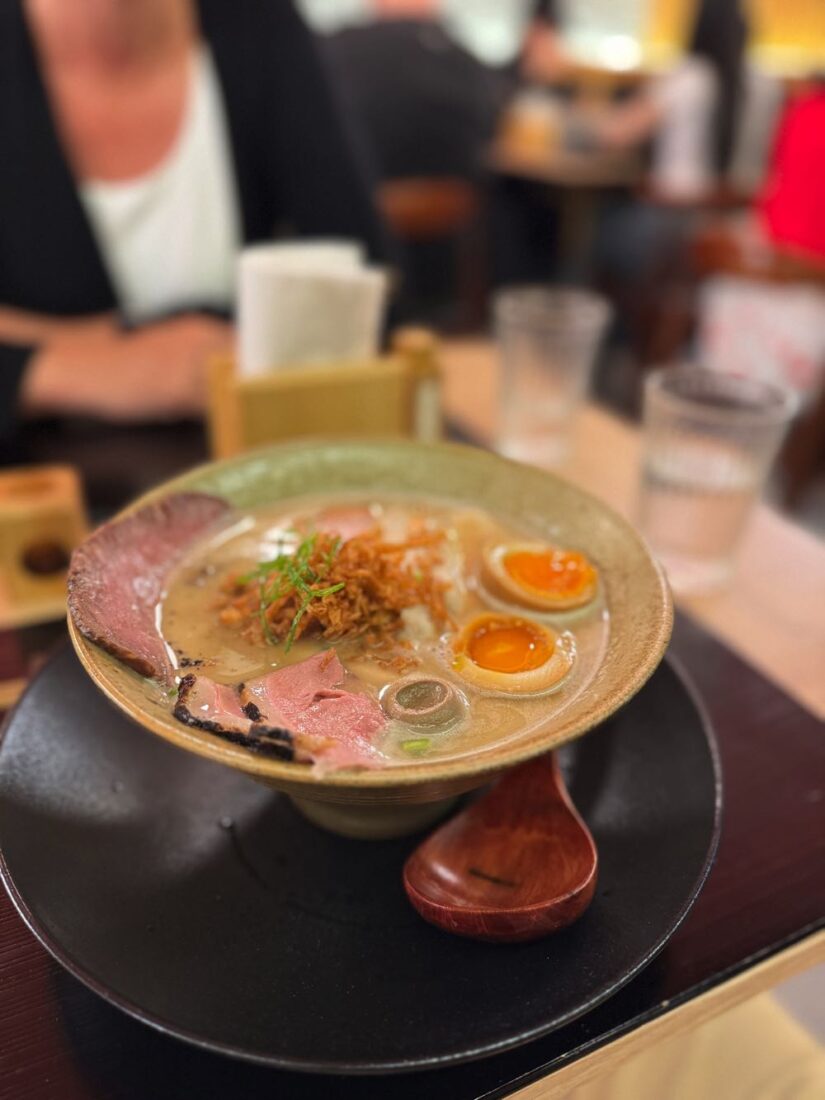
ramen in syndey
This bowl of ramen was so good. We waited in line for about 15 minutes to get in

The food choices in Sydney are endless. No matter what type of cuisine you’re craving, you’ll find it here. For us, having already spent quite a bit of time in Australia (and eaten our fair share of pies and parmys), during our 5 days in Sydney, we went 100% Asian cuisines!

There were many standouts, but if you’re into ramen, Mensho Tokyo is set down a cool back alleyway and serves up some unique bowls of rich ramen soup.

The original branches in San Francisco and Tokyo are Michelin Recommended, but since there’s no such rating in Australia, technically the Sydney branch isn’t Michelin recommended – even though it claims to be.

Either way, it was very good. Nick went with the Signature Toripaitan which had just a touch of truffle flavour, and I chose the Classic Toripaitan and added a perfectly jammy egg to it. Click here for directions to Mensho Tokyo on Google Maps.

9. Take a Ferry to Manly

ferry to manly in sydney
Taking the ferry from Circular Quay to Manly

Of all the things to do in Sydney, a visit to the suberb of Manly was a standout for me! Bondi Beach gets all the hype, but in my opinion, Manly was the winner.

The wide, sweeping shoreline backed by rows of pine trees gives it a laid-back, postcard-perfect feel that’s hard to beat.

Getting there is half the experience, with the ferry ride across the harbour offering some of the best views in Sydney. Once you arrive, there’s a cute pedestrian-only walkway filled with shops, restaurants and bars, and a long waterfront promenade that runs along the beach.

manly
the cute pedestrian-only area in Manly with shops, bars and restaurants

The layout of Manly is great. We spent a few hours walking the pedestrian street, then along the beachside, and continued around the headland to Shelly Beach – which was perfectly calm and great for swimming.

If you’re into Thai food, check out the lunch special at Manly Thai Gourmet ($12 AUD!), grab a drink at the Boathouse, and finish off the day with a tasty gelato at Anita Gelato. Getting to Manly is easy on the Manly Fast Ferry from Circular Quay. Click here for current details.

10. Get a Bird’s Eye View in a Helicopter

Seeing Sydney by boat or on foot is great, sure…but seeing it from above would be truly next level!

We’ve taken scenic helicopter rides in a few other places (like Chicago and when we got engaged in France!), but unfortunately, we didn’t have a chance to do it in Sydney.

Still, we saw lots of helicopters flying around (both for sightseeing and finding sharks) and the views they’d be seeing would be fantastic.

Check out this highly-rated, 20 minute flight over Sydney – it’s a great way to see all the sights in one go! This 5 star company allows you to reserve now, and pay later, and offers cancellation up to 2 days before the trip. Click here for more details.

11. See the Sydney Tower Eye

sydney tower
You can spot the Sydney Tower Eye from pretty much anywhere in the city

Another awesome way to see Sydney from above – and to get your bearings in the city – is the Sydney Tower Eye. Dominating the skyline, this landmark rises above the CBD and offers a completely different perspective on the city.

Take the elevator up to the observation deck (which is around 250 meters above the streets below), and you’ll be rewarded with incredible 360-degree views.

Floor-to-ceiling windows make it easy to take it all in, but if you’re after something a bit more memorable (or terrifying, depending on how you look at it!), the Skywalk lets you safely step outside onto a glass platform above the city. Click here to learn more about the Skywalk and reserve your tickets.

12. See Hyde Park & St. Mary’s Cathedral

hyde park in sydney
Relaxing in Hyde Park is one of the best things to do in Sydney on a hot day

Right in the heart of Sydney, Hyde Park is the city’s oldest public park and a perfect place to relax and wander around. This is exactly what we did after our flight landed in Sydney and we checked into our hotel.

With its wide pathways, towering fig trees, and open lawns, it’s a great place to take a quick break from the busy streets. You’ll also see St. Mary’s Cathedral from here – it’s hard to miss its tall Gothic towers. You can simply check it out from the park, or go inside to see the stained glass, high ceilings, and quiet interior. Click here to find Hyde Park on Google Maps.

13. Shop (or gawk) at Queen Victoria Building

gorgeous QVB building
The view every time we left our hotel room

Every time we stepped out of our hotel, we were greeted by this grand building – and it never got old! Built in the late 1800s, it was originally designed as a marketplace but today it’s an elegant shopping center right in the heart of the CBD.

What makes it special isn’t just the shopping, but the architecture. Inside, you’ll find towering ceilings, stained glass windows, intricate ironwork, and a series of grand domes that make it feel more like a cathedral than a mall.

The building stretches for an entire city block along George Street, and walking through it is an experience in itself. Click here to find the QVB on the map.

👉 Click here for the best areas and accommodations in Sydney

14. Wander Around The Rocks

The Rocks is set right beneath the Harbour Bridge and is one of the most character-filled areas in Sydney. With its cobblestone laneways, historic sandstone buildings, and mix of cafés, shops, and bars, it’s a great place to wander around.

Our Aussie friends told us we must visit the oldest neighbourhood in Sydney. Unfortunately, the day we planned to go to The Rocks, we weren’t feeling well, so we only really saw one lane near the harbor!

This area is touristy of course, but for good reason. After exploring the streets, pop into Fortune of War, which is Sydney’s oldest pub! Click here to find The Rocks on Google Maps.

15. Learn to Surf

bondi beach australia
Beautiful Bondi Beach is a great place to learn to surf

Australia and surfing go hand in hand, and you don’t have to go far from Sydney to find some good waves – for beginners or more advanced surfers.

When we did day trips to Manly and Bondi Beach, we saw lots of people enjoying the surf. If you’re a beginner, it’s best to learn from a professional. Check out this 2-hour lesson with a guide, it’s perfect if you’ve never surfed before, or if you want a bit of a refresher.

In Conclusion

Having 5 days in the city was a good amount of time, but we could’ve easily spent a week in Sydney! We really liked how the city was laid out and how easy it was to get around by metro, foot, and ferry. Whether you’re into beaches, culture, food, or craft beer, Sydney has something for everyone.


Source link

Leave a Reply

Subscribe to Our Newsletter

Get our latest articles delivered straight to your inbox. No spam, we promise.

Recent Reviews


Python Split Method – Table of Content

What is a string and how to declare it?

A string is a sequence of characters, which can include numbers, symbols, alphabets, and more. In Python, strings are treated as objects, and they can be declared using either single quotes (‘ ‘) or double quotes (” “). Here is the syntax for declaring a string:

StringName="String value"

or

StringName = "String value"

This is a small program that shows how strings can be declared.

FirstString = 'Hi'

SecondString = "Hello World"

print("The first string is:", FirstString)

print("The second string is:", SecondString)

The output for this would be,

The first string is: Hi

The second string is: Hello World

Become a python Certified professional  by learning this HKR Python Training !

The Split() method and its parameters

The split() Method in Python is used to divide a string into multiple pieces. It returns a list of strings, and it comes with two optional parameters:

StringName.split(separator, maxsplit)

separatorThe separator parameter specifies the character used as a delimiter while splitting. By default, whitespace is the separator.

maxsplitThe maxsplit parameter determines the maximum number of splits to perform on the string. The default value is -1, indicating all occurrences.

How split() works in Python?

To understand how split() works, let’s consider an example without specifying any parameters:

#String declaration

SampleString = "Welcome to HKR trainings"

words = SampleString.split()

print(words)

The output for the above is as follows.

['Welcome', 'to', 'HKR', 'trainings']

The split() Method breaks the string into words based on whitespace, the default separator.

Split string with a separator

You can split a string using a specific separator. Here’s an example:

#String declaration

OriginalString = "We have blogs on python operators, python generators, etc"

print("The original string is:", OriginalString)

result = OriginalString.split(',')

print("The result after splitting is:", result)

Running this code will yield the following output:

The original string is: We have blogs on python operators, python generators, etc

The result after splitting is: [‘We have posts on python operators’, ‘ python generators’, ‘ etc’]

Acquire Juniper Contrail certification by enrolling in the HKR Juniper Contrail Training program in Hyderabad!

Python Training Certification

  • Master Your Craft
  • Lifetime LMS & Faculty Access
  • 24/7 online expert support
  • Real-world & Project Based Learning

Split string and assign into variables

You can split a string and assign the results to different variables, as shown below:

#String declaration

OriginalString = "Welcome, to, HKR, training"

print("The original string is:", OriginalString)

FirstWord, SecondWord, ThirdWord, FourthWord = OriginalString.split(',')

print("The first word is:", FirstWord)

print("The second word is:", SecondWord)

print("The third word is:", ThirdWord)

print("The fourth word is:", FourthWord)

The output for the above program is as follows.

The original string is: Welcome, to, HKR, training

The first word is: Welcome

The second word is: to

The third word is: HKR

The fourth word is: training

The resultant strings are called tokens.

Top 50 frequently asked Python interview Question and answers !

Split string by character

Python provides the list() Method to split a string into a sequence of characters. See the example below:

#String declaration

OriginalString = "Welcome"

print("The resultant characters are:", list(OriginalString))

The output will be as follows.

The resultant characters are: ['W', 'e', 'l', 'c', 'o', 'm', 'e']

How split() works when maxsplit is specified?

The maxsplit parameter controls the number of splits. Consider the following example:

#String declaration

OriginalString = "Welcome to HKR training"

FirstCase = OriginalString.split(' ', 2)

print("When the string is split by 2 maxsplit:", FirstCase)

SecondCase = OriginalString.split(' ', 5)

print("When the string is split by 5 maxsplit:", SecondCase)

ThirdCase = OriginalString.split(' ', 0)

print("When the string is split by 0 maxsplit:", ThirdCase)

Here is the output for the above program.

When the string is split by 2 maxsplit: ['Welcome', 'to', 'HKR training']

When the string is split by 5 maxsplit: ['Welcome', 'to', 'HKR', 'training']

When the string is split by 0 maxsplit: ['Welcome to HKR training']

In the first case, a maxsplit of 2 results in three items. In the second case, a maxsplit of 5 doesn’t affect the outcome because there are only four words. In the third case, a maxsplit of 0 returns the entire input string as a single item.

How do you split a string in python without split method

While split() is convenient, you can split strings manually. Here’s an example:

#String declaration

OriginalString = "Welcome to HKR training"

Result = []

pos = -1

last_pos = -1

while ' ' in OriginalString[pos + 1:]:

pos = OriginalString.index(' ', pos + 1)

Result.append(OriginalString[last_pos + 1:pos])

last_pos = pos

Result.append(OriginalString[last_pos + 1:])

print(Result)

The result for the above program will be as follows.

['Welcome', 'to', 'HKR', 'training']

Big Data Analytics, python-split-method-description-0, Big Data Analytics, python-split-method-description-1

Subscribe to our YouTube channel to get new updates..!

What is the difference between strip and split methods in Python?

In Python, both the strip() and split() methods belong to the string class but serve distinct purposes. Understanding their differences is crucial for effective text manipulation. Let’s explore these methods with examples.

#String declaration

OriginalString = "##Hello World##"

print("The original string is:", OriginalString)

#Applying the strip method

StrippedString = OriginalString.strip('#')

print("The string after stripping is:", StrippedString)

#Applying the split method

SplittedString = OriginalString.split(' ')

print("The string after splitting is: ", SplittedString)

The output for the above program is as follows.

The original string is: ##Hello World##

The string after stripping is: Hello World

The string after splitting is: ['##Hello', 'World##']

Advantages of the split method

The split() Method offers several advantages:

  • Decoding Encrypted Strings: It aids in decoding encrypted strings easily.
  • Data Analysis: It simplifies data analysis and deduction of conclusions.
  • String Chunking: You can break down a large string into manageable chunks.
  • List of Words: The split() Method returns a list of words, making further processing straightforward.


Take your career to next level in Kofax Capture with HKR. Enroll now to get Kofax Capture Training!

Python Training Certification

Weekday / Weekend Batches

Useful tips for applying split() method

Here are some essential tips for working with the split() Method:

  • The split() Method only operates on strings.
  • When you specify maxsplit in the split() Method, you will get maxsplit + 1 items as a result.
  • If you do not specify any separator in the Method and use only single quotes (like split(”)), Python will throw an error. Always specify a separator or leave it empty.
  • The split() Method is particularly useful for reading CSV files.

How can splitting and rejoining strings be useful for cleaning user input?

String splitting and rejoining are powerful techniques for cleaning user input in various ways. Here’s how they can be helpful:

Removing Excessive Whitespace

When dealing with user input, it’s common to encounter excessive whitespace at the beginning or end of the input. By splitting the input string into words or segments and then rejoining them, you can easily eliminate leading and trailing whitespace, ensuring a properly formatted input.

Ensuring Consistent Formatting

User inputs may vary in formatting, including inconsistent capitalization and spacing. Splitting the input into segments allows you to manipulate and format each segment as needed. You can convert words to lowercase, capitalize the first letter, or add specific characters or punctuation as required. Rejoining the modified segments results in cleaner and uniform input.

Removing Unwanted Characters

Users might inadvertently include special characters or symbols in their input. Splitting the input string allows you to identify and exclude or replace these unwanted characters. This improves the readability and usability of user input.

In summary, string splitting and rejoining are valuable tools for cleaning user input. They help remove excess whitespace, ensure consistent formatting, and eliminate unwanted characters, enhancing the overall quality and reliability of user inputs in various applications.

What are some additional functions provided by the os.path module for working with file paths?

Apart from os.path.plaintext(), os.path.basename(), and os.path.dirname(), the os.path module in Python provides other functions for working with file paths:

  • os.path.join(): Joins multiple path components using the appropriate separator for the operating system. Useful for constructing dynamic file paths.
  • os.path.exists(): Checks if a given path exists in the filesystem, helping verify the existence of a file or directory before further operations.
  • os.path.isabs(): Determines if a path is absolute or relative. Returns True for absolute paths and False for relative paths.
  • os.path.normpath(): Normalizes a path, removing unnecessary components like redundant separators and up-level references (e.g., “..”).
  • os.path.isfile(): Checks if a path corresponds to a regular file.
  • os.path.isdir(): Checks if a path corresponds to a directory.

These functions provide a comprehensive set of tools for manipulating and analyzing file paths in a platform-independent manner.

What are some recommended libraries for handling CSV parsing in Python?

When it comes to handling CSV parsing in Python, several libraries are recommended. One of the most commonly used libraries is the CSV module, which offers robust CSV parsing capabilities.

With the csv module, you can create a csv.reader object to parse CSV data. This reader allows you to retrieve rows of fields from the CSV file. Using the next() function on the reader object, you can fetch the first row of fields.

The csv module is advantageous because it handles quoted values, such as “Doe, Jr.”, containing commas within them. These quoted values are treated as single fields, ensuring accurate CSV data parsing.

In summary, while the csv module is a popular choice for CSV parsing in Python, other libraries like Pandas and Dask also offer additional functionality and flexibility for working with CSV files.

What are some special cases to consider when parsing CSV data?

When parsing CSV data, several special cases must be considered:

  • Quoted Values: Fields enclosed within quotes can contain commas. The parser must correctly identify the boundaries of such fields and handle internal commas.
  • Escaped Characters: Some CSV formats allow escaping special characters like commas or quotes within a field. The parser should recognize and handle these escaped characters, typically represented by consecutive characters (e.g., “” for a double quotation mark).
  • Different Delimiters: CSV files may use delimiters other than commas, such as semicolons or tabs. The parser should adapt to different delimiters.
  • Empty Fields: CSV files can have empty fields, represented by consecutive delimiters with no data between them. The parser should handle and represent these empty fields.
  • Line Breaks: CSV data may span multiple lines, especially when fields contain line breaks within quotes. The parser should recognize and correctly handle multiline fields.

While these special cases can be handled with custom parsing logic, using dedicated CSV parsing libraries like the CSV module or Pandas simplifies the process. These libraries automatically handle various special cases, saving time and effort.

What are some real-world examples and use cases for the split() function?

The split() function in Python has various real-world applications, including:

1) Word Frequency Analysis: 

Splitting a text document into words allows you to analyze the frequency of each word. This is useful in natural language processing tasks and text analytics.

2) Sentiment Analysis: 

When analyzing user-generated content, splitting text into sentences or words is a common preprocessing step for sentiment analysis. It helps determine the sentiment or emotional tone of the text.

3) Data Extraction: 

In data extraction tasks, splitting text based on predefined patterns or delimiters is essential. For example, extracting product names, prices, and descriptions from e-commerce listings.

4) Log File Parsing: 

When analyzing log files generated by software or systems, splitting log entries into meaningful components helps in troubleshooting and debugging.

5) URL Parsing: 

In web development, splitting URLs into components like the protocol, domain, path, and query parameters is necessary for various tasks, including routing and data retrieval.

In each of these scenarios, the split() function is a fundamental tool for breaking down textual data into manageable parts for further analysis or processing.

How can whitespace and input cleaning be handled when splitting strings?

When splitting strings, it’s important to handle whitespace and input cleaning effectively. Here’s how you can achieve this:

Removing Whitespace

To remove excessive whitespace at the beginning and end of lines while splitting, you can use the strip() Method on each line. Here’s an example:

text=" Line 1 Line 2 Line 3 "

lines = [line.strip() for line in text.split(' ')]

print(lines)

In this example, the strip() method removes leading and trailing whitespace from each line, resulting in clean and trimmed lines.

Input Cleaning

Input cleaning involves removing unwanted characters, normalizing text, and ensuring consistent formatting. While splitting helps break down the input, additional steps like filtering out special characters or converting text to lowercase may be required for thorough input cleaning.

In conclusion, the split() function is a versatile tool for breaking down text, but input cleaning often involves additional steps to ensure data quality and consistency.

Conclusion

The split() Method in Python is a fundamental string manipulation tool with various apps. Understanding its differences from other methods like strip(), its advantages, and best practices for usage is essential for effective text processing, data analysis, and input cleaning. By mastering the split() function and related techniques, you can elevate your Python programming skills and tackle a wide range of real-world tasks.

Related Articles:

1. Python Partial Functions

2. Python Operators

3. Python Generators

4. Python List Length

5. Python Serialization


Source link