

Pros
- Same price as last year
- More powerful M5 processor
- Still-great OLED display
- iPadOS 26 unleashes multitasking
Cons
- Expensive with accessories
- Lacks some pro tools found on Macs
- OS browsers still feel weird to me
Editor’s note, April 29: This review was updated with information about the CNET Labs Award for Brightest Screen. The M5 iPad Pro was also awarded a CNET Editors’ Choice award on Nov. 24, 2025, for being the very best product in Apple’s iPad lineup. While its price can run very high, anyone who isn’t budget-concerned and wants the best display and performance on an iPad will find an excellent experience here. It’s not the same as a Mac, but with a keyboard case and iPadOS 26, it’s becoming extremely versatile.
I had a feeling of cynicism when Apple announced the iPad Pro with an M5 chip. Here we go again with the same iPad, just faster. I’ve felt this way for years about the Pro iPads. They’re fast, fancy and definitely not necessary.
And yet, living with the 13-inch iPad Pro with iPadOS 26 for this review, something different is happening. I’m connected to my office apps and using it like my work laptop with a Magic Keyboard. Is the iPad finally ready to replace my Mac and serve as my main computer?
There are things about this iPad Pro that I like more than my laptop. FaceID sign-ins are smooth and easy. The crisp OLED touchscreen is better for movies and better overall than any Mac for now. The M5 processor blazes.
The new iPad Pro is best with a Pencil Pro, but its overall proposition keeps improving by degrees over time.
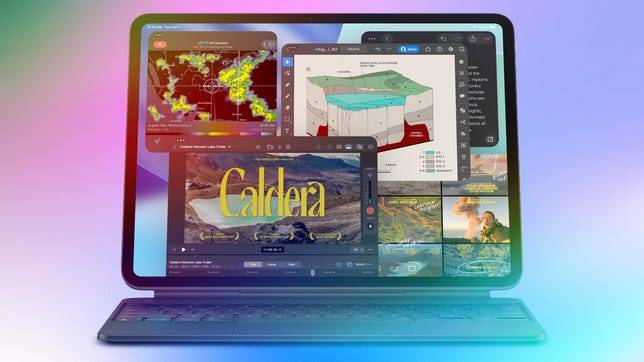
Credit the changes mostly to iPadOS 26, which you can run on other, slower iPads too. Thanks to the M5 silicon, however, multitasking really shines on the 13-inch iPad Pro. The multi-window workflow feels more natural, and in fact I’m working on it as I write these words.
Watch this: Apple’s Latest Pro iPad Isn’t a Mac Yet, but It’s Getting Damn Close
Apple’s latest chip update to M5 had a telling triple debut across MacBook Pro, iPad Pro, and Vision Pro lines. Vision is Apple’s computer of the future. MacBook Pro is Apple’s computer of the past. And the iPad Pro is so close to being my go-to computer of the present. Almost, but not quite. The browser still doesn’t feel like a Mac. But my complaints are diminishing with every year.
For all the magic of the iPad accessories, you still just get the tablet and charger in the box.
Same design outside, new chip(s) inside
The M5 iPad Pro is basically the same as the M4 model last year, but with a new M5 processor. Apple also claims it has faster 5G wireless and Wi-Fi 7/Bluetooth 6 via new CX1 and N1 modem and wireless chips. (The M4 Pro had Wi-Fi 6E and Bluetooth 5.3.) The size, thickness and weight are the same, as are Pencil Pro compatibility, cameras and price.
My general recommendation remains unchanged as well. Just like last year, you can buy cheaper iPads and get a lot of the same experience for casual use. The M5 is about powerful processing, a better Pencil, better graphics and that nicer display.
Working on an iPad Pro with Magic Keyboard is approaching being Mac-like even more than ever.
iPadOS opens the door (er, window)
I can’t justify the high price of the iPad Pro unless it’s my main go-to computer, and iPadOS 26 helps make that possible. It has a more Mac-like window system that Apple first previewed in June, and now that I’m living on it, I see its advantages clearly. I don’t feel hampered by flow as much, and the top menu bars in apps are a bigger help in navigating functions than I expected. Really, iPadOS 26 is mostly doing what Macs can do already, and that’s a good thing.
Apple still doesn’t specify how many windows iPadOS can open at once, and it depends on the iPad hardware. I’ve never seen a functional limit on this year’s other iPads, though.
What still feels weird on iPadOS is how the browser’s handled. iOS and iPadOS lean on apps to pull out individual functions I’d generally do in-browser on a Mac. That’s still the case now, and it makes some handoffs for particular workflows (like Google’s ecosystem of cloud tools) feel less organic on iPad. I’d love a big browser update and overhaul for future pro iPads…or, on the flipside, if that rumored touchscreen Mac does indeed come next year, maybe it should adopt a ton of iPadOS into it.
Videos look great on this iPad, without a doubt.
Great display, fast charging, speedy M5
The Tandem OLED display Apple calls Ultra Retina XDR, which Apple introduced on the M4 model last year, is vivid and great for movies. The display is also the brightest we’ve ever tested — of any tablet — reaching a peak brightness of 1,535 nits (just shy of the 1,600 nits Apple states in its specs). The 13-inch M5 iPad Pro is now the recipient of the CNET Labs Award for Brightest Screen.
The M5 iPad Pro’s thinner body helps when using it with a keyboard case, and yes, this M5 model works with the M4’s accessories and cases. The Pencil Pro has a few new tricks, including a rotating brush, but this year’s iPad Air and last year’s iPad Mini can use it too.
This iPad can charge faster, but the fast charger isn’t included. You need a separately sold adapter plug or a bigger-wattage charger of your own.
In my tests, the M5 processor looks to be a significant graphics and speed bump over the M4. In Geekbench 6 tests, the multicore benchmark number I got with the 10-core M5 is 16,116, versus 14,672 for last year’s higher-end M4 iPad Pro. That’s about 10% faster. Compared with the M3 iPad Air from earlier this year, which got a multicore score of 11,643, it’s 38% faster.
Just like last year, Apple has a more powerful processor/RAM tier for Pro models with more storage. The 256 and 512GB models have 12GB of RAM and a nine-core CPU/10-core GPU, while the 1 and 2TB models have 16GB of RAM and 10-core CPU/10-core GPUs. I tested an iPad Pro 13-inch 1TB model with the higher specs.
The M5 iPad Pro is the same price as the M4 model, and still expensive at $999 or $1,299 with 256GB of storage. The price climbs if you add more storage or accessories, and you can hit $2,000 without much effort.
You can get lots of what this iPad offers in lower-priced models.
I still say you don’t need the Pro
iPads are the best tablets, and most people will be best served by a cheaper iPad. Lots of what I like about the iPad Pro can be done at lower price levels too. Add a keyboard case to the iPad Air or even the entry-level iPad, and you can do multitasking windows and work with Pencils too.
The fast speed, extra-vivid display, and thinner size of the Pro make the experience feel more premium. But are they worth the high price at the Pro end, and can they truly flex to become computers for everything else? The answer to that is increasingly yes, but not quite. The iPad is full of excellent creative apps, but still feels like it’s missing some of the pro Mac tools for video editing and graphics that could easily be there now. Or, make Mac and iPadOS apps for pros be truly interchangeable now.
Do I want a MacBook that feels as good as this iPad Pro? Yeah, I do. We may be heading to that fusion zone soon enough. Or, as I finish filing this story on a Mac written entirely on an iPad Pro M5, and losing track of which computer I’m on, maybe I’m already there.

Stephan is the sports journalist for the Maple Grove Report.