How to refer friends and family to American Express cards


American Express cardmembers can earn bonus Membership Rewards points, airline miles and hotel points by referring friends and family members to eligible cards.

Depending on the card you carry and the current offer attached to your account, referral bonuses can be quite lucrative — especially if you regularly recommend cards to people in your orbit anyway.

Referral offers change frequently and vary by account, but the process itself is simple. Here’s how American Express referrals work and how to maximize them.

How American Express referrals work

Most American Express cards include a “Refer a Friend” feature that allows existing cardmembers to generate a personalized referral link. If someone applies through your link and is approved, you’ll typically earn a referral bonus.

Those bonuses can come in several forms, including:

  • Membership Rewards points
  • Airline miles
  • Hotel points
  • Cash back

In many cases, the person applying through your link may also receive an elevated welcome offer compared to the public application page.

a woman types on her computer while holding a credit card
JACOBLUND/GETTY IMAGES

Amex referral links are often broader than people expect. You might hold one card but still be able to refer someone to a completely different American Express product.

Referral offers can also vary significantly from person to person, even among people with the same card.

Reward your inbox with the TPG Daily newsletter

Join over 700,000 readers for breaking news, in-depth guides and exclusive deals from TPG’s experts

How to find your Amex referral link

Finding your referral link is fairly straightforward.

On desktop:

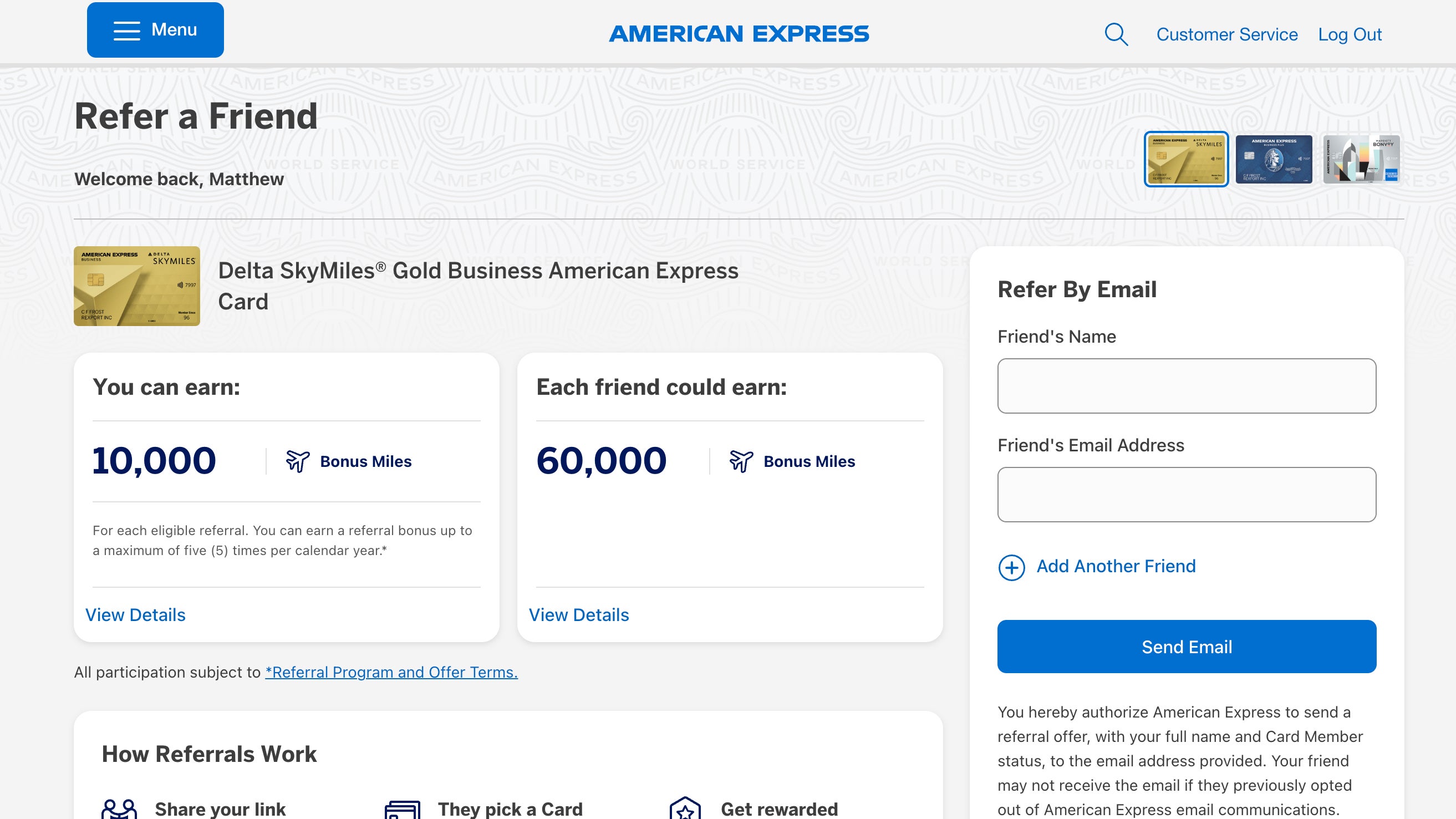
  • Go to this link.
  • Log into your American Express account.
  • View your referral offers.
  • Share your personalized link.
Amex referral page
AMERICAN EXPRESS

In the Amex mobile app:

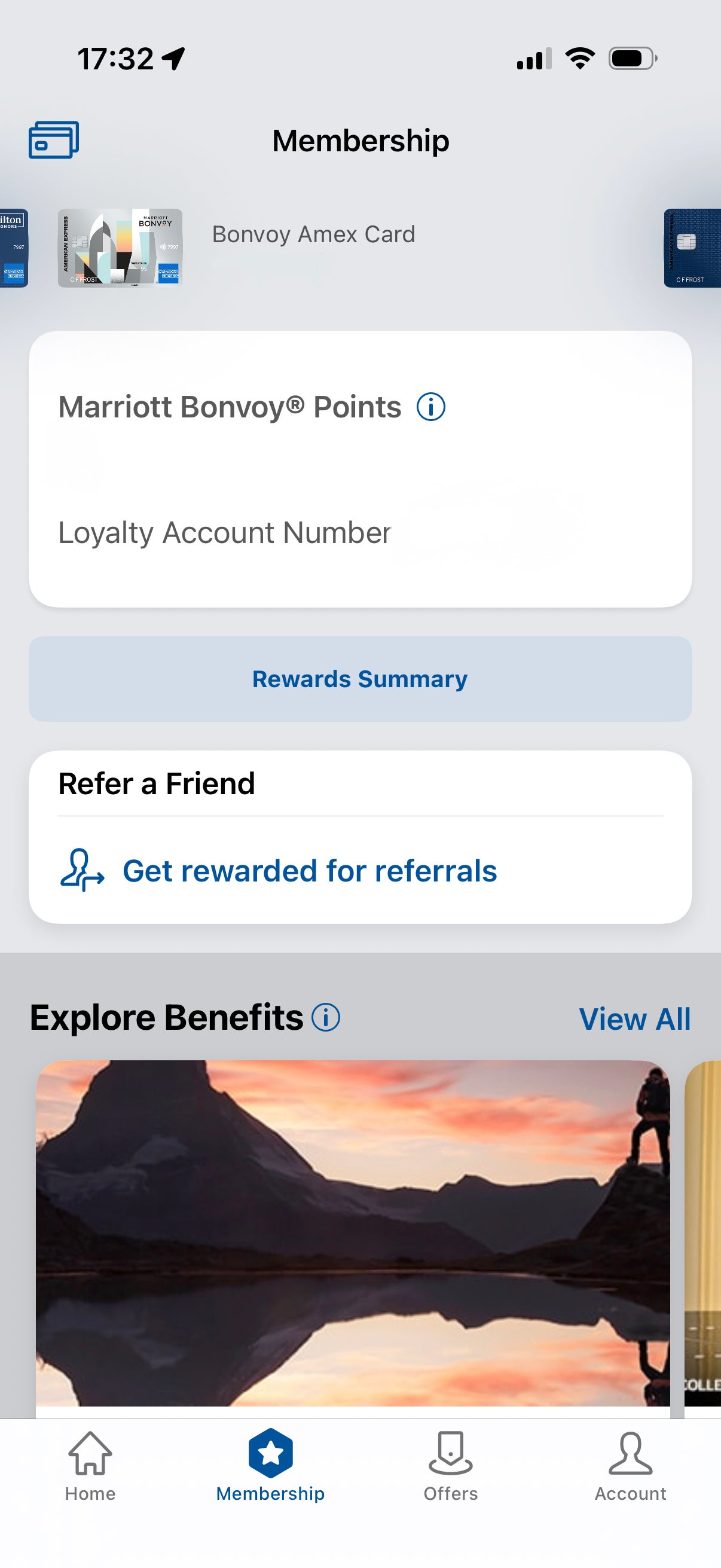
  • Open the app and select your card.
  • Navigate to the Membership tab.
  • Click on “Get rewarded for referrals” (note that not all cards may show this option).
  • Share your personalized link.
Amex referral page mobile
AMERICAN EXPRESS

Amex frequently rotates referral offers, so it’s worth checking back periodically to see whether your bonus has increased.

What you can earn from referrals

Referral bonuses vary depending on the card and the current promotion attached to your account.

Here are a few examples of referral offers I’ve personally seen on my accounts:

*Legacy product no longer available to new applicants. The information for the Marriott Bonvoy American Express Card has been collected independently by The Points Guy. The card details on this page have not been reviewed or provided by the card issuer.

For the Delta and Marriott offers, all personal and business cards within the Delta and Marriott card families, respectively, were eligible for me to refer friends to. Conversely, my Blue Business Plus referral only worked for that particular card.

Disappointingly, I had no ability to refer friends to the two American Express cards I value most: the American Express Platinum Card® or Hilton Honors American Express Aspire Card.

Conversely, TPG credit cards editor Olivia Mittak has a referral link for her Amex Platinum, offering 15,000 bonus points for up to five approved cardmembers. If you don’t currently have the ability to refer anyone to one of your Amex cards, it’s worth checking back regularly.

Amex also limits how many referral bonuses you can earn each calendar year, though the cap varies by card. For the three examples I gave above, they were capped at 50,000 points or miles per calendar year each.

Tips for maximizing Amex referrals

Referral offers constantly change, so a little strategy can go a long way.

Before sending a referral, I always compare the referral offer against the public link to make sure the other person is actually getting a better deal. Sometimes the referral offer is stronger — but not always.

2 friends look at a smartphone together
MLADENBALINOVA/GETTY IMAGES

A few other things worth keeping in mind:

  • Check your referral offers regularly, since Amex frequently runs elevated promotions.
  • Consider referring within your household if someone is already planning to apply for a card.
  • Screenshot elevated referral offers in case they disappear later.

It’s also important to remember that approval isn’t guaranteed, and Amex’s standard welcome bonus eligibility rules still apply.

Related: Should my partner get their own card or be added as an authorized user?

Bottom line

American Express referrals can be an easy way to earn extra rewards if friends or family members are already considering a new card.

Depending on your account, those bonuses can add up quickly in the form of Membership Rewards points, airline miles or hotel points.

Since Amex referral offers change frequently, it’s worth checking your accounts regularly — especially before recommending a card to someone else.

Related: Credit card strategies for couples: 2-player mode


Source link

Leave a Reply

Subscribe to Our Newsletter

Get our latest articles delivered straight to your inbox. No spam, we promise.

Recent Reviews


What is Salesforce approval process ?

Approval Process in Salesforce is an automated process that automates the approval of Salesforce records in your org. In Salesforce, an approval process is a series of steps that allow a record to be approved or rejected by a user, queue, or public groups. An approval process also specifies the actions to be taken when a record is approved, rejected, recalled, or submitted for approval for the first time.

For instance, when an employee requests time off, Salesforce should automatically send an approval request to the employee’s manager. 

Wish to make a career in the world of salesforce? Start with HKR’S  salesforce online training !

Why the salesforce approval process?

Salespeople are frequently required to confirm their transactions with internal departments (for example: legal, accounting).

Typically, it entails sending numerous emails to various people, after which you must ensure that it is confirmed.It’s no secret that this process could take a long time.As a result, Salesforce created a built-in approval process that you can use to automate approval requests.Once configured, you can request approval with the click of a button.

Salesforce Training

  • Master Your Craft
  • Lifetime LMS & Faculty Access
  • 24/7 online expert support
  • Real-world & Project Based Learning

Steps for approval process in salesforce:

Here are the important steps in the salesforce approval process. They are:

  • Setup -> Create -> Workflow and Approval -> Approval Process
  • Select object for approval process to be written
  • Click on Create New Approval Process
  • Select Standard Setup Wizard from drop down
  • Enter the Process name, Unique Name and description for your process
  • Specify Entry criteria 

Salesforce approval process example:

The following are the sections that must be configured in the salesforce approval process:

  • Process Definition Detail – Approval Process Header level information such as name, email template, and so on.
  • Initial Submission Actions – It would be executed whenever the customers click on the object record’s ‘Submit for Approval’ button.
  • Approval Steps – Specifics on the Steps criteria and approvers
  • Final Approval Actions – It will be carried out once all of the approval process steps have been approved.
  • Final Rejection Actions – This action will be taken if one of the approval process steps is rejected.
  • Recall Actions – This will be carried out if one of the approval process steps is recalled.

Create an Approval Process:

Let’s create an approval process in which the sales manager approves possibilities with a total opportunity value greater than $500,000. The opportunity’s approval status should be reflected: Approved or Rejected.

Planning:

Carefully plan ahead of time before you begin configuring the Approval process in Salesforce, as this will allow you to design the approval process in the most efficient manner. Preparation entails the following steps:

  • creation of mandatory fields
  • Determine the object for the Approval procedure.
  • Final Approval of the Email Template Actions such as unlocking the record or changing the record’s status

Wish to make a career in the world of salesforce? Start with HKR’S  salesforce training in London !

HKR Trainings Logo

Subscribe to our YouTube channel to get new updates..!

Creating approval process:
  • Log in to Salesforce; however, if you are already logged in, you can skip this step.
  • To Manage Approval Processes, go to Setup and search for ‘Approval Process’ in Quick Find, or go to ‘Create’->Workflow & Approvals -> Approval Process. For, choose Opportunity.

Create an Approval Process

  • Select Create New Approval Process | Use Jump Start Wizard from the drop-down menu.
  • By making some decisions for you, the Jump Start Wizard assists you in creating a simple approval process.
  • Set up the approval procedure.

Set up the approval procedure

  • Keep the approval process in mind.
  • View the Approval Process Detail Page by clicking the View Approval Process Detail Page button.
  • Click Add New | Field Update under Final Approval Actions and fill in the blanks with these values.

Field Update under Final Approval

  • Then click on the save option.
  • Under Final Rejection Actions, tap Add New | Field Update and fill in the blanks with the following principles.
  • Click on save.so that your approval process has been successfully configured.

Click here to get frequently asked Salesforce interview questions & answers

Approval Actions:

In the preceding example, we only used ‘Field Update.’ I’d like to go over Approval Actions in more detail, such as Final Approval Actions and Final Rejection Actions, which include:

Task – If a job is selected, the user will input a task for a record, such as Opportunity, once the application process has indeed been approved/rejected.

If an Email Alert is selected, the message will be displayed via email once the approval process has been approved or rejected.

Field Update – You already saw an example within the preceding section, but once the approval process has indeed been approved/rejected, the framework would then update the field towards the specified value.

Outbound Message – This will assist in notifying third-party systems. Consider a scenario in which you would like to inform the derived or provisioning system of the approval results; for instance, once orders are approved, begin generating bills; this will assist you in meeting the requirement.

Approval Actions

Wish to make a career in the world of salesforce? Start with HKR’S  Salesforce Training in Atlanta !

Salesforce Training

Weekday / Weekend Batches


Email to approve request:

We can configure the approval process via email; to allow email approval response, follow the directions below.

Setup -> Process Automation Settings -> Enable Email Approval Response checkbox, and then click Save.

Some words could be used in the first line of a response to an approval request with periods or exclamation marks. Approved, Approved, and Yes are used for approval, while Reject, Rejected, and No are used for rejection.

Conclusion:

In the above blog post we had discussed the salesforce approval process steps in depth. Had any doubts drop your queries in the comments section to get them clarified.

Related Articles:


Source link