
Lawns are great surfaces for throwing a football or laying out a picnic.
But turfgrass in the United States now covers an estimated 40 million acres — an area about the size of the state of Georgia — and these manicured lawns take an environmental toll.
Gas-powered yard equipment, like lawn mowers and trimmers, put out 30 million tons of air pollutants a year, the Environmental Protection Agency says.
To keep our lawns tidy and green, we also use weedkillers and fertilizers. When it rains, those chemicals escape our yards and make their way through storm drains to our lakes and rivers.
Shrinking lawns can reduce all these impacts. It can also create space for gardens that feed wildlife — great news at a time when North America has lost one-quarter of its birds and the U.S. has lost one-fifth of its butterflies.
University of Delaware entomologist Doug Tallamy has calculated that if Americans reduced their lawns by half and added native plant gardens to feed birds, butterflies and other wildlife, this would create more habitat than Yellowstone and a dozen other major national parks combined.
Interested in ditching your lawn? These tips can get you started.
1. Choose a spot where you'll kill some grass
Consider starting small, especially if you're new to gardening.
" It can be overwhelming to take on an expansive garden," says Stacia Stelk, executive director of Deep Roots KC, a group that teaches the public how and why to plant habitat gardens in the Kansas City region. " As you get more comfortable, there's always room to expand."
Replacing the whole lawn at once can lead to weed, mud and erosion problems, so it requires careful planning and more work.
A good place to remove some grass could be along a fence or sidewalk. If you have a tree in your yard, consider putting a flower bed around it. This is called a soft landing because it gives caterpillars a safe place to go after they finish feeding on your tree's leaves. There, they can make their chrysalises and cocoons among flowers and leaf litter, safe from lawnmowers, and emerge as adult butterflies and moths. Bees, fireflies and other insects will find homes there too.
2. Plan what you are going to plant
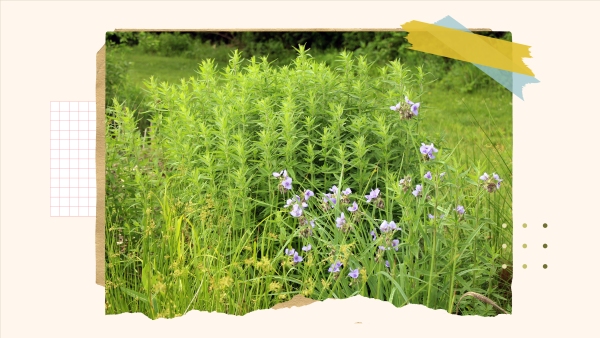
Using flowers, trees and shrubs that have existed in North America for millennia is a surefire way to turn your space into a wildlife magnet.
That's because many insects feed on specific native plants. A famous example is the monarch caterpillar's need for milkweed — it can't eat anything else.Native plants also boost insect populations, which feed birds, frogs, lizards and other animals.
To pick your specific plants, first note whether your new flower bed will be in shade or sun and what the ground is like. For example, is the soil very sandy? Is the area usually wet?
Next, find a native plant group specific to your region, because native plants for Arizona and New York are completely different. Many of these groups have online cheat sheets for picking plants. Midwesterners, for example, can check out GrowNative.org, which has sample flower bed plans and Top 10 lists of plants for different light and soil conditions.
Also know what style you're looking for. Are you looking for short groundcovers? Do you dream of a cottagecore garden with big drifts of pastel flowers? Do you want a hedge between you and your neighbors?
Finally, know your local rules: Some homeowners associations or city codes restrict tall flowers and grasses in the front yard, for example.
3. Kill your grass

There are plenty of ways to kill your grass. You can kill it by covering it with cardboard to deprive it of sunlight. You can lay down sheets of clear plastic to block light and rain while baking the grass in the sun's heat. You can rent a sod cutter or use a shovel to dig the turf out by hand. You can also use herbicide. Iowa State University has a nice guide to carrying out these options.
There's no right way to kill your grass. The best option for you will likely depend on your particular outdoor space, how much hands-on time you want to spend removing the grass and how long you're willing to wait for it to die. Smothering the grass with cardboard can take weeks or months, for example.
If you're using plastic or cardboard, there's no need to remove the grass once it's completely dead, unless you see seedheads or grass pieces that could resprout. The dead turf will decompose on its own and add organic matter to your garden.

4. Buy plants for your new garden (or look for free options)
The tricky thing about native plants is that typical garden centers often don't stock many of them. Many opt to focus on popular ornamentals such as peonies and boxwoods that originally came from other continents.
Native plant or wildlife advocacy groups often post indexes online of native plant nurseries or pop-up events where native plants will be sold.
But buying lots of plants can be expensive.
Jeffrey Popp, director of restoration at Anne Arundel Watershed Stewards Academy near Annapolis, Md., has a few tips to save money when buying plants.
First, look for places that sell plugs — small, young plants in six-packs or flats.
"You can buy native plant plugs relatively inexpensive," Popp says.
Despite being small, those plugs can grow fast. Also, some homeowners with native plant gardens will give away seedlings for free or swap plants, he says.
Try searching Facebook for local groups dedicated to native plants. This might mean a native plant society, for example, or a local chapter of Wild Ones, a group that encourages wildlife friendly gardening.
You can also start plants from seed, but this takes patience. Nurseries like Prairie Moon, a major native plant seller based in Minnesota, have detailed instructions for how to get each kind of seed to germinate.
5. Plant the plants and wait

Get them in the ground and put mulch around them. There's no need to add extra garden soil during planting if you've picked native plants suited to your soil conditions. Advice on how far to space the plants out varies depending on the plant. But basically, you'll want to space them so that once the plants mature, your flower bed is full.
" Plants want to touch each other," says Paula Diaz, a master gardener in Kansas City. "They don't want acres of mulch in between them."
This is better for you, too, because eventually you won't have to replenish mulch or pull weeds as often.
It'll take a few years to get to that point, though. Gardeners like to say that many perennials "sleep, creep, leap," meaning they won't seem to do much in their first year, will only grow a little in their second, and then will thrive in their third. (Although it's true that some species can grow faster.)
6. Watch out for weeds and dry conditions. And be sure to enjoy your new garden
As young plants grow, you'll especially have to keep an eye out for weeds and to make sure that empty spaces between plants are mulched.
You may also need to water them while they develop strong root systems. If you've chosen plants appropriate to your area, you shouldn't have to water them once they mature, except perhaps during serious dry spells.
In the winter, don't cut the plants all the way to the ground. Leave at least part of the stems because native bees nest in them. Also leave fallen leaves, because butterflies and other critters are overwintering in there.
Enjoy! Diaz has gardened with native plants for more than a decade and five of her neighbors have followed suit.
"There's always a bird that's singing or frogs that are croaking," she says. "Being able to go outside and just walk around and see life that happened because you planted what you planted — it helps your heart."
Celia Llopis-Jepsen is host of the environmental podcast Up From Dust and a reporter for Harvest Public Media.
The podcast episode was produced by Sylvie Douglis. This story was edited by Shahla Farzan, Malaka Gharib and Neela Banerjee. The visual editor is CJ Riculan.
We'd love to hear from you. Email us at LifeKit@npr.org. Listen to Life Kit on Apple Podcasts and Spotify, or sign up for our newsletter.
Copyright 2026, NPR