Inside Air India’s new Maharaja Lounge at SFO


Air India is bringing its premium overhaul to San Francisco International Airport (SFO) with the opening of its first signature lounge outside India.

Officially opening on May 23, the new Maharaja Lounge marks another major investment in the airline’s ongoing transformation, bringing its updated premium experience to one of its key international gateways.

Located near the A Gates in SFO’s International Terminal, the lounge spans roughly 3,300 square feet and blends contemporary luxury with design elements inspired by Indian culture and crafts.

TPG got an early look inside ahead of the official opening. Here’s what travelers can expect.

Where is Air India’s Maharaja Lounge at SFO?

The Maharaja Lounge is located postsecurity near the A gates in SFO’s International Terminal.

After clearing security, travelers should turn left and walk past the Air France lounge before taking the escalators up one level. At the top, signage directs guests toward the lounge; from there, a short walk with a couple of right turns leads directly to the entrance on the right-hand side.

The lounge is expected to operate daily from approximately 6:30 a.m. to 10 p.m., though hours may vary based on flight schedules.

A lounge designed to feel like a gateway to India

Designed by hospitality firm Hirsch Bedner Associates (HBA), the Maharaja Lounge reflects the airline’s updated design philosophy, with a contemporary look that also pays homage to its founding back in 1932.

Warm champagne tones, ivory-hued accents and deep red accent furniture reflect Air India’s refreshed branding, while subtle motifs alluding to the airline’s “Vista” logo appear throughout the walls and furniture. Works by local artists and installations crafted from upcycled aircraft components add texture and points of visual interest throughout the lounge.

Reward your inbox with the TPG Daily newsletter

Join over 700,000 readers for breaking news, in-depth guides and exclusive deals from TPG’s experts

Several art installations near the dining area were sourced from India, including one piece created with pigments derived from Indian spices and botanicals rather than traditional paint. According to the airline, the artwork incorporates colors derived from ingredients such as turmeric, roses and cinnamon — a fitting complement to the lounge’s culinary focus (more on that below).

Even smaller details, including branded glassware and tableware featuring Maharaja motifs, reinforce the airline’s effort to create what it describes as a more immersive “gateway to India” experience before boarding.

STEPHANIE STEVENS/THE POINTS GUY

Large windows and abundant natural light help the lounge feel open and relaxing, while comfortable seating and plentiful power outlets make it easy to settle in before a long-haul flight. At times, it is easy to forget you are inside an airport lounge at all — until aircraft taxi past the tarmac-facing windows.

The Aviator’s Bar

One of the lounge’s focal points is the Aviator’s Bar, a separate speakeasy-inspired cocktail space distinct from the main dining and buffet area.

This separation helps create a more intimate atmosphere, giving the lounge multiple zones for dining, socializing and relaxing.


The space was designed to reflect Air India’s history. The bar stools were inspired by seating used on some of the carrier’s earliest aircraft dating back to the 1930s, incorporating similar stitching patterns, materials and color palettes.

Even the ceiling installation carries an aviation reference: Lighting elements were modeled after the propeller shafts of early planes, intended to evoke the motion and energy of flight before the jet age.

STEPHANIE STEVENS/THE POINTS GUY

The walls of the bar also function as a historical canvas, featuring archival imagery, vintage postcards, aircraft drawings and model aircraft that trace Air India’s evolution over time.

The bar features a curated selection of wines and whiskies alongside signature cocktails, including the Maharaja Manhattan — a twist on the classic cocktail featuring black pepper — and the Limitless, a gin-based drink infused with rose, hibiscus and saffron.


During my visit, I sampled the Mixed Emotions mocktail, a refreshing drink made with cranberry juice, passion fruit, lime juice, simple syrup and soda water, then finished with fresh mint. I also tried the Maharaja Mule, an Indian-inspired take on the classic Moscow Mule that blends lime, muddled mint and ginger.

The beverage program feels carefully considered, balancing classic cocktails with drinks inspired by Indian flavors and ingredients.

And with views from the bar overlooking the tarmac, it makes for an especially appealing spot for aviation enthusiasts and travelers hoping to unwind before a long-haul flight.

Dining and food offerings

The Maharaja Lounge includes both Indian and international dining options with a self-serve buffet.

Menus will rotate on a recurring cycle that varies by mealtime in an effort to keep the experience interesting for passengers who regularly fly between San Francisco and India.

During my visit, the buffet leaned heavily into Indian cuisine, with dishes including dal Bukhara, chicken tikka masala, vegetable biryani, paneer moringa and beet-and-fig sham savera kofta alongside grilled salmon and vegetables.

A cold spread featured fresh fruit, crackers, cheeses and house specialty dips, including tikka achari and mango habanero.
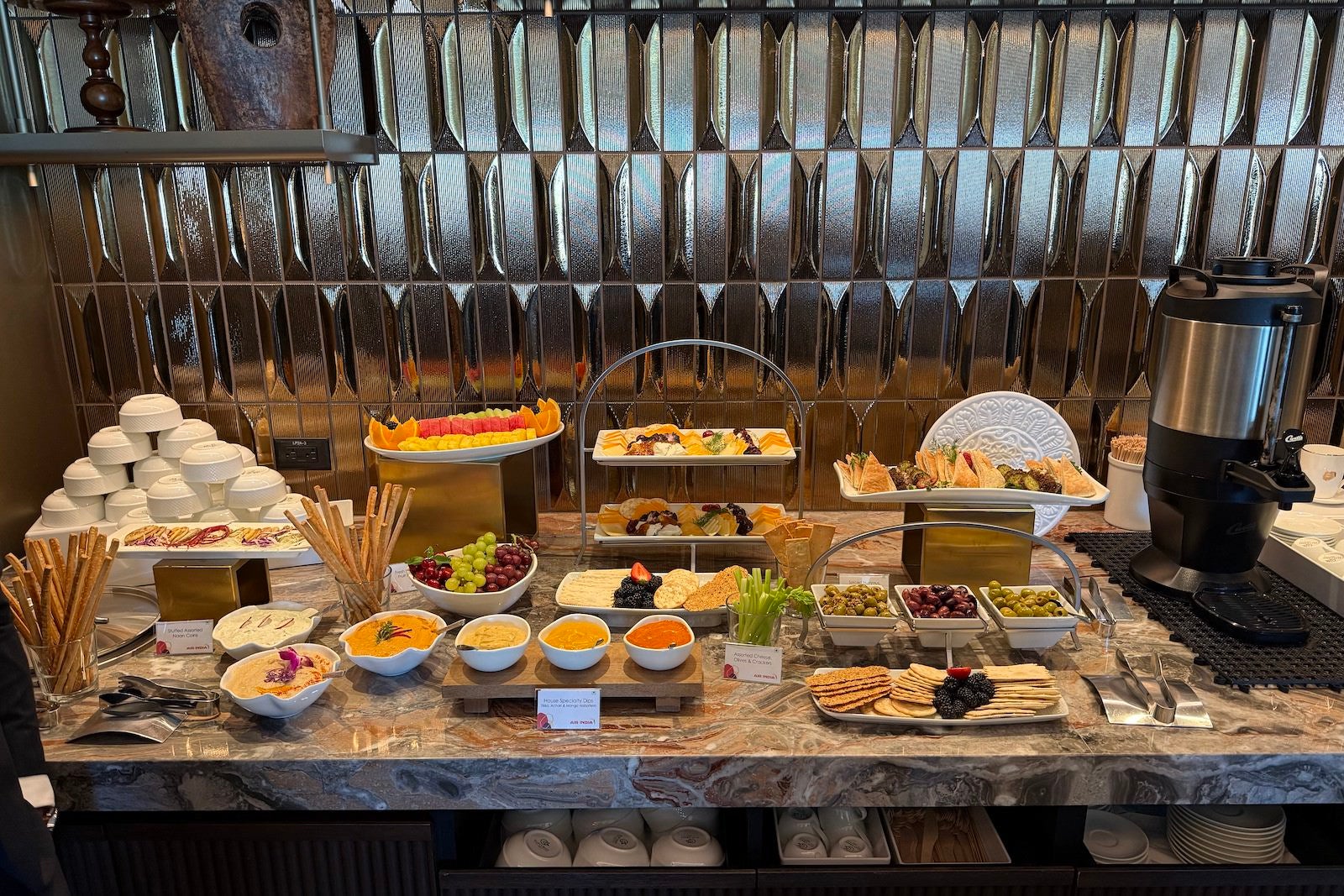

Smaller bites included fish croquettes, paneer tossed in Szechuan sauce and a modernized take on gajar ka halwa — a traditional North Indian carrot dessert slow-cooked with butter, milk and nuts — served in a tart-like bite-sized presentation.

STEPHANIE STEVENS/THE POINTS GUY

The food felt flavorful and thoughtfully prepared, with dishes that leaned into bold spices and comforting regional flavors. Most items hovered around a mild-to-moderate heat level, though additional accompaniments were available for travelers looking to dial up the spice.
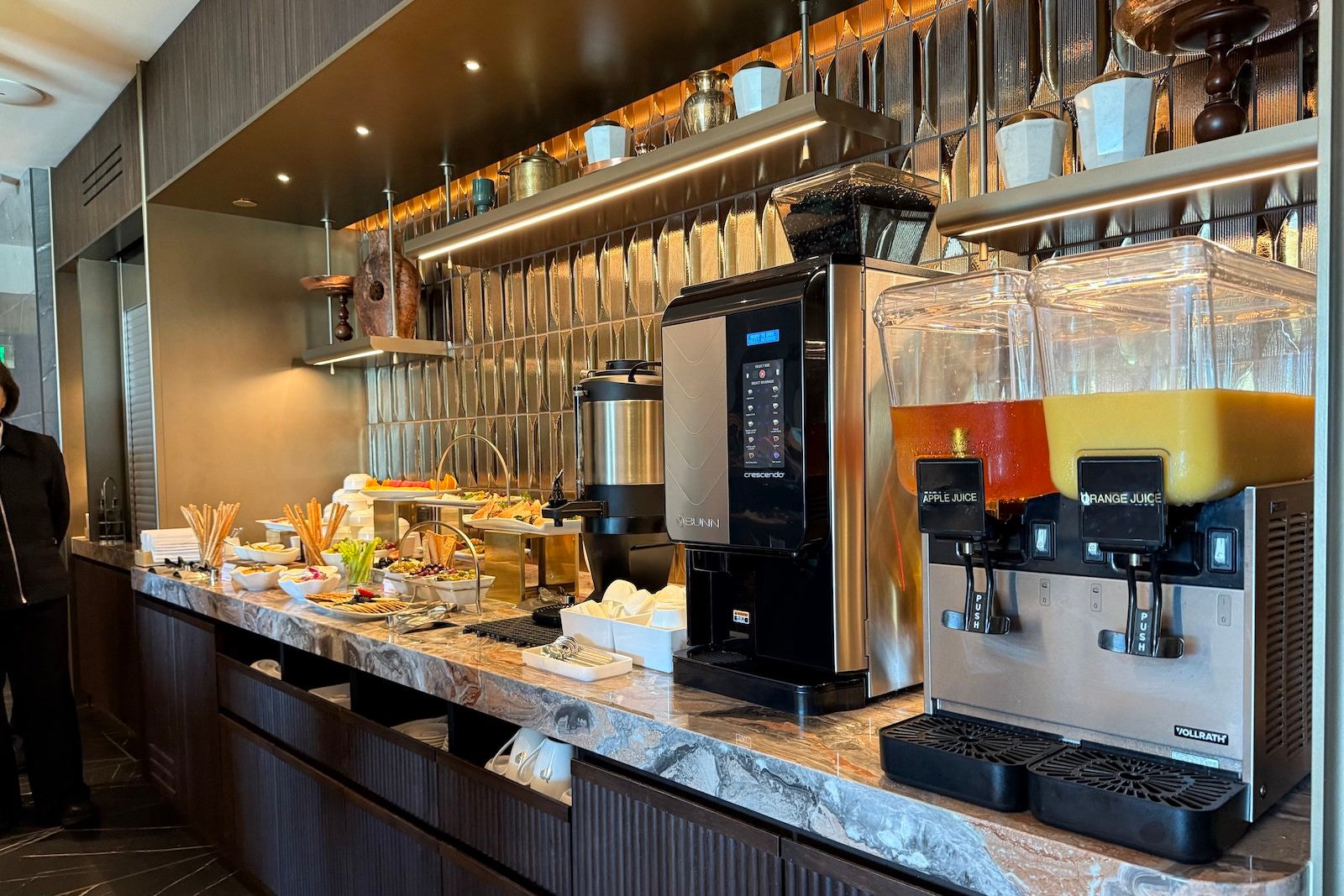

A self-serve beverage station offers juices, soft drinks, coffee and tea, while the Aviator’s Bar handles cocktails, wine and spirits separately from the buffet area.

Private first-class area

Tucked into a quieter corner of the lounge is a dedicated Private Zone reserved exclusively for Air India first-class passengers.

This space accommodates just eight guests at a time and offers a noticeably more serene and elevated experience compared to the main lounge, which seats roughly 75 travelers.

First-class passengers also have access to an a la carte dining menu and a reserved selection of cognac and whiskey, providing a more personalized experience beyond the buffet.

Amenities and practical touches

The lounge includes fast and free Wi-Fi, ample charging points and accessible facilities throughout.

AC outlets and USB-A and USB-C ports are available across seating areas, and seating itself is both modern and comfortable, making it easy to work or relax before departure.

STEPHANIE STEVENS/THE POINTS GUY

One notable omission, however, is showers — something many premium international lounges typically offer for long-haul passengers.

Still, the lounge’s design, natural light and thoughtful layout help create a calm and polished preflight environment despite its relatively compact footprint.

Who can access Air India’s Maharaja Lounge at SFO?

Access is available to:

  • Air India First Class passengers
  • Air India Business Class passengers
  • Eligible Star Alliance premium passengers
  • Maharaja Club Gold and Platinum members traveling on eligible flights

The Private Zone is reserved exclusively for first-class passengers.

Bottom line

Rather than aiming for scale or flash, Air India has created a space that feels polished and intentional. The lounge leans into the airline’s Indian heritage through its design, food and cocktail program, while still offering the comfort and functionality travelers expect before a long-haul flight.

Between the spice-inspired artwork, aviation heritage details, tarmac-facing bar and Indian-focused dining program, the lounge feels cohesive and thoughtfully designed.

And for travelers flying Air India’s long-haul routes to India, it’s a noticeable upgrade to the airline’s preflight experience in San Francisco.

Related: Air India Maharaja Club: How to earn and redeem points, get elite status and more


Source link

Leave a Reply

Subscribe to Our Newsletter

Get our latest articles delivered straight to your inbox. No spam, we promise.

Recent Reviews


Elasticsearch Aggregations – Table of Content

Characteristics

  • It can be formed together to manufacture complex sum up of information. 
  • It tends to be considered as a single unit-of-work that makes analytic data over a bunch of archives which are accessible in elasticsearch. 
  • It is fundamentally based on the building blocks. 
  • Aggregation functions are the same as GROUP BY COUNT and SQL AVERAGE functions.
  • Utilizing aggregation in elasticsearch, can perform GROUP BY aggregation on any numeric field, yet we should type keywords or there must be fielddata = valid for text fields.

Four categories of Aggregations 

Bucket aggregations

Bucketing is a group of aggregations, which is liable for building buckets. It doesn’t figure metrics over the fields like metric collection. Each pail is related with a key and a report. It is utilized to gather or make information buckets. These information buckets can be made dependent on the current fields, ranges, and altered filters, and so on.

Metric aggregations

These aggregations help in processing matrices from the field’s estimations of the collected reports and at some point a few values can be produced from contents. Numeric matrices can either be single-valued like average aggregation or multi-valued like stats.

Pipeline aggregations

It takes contributions from the yield of different aggregations. Pipeline aggregations are liable for assembling the yield of different aggregations.

Matrix aggregations

Matrix collection is an aggregation that works on different fields. It deals with more than one field and creates a matrix result out of the values, that is extricated from the solicitation record fields. It doesn’t uphold scripting. 

      Want to get  ElasticSearch Training From Experts? Enroll Now to get free demo on Elasticsearch Training.

Types of Aggregations

1. Filter Aggregation

The filter aggregation assists with separating the archives in a solitary bucket. Its fundamental reason for existing is to give the best outcomes to its clients by sifting the archive. We should take a guide to channel the reports dependent on “fees” and “Admission year”. It will restore archives that coordinate with the conditions determined in the query. You can filter the report utilizing any field you need.

POST student/ _search/  

{  

       "query": {    

            "bool": {  

                "filter": [  

                     { "term": { "fees": "22900" } },  

                     { "term": { "Admission year": "2019" } },  

                 ]  

           }  

    }  

}  

Response

{   

"took": 5,  

"timed_out": false,  

"_shards": {  

"total": 1,  

"successful": 1,  

"skipped": 0,  

"failed": 0  

},  

"hits": {  

                   "total": {  

  "value": 1,  

  "relation": "eq"  

           },  

"max_score": 0,  

"hits": [ ]  

{  

         "index": "student",  

          "type": "_doc",  

         "id": "02",  

         "score": 1,  

         "_source": {  

  "name ": "Jose Fernandez",  

 "dob": "07/Aug/1996",  

 "course": "Bcom (H)",  

 "Admission year": "2019",  

  "email": "jassf@gmail.com",  

 "street": "4225 Ersel Street",   

  "state": "Texas",   

 "country": "United States",   

  "zip": "76011",  

  "fees": "22900"  

                   }  

             }  

         ]  

      }  

}  

2. Terms Aggregation

The terms aggregation is liable for producing buckets by the field esteems. By choosing a field (like name, admission year, and so forth), it creates the buckets. Determine the aggregation name in query while making an inquiry. Execute the accompanying code to look through the values assembled by admission year field:

POST student/ _search/  

{  

   "size": 0,    

    "aggs": {    

       "group_by_Admission year": {  

               "terms" : {   

                    "field": "Admission year.keyword"  

                }  

          }  

    }  

}  

By executing the above code, it  will be returned as a group by admission year. The output is as follows.

Output

{   

"took": 179,  

"timed_out": false,  

"_shards": {  

"total": 1,  

"successful": 1,  

"skipped": 0,  

"failed": 0  

},  

"hits": {  

                   "total": {  

 "value": 3,  

 "relation": "eq"  

          },  

"max_score": null,  

"hits": [ ]  

},  

  "aggregations":  {  

         "group_by_Addmission year": {  

             "student1",  

             "doc_count_error_upper_bound": 0,  

             "sum_other_doc_count": 0,  

              "buckets": [  

              {  

      "key ": "2019",  

      "doc_count": 2   

 },  

 {  

      "key": "2018",  

      "doc_count": 1  

}  

                  ]  

          }  

     }  

ElasticSearch Training

  • Master Your Craft
  • Lifetime LMS & Faculty Access
  • 24/7 online expert support
  • Real-world & Project Based Learning

3. Nested Aggregation

A nested aggregation permits you to assemble a field with nested reports, a field that has numerous sub-fields.A unique single bucket aggregation that empowers accumulating nested archives. For instance, let’s state we have a list of products, and every item holds the list of resellers, each having its own cost for the item.  Resellers is an array that holds nested documents. The mapping could resemble:

PUT /products

{

  "mappings": {

    "properties": {

      "resellers": { 

        "type": "nested",

        "properties": {

          "reseller": { "type": "text" },

          "price": { "type": "double" }

        }

      }

    }

  }

}

The following request adds a product with two resellers:

PUT /products/_doc/0

{

  "name": "LED TV", 

  "resellers": [

    {

      "reseller": "companyA",

      "price": 350

    },

    {

      "reseller": "companyB",

      "price": 500

    }

  ]

}

The following request returns the minimum price a product can be purchased for:

GET /products/_search

{

  "query": {

    "match": { "name": "led tv" }

  },

  "aggs": {

    "resellers": {

      "nested": {

        "path": "resellers"

      },

      "aggs": {

        "min_price": { "min": { "field": "resellers.price" } }

      }

    }

  }

}

Output

{

  ...

  "aggregations": {

    "resellers": {

      "doc_count": 2,

      "min_price": {

        "value": 350

      }

    }

  }

 }

4. Cardinality Aggregation

This aggregation gives the tally of distinct values in a specific field. It helps to find a unique value for a field. 

POST /schools/_search?size=0

{

   "aggs":{

      "distinct_name_count":{"cardinality":{"field":"fees"}}

   }

}

On running the above code, we get the following result,

Output

{

   "took" : 2,

   "timed_out" : false,

   "_shards" : {

      "total" : 1,

      "successful" : 1,

      "skipped" : 0,

      "failed" : 0

   },

   "hits" : {

      "total" : {

         "value" : 2,

         "relation" : "eq"

      },

      "max_score" : null,

      "hits" : [ ]

   },

   "aggregations" : {

      "distinct_name_count" : {

         "value" : 2

      }

   }

}

The value of cardinality is 2 because there are two distinct values in fees.

Big Data Analytics, elasticsearch-aggregations-description-0, Big Data Analytics, elasticsearch-aggregations-description-1

Subscribe to our YouTube channel to get new updates..!

5. Extended Stats Aggregation

This aggregation produces all the statistics about a particular mathematical field in collected documents. 

POST /schools/_search?size=0

{

   "aggs" : {

      "fees_stats" : { "extended_stats" : { "field" : "fees" } }

   }

}

On running the above code, we get the following result,

Output

{

   "took" : 8,

   "timed_out" : false,

   "_shards" : {

      "total" : 1,

      "successful" : 1,

      "skipped" : 0,

      "failed" : 0

   },

   "hits" : {

      "total" : {

         "value" : 2,

         "relation" : "eq"

      },

      "max_score" : null,

      "hits" : [ ]

   },

   "aggregations" : {

      "fees_stats" : {

         "count" : 2,

         "min" : 2200.0,

         "max" : 3500.0,

         "avg" : 2850.0,

         "sum" : 5700.0,

         "sum_of_squares" : 1.709E7,

         "variance" : 422500.0,

         "std_deviation" : 650.0,

         "std_deviation_bounds" : {

            "upper" : 4150.0,

            "lower" : 1550.0

         }

      }

   }

}

6. Stats Aggregation

A multi-value metrics aggregation that figures statistics over numeric values removed from the aggregated reports. It is a multi-value numeric matrix aggregation that helps to create sum, avg, max, min, and count in a single shot. The query structure is the same as the other aggregation

POST /schools/_search?size=0

{

   "aggs" : {

      "grades_stats" : { "stats" : { "field" : "fees" } }

   }

}

On running the above code, we get the following result,

Output

{

   "took" : 2,

   "timed_out" : false,

   "_shards" : {

      "total" : 1,

      "successful" : 1,

      "skipped" : 0,

      "failed" : 0

   },

   "hits" : {

      "total" : {

         "value" : 2,

         "relation" : "eq"

      },

      "max_score" : null,

      "hits" : [ ]

   },

   "aggregations" : {

      "grades_stats" : {

         "count" : 2,

         "min" : 2200.0,

         "max" : 3500.0,

         "avg" : 2850.0,

         "sum" : 5700.0

      }

   }

}

Avg Aggregation

This collection is utilized to get the avg of any numeric field present in the collected records. 

POST /schools/_search

{

   "aggs":{

      "avg_fees":{"avg":{"field":"fees"}}

   }

}

On running the above code, we get the following result −

Output

{

   "took" : 41,

   "timed_out" : false,

   "_shards" : {

      "total" : 1,

      "successful" : 1,

      "skipped" : 0,

      "failed" : 0

   },

   "hits" : {

      "total" : {

         "value" : 2,

         "relation" : "eq"

      },

      "max_score" : 1.0,

      "hits" : [

         {

            "_index" : "schools",

            "_type" : "school",

            "_id" : "5",

            "_score" : 1.0,

            "_source" : {

               "name" : "Central School",

               "description" : "CBSE Affiliation",

               "street" : "Nagan",

               "city" : "paprola",

               "state" : "HP",

               "zip" : "176115",

               "location" : [

                  31.8955385,

                  76.8380405

               ],

            "fees" : 2200,

            "tags" : [

               "Senior Secondary",

               "beautiful campus"

            ],

            "rating" : "3.3"

         }

      },

      {

         "_index" : "schools",

         "_type" : "school",

         "_id" : "4",

         "_score" : 1.0,

         "_source" : {

            "name" : "City Best School",

            "description" : "ICSE",

            "street" : "West End",

            "city" : "Meerut",

            "state" : "UP",

            "zip" : "250002",

            "location" : [

               28.9926174,

               77.692485

            ],

            "fees" : 3500,

            "tags" : [

               "fully computerized"

            ],

            "rating" : "4.5"

         }

      }

   ]

 },

   "aggregations" : {

      "avg_fees" : {

         "value" : 2850.0

      }

   }

}

Max Aggregation

This aggregation finds the maximum value of a particular numeric field in collected archives. 

POST /schools/_search?size=0

{

   "aggs" : {

   "max_fees" : { "max" : { "field" : "fees" } }

   }

}

On running the above code, we get the following result −

Output

{

   "took" : 16,

   "timed_out" : false,

   "_shards" : {

      "total" : 1,

      "successful" : 1,

      "skipped" : 0,

      "failed" : 0

   },

  "hits" : {

      "total" : {

         "value" : 2,

         "relation" : "eq"

      },

      "max_score" : null,

      "hits" : [ ]

   },

   "aggregations" : {

      "max_fees" : {

         "value" : 3500.0

      }

   }

}

Min Aggregation

This aggregation finds the maximum value of a particular numeric field in collected archives. 

POST /schools/_search?size=0

{

   "aggs" : {

      "min_fees" : { "min" : { "field" : "fees" } }

   }

}

On running the above code, we get the following result −

Output

{

   "took" : 2,

   "timed_out" : false,

   "_shards" : {

      "total" : 1,

      "successful" : 1,

      "skipped" : 0,

      "failed" : 0

   },

   "hits" : {

      "total" : {

         "value" : 2,

         "relation" : "eq"

      },

      "max_score" : null,

      "hits" : [ ]

   },

  "aggregations" : {

      "min_fees" : {

         "value" : 2200.0

      }

   }

}

ElasticSearch Training

Weekday / Weekend Batches

Sum Aggregation

This aggregation finds the maximum value of a particular numeric field in collected archives.

POST /schools/_search?size=0

{

   "aggs" : {

      "total_fees" : { "sum" : { "field" : "fees" } }

   }

}

On running the above code, we get the following result −

Output

{

   "took" : 8,

   "timed_out" : false,

   "_shards" : {

      "total" : 1,

      "successful" : 1,

      "skipped" : 0,

      "failed" : 0

   },

   "hits" : {

      "total" : {

         "value" : 2,

         "relation" : "eq"

      },

      "max_score" : null,

      "hits" : [ ]

   },

   "aggregations" : {

      "total_fees" : {

         "value" : 5700.0

      }

   }

}

7. Aggregation Metadata

You can add some information about the aggregation at the hour of solicitation by utilizing meta tag and can get that accordingly.

POST /schools/_search?size=0

{

   "aggs" : {

      "min_fees" : { "avg" : { "field" : "fees" } ,

         "meta" :{

            "dsc" :"Lowest Fees This Year"

         }

      }

   }

}

On running the above code, we get the following result −

Output

{

   "took" : 0,

   "timed_out" : false,

   "_shards" : {

      "total" : 1,

      "successful" : 1,

      "skipped" : 0,

      "failed" : 0

   },

   "hits" : {

      "total" : {

         "value" : 2,

         "relation" : "eq"

      },

      "max_score" : null,

      "hits" : [ ]

   },

   "aggregations" : {

      "min_fees" : {

         "meta" : {

            "dsc" : "Lowest Fees This Year"

         },

         "value" : 2850.0

      }

   }

}

Conclusion

The different types of aggregations have their own purpose and functions. We have discussed it in detail about it using the coding examples. There exists metrics aggregations that are used in particular cases such as geo bounds aggregation and geo centroid aggregation to get the understanding of geo location. You could understand the concept of aggregation through the examples provided.

Related Articles:


Source link