7 Easy-To-Make Smoothies That Are Both Nutritious and Filling


Frozen produce, dairy, protein powder, and other ingredients can make simple but filling smoothies.Credit: Natalie_magic / Getty Images
Frozen produce, dairy, protein powder, and other ingredients can make simple but filling smoothies.
Credit: Natalie_magic / Getty Images
  • Smoothies offer a simple way to combine multiple healthy ingredients for a quick, on-the-go meal or snack.
  • To make smoothies filling, prioritize protein from dairy and protein powder, fiber from grains or produce, and healthy fats from nuts, seeds, or avocados.
  • Other ingredients like berries, spices, and chia seeds provide an extra boost of antioxidants, vitamins, and minerals.

Smoothies are one of the easiest ways to throw together a nutrient-packed breakfast or snack when you’re short on time. But a quick, simple smoothie should contain more than just fruit and juice if you want to feel full. Here are seven easy-to-make smoothies that are packed with filling, healthy protein, fiber, and fats.

1.  Berry Greek Yogurt Smoothie

Credit: Sol de Zuasnabar Brebbia / Getty Images

This nutrient-dense smoothie contains:

  • Frozen berries: These fruits are rich in antioxidants called anthocyanins, which are responsible for berries' deep blue, purple, and red colors. Antioxidants help neutralize unstable molecules called free radicals, which otherwise contribute to inflammation and damage cells. Research suggests anthocyanin-rich berries may support heart health, brain health, and blood sugar balance.
  • Greek yogurt: A standard serving of plain, nonfat Greek yogurt adds over 17 grams of protein to your smoothie, which helps support fullness.

Other ingredients to add: Throw in a handful of spinach for extra folate and vitamin K to support healthy cell division and strong bones. You can also add chia seeds to your smoothie—which are high in fiber and omega-3 fatty acids—for better heart health, cholesterol levels, and digestion.

How to make it: Add ice, one-half cup frozen mixed berries, half of a frozen banana, a handful of spinach, 1 tablespoon of chia seeds, 1 cup of milk, and three-fourths cup plain, nonfat Greek yogurt. Blend until smooth.

2.  Peanut Butter Cinnamon Oat Smoothie

Credit: nata_vkusidey / Getty Images

This smoothie tastes like peanut butter overnight oats blended into a creamy shake. It contains:

  • Peanut butter: Rich in healthy fats and protein, peanut butter helps make your smoothie more filling.
  • Banana: A classic smoothie addition, bananas provide potassium, which helps support healthy blood pressure.
  • Oats: This whole grain contains beta-glucan, a type of soluble fiber linked to healthy cholesterol levels, gut health, and better blood sugar balance.
  • Cinnamon: A sprinkle of cinnamon adds sweetness without added sugar. Studies suggest that cinnamon may also help support more stable blood sugar in people with obesity and prediabetes.

Other ingredients to add: Unflavored or vanilla protein powder can increase protein content and make your peanut butter cinnamon oat smoothie even more filling.

How to make it: Combine half of a frozen banana, one-half cup rolled oats, 1 tablespoon peanut butter, 1 cup of milk, a scoop protein powder (optional), ice, and cinnamon to taste. Blend until smooth and creamy.

3. Green Avocado Smoothie

Credit: iweta0077 / Getty Images

Green smoothies can leave you feeling hungry when they're primarily made from juiced produce. But this simple smoothie is more filling thanks to healthy fats and fiber from:

  • Avocados: Half of an avocado provides nearly 5 grams of fiber, which promotes fullness by slowing down your digestion. Plus, it has over 10 grams of unsaturated fats, which make your smoothie extra creamy and also help promote healthy cholesterol levels.
  • Leafy greens: Kale and spinach provide fiber, antioxidants, and vitamins A, C, and K.

Other ingredients to add: Flaxseeds are yet another source of fiber to add to your green smoothie, plus they contribute omega-3 fats which may help combat inflammation. You can also add some fruit—pineapple brightens the flavor so the greens don’t overpower your drink. If you plan to enjoy this smoothie as a full meal, consider adding protein powder.

How to make it: Blend ice, half of an avocado, 1 cup spinach and/or kale (stems removed), one-half cup frozen pineapple, 1 tablespoon flaxseeds, and 1 scoop unflavored protein powder (optional) until smooth.

4. Tropical Kefir Smoothie

Credit: Angelika Mostova / Getty Images

This fruity, tart smoothie includes:

  • Kefir: Made from fermented milk, kefir tastes like a tangy, drinkable yogurt. It has protein, healthy bacteria called probiotics, and other compounds that may support fullness, gut health, and immune function.  
  • Frozen mango: Along with a tropical sweetness, mango offers a decent amount of vitamin C, which supports immune and skin health.

Other ingredients to add: Three tablespoons of hemp seeds provide plenty of healthy fats, in addition to about 9.5 grams of plant-based protein to make your smoothie more filling. A frozen banana can offer a creamy consistency, plus potassium and vitamin B6 for healthy blood pressure and metabolism.

How to make it: Blend 1 cup unsweetened kefir, one-half cup frozen mango, half of a frozen banana, 2 tablespoons hemp seeds, and ice until smooth.

5. Chocolate Cherry and Cauliflower Smoothie

Credit: IriGri8 / Getty Images

If you’re craving something sweet, this smoothie can easily pass for dessert. It contains:

  • Cherries: Research suggests both sweet and tart cherries may help reduce inflammation, support exercise recovery, and promote better sleep.  
  • Cocoa powder: Cocoa powder adds rich chocolate flavor along with flavanols—these plant compounds may support brain health and improve cardiovascular disease risk factors, studies suggest.
  • Frozen cauliflower: The secret ingredient in this smoothie is frozen cauliflower, which adds a creamy texture without overpowering the flavor. Cauliflower contains an array of bioactive plant compounds with antioxidant and anti-inflammatory effects.

Other ingredients to add: Adding plain Greek yogurt or a scoop of protein powder makes this smoothie even more filling.

How to make it: Add ice, one-half cup frozen sweet cherries, 1 tablespoon unsweetened cocoa powder, one-half cup frozen cauliflower, and 1 cup milk. Finish with three-fourths cup Greek yogurt or 1 scoop protein powder if you choose, and blend until creamy.

6. Coffee Protein Smoothie

Credit: bhofack2 / Getty Images

If you're trying to avoid added sugar but you're craving a blended coffee treat, try a smoothie made with:

  • Coffee: This classic morning beverage is rich in antioxidants, and the caffeine may help improve alertness and focus.
  • Protein powder: In addition to keeping you full, protein powder helps you maintain stable blood sugar and energy levels. You can use vanilla for a lighter option, or chocolate for a mocha-like flavor.
  • Banana: This creates a creamy texture for your smoothie, along with essential nutrients like potassium and vitamin B6.

Other ingredients to add: It might taste a bit less like your normal morning coffee, but you can blend almond butter or peanut butter into your smoothie for more healthy fats and protein. You can also finish your smoothie with a dash of chia seeds on top for extra fiber and healthy fats.

How to make it: Blend 1 cup cold brew coffee, a scoop of vanilla protein powder, half of a frozen banana, and 1 tablespoon almond butter until smooth. Sprinkle with 1 tablespoon of chia seeds.

7. Strawberry Almond Smoothie

Credit: bingokid / Getty Images

This simple yet tasty smoothie offers sweetness and health benefits from:

  • Strawberries: Strawberries bring bright sweetness along with vitamin C and polyphenol antioxidants. These may help reduce inflammation and oxidative stress, a harmful phenomenon where the body has high levels of cell-damaging molecules.
  • Almond butter: Beyond its creamy texture, almond butter adds fiber, healthy fats, magnesium, and vitamin E to your smoothie. There's less research on almond butter, but studies suggest eating almonds regularly may support healthy cholesterol levels and overall heart health.

Other ingredients to add: In this simple smoothie, Greek yogurt or protein powder can be helpful for boosting the protein content. For more natural sweetness and fiber, consider adding dates.

How to make it: Blend ice, 1 cup frozen strawberries, 2 tablespoons almond butter, one-half cup plain Greek yogurt (or a scoop of vanilla protein powder), two pitted dates, and 1 cup of milk until creamy.




Source link

Leave a Reply

Subscribe to Our Newsletter

Get our latest articles delivered straight to your inbox. No spam, we promise.

Recent Reviews


ServiceNow Webassessor – Table of Content

What is Webassessor

Webassessor is an online credential management service that allows you to apply for examinations,track certification status, and take proctored exams.You must first build a profile on the ServiceNow Webassessor site before you can apply for a Mainline exam.

Registering /Scheduling a Remote/Online Proctor Exam

The below are the instructions which have to be followed to get registered or schedule enrolment for an online (remote proctored) exam.

Become a Servicenow Certified professional by learning this HKR Servicenow Training !

Scheduling or Registering an Online Proctored Exam

1. For candidate exam registration, each Test Sponsor has a branded Webassessor portal. To access your Test Sponsor’s unique link, go to their certification, testing, or training program page.

2. If you don’t already have an account, press Create Account and fill out the registration form.Enter your username and password and click Login if you already have an account.

3. Click on the “Exam Catalog” tab.

4. Look for the Online Proctored option on the exam you’d like to register for. (This delivery form is not available for all exams).

5. Next to Online Proctored, click the Buy Now or Get Now button.

6. Using the calendar, find an available testing date. The dates that are available are bolded.

7. From the list on the right, select start time.

8. Check the box below after carefully examining your Test Sponsor’s instructions.

9. Then click ‘Select”.

10. Complete the transaction’s payment section.

11. You will get an email confirmation of your enrollment, along with exam-specific details.

12. Complete the Online Exam System Check to test the system settings HERE


Note:  Single-Sign-On (SSO) can be used by some Test Sponsors to connect you directly to Webassessor through their Learning Management or other internal systems. Once you’ve signed in to the LMS, you’ll be able to enter the Exam Portal for these Test Sponsors.

To register for a Webassessor Mainline Exam, follow the steps below.

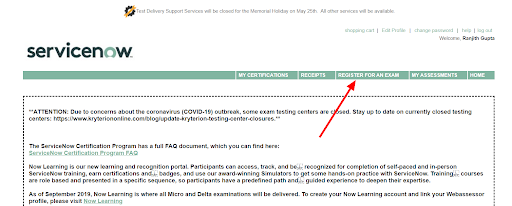
Step 1: Navigate to the REGISTER FOR AN EXAM tab after logging into Webassessor.

Webassessor ServiceNow, Service Nows, servicenow-webassessor-description-0

Step 2: Select Mainline Exams Including Retakes.

Step 3: Select the + icon next to the exam you want to finish. 

Step 4: Next to Onsite Proctored or Online Proctored (depending on the delivery you wish you to complete), click Buy Now.

Onsite Proctored exam

Completed at one of the Kryterion Testing Network’s Testing Centers.
Select a testing center that is available (filter based on your location).
Choose the date and start time. 
If this is your first time taking the exam, use the voucher code you got after finishing the training to get the exam fee waived at checkout.

Online Proctored exam: 

The exam was conducted entirely online. If you choose this option, make sure you follow Kryterion’s online proctoring requirements 
Choose a time zone, a date, and a starting time.
If this is your first time taking the exam, use the voucher code you got after finishing the training to get the exam fee waived at checkout.
On all confirmation and reminder communications, the exam start time will be specified in 24-hour clock format.

Creating a ServiceNow Webassessor account

Simply go to “https://www.webassessor.com/SERVICE_NOW” 

Webassessor ServiceNow, Service Nows, servicenow-webassessor-description-0, Creating a ServiceNow Webassessor account, Service Nows, servicenow-webassessor-description-1

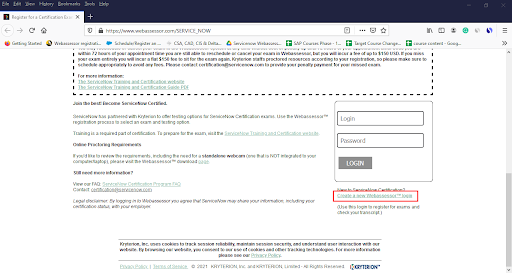
If you already have a Webassessor account, you can log in from here

Webassessor ServiceNow, Service Nows, servicenow-webassessor-description-0, Creating a ServiceNow Webassessor account, Service Nows, servicenow-webassessor-description-1, Webassessor Account, Service Nows, servicenow-webassessor-description-2

If you don’t already have a Webassessor account, click Create a New Webassessor Login Now, and then enter your details to create your account on this screen.


Webassessor ServiceNow, Service Nows, servicenow-webassessor-description-0, Creating a ServiceNow Webassessor account, Service Nows, servicenow-webassessor-description-1, Webassessor Account, Service Nows, servicenow-webassessor-description-2, Create a New Webassessor Account, Service Nows, servicenow-webassessor-description-3

Want to know more about Servicenow,visit here Servicenow Tutorial !

There are a lot of fillers that need to be filled. The most important point to remember is that your Webassessor login must be an email address, and it is advisable for you to use your personal email address instead of your work email address since you don’t want to lose access to your Webassessor login if you change jobs.


Webassessor ServiceNow, Service Nows, servicenow-webassessor-description-0, Creating a ServiceNow Webassessor account, Service Nows, servicenow-webassessor-description-1, Webassessor Account, Service Nows, servicenow-webassessor-description-2, Create a New Webassessor Account, Service Nows, servicenow-webassessor-description-3, Create a New Webassessor step 2, Service Nows, servicenow-webassessor-description-4

Then you enter your name, email address, and use your personal email address to create your own free developer account linked to your Salesforce account.Enter your contact details above such as address, city, state, postal code,country, and select yes in the dropdown options for agreeing to add your name and certification statuses to the public certification verification portal and then click Save.

Webassessor ServiceNow, Service Nows, servicenow-webassessor-description-0, Creating a ServiceNow Webassessor account, Service Nows, servicenow-webassessor-description-1, Webassessor Account, Service Nows, servicenow-webassessor-description-2, Create a New Webassessor Account, Service Nows, servicenow-webassessor-description-3, Create a New Webassessor step 2, Service Nows, servicenow-webassessor-description-4, reate a New Webassessor Login step 3, Service Nows, servicenow-webassessor-description-5

Summary of Webassessor Home Page
Participants can view relevant and important ServiceNow announcements on the home page after logging into Webassessor. Take a look at the summary of the Webassessor home page as discussed below:

  • My Certifications: Check the status of your ServiceNow Mainline certifications.
  • Receipts: Send a receipt for a scheduled or completed exam to your primary Webassessor email.
  • Register for an Exam: Schedule a ServiceNow Mainline exam.
  • My Assessments: Exams that are scheduled, in progress, or completed can be found here.
  • Home: Return to the main ServiceNow announcements homepage.
  • Edit Profile: Change your primary email address and other personal details.

Accessing ServiceNow Webassessor Overview

Now we are going to cover the overview of moving around in web Assessor. The URL for the web Assessor is “webassessor.com,” and it will take you to this screen which is shown below. You can log in with your username and password, and if you forget your password, we will email it to you so you can schedule a demo or get technical support.


Webassessor ServiceNow, Service Nows, servicenow-webassessor-description-0, Creating a ServiceNow Webassessor account, Service Nows, servicenow-webassessor-description-1, Webassessor Account, Service Nows, servicenow-webassessor-description-2, Create a New Webassessor Account, Service Nows, servicenow-webassessor-description-3, Create a New Webassessor step 2, Service Nows, servicenow-webassessor-description-4, reate a New Webassessor Login step 3, Service Nows, servicenow-webassessor-description-5, Accessing ServiceNow Webassessor, Service Nows, servicenow-webassessor-description-6

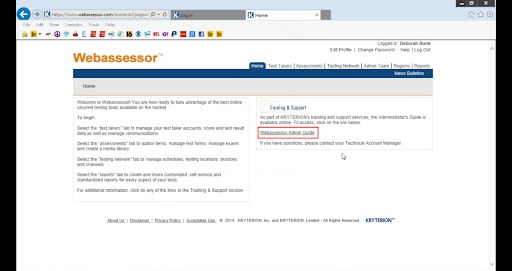
These are the things you’ll see when you log in to the Web Assessor. The first thing you can do is edit your profile. Make sure you have all of the necessary details in there, and the administrator will assign you a password for the web Assessor system. It would be best for you to go in and design a password for yourself which would be a “change password”. There is also your help box for any web assessing assistance you can need. 

Webassessor ServiceNow, Service Nows, servicenow-webassessor-description-0, Creating a ServiceNow Webassessor account, Service Nows, servicenow-webassessor-description-1, Webassessor Account, Service Nows, servicenow-webassessor-description-2, Create a New Webassessor Account, Service Nows, servicenow-webassessor-description-3, Create a New Webassessor step 2, Service Nows, servicenow-webassessor-description-4, reate a New Webassessor Login step 3, Service Nows, servicenow-webassessor-description-5, Accessing ServiceNow Webassessor, Service Nows, servicenow-webassessor-description-6, Accessing ServiceNow Webassessor step 2, Service Nows, servicenow-webassessor-description-7

Working in web Assessor is a “Web Assessor admin” guide that will take you through the various phases of working in web Assessor.


Webassessor ServiceNow, Service Nows, servicenow-webassessor-description-0, Creating a ServiceNow Webassessor account, Service Nows, servicenow-webassessor-description-1, Webassessor Account, Service Nows, servicenow-webassessor-description-2, Create a New Webassessor Account, Service Nows, servicenow-webassessor-description-3, Create a New Webassessor step 2, Service Nows, servicenow-webassessor-description-4, reate a New Webassessor Login step 3, Service Nows, servicenow-webassessor-description-5, Accessing ServiceNow Webassessor, Service Nows, servicenow-webassessor-description-6, Accessing ServiceNow Webassessor step 2, Service Nows, servicenow-webassessor-description-7, Web Assessor admin Guide, Service Nows, servicenow-webassessor-description-8

We’ll now go through the different tabs and features available in web Assessor. 

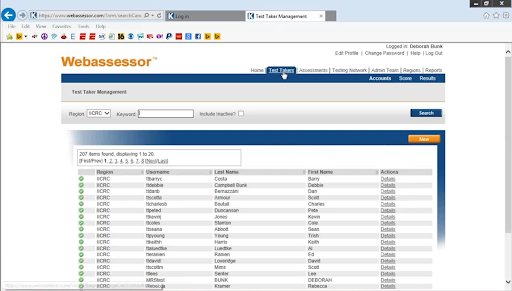
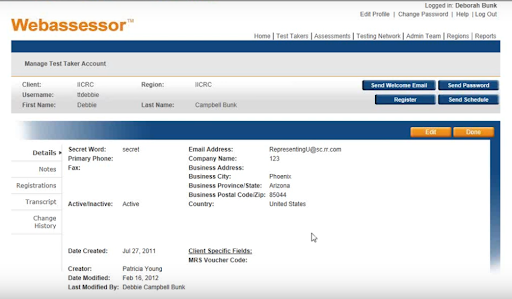
You’ll find all of the test takers, whether they’re taking the test online or in a testing center, under the test takers tab at the top of the page. The details of each of these test-takers are shown inside these screens.


Webassessor ServiceNow, Service Nows, servicenow-webassessor-description-0, Creating a ServiceNow Webassessor account, Service Nows, servicenow-webassessor-description-1, Webassessor Account, Service Nows, servicenow-webassessor-description-2, Create a New Webassessor Account, Service Nows, servicenow-webassessor-description-3, Create a New Webassessor step 2, Service Nows, servicenow-webassessor-description-4, reate a New Webassessor Login step 3, Service Nows, servicenow-webassessor-description-5, Accessing ServiceNow Webassessor, Service Nows, servicenow-webassessor-description-6, Accessing ServiceNow Webassessor step 2, Service Nows, servicenow-webassessor-description-7, Web Assessor admin Guide, Service Nows, servicenow-webassessor-description-8, Test Takers, Service Nows, servicenow-webassessor-description-9

Get ahead in your career by learning ServiceNow course through hkrtraining ServiceNow Training in Chennai !

ServiceNow Training

  • Master Your Craft
  • Lifetime LMS & Faculty Access
  • 24/7 online expert support
  • Real-world & Project Based Learning


This will provide them with your company’s phone number and passwords. any notes you may make, any registrations for tests they may have taken, and the test transcripts.
When a test taker contacts you for a password or assistance with registering or scheduling, this was also a test taker mode.

Webassessor ServiceNow, Service Nows, servicenow-webassessor-description-0, Creating a ServiceNow Webassessor account, Service Nows, servicenow-webassessor-description-1, Webassessor Account, Service Nows, servicenow-webassessor-description-2, Create a New Webassessor Account, Service Nows, servicenow-webassessor-description-3, Create a New Webassessor step 2, Service Nows, servicenow-webassessor-description-4, reate a New Webassessor Login step 3, Service Nows, servicenow-webassessor-description-5, Accessing ServiceNow Webassessor, Service Nows, servicenow-webassessor-description-6, Accessing ServiceNow Webassessor step 2, Service Nows, servicenow-webassessor-description-7, Web Assessor admin Guide, Service Nows, servicenow-webassessor-description-8, Test Takers, Service Nows, servicenow-webassessor-description-9, , Service Nows, servicenow-webassessor-description-10, Manage Test Takers Account, Service Nows, servicenow-webassessor-description-11
Assessments:

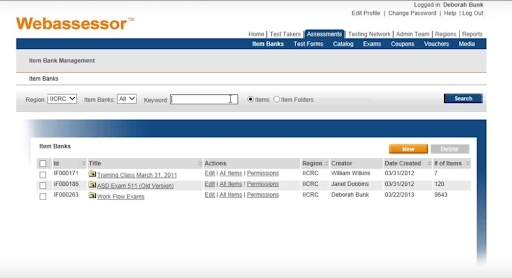
You’ll spend the most time on “assessments”. You have your item banks inside assessments and then You build your own “test forms”. All of the ICR scenes item tests are under the workflow exams in your item banks.


Webassessor ServiceNow, Service Nows, servicenow-webassessor-description-0, Creating a ServiceNow Webassessor account, Service Nows, servicenow-webassessor-description-1, Webassessor Account, Service Nows, servicenow-webassessor-description-2, Create a New Webassessor Account, Service Nows, servicenow-webassessor-description-3, Create a New Webassessor step 2, Service Nows, servicenow-webassessor-description-4, reate a New Webassessor Login step 3, Service Nows, servicenow-webassessor-description-5, Accessing ServiceNow Webassessor, Service Nows, servicenow-webassessor-description-6, Accessing ServiceNow Webassessor step 2, Service Nows, servicenow-webassessor-description-7, Web Assessor admin Guide, Service Nows, servicenow-webassessor-description-8, Test Takers, Service Nows, servicenow-webassessor-description-9, , Service Nows, servicenow-webassessor-description-10, Manage Test Takers Account, Service Nows, servicenow-webassessor-description-11, Assessments, Service Nows, servicenow-webassessor-description-12

You can see them coated with the exam’s original time and then coded them with the new date as we make changes.

Test Forms:

Your “test forms” will be where you will build your test. This is where you’ll take the items and put them into a test form,whether you’re taking an online test,a test center test, or printing some paper. One thing to keep in mind is that once these are locked, you won’t be able to make any more changes to the test forms.


Webassessor ServiceNow, Service Nows, servicenow-webassessor-description-0, Creating a ServiceNow Webassessor account, Service Nows, servicenow-webassessor-description-1, Webassessor Account, Service Nows, servicenow-webassessor-description-2, Create a New Webassessor Account, Service Nows, servicenow-webassessor-description-3, Create a New Webassessor step 2, Service Nows, servicenow-webassessor-description-4, reate a New Webassessor Login step 3, Service Nows, servicenow-webassessor-description-5, Accessing ServiceNow Webassessor, Service Nows, servicenow-webassessor-description-6, Accessing ServiceNow Webassessor step 2, Service Nows, servicenow-webassessor-description-7, Web Assessor admin Guide, Service Nows, servicenow-webassessor-description-8, Test Takers, Service Nows, servicenow-webassessor-description-9, , Service Nows, servicenow-webassessor-description-10, Manage Test Takers Account, Service Nows, servicenow-webassessor-description-11, Assessments, Service Nows, servicenow-webassessor-description-12, Test Forms, Service Nows, servicenow-webassessor-description-13

Catalog:

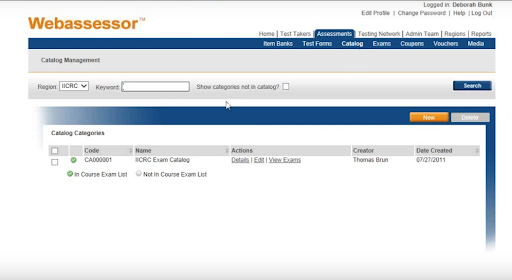
The active exams will be displayed in the “catalog”. The catalog of all the exams we have is related to the MRS (mold removal specialist) test.These are the various tests that we went through in order to establish form A and B of our exams. These are the exams that are performed at a test center.


Webassessor ServiceNow, Service Nows, servicenow-webassessor-description-0, Creating a ServiceNow Webassessor account, Service Nows, servicenow-webassessor-description-1, Webassessor Account, Service Nows, servicenow-webassessor-description-2, Create a New Webassessor Account, Service Nows, servicenow-webassessor-description-3, Create a New Webassessor step 2, Service Nows, servicenow-webassessor-description-4, reate a New Webassessor Login step 3, Service Nows, servicenow-webassessor-description-5, Accessing ServiceNow Webassessor, Service Nows, servicenow-webassessor-description-6, Accessing ServiceNow Webassessor step 2, Service Nows, servicenow-webassessor-description-7, Web Assessor admin Guide, Service Nows, servicenow-webassessor-description-8, Test Takers, Service Nows, servicenow-webassessor-description-9, , Service Nows, servicenow-webassessor-description-10, Manage Test Takers Account, Service Nows, servicenow-webassessor-description-11, Assessments, Service Nows, servicenow-webassessor-description-12, Test Forms, Service Nows, servicenow-webassessor-description-13, Catalog, Service Nows, servicenow-webassessor-description-14

Enroll in our Fortiweb Training program today and elevate your skills!

Webassessor ServiceNow, Service Nows, servicenow-webassessor-description-0, Creating a ServiceNow Webassessor account, Service Nows, servicenow-webassessor-description-1, Webassessor Account, Service Nows, servicenow-webassessor-description-2, Create a New Webassessor Account, Service Nows, servicenow-webassessor-description-3, Create a New Webassessor step 2, Service Nows, servicenow-webassessor-description-4, reate a New Webassessor Login step 3, Service Nows, servicenow-webassessor-description-5, Accessing ServiceNow Webassessor, Service Nows, servicenow-webassessor-description-6, Accessing ServiceNow Webassessor step 2, Service Nows, servicenow-webassessor-description-7, Web Assessor admin Guide, Service Nows, servicenow-webassessor-description-8, Test Takers, Service Nows, servicenow-webassessor-description-9, , Service Nows, servicenow-webassessor-description-10, Manage Test Takers Account, Service Nows, servicenow-webassessor-description-11, Assessments, Service Nows, servicenow-webassessor-description-12, Test Forms, Service Nows, servicenow-webassessor-description-13, Catalog, Service Nows, servicenow-webassessor-description-14, , Service Nows, servicenow-webassessor-description-15

Subscribe to our YouTube channel to get new updates..!

Exams:

The “exams” tab will show you the details of the exam as shown in the below screen.

Webassessor ServiceNow, Service Nows, servicenow-webassessor-description-0, Creating a ServiceNow Webassessor account, Service Nows, servicenow-webassessor-description-1, Webassessor Account, Service Nows, servicenow-webassessor-description-2, Create a New Webassessor Account, Service Nows, servicenow-webassessor-description-3, Create a New Webassessor step 2, Service Nows, servicenow-webassessor-description-4, reate a New Webassessor Login step 3, Service Nows, servicenow-webassessor-description-5, Accessing ServiceNow Webassessor, Service Nows, servicenow-webassessor-description-6, Accessing ServiceNow Webassessor step 2, Service Nows, servicenow-webassessor-description-7, Web Assessor admin Guide, Service Nows, servicenow-webassessor-description-8, Test Takers, Service Nows, servicenow-webassessor-description-9, , Service Nows, servicenow-webassessor-description-10, Manage Test Takers Account, Service Nows, servicenow-webassessor-description-11, Assessments, Service Nows, servicenow-webassessor-description-12, Test Forms, Service Nows, servicenow-webassessor-description-13, Catalog, Service Nows, servicenow-webassessor-description-14, , Service Nows, servicenow-webassessor-description-15, Exams, Service Nows, servicenow-webassessor-description-16

These details will include the cost, the security parameters, the test form alignment assignment, and the test’s availability. There are no end dates or blackout dates for these assessments if they can’t be administered at a certain time.


Webassessor ServiceNow, Service Nows, servicenow-webassessor-description-0, Creating a ServiceNow Webassessor account, Service Nows, servicenow-webassessor-description-1, Webassessor Account, Service Nows, servicenow-webassessor-description-2, Create a New Webassessor Account, Service Nows, servicenow-webassessor-description-3, Create a New Webassessor step 2, Service Nows, servicenow-webassessor-description-4, reate a New Webassessor Login step 3, Service Nows, servicenow-webassessor-description-5, Accessing ServiceNow Webassessor, Service Nows, servicenow-webassessor-description-6, Accessing ServiceNow Webassessor step 2, Service Nows, servicenow-webassessor-description-7, Web Assessor admin Guide, Service Nows, servicenow-webassessor-description-8, Test Takers, Service Nows, servicenow-webassessor-description-9, , Service Nows, servicenow-webassessor-description-10, Manage Test Takers Account, Service Nows, servicenow-webassessor-description-11, Assessments, Service Nows, servicenow-webassessor-description-12, Test Forms, Service Nows, servicenow-webassessor-description-13, Catalog, Service Nows, servicenow-webassessor-description-14, , Service Nows, servicenow-webassessor-description-15, Exams, Service Nows, servicenow-webassessor-description-16, catalog Exams, Service Nows, servicenow-webassessor-description-17

   Top 30 frequently asked Servicenow Interview Questions !

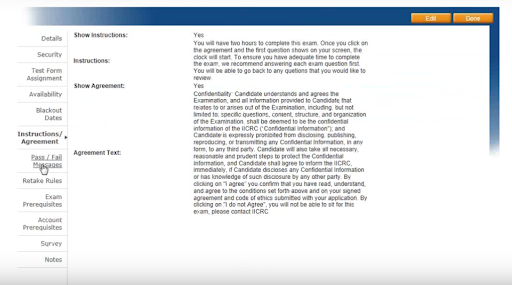
It also contains any “instructions” for the test-taking student. The pass and fail messages are where we establish pass and fail if you take an online test and get your results right away. There are retake rules, such as how many times you should take the exam. If we perform any surveys or have any notes on this, we will conduct an exam or account prerequisites survey. All of these can be found under exams, which is under the actual exam. The mold removal specialist is the one that we’re utilizing an outside service.


Webassessor ServiceNow, Service Nows, servicenow-webassessor-description-0, Creating a ServiceNow Webassessor account, Service Nows, servicenow-webassessor-description-1, Webassessor Account, Service Nows, servicenow-webassessor-description-2, Create a New Webassessor Account, Service Nows, servicenow-webassessor-description-3, Create a New Webassessor step 2, Service Nows, servicenow-webassessor-description-4, reate a New Webassessor Login step 3, Service Nows, servicenow-webassessor-description-5, Accessing ServiceNow Webassessor, Service Nows, servicenow-webassessor-description-6, Accessing ServiceNow Webassessor step 2, Service Nows, servicenow-webassessor-description-7, Web Assessor admin Guide, Service Nows, servicenow-webassessor-description-8, Test Takers, Service Nows, servicenow-webassessor-description-9, , Service Nows, servicenow-webassessor-description-10, Manage Test Takers Account, Service Nows, servicenow-webassessor-description-11, Assessments, Service Nows, servicenow-webassessor-description-12, Test Forms, Service Nows, servicenow-webassessor-description-13, Catalog, Service Nows, servicenow-webassessor-description-14, , Service Nows, servicenow-webassessor-description-15, Exams, Service Nows, servicenow-webassessor-description-16, catalog Exams, Service Nows, servicenow-webassessor-description-17, instructions, Service Nows, servicenow-webassessor-description-18

Voucher:

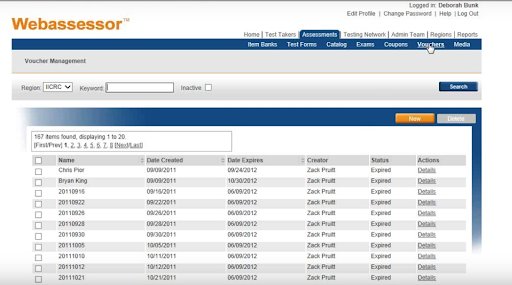
A “Vouchers” tab is where the staff assigns a code to a test taker after they have met the requirements, their application has been accepted, and they have submitted their payment, and we tend to allocate them by date. This code will be used to register for the test at a testing center.


Webassessor ServiceNow, Service Nows, servicenow-webassessor-description-0, Creating a ServiceNow Webassessor account, Service Nows, servicenow-webassessor-description-1, Webassessor Account, Service Nows, servicenow-webassessor-description-2, Create a New Webassessor Account, Service Nows, servicenow-webassessor-description-3, Create a New Webassessor step 2, Service Nows, servicenow-webassessor-description-4, reate a New Webassessor Login step 3, Service Nows, servicenow-webassessor-description-5, Accessing ServiceNow Webassessor, Service Nows, servicenow-webassessor-description-6, Accessing ServiceNow Webassessor step 2, Service Nows, servicenow-webassessor-description-7, Web Assessor admin Guide, Service Nows, servicenow-webassessor-description-8, Test Takers, Service Nows, servicenow-webassessor-description-9, , Service Nows, servicenow-webassessor-description-10, Manage Test Takers Account, Service Nows, servicenow-webassessor-description-11, Assessments, Service Nows, servicenow-webassessor-description-12, Test Forms, Service Nows, servicenow-webassessor-description-13, Catalog, Service Nows, servicenow-webassessor-description-14, , Service Nows, servicenow-webassessor-description-15, Exams, Service Nows, servicenow-webassessor-description-16, catalog Exams, Service Nows, servicenow-webassessor-description-17, instructions, Service Nows, servicenow-webassessor-description-18, Voucher, Service Nows, servicenow-webassessor-description-19

Media Center:

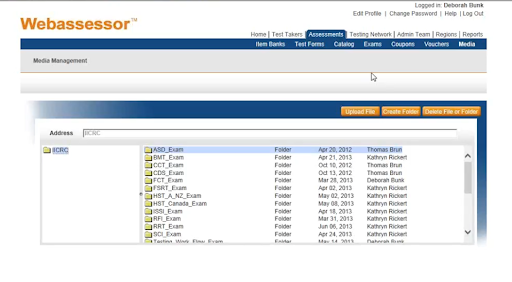
The media center will take a few moments to load because it contains all of the pictures and graphics from the test.Any item that uses it is broken down by the exam for which it is associated. All media must be uploaded here before it can be added to a test item and then transferred to a test forum. 

Webassessor ServiceNow, Service Nows, servicenow-webassessor-description-0, Creating a ServiceNow Webassessor account, Service Nows, servicenow-webassessor-description-1, Webassessor Account, Service Nows, servicenow-webassessor-description-2, Create a New Webassessor Account, Service Nows, servicenow-webassessor-description-3, Create a New Webassessor step 2, Service Nows, servicenow-webassessor-description-4, reate a New Webassessor Login step 3, Service Nows, servicenow-webassessor-description-5, Accessing ServiceNow Webassessor, Service Nows, servicenow-webassessor-description-6, Accessing ServiceNow Webassessor step 2, Service Nows, servicenow-webassessor-description-7, Web Assessor admin Guide, Service Nows, servicenow-webassessor-description-8, Test Takers, Service Nows, servicenow-webassessor-description-9, , Service Nows, servicenow-webassessor-description-10, Manage Test Takers Account, Service Nows, servicenow-webassessor-description-11, Assessments, Service Nows, servicenow-webassessor-description-12, Test Forms, Service Nows, servicenow-webassessor-description-13, Catalog, Service Nows, servicenow-webassessor-description-14, , Service Nows, servicenow-webassessor-description-15, Exams, Service Nows, servicenow-webassessor-description-16, catalog Exams, Service Nows, servicenow-webassessor-description-17, instructions, Service Nows, servicenow-webassessor-description-18, Voucher, Service Nows, servicenow-webassessor-description-19, Media Center, Service Nows, servicenow-webassessor-description-20

Become a Servicenow Certified professional by learning this HKR Servicenow Training  in Hyderbad !

ServiceNow Training

Weekday / Weekend Batches


So assessments are where you’ll be developing your items, evaluating them, updating them, and converting them to a test form to see whether you want to export them to paper and pencil or place them online. As a result, it will be used for computer-based tests, and you’ll have your voucher so that those who have paid for the test will take it.

Admin Team:

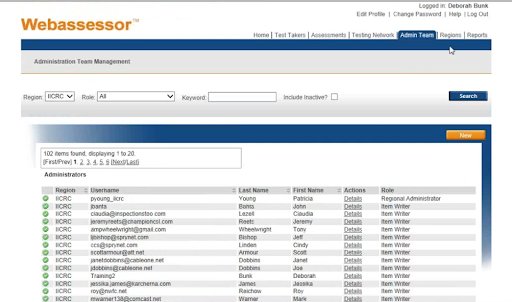
The “admin team” is the next tab. This is where volunteers and workers of the IICRC can access the web Assessor system and make changes to the item database, exams, profiles, and passwords. The original administrator, the assessment manager, the item writer, the registration manager, the private scheduler, the supervisor, and the test taker administration are the seven different roles that can be defined for the test-taker. This is where each of these roles will be developed.


Webassessor ServiceNow, Service Nows, servicenow-webassessor-description-0, Creating a ServiceNow Webassessor account, Service Nows, servicenow-webassessor-description-1, Webassessor Account, Service Nows, servicenow-webassessor-description-2, Create a New Webassessor Account, Service Nows, servicenow-webassessor-description-3, Create a New Webassessor step 2, Service Nows, servicenow-webassessor-description-4, reate a New Webassessor Login step 3, Service Nows, servicenow-webassessor-description-5, Accessing ServiceNow Webassessor, Service Nows, servicenow-webassessor-description-6, Accessing ServiceNow Webassessor step 2, Service Nows, servicenow-webassessor-description-7, Web Assessor admin Guide, Service Nows, servicenow-webassessor-description-8, Test Takers, Service Nows, servicenow-webassessor-description-9, , Service Nows, servicenow-webassessor-description-10, Manage Test Takers Account, Service Nows, servicenow-webassessor-description-11, Assessments, Service Nows, servicenow-webassessor-description-12, Test Forms, Service Nows, servicenow-webassessor-description-13, Catalog, Service Nows, servicenow-webassessor-description-14, , Service Nows, servicenow-webassessor-description-15, Exams, Service Nows, servicenow-webassessor-description-16, catalog Exams, Service Nows, servicenow-webassessor-description-17, instructions, Service Nows, servicenow-webassessor-description-18, Voucher, Service Nows, servicenow-webassessor-description-19, Media Center, Service Nows, servicenow-webassessor-description-20, Admin Team, Service Nows, servicenow-webassessor-description-21

Regions:

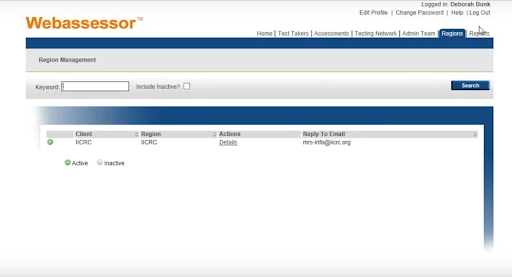
The regions are the separate entities within an organization. They can represent a variety of departments,geographic areas, and even teams. You have one region to find but if you do need additional regions to establish then you need to contact the technical Account Manager.They’re a wonderful tool for creating web pages in multiple languages or different branding elements for different business units within the same company. 


Webassessor ServiceNow, Service Nows, servicenow-webassessor-description-0, Creating a ServiceNow Webassessor account, Service Nows, servicenow-webassessor-description-1, Webassessor Account, Service Nows, servicenow-webassessor-description-2, Create a New Webassessor Account, Service Nows, servicenow-webassessor-description-3, Create a New Webassessor step 2, Service Nows, servicenow-webassessor-description-4, reate a New Webassessor Login step 3, Service Nows, servicenow-webassessor-description-5, Accessing ServiceNow Webassessor, Service Nows, servicenow-webassessor-description-6, Accessing ServiceNow Webassessor step 2, Service Nows, servicenow-webassessor-description-7, Web Assessor admin Guide, Service Nows, servicenow-webassessor-description-8, Test Takers, Service Nows, servicenow-webassessor-description-9, , Service Nows, servicenow-webassessor-description-10, Manage Test Takers Account, Service Nows, servicenow-webassessor-description-11, Assessments, Service Nows, servicenow-webassessor-description-12, Test Forms, Service Nows, servicenow-webassessor-description-13, Catalog, Service Nows, servicenow-webassessor-description-14, , Service Nows, servicenow-webassessor-description-15, Exams, Service Nows, servicenow-webassessor-description-16, catalog Exams, Service Nows, servicenow-webassessor-description-17, instructions, Service Nows, servicenow-webassessor-description-18, Voucher, Service Nows, servicenow-webassessor-description-19, Media Center, Service Nows, servicenow-webassessor-description-20, Admin Team, Service Nows, servicenow-webassessor-description-21, Regions, Service Nows, servicenow-webassessor-description-22

Report:

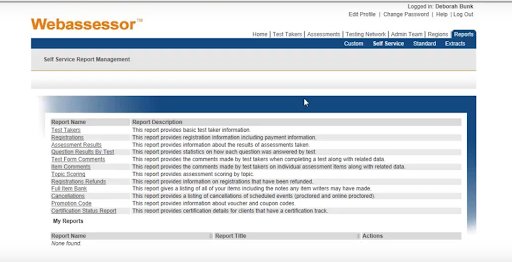
Any system standard reports that you want to keep track of on a regular basis can be saved to custom reports.
The self-service reports are those that have already been developed by the web Assessor system, and you can pull various reports depending on the details that you’re looking for. Despite the fact that each report has its own set of fields and selection criteria, the reports share a lot of similar attributes.


Webassessor ServiceNow, Service Nows, servicenow-webassessor-description-0, Creating a ServiceNow Webassessor account, Service Nows, servicenow-webassessor-description-1, Webassessor Account, Service Nows, servicenow-webassessor-description-2, Create a New Webassessor Account, Service Nows, servicenow-webassessor-description-3, Create a New Webassessor step 2, Service Nows, servicenow-webassessor-description-4, reate a New Webassessor Login step 3, Service Nows, servicenow-webassessor-description-5, Accessing ServiceNow Webassessor, Service Nows, servicenow-webassessor-description-6, Accessing ServiceNow Webassessor step 2, Service Nows, servicenow-webassessor-description-7, Web Assessor admin Guide, Service Nows, servicenow-webassessor-description-8, Test Takers, Service Nows, servicenow-webassessor-description-9, , Service Nows, servicenow-webassessor-description-10, Manage Test Takers Account, Service Nows, servicenow-webassessor-description-11, Assessments, Service Nows, servicenow-webassessor-description-12, Test Forms, Service Nows, servicenow-webassessor-description-13, Catalog, Service Nows, servicenow-webassessor-description-14, , Service Nows, servicenow-webassessor-description-15, Exams, Service Nows, servicenow-webassessor-description-16, catalog Exams, Service Nows, servicenow-webassessor-description-17, instructions, Service Nows, servicenow-webassessor-description-18, Voucher, Service Nows, servicenow-webassessor-description-19, Media Center, Service Nows, servicenow-webassessor-description-20, Admin Team, Service Nows, servicenow-webassessor-description-21, Regions, Service Nows, servicenow-webassessor-description-22, Report, Service Nows, servicenow-webassessor-description-23

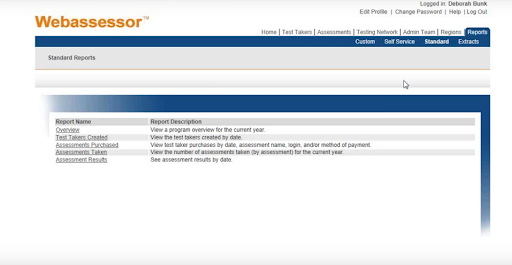
The standard reports are those that are also created with the web Assessor and are generated directly from the assessments.


Webassessor ServiceNow, Service Nows, servicenow-webassessor-description-0, Creating a ServiceNow Webassessor account, Service Nows, servicenow-webassessor-description-1, Webassessor Account, Service Nows, servicenow-webassessor-description-2, Create a New Webassessor Account, Service Nows, servicenow-webassessor-description-3, Create a New Webassessor step 2, Service Nows, servicenow-webassessor-description-4, reate a New Webassessor Login step 3, Service Nows, servicenow-webassessor-description-5, Accessing ServiceNow Webassessor, Service Nows, servicenow-webassessor-description-6, Accessing ServiceNow Webassessor step 2, Service Nows, servicenow-webassessor-description-7, Web Assessor admin Guide, Service Nows, servicenow-webassessor-description-8, Test Takers, Service Nows, servicenow-webassessor-description-9, , Service Nows, servicenow-webassessor-description-10, Manage Test Takers Account, Service Nows, servicenow-webassessor-description-11, Assessments, Service Nows, servicenow-webassessor-description-12, Test Forms, Service Nows, servicenow-webassessor-description-13, Catalog, Service Nows, servicenow-webassessor-description-14, , Service Nows, servicenow-webassessor-description-15, Exams, Service Nows, servicenow-webassessor-description-16, catalog Exams, Service Nows, servicenow-webassessor-description-17, instructions, Service Nows, servicenow-webassessor-description-18, Voucher, Service Nows, servicenow-webassessor-description-19, Media Center, Service Nows, servicenow-webassessor-description-20, Admin Team, Service Nows, servicenow-webassessor-description-21, Regions, Service Nows, servicenow-webassessor-description-22, Report, Service Nows, servicenow-webassessor-description-23, standard reports, Service Nows, servicenow-webassessor-description-24

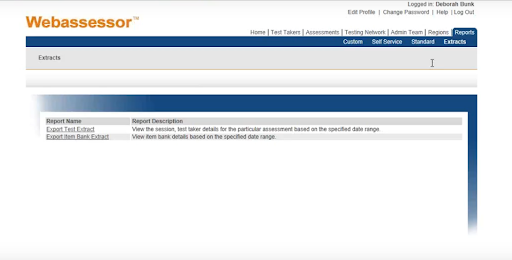
The extract reports are the reports in which you would enter specifics on what you were looking for,and the data would be extracted into a CSV file, which you could then manipulate and display in various documents.

Webassessor ServiceNow, Service Nows, servicenow-webassessor-description-0, Creating a ServiceNow Webassessor account, Service Nows, servicenow-webassessor-description-1, Webassessor Account, Service Nows, servicenow-webassessor-description-2, Create a New Webassessor Account, Service Nows, servicenow-webassessor-description-3, Create a New Webassessor step 2, Service Nows, servicenow-webassessor-description-4, reate a New Webassessor Login step 3, Service Nows, servicenow-webassessor-description-5, Accessing ServiceNow Webassessor, Service Nows, servicenow-webassessor-description-6, Accessing ServiceNow Webassessor step 2, Service Nows, servicenow-webassessor-description-7, Web Assessor admin Guide, Service Nows, servicenow-webassessor-description-8, Test Takers, Service Nows, servicenow-webassessor-description-9, , Service Nows, servicenow-webassessor-description-10, Manage Test Takers Account, Service Nows, servicenow-webassessor-description-11, Assessments, Service Nows, servicenow-webassessor-description-12, Test Forms, Service Nows, servicenow-webassessor-description-13, Catalog, Service Nows, servicenow-webassessor-description-14, , Service Nows, servicenow-webassessor-description-15, Exams, Service Nows, servicenow-webassessor-description-16, catalog Exams, Service Nows, servicenow-webassessor-description-17, instructions, Service Nows, servicenow-webassessor-description-18, Voucher, Service Nows, servicenow-webassessor-description-19, Media Center, Service Nows, servicenow-webassessor-description-20, Admin Team, Service Nows, servicenow-webassessor-description-21, Regions, Service Nows, servicenow-webassessor-description-22, Report, Service Nows, servicenow-webassessor-description-23, standard reports, Service Nows, servicenow-webassessor-description-24, extract reports, Service Nows, servicenow-webassessor-description-25
As an example,the committee members are working on their exams and need to see an updated printed version of the exam. You could review it by placing it into an approved mode, turning it into an exam, or extracting a report.Extract the data into Excel, manipulate it, and then convert it to a Word document that displays the same information to them.It will also provide them with the additional details they need to provide their source definition,documentation,and teaching point or evidence statement.

Conclusion:

We have covered the basic overview of the web Assessor system and all its features. We hope this blog has helped you with all the essential details on how to use the ServiceNow Webassessor for scheduling the exams.

Related Articles:


Source link