
I saved the receipts, here’s how much real-world value the Sapphire Reserve Card delivered in the last year


The Chase Sapphire Reserve® (see rates and fees) is back in the spotlight thanks to its highest-ever publicly available welcome bonus: Earn 150,000 bonus points after spending $6,000 on purchases in the first three months from account opening.

But even with a massive bonus on the table, there’s one number that’s hard to ignore: the card’s $795 annual fee.

Chase says the Sapphire Reserve offers more than $3,000 in annual value through statement credits, perks and travel benefits. That sounds great in theory — but I wanted to know what the card was actually worth in my real life.

So I looked back at the nearly 12 months since the card’s June 2025 overhaul and added up every credit and perk I actually used.

The result? About $2,200 in redeemed statement credits alone — before factoring in lounge visits, points earned, travel protections and more.

CHASE

Getting $2,200 in value from Chase Sapphire Reserve credits

If you think it takes some level of effort to get full value out of many of the premium cards, such as the Chase Sapphire Reserve, you’re not wrong.

I have a lot of credit cards (25 to be exact) and a very busy life as a working parent of two active kids, so while I try to maximize the cards in my wallet, I’m also not rearranging my life to chase every obscure credit.

In looking back at the last year, there are a few Sapphire Reserve credits I didn’t use — or didn’t fully use — which I imagine is probably common for many other cardholders.

But from those I did use, the total is around $2,200 in credits.

Reward your inbox with the TPG Daily newsletter

Join over 700,000 readers for breaking news, in-depth guides and exclusive deals from TPG’s experts

Here’s where the value actually came from for me over the last year:

Benefit Official Value How I Used It Approx. Value Used
The Edit by Chase Travel℠ Credit

Up to $500 annually (two up-to-$250 credits)*

Grand Cayman, Germany & Anaheim hotel stays

$750

Chase Travel Credit valid at select IHG Hotels and others

Up to $250 this year**

Grand Cayman IHG stay

$250

Up to $300 annually

Automatically applied to travel purchases

$300

Sapphire Reserve Exclusive Tables Dining Credit

Up to $300 annually (two up-to-$150 biannual credits)

Used $150 in Austin + $150 in Hawaii

$300

Up to $300 annually (split into two up-to-$150 biannual credits; through Dec. 31, 2027; activation required)

Used for & Juliet + Book of Mormon

$300

Up to $300 annually (Up to $25 in monthly promos plus at least one complimentary year of DashPass; activate by Dec. 31, 2027).

Monthly promos used throughout the year

$180

Up to $120 annually (Up to $10 each month through Sept. 30, 2027, does not apply to Wait & Save, bike or scooter rides)

Partial usage

$60

Peloton Monthly Membership Credit

Up to $120 annually (through Dec. 31, 2027)

Partial usage

$60

Apple TV+ and Apple Music Subscription Benefit

Up to $288 annual value (one-time activation required for both services, through June 22, 2027)

Didn’t use so far

$0

Global Entry / TSA PreCheck / NEXUS Credit

Up to $120 every 4 years

Didn’t use this year

$0

  • Approximate Total Credits Used: $2,200
  • Annual Fee: $795
  • Approximate Net Positive Credit Value: $1,400+

*Must be on prepaid stays of two nights or more.
**A one-time $250 statement credit for eligible prepaid hotel stays booked through Chase Travel in 2026.

Here are a few details on how I’m using some of the larger credits.

Using $750 in Chase The Edit credits

I stacked using a combination of Ultimate Rewards points via Points Boost and one $250 Chase Sapphire Reserve The Edit credit in 2025 to book a two-night stay the J.W. Marriott Bonnet Creek in Orlando near Walt Disney World.

Pool at JW Marriott Orlando Bonnet Creek
JW Marriott Orlando Bonnet Creek Resort & Spa. ANDREA ROTONDO/THE POINTS GUY

I’ve already booked two stays for 2026, using up the full $500 credit for this year (in $250 increments). On one of the upcoming stays in Grand Cayman, I was also able to use the $250 hotel credit we’ll talk more about below.

Using $250 Chase Select Hotel Credit

This year, Sapphire Reserve cardholders can use a one-time $250 statement credit for eligible prepaid hotel stays of two nights or more booked through Chase Travel. This credit is only valid for certain brands, including:

  • IHG Hotels & Resorts
  • Minor Hotels
  • Montage Hotels & Resorts
  • Omni Hotels & Resorts
  • Pan Pacific Hotels and Resorts
  • Pendry Hotels & Resorts
  • Virgin Hotels
Hotel Indigo Grand Cayman IHG

The plan here is to find a hotel where you can use both this $250 credit and one of your $250 The Edit credits to get $500 off a two-night stay, which is exactly what I’ve done for an IHG property in Grand Cayman.

CHASE

Using $300 in Stubhub credits to see Broadway shows

I used both of my biannual $150 StubHub credits for Broadway shows — first for & Juliet and later for an upcoming showing of The Book of Mormon.

Using the Stubhub credit to see Broadway shows such as &Juliet. SUMMER HULL/THE POINTS GUY

In both cases, tickets to the shows start under $150, so the credit can often fully cover one ticket or even get you part of the way to two tickets.

Using $300 in Exclusive Tables dining credit

I’ll be honest, this $300 annual dining credit ($150 available Jan. – June and another $150 July – Dec.) was a tougher one for me at first.

I kept trying to force a way to use it close-ish to home. But the reality is, outside of major cities, there’s not a lot of easy ways to put this credit to use, as there aren’t a ton of Chase Exclusives Tables outside of major cities.

So, I stopped trying to use it while close to home and now try to find somewhere fun to use it when we hit the road to places like Orlando, New York City, Austin and even Honolulu.

While in Hawaii this spring, we had an excellent meal for three that came in just over $150 at Hau Tree on the beach in Honolulu. We did the same while in Austin for the weekend in fall 2025 at La Condesa.

TPG Tip: I loved the frozen ube pina colada at Hau Tree and the queso flameado appetizer is absolutely not to be missed if you make it to La Condesa in Austin.

Using the Chase Exclusive’s Dining Credit while in Hawaii. SUMMER HULL/THE POINTS GUY

Lounge visits, points and more

On top of the credits, which are pretty easy to quantify, I’ve also gotten plenty of other value from my Sapphire Reserve.

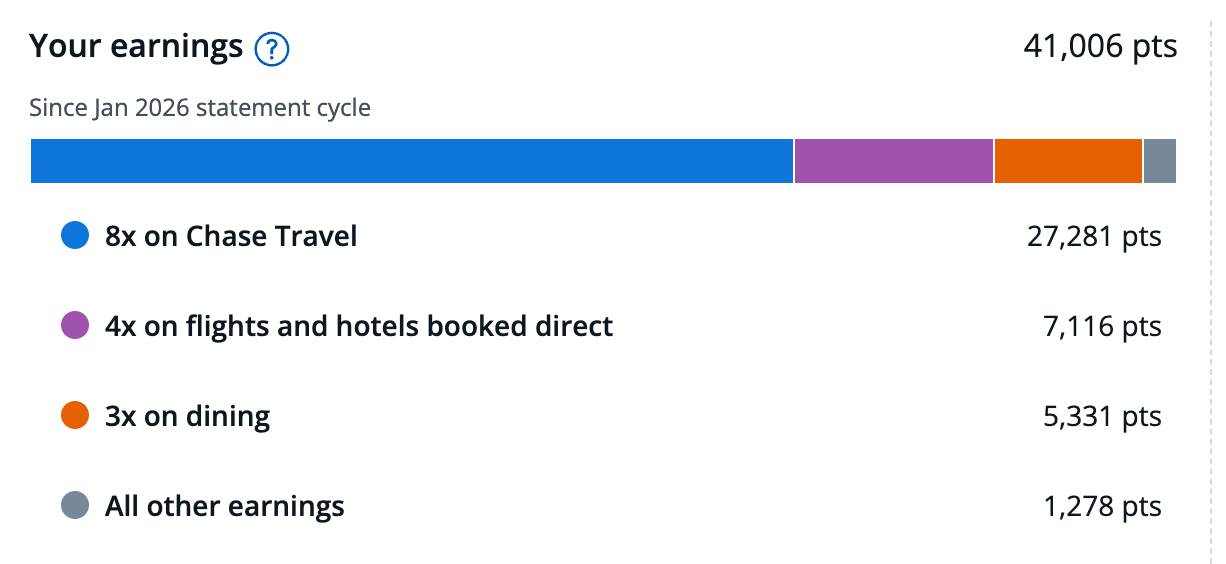
Since January 2026 alone (when the counter reset), I’ve earned over 40,000 Chase Ultimate Rewards points that TPG values (as of May 2026) at north of $800. Many of those points were earned at increased multiples, such as 8 points per dollar via Chase Travel, 4 points per dollar on hotel and airfare booked direct with hotels and airlines and 3 points per dollar on dining.
CHASE

I’ve also had at least six visits to Sapphire Lounges at various airports over the last year, including at New York’s LaGuardia, San Diego, Philadelphia and Las Vegas.

Between meals, coffee and drinks, those lounge visits probably saved my family and me another couple of hundred dollars over the course of the year versus if we’d been foraging in the airport instead of enjoying the treats in the lounge.

Chase Sapphire Lounge in Las Vegas. SUMMER HULL/THE POINTS GUY

Bottom line

The Chase Sapphire Reserve isn’t a card everyone should pay $795 a year to carry. It’s $95 per year sister, the Chase Sapphire Preferred® Card (see rates and fees) is likely a better match for some who don’t travel as much or simply don’t want to bother with using up as many of the credits.

But after looking back at my own spending and travel over the last year, it’s clear the Sapphire Reserve math easily works for me.

I redeemed roughly $2,200 in statement credits alone, earned tens of thousands of valuable Chase Ultimate Rewards points on my spending and regularly used perks like Sapphire Lounge access while traveling.

If you’re someone who travels regularly and can realistically use several of the card’s credits each year, the Sapphire Reserve can absolutely deliver more value than its annual fee.

And with the card currently offering its highest-ever public welcome bonus, now may be the best time to apply if you’ve decided to add it to your wallet.

If you think the Chase Sapphire Reserve is a winner for your wallet, I’d recommend getting the card while it has its highest-ever public offer of 150,000 bonus Chase Ultimate Rewards points, earned after spending $6,000 on purchases in the first three months from account opening.


Source link

Leave a Reply

Subscribe to Our Newsletter

Get our latest articles delivered straight to your inbox. No spam, we promise.

Recent Reviews


DOMO Tutorial – Table of Content

What is Domo?

Domo is a cloud-based business intelligence software company first founded in 2010 by Josh James, located in American fork, Utah, United States. The main purpose of Domo is to provide business intelligence tools and data visualizations. This cloud-based platform helps users to integrate the business data from multiple sources. Domo supports collaborating with users, data, and systems to form a digitally-connected platform. Domo is one of the SaaS (software-as-a-service) software ventures. Domo is mainly used to perform operations like; data-analytics, data visualization, reporting, and digitalization. Up to five users can access the Demo tool free of cost. This software tool provides fully integrated business data for many textual programming languages.

Why Domo?

As I said earlier the main purpose of using Domo is to mainly perform data analytic and visualization operations. Apart from these usages, Domo has been used for other real-time activities. So these make Domo as one of the popular business intelligence tools. I would like to explain the main reasons why we need Domo in our business organizations;

  • By using Domo tool you can run your company with the help of Mobile phones.
  • This software tool lets the user perform real-time data in the real environment.
  • Domo is available in the form application (app) so that you can access it easily.
  • This offers data-driven business intelligence and analytics.
  • Offers a high-level of consumerization and mobility.
  • Matured levels of data monitoring also possible.
  • Decision making: This Domo converts the business data into information. This helps the management to make fact-based decisions.
  • This supports dashboard services and business assistance.
  • Mobile services are getting easier because of the Domo business tool.

Take your career to next level in Domo with HKR. Join Domo online training now

Domo Architecture

Domo Architecture

Domo architecture explains the components and their applications. The below diagram will give you some idea about real-time Domo components usage and their functions. So let’s check with Architecture;

Firstly have a look into the Domo advanced components;

  • Implementation in windows: This sever is the best to run your application without any use of java web application servers. This traffic allows traffic between the client browser and Domo advanced to pass through and appear as though it is coming from Microsoft IIS.
  • Domo architecture is made up of several applications such as;
  • Domo builder: It is a kind of desktop application written in java language mainly used to create and design dashboard applications.
  • Any of these Domo application servers can be configured to use SSL as an added measure of security.
  • Supported browsers: Domo advanced administrator is used to configure and manage the multiple Domo servers.
  • Mobile Servers: This Domo mobile server is a specialized mobile application browser mainly used for iPhone, Android, and other smartphones.
  • These components, servers, and applications can able the user to access them on the Domo dashboard.

Domo Software:

Domo Software is a cloud-based business intelligence platform designed to offer easiest, real-time, and direct access to the business data. And also make them run on dashboard browsers to help several mobile application servers. It is a SaaS (software-as-a-service) software venture. This software also used to perform data analysis, data visualization, and reporting operations. Domo software is available for free and helps to run the business application everywhere. Domo’s freemium allows up to five users to access it and if you need it for advanced application, you can change it from freemium to premium.

Domo Training

  • Master Your Craft
  • Lifetime LMS & Faculty Access
  • 24/7 online expert support
  • Real-world & Project Based Learning

Details of Domo pricing:

Domo Pricing is nothing but the total cost of the functionality.

Domo is the app to help you truly “showcase” the numbers, without needing to write gazillion lines of code in the process. The data visualizations are staggering. The ease of incorporating data sources into the platform is very simple. Domo is as simple as connecting your data and building a “card” – a sort of mis easy to create and read reports on analytics and social media for the client. The only limit you may find in the Domo is the price point- while the basic functions are free to come up with a generous 100 GB of space, maybe a deal-breaker for many consultants. Finally, there is a Domo for developers that allow you to customize just about everything you can think of. Domo tool’s connectors and user interfaces help users to  access other apps namely QuickBooks, Excel, or social media platform for better communication with the clients. Users can able to create customized indicators from the usage of external data sources analysis purpose and present the overall result on the Domo dashboards.

Before you start learning the Domo Course we suggest you learn Tableau Online Course

Difference between Domo Vs Tableau

Here I am going to explain the main differences between Tableau and Domo:

Topic Tableau Domo
Data sources and Data connectors Holds a good comprehensive list of data sources and also custom connectors. Domo holds a huge list of data sources mainly based on company business roles and also custom connectors.
Data team Large ecosystem of users and talent available being one of the oldest BI toolsData team Good options and community due to ease of use of the tool
End users Can be accessed using Tableau cloud/servers in browsers and able on Tableau Reader in local environments Completely cloud-based, it has cards, collections and dashboards all can be accessed by using single URLs
Data Size and growth All its connectors handle the data very well In Domo, all the connectors handle the data very well and Domo software team update them regularly
Timelines and Cost To manage a large amount of data, backend work and SQL data flows can be added to optimize it. Expensive tool.

To manage a large amount of data, backend work and ETL/SQL data flows can be added to optimize it. Cost-effective tool.


Domo Datatypes:

Domo Datatypes are distinguished into two types;

  • Common data type: Under this type, there are four data types added such as,

o   LONG

o   DOUBLE

o   STRING

o   DATE and TIME

  • Different data types: Under this data type, two types added such as,

o   BINARY

o   DECIMAL

Let me explain one by one;

LONG: This datatype stores numbers as a numeric value, including integers, floating-point, and whole numbers.

DOUBLE: this data type stores double-decision floating point number value.

STRING: String in Domo stores alphanumeric characters as a text.

DATE: store the values like the year, month, and day value.

TIME: This data type stores hour, minute, and second values.

BINARY: This store addition, subtraction, multiplication, and division values.

DECIMAL: This datatype stores the value ranges from 0 to 1.

Domo Functions:

Domo supports many types of functions to perform specific tasks. The following are the main functions used in Domo;

o   APPROXIMATE COUNT (DISTINCT) -> Returns the approximate count of several unique values in the column.

o   AVG -> Returns the average value for each series in a column.

o   CEILING -> Returns the highest value for each series in a column.

o   COUNT -> Returns the number of row values in a column.

o   FLOOR -> Returns the lowest value for each series in a numeric column.

o   ABS -> Returns the absolute value for all values in a numeric column.

o   MOD -> Returns the reminder of each value in a numeric column divided by some specified number.

o   POWER-> Returns each value in a numeric column raised to a given power.

o   RAND-> Returns random values between 0 and 1.

o   ROUND -> Returns the values in a numeric column rounded to the nearest specified decimal place.

o   CASE-> use to begin logical statements such as when…. Then or when… then, else.

o   IFNULL -> Used in logical statements in which you want to specify a replacement for null values.

o   NULLIF -> Returns the null if the value in the first column equals the value in the second column; otherwise it returns the first column if this condition is not satisfied.

o   CONCAT -> Combines strings from two or more string columns.

o   INSTR -> Returns the positon of first string instances, mostly starting from the first letter in any given columns.

o   LEFT -> Returns the specified number of characters in each string in the given column, starting from the left.

o   LENGTH -> Returns the number of characters in each string in the given column.

o   LOWER -> Converts strings from one or more string columns into lower-case.

o   ADD DATE -> adds date or date-time values to date values in a date column.

o   ADDTIME -> adds a specified number of seconds to all values in a time column.

o   CURDATE -> returns the current date.

o   CURTIME -> returns the current time.

o   HOUR -> returns the hour for all values in a date/time column.

o   MONTH -> returns the month number.

Business Intelligence & Analytics, domo-tutorial-description-1, Business Intelligence & Analytics, domo-tutorial-description-2

Subscribe to our YouTube channel to get new updates..!

DOMO Features and capabilities:

  • The following are the feature summary of DOMO platform;
  • This platform supports business cloud operations and helps you to connect all your existing business data/ applications.
  • This also helps users to integrate all the existing business data
  • Domo platform available in the form apps that are designed by third-party app developers
  • Social media communications and messaging features also added
  • You can operate this Domo from anywhere by using your mobile phone.

Domo Features and Capabilities in-depth:

Holds multiple connecting sources:

  • Data transformation: The Domo platform has an option to combine multiple data that are available from multiple sources. Before it was difficult to transform business data due to the usage of codes. Now recent upgrade has come up with an advanced feature to helps non-technical background people can also access this tool.
  • The Domo platform holds a large number of dashboards and connectors, which helps to connect the multiple business data available from multiple sources. This Domo tool contains more than 40 one-click connectivity apps and 300-500 total connectors.
  • Data Visualization:Domo card builder helps to create meaningful data insights and visualizations. Navigation is as follows: Choose the chart types -> array -> card builder to visualize your business data. The Domo will automatically highlight the key along with important figures.

Domo Platform in detail:

Domo is a fully cloud-based business intelligence tool. This is one of the most demanding software tools when compare to tableau because of its enormous advantages, features, and capabilities. The main purpose of using Domo is to provide data visualizations, analysis, and data integration for all the business data.

Domo enables us to give a 360-degree view of your business and it enables you to access data and also visible to everyone in the company. You can convert the data into actionable steps. The existing integration features are available which makes it easy to combine our daily data routines. The Domo platform also provides a web-based hub for your data and helps us to visualize where the team focuses to interact with their data. One of the main things Domo provides is the -ETL tool. So this makes users integrate, extract, transform, and loading of multiple business data. Easy to use the platform as it doesn’t require any coding experience and also offers API interfaces to build customized user queries. Data analysis with Domo is very easy to do and understandable tool available in the most recent years. Effective Communication on a social media platform and affordable tool. Up to 5 users can access Domo freemium and for any advanced usage, we need to go with Domo premium subscriptions.

Lastly but very important Domo is available in the form of Apps, easy to install from app stores and you can access it from anywhere with the help of Mobile phones.

Top 30 Real Time Domo Interview Quuestions & Answers for 2020

Creating Domo stories

The main purpose of Domo stories is to design customizes story pages and enables them to work smoothly across the device. Domo stories are available in the form of layout or chart they have been optimized for web services, mobile devices, tablets, or IPods.

Converting standard pages to a Domo software page is as follows:

Steps:

1) Choose the Design Dashboard -> from the settings menu -> located in the top right corner of the page.

2) Then now click the design dashboard button

If this Domo design page contains any collections, all these collections become Domo stories pages automatically. If the page doesn’t contain any collections that will be added into the Appendix section.

3) If you are happy with this Domo stories layout -> click Save -> then close it.

Converting a Domo stories page back to a standard page:

To converts, a Domo stories page back to the standard page, either you should be an owner or Admin.

Steps:

1) Now select the Convert to standard page button -> from the setting menu -> located in the top right corner of the page.

2) Choose -> convert page-> confirm.

If any page contains Domo stories, all these Domo stories will be converted into collections.

Adding Domo stories/ layout components:

  • Add your new domo card layouts on the base of the Domo stories template.
  • Now you need to drag and drop KPI domo cards into the layout slots.
  • Now crop the template and cards to make them in the correct shape or size.
  • You can also swap domo cards by dragging one card after the other.
  • You can also add headers to your domo stories.
  • If you want you can drag or drop layout and headers on the domo page.
  • You can also remove/delete the layouts or headers as per your requirements.
  • You can also add borders and images to the domo page.
  • You can change the background color of your domo page/domo card.

Domo Training

Weekday / Weekend Batches

Adding a new domo stories pages:

Steps:

1) Click on the ‘+’ in the top right corner of the domo screen.

2) Choose a new story to add.

3) Now enter the name for the new stories page.

Adding a Domo stories layout into the page:

Steps:

1) Go to the Domo page -> to add a domo stories layout -> choose to edit the dashboard button -> in the settings menu.

2) Now just click and drag the icon -> located in the right corner of the page.

You can see that by dragging the layout icon located in the corner, this highlights the layout page.

3) Now by using the filter option to see the location of the desired template.

4) Once you locate the template -> now just click on it.

Adding headers:

Steps:

1) Select the page, to add header text to any page->click on the edit dashboard -> from the setting menu

2) Click the page and drag the icon toolbar to add the header page.

Advantages of using Domo tool:

There are lots of advanced features and tools that make Domo as one of the demanding cloud-based business intelligence tools. Let’s get into know the advantages of Domo tool.

Scalability:

Domo tool enables users to store the billions of data rows, and also help to connect multiple data sources. Domo delivers effective and safe business services across the world.

Architecture design:

Domo architecture has made up of millions of connectors and dashboards. These connectors and dashboards help the business team to increase the operational performances.

Very secured to use:

Domo tool offers the most secure and authorized data usage. So there is less chance of data leakage kind of issues.

Cost-effective:

Domo is a cost-effective, affordable, and easy-to-maintain tool with different capabilities. It also allows you to take a free trial for basic purposes. 

Conclusion

Domo is one of the effective and commonly used cloud-based business intelligence tools. Domo features and capabilities tend to use them in many applications like web services, mobile devices, and social media platforms for better communications and performance. This article covers the topics, this may help beginners to know as well as learn the tool in a more effective way. I think this article may help a few of the business intelligence developers and also for the domo community forums.

Other related articles:

1. Domo Interview Questions


Source link