17 High-Protein Breakfast Recipes That Can Support Lower Cholesterol


Breakfasts high in fiber, lean protein, and healthy fats can help support healthy cholesterol levels.Credit: alvarez / Getty Images
Breakfasts high in fiber, lean protein, and healthy fats can help support healthy cholesterol levels.
Credit: alvarez / Getty Images
  • A high-protein breakfast can help keep you full and energized throughout the morning.
  • Many breakfast foods that support healthy cholesterol levels are also rich in fiber.
  • Oats, beans, lentils, nuts, seeds, and soy foods can be part of a heart-healthy breakfast.

A high-protein breakfast can help keep you full and energized throughout the morning. Some options, like overnight oats, tofu scrambles, and bean-based breakfasts, also contain fiber-rich ingredients that support healthy cholesterol levels.

1. Greek Yogurt Parfait With Berries and Chia Seeds

Protein: 22-25 grams per serving

Note: Protein amounts are estimates and may vary depending on the specific ingredients, brands, and portion sizes used.

Greek yogurt provides protein, probiotics, and other nutrients that may support healthy cholesterol levels, while berries and chia seeds add fiber. Chia seeds also contain heart-healthy fats, making this a filling breakfast that supports overall heart health.

Try it: Layer plain Greek yogurt with mixed berries and one to two tablespoons of chia seeds. For extra crunch, add a sprinkle of chopped almonds or walnuts.

2. Protein Overnight Oats

Protein: 20–25 grams per serving

Oats are one of the best breakfast foods for heart health because they contain beta-glucan, a type of soluble fiber that can help lower LDL ("bad") cholesterol. Adding ingredients like Greek yogurt and chia seeds boosts the protein content, helping make this breakfast more filling.

Try it: Combine rolled oats, plant-based or low-fat dairy milk, Greek yogurt, and chia seeds in a jar and refrigerate overnight. Add berries, cinnamon, or nut butter before serving.

3. Peanut Butter Banana Oatmeal

Protein: 15–20 grams per serving

This breakfast combines peanut butter, oats, and bananas for a filling mix of protein and fiber. Peanut butter is high in heart-healthy unsaturated fats that can lower cholesterol and overall risk of heart disease.

Try it: Stir a tablespoon of natural peanut butter into cooked oatmeal and top with sliced banana and cinnamon.

4. Cottage Cheese Bowl With Berries and Walnuts

Protein: 24–28 grams per serving

Cottage cheese is naturally high in protein, while walnuts provide some protein and heart-healthy unsaturated fats. Berries add fiber and antioxidants that help protect cells from damage linked to chronic disease. Regular berry consumption has also been associated with lower cholesterol levels.

Try it: Top cottage cheese with fresh berries and chopped walnuts.

5. Tofu Scramble

Protein: 18–22 grams per serving

Tofu is a complete plant protein made from soybeans. Soy foods may help lower LDL cholesterol, especially when they replace foods higher in saturated fat. Adding vegetables boosts the fiber content and makes this breakfast more filling.

Try it: Sauté crumbled tofu with spinach, mushrooms, onions, and turmeric.

6. Black Bean Breakfast Tacos

Protein: 18–20 grams per serving

Black beans provide both protein and soluble fiber. Pair them with eggs for extra protein, or use a mix of whole eggs and egg whites. Wrap everything in a whole-grain tortilla for even more fiber.

Try it: Fill tortillas with black beans, eggs or egg whites, salsa, and avocado.

7. Protein Smoothie With Berries and Flaxseed

Protein: 20–30 grams per serving

A protein smoothie is an easy breakfast on busy mornings. Flaxseeds provide protein, fiber, and omega-3 fats, while berries add fiber and antioxidants.

Try it: Blend protein powder, fresh or frozen berries, flaxseed, spinach, and milk.

8. White Bean Avocado Toast

Protein: 12–15 grams per serving

Adding white beans to avocado toast boosts the meal's protein and fiber content. These nutrients, combined with avocado's heart-healthy fats, can help keep you full while supporting healthy cholesterol levels.

Try it: Mash white beans and avocado together and spread on whole-grain toast.

9. Huevos Rancheros

Protein: 18–20 grams per serving

This classic breakfast combines eggs, beans, vegetables, and corn tortillas for a satisfying meal rich in protein and fiber.

Try it: Top corn tortillas with black beans, eggs, salsa, and avocado.

10. Quinoa Breakfast Bowl

Protein: 15–20 grams per serving

Quinoa provides protein and fiber, making it a satisfying breakfast option. Top it with berries, nuts, or seeds for even more fiber and heart-healthy fats.

Try it: Serve cooked quinoa with berries, walnuts, cinnamon, and Greek yogurt.

11. Egg White Bites

Protein: 18–20 grams per serving

Egg white bites are a convenient source of protein and contain very little saturated fat. Adding vegetables boosts the fiber content and provides antioxidants and other nutrients that support heart health.

Try it: Bake egg whites with spinach, peppers, onions, and mushrooms in a muffin tin.

12. Protein Waffles With Fruit

Protein: 15–20 grams per serving

Protein waffles can help you reach your protein goals while still enjoying a breakfast favorite. Pairing them with fruit adds fiber and antioxidants. Adding oats to the batter is an easy way to boost both protein and soluble fiber, including beta-glucan.

Try it: Top homemade protein waffles with berries and Greek yogurt.

13. Breakfast Quesadilla

Protein: 18–22 grams per serving

A breakfast quesadilla can be a balanced meal when made with protein-rich ingredients and plenty of vegetables. Depending on the ingredients, it can pack 30 grams or more of protein per serving.

Try it: Fill a whole-grain tortilla with eggs, black beans, spinach, and a small amount of cheese. For even more protein, add egg whites, cottage cheese, or lean breakfast sausage.

14. Chicken Sausage Breakfast Burrito

Protein: 25–30 grams per serving

Chicken sausage is typically lower in saturated fat than traditional pork sausage while still providing plenty of protein. Pairing it with black beans and vegetables adds fiber, making this a filling breakfast that supports heart health and healthy cholesterol levels.

Try it: Wrap eggs, chicken sausage, black beans, peppers, and salsa in a whole-grain tortilla.

15. Breakfast Dal Bowl

Protein: 20–23 grams per serving

Dal, a dish made from lentils, is rich in both protein and fiber. Lentils are especially high in soluble fiber, which may help support healthy cholesterol levels while helping keep you full throughout the morning.

Try it: Make a batch of lentil dal with tomatoes, garlic, ginger, and warming spices. Top with plain yogurt and fresh cilantro, and enjoy leftovers throughout the week.

16. Chia Pudding

Protein: 12–15 grams per serving

Chia seeds provide plant protein, fiber, and omega-3 fatty acids to support fullness and heart health. Just 2 tablespoons pack in nearly 10 grams of fiber.

Try it: Mix 2 tablespoons of chia seeds with a half-cup of low-fat dairy or plant-based milk. Refrigerate until thickened, then top with berries and nuts or seeds.

17. Smoothie Bowl

Protein: 20–30 grams per serving

A smoothie bowl can be a nutrient-dense breakfast when made with protein-rich and fiber-rich ingredients. Unlike a traditional smoothie, you eat it with a spoon, making it easy to add toppings like fruit, nuts, and seeds for extra fiber and crunch.

Try it: Blend Greek yogurt, berries, spinach, and milk until thick. Top with walnuts, chia seeds, and fresh fruit.

Other Tips To Help Lower Cholesterol

While a heart-healthy breakfast is a good place to start, your overall eating pattern and lifestyle habits matter most. Consider these additional strategies:

  • Eat more fiber-rich foods, especially oats, beans, lentils, fruits, and seeds
  • Choose unsaturated fats, such as olive oil, nuts, seeds, avocados, and fatty fish, more often
  • Include more plant proteins, such as beans, lentils, tofu, and edamame
  • Move your body more often
  • Avoid smoking
  • Limit foods high in saturated fat and added sugar.


Source link

Leave a Reply

Subscribe to Our Newsletter

Get our latest articles delivered straight to your inbox. No spam, we promise.

Recent Reviews


What is Denodo Tool?

Denodo tool is a leading data virtualization tool that helps many business users across industries. Moreover, Denodo serves as an interactive data storage for semantic search and data governance across the enterprise. 

Data virtualization is a technical approach to data management. It develops a single logical data layer linking multiple data. Also, it offers integrated access to the apps that use the semantic components. These components are stated within the virtual layer, and users can reuse them. 

Denodo tool has the potential to provide the logical data fabric across the industry. Further, the Denodo platform offers combined data access across the business entity. It does so without replicating the data. The Denodo tool is handy for many users across industries. Thus, it offers data virtualization (DV) technology.

Why Denodo Tool?

Denodo is really the market leader in data visualization. For many years, Denodo has indeed been ahead of many other vendors throughout this industry. Clients, partner organisations, and industry experts have identified denodo trusted technology. Here are a few examples:

  • It really can apply sophisticated optimization algorithms instantaneously, which is critical in large data scenarios. 
  • To really be accessible in a Docker container and be registered on the Amazon Web Services (AWS) and Microsoft Azure Marketplaces.
  • It enables business customers to look for information and explore connections. It has received more industry accolades than any other data virtualization vendor. 
  • Denodo persists to push the boundaries of data virtualization with the in fabric assistance, data cataloging, and enterprise-wide rollouts.

Denodo platform offers leading data virtualization and data integration facilities. By using the Denodo tool, many industries got satisfied due to its data virtualization technology. It helps entities to recover data faster by saving time. It allows business users to find accurate data through an intuitive and interactive interface. 

Moreover, it helps to achieve advanced performance benefits in big data scenarios, logical data storage, and operations. It offers powerful data integration software that automatically applies advanced optimization techniques to optimize data. Also, it speeds up the usage of cloud DV and allows many business users to search data and find out the relations. Hence, the following are the various benefits of using the Denodo tool.

Prompt data usage by business users with Self-Service data discovery

Denodo Platform offers a user-friendly and interactive interface to search actual data. Further, users can browse specific links among the data items to search for data specifically. Now users can build many improvised queries. Also, they can store these queries as views using the latest Advanced Query Wizard (AQW). Moreover, users can use the approved data model to learn about various things. These include data accessibility, structure, and connectivity with other data systems. 

Extensive integration with a vast range of data sources

We can connect to any data source, including the web and any other structured or unstructured format at any time, to the Denodo Platform. But it doesn’t support some data sources for which Eclipse Plugin and connector SDK are used. Moreover, the Denodo Platform can manage the RDMS, Streaming data, Hadoop, flat files, REST, SOAP Web Services, Email, Documents, etc. 

Speedy adoption of cloud Data Virtualization (DV)

The latest version of the Denodo tool is Denodo 8.0. But the Denodo version 6.0 is the only version available as a data virtualization solution at AWS Marketplace. Further, the platform minimizes the DV costs, simplifies its use and speeds up its adoption. It doesn’t need any installations. 

Advanced level performance in the context of Big Data and logical data storage

The Denodo Platform comprises a caching process that allows complete materialization and sequential query caching. It does so additionally apart from the Dynamic Query Optimizer (DQO). Further, the Denodo Platform also uses progressive Big Data optimization methods. 

To minimize the network traffic automatically, the DQO implements the approach of “forward processing to the data”. Further, this dynamic optimizer selects the best query performance plan based on various data source statistics. It also includes the features of significant data sources to provide outstanding performance. 

Governed and secured access to the information

The strategy, row and column-based security management skill consist of managed access to role-based security access, data-specific and across schema permissions. Further, it includes support for crucial security protocols, including single instances like Kerberos.

Support for many analytical, operational, and Big Data scenarios

Denodo Platform supports Big Data, Web Integration, and other conventional data handling use cases. It also provides various use cases and the typical analytical examples that many data virtualization platforms offer. Moreover, using the Denodo Platform, you can build a data services layer that reveals the primary data sources as services. 

Also, to integrate with the business web portals and MS SharePoint, we can produce data services as REST Web Services, including web components. Further, in the Denodo Platform, the data services enable the virtual presentation created for reusability. Apart from this, it offers a single and compatible rendering of the fundamental data assets.

To gain in-depth knowledge with practical experience in Denodo, Then explore HKR’S  Denodo Training!

Denodo Training

  • Master Your Craft
  • Lifetime LMS & Faculty Access
  • 24/7 online expert support
  • Real-world & Project Based Learning

Is Denodo considered a Database?

The Denodo tool is considered a database where Denodo Server includes multiple virtual databases. A database schema consisting of various data sources, stored processes, web services, and other capabilities is a virtual database. Each virtual DB built within the Denodo Server is different from other databases. 

Moreover, each virtual DB may have multiple benefits allocated by various users. The Denodo tool also contains a cache module that saves the local copies of data. This data is recovered from the data sources inside a relational database. Along with a database, it is also a modern data management and data integration tool.

Denodo Express

Denodo Express is a simple and free-to-use edition of Denodo Data Virtualization platform. It is easy and free to use, develop and download and offers some essential Denodo features. Further, the Denodo Express combines and links different data sources on the cloud and on-premise, like structured, unstructured, and others. 

Moreover, users can easily access these resources, including business apps, dashboards, portals, and other valuable tools. Any single user registering online can utilize Denodo Express. Furthermore, we can use Denodo Express for training in DV, department-related projects, and model enterprise projects. However, it helps to create value for the clients and users. 

Understand Data Virtualization (DV) in Denodo

The Denodo tool is famous for its data integration and virtualization fields. Data virtualization is the fastest way to access all enterprise-level data without worrying about primary difficulties. 

Moreover, DV offers a logical data layer that links diverse data and provides blended access to ingest apps. 

These apps will utilize the semantic components stated within the virtual layer and reuse them as required. It combines all the business data from different sources and manages the blended data central security and control. Also, it makes it available for many business users in real time. It makes your apps free from the physical sources of data storage. 

How does Data Virtualization Work?

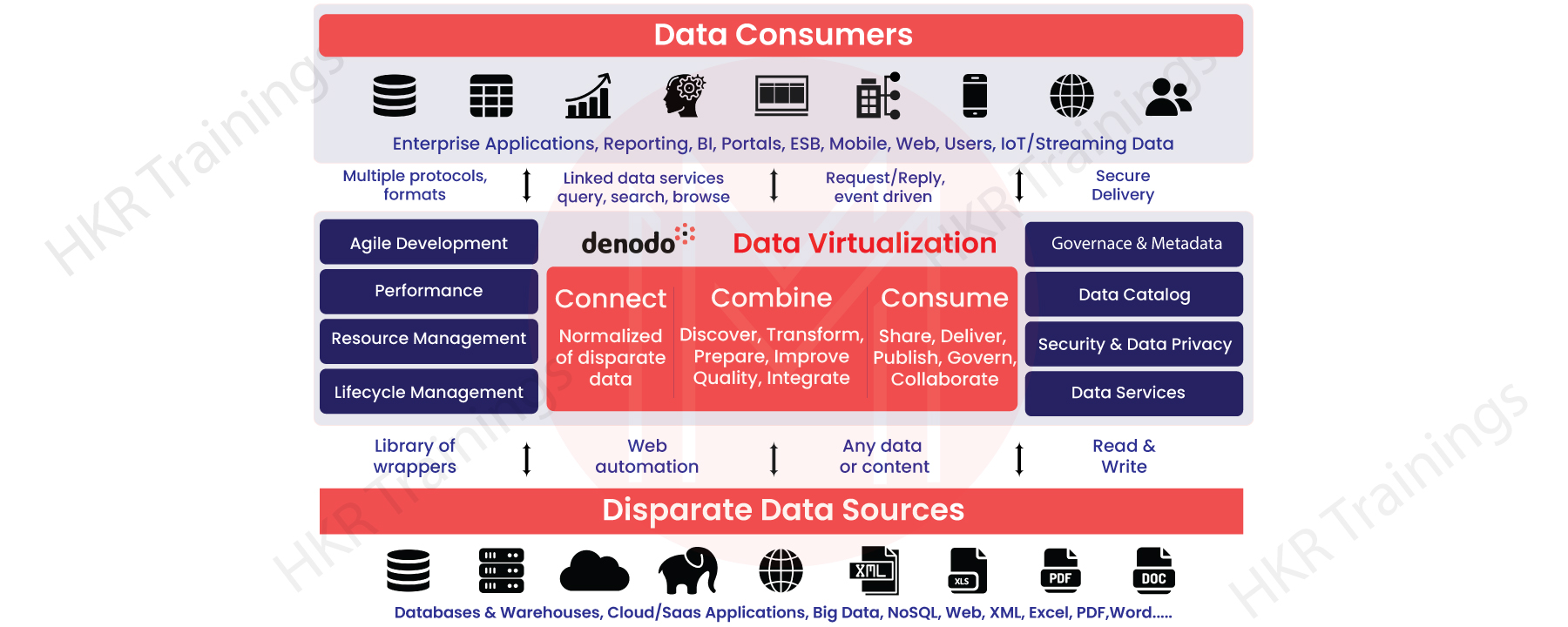
This concept includes the logical data layer that allows business users to utilize business data in various forms. It blends the enterprise data from multiple systems and manages it for central security and administration. Further, data virtualization uses an approach that includes three steps- connect, unify, and consume. It provides a complete view of the enterprise data throughout the primary systems of the enterprise. There are many benefits of using data virtualization. 

The primary concept behind the Denodo tool is to offer it more power. Also, it provides the fastest way to get all the business data without any issues quickly. 

, Business Intelligence & Analytics, denodo-tool-description-0, Business Intelligence & Analytics, denodo-tool-description-0, Business Intelligence & Analytics, denodo-tool-description-0, Business Intelligence & Analytics, denodo-tool-description-0, Business Intelligence & Analytics, denodo-tool-description-0, Business Intelligence & Analytics, denodo-tool-description-0, , Business Intelligence & Analytics, denodo-tool-description-0, Business Intelligence & Analytics, denodo-tool-description-0, Business Intelligence & Analytics, denodo-tool-description-0, Business Intelligence & Analytics, denodo-tool-description-0, Business Intelligence & Analytics, denodo-tool-description-0, , Business Intelligence & Analytics, denodo-tool-description-0, Business Intelligence & Analytics, denodo-tool-description-0, Business Intelligence & Analytics, denodo-tool-description-0, Business Intelligence & Analytics, denodo-tool-description-0, , Business Intelligence & Analytics, denodo-tool-description-0, Business Intelligence & Analytics, denodo-tool-description-0, Business Intelligence & Analytics, denodo-tool-description-0, , Business Intelligence & Analytics, denodo-tool-description-0, Business Intelligence & Analytics, denodo-tool-description-0, , Business Intelligence & Analytics, denodo-tool-description-0, Denodo Tool, Business Intelligence & Analytics, denodo-tool-description-1, Business Intelligence & Analytics, denodo-tool-description-1, Business Intelligence & Analytics, denodo-tool-description-1, Business Intelligence & Analytics, denodo-tool-description-1, Business Intelligence & Analytics, denodo-tool-description-1, Business Intelligence & Analytics, denodo-tool-description-1

Let us know in detail how the virtualization of data in Denodo works.

Connect with multiple data sources

The connect layer in the Denodo tool enables the upper layer to access the data from different storage. It protects them from the core reporting protocols and layouts. The DV links various data sources, Big Data Systems, databases, and cloud storage. 

It uses custom connectors to link specific apps and turns data source types. Therefore, all the primary views look like relational views to the upper layers.

Combine any data type

Data Virtualization (DV) in the Denodo tool unifies the related data into business views. The data can be in any format like Hadoop, NoSQL, Cloud APIs, etc. The layer uses the pre-built template library and some components to automate the web integration process interactively. This layer provides the flexibility to do so. It performs so by designing workflow, extraction, and driving, including the construction of web and other data types. 

Further, users using this layer can execute complex data changes, designing metadata, data quality, etc., through SQL and other relational tools. It supports data changes using logical operators for creating composite data views flawlessly. 

Consume data in any mode

The Consume layer under DV offers single-point access to the primary data sources, including distracted data views in an ordinary delivery form. However, data virtualization allows business users to consume data in various forms like reports, web & mobile apps, dashboards, etc. 

Moreover, the Consume layer offers various data delivery options. Such as JDBC, SOAP and RESTful Web Services, ODBC, OData, Portlets, exporting data to MS Excel or SQL, etc. 

Hence, these are the various layers and their uses under the Denodo tool’s data virtualization concept. 

Get ahead in your career with our Denodo Tutorial 

, Business Intelligence & Analytics, denodo-tool-description-0, Business Intelligence & Analytics, denodo-tool-description-0, Business Intelligence & Analytics, denodo-tool-description-0, Business Intelligence & Analytics, denodo-tool-description-0, Business Intelligence & Analytics, denodo-tool-description-0, Business Intelligence & Analytics, denodo-tool-description-0, , Business Intelligence & Analytics, denodo-tool-description-0, Business Intelligence & Analytics, denodo-tool-description-0, Business Intelligence & Analytics, denodo-tool-description-0, Business Intelligence & Analytics, denodo-tool-description-0, Business Intelligence & Analytics, denodo-tool-description-0, , Business Intelligence & Analytics, denodo-tool-description-0, Business Intelligence & Analytics, denodo-tool-description-0, Business Intelligence & Analytics, denodo-tool-description-0, Business Intelligence & Analytics, denodo-tool-description-0, , Business Intelligence & Analytics, denodo-tool-description-0, Business Intelligence & Analytics, denodo-tool-description-0, Business Intelligence & Analytics, denodo-tool-description-0, , Business Intelligence & Analytics, denodo-tool-description-0, Business Intelligence & Analytics, denodo-tool-description-0, , Business Intelligence & Analytics, denodo-tool-description-0, Denodo Tool, Business Intelligence & Analytics, denodo-tool-description-1, Business Intelligence & Analytics, denodo-tool-description-1, Business Intelligence & Analytics, denodo-tool-description-1, Business Intelligence & Analytics, denodo-tool-description-1, Business Intelligence & Analytics, denodo-tool-description-1, Business Intelligence & Analytics, denodo-tool-description-1, , Business Intelligence & Analytics, denodo-tool-description-0, Business Intelligence & Analytics, denodo-tool-description-0, Business Intelligence & Analytics, denodo-tool-description-0, Business Intelligence & Analytics, denodo-tool-description-0, Business Intelligence & Analytics, denodo-tool-description-0, , Business Intelligence & Analytics, denodo-tool-description-0, Business Intelligence & Analytics, denodo-tool-description-0, Business Intelligence & Analytics, denodo-tool-description-0, Business Intelligence & Analytics, denodo-tool-description-0, , Business Intelligence & Analytics, denodo-tool-description-0, Business Intelligence & Analytics, denodo-tool-description-0, Business Intelligence & Analytics, denodo-tool-description-0, , Business Intelligence & Analytics, denodo-tool-description-0, Business Intelligence & Analytics, denodo-tool-description-0, , Business Intelligence & Analytics, denodo-tool-description-0, Denodo Tool, Business Intelligence & Analytics, denodo-tool-description-1, Business Intelligence & Analytics, denodo-tool-description-1, Business Intelligence & Analytics, denodo-tool-description-1, Business Intelligence & Analytics, denodo-tool-description-1, Business Intelligence & Analytics, denodo-tool-description-1, , Business Intelligence & Analytics, denodo-tool-description-0, Business Intelligence & Analytics, denodo-tool-description-0, Business Intelligence & Analytics, denodo-tool-description-0, Business Intelligence & Analytics, denodo-tool-description-0, , Business Intelligence & Analytics, denodo-tool-description-0, Business Intelligence & Analytics, denodo-tool-description-0, Business Intelligence & Analytics, denodo-tool-description-0, , Business Intelligence & Analytics, denodo-tool-description-0, Business Intelligence & Analytics, denodo-tool-description-0, , Business Intelligence & Analytics, denodo-tool-description-0, Denodo Tool, Business Intelligence & Analytics, denodo-tool-description-1, Business Intelligence & Analytics, denodo-tool-description-1, Business Intelligence & Analytics, denodo-tool-description-1, Business Intelligence & Analytics, denodo-tool-description-1, , Business Intelligence & Analytics, denodo-tool-description-0, Business Intelligence & Analytics, denodo-tool-description-0, Business Intelligence & Analytics, denodo-tool-description-0, , Business Intelligence & Analytics, denodo-tool-description-0, Business Intelligence & Analytics, denodo-tool-description-0, , Business Intelligence & Analytics, denodo-tool-description-0, Denodo Tool, Business Intelligence & Analytics, denodo-tool-description-1, Business Intelligence & Analytics, denodo-tool-description-1, Business Intelligence & Analytics, denodo-tool-description-1, , Business Intelligence & Analytics, denodo-tool-description-0, Business Intelligence & Analytics, denodo-tool-description-0, , Business Intelligence & Analytics, denodo-tool-description-0, Denodo Tool, Business Intelligence & Analytics, denodo-tool-description-1, Business Intelligence & Analytics, denodo-tool-description-1, , Business Intelligence & Analytics, denodo-tool-description-0, Denodo Tool, Business Intelligence & Analytics, denodo-tool-description-1, , Business Intelligence & Analytics, denodo-tool-description-2, Business Intelligence & Analytics, denodo-tool-description-2, Business Intelligence & Analytics, denodo-tool-description-2, Business Intelligence & Analytics, denodo-tool-description-2, Business Intelligence & Analytics, denodo-tool-description-2, Business Intelligence & Analytics, denodo-tool-description-2

Subscribe to our YouTube channel to get new updates..!

Denodo Testing Tool

Denodo Testing Tool is a discrete application with a simple and easy-to-use user interface executable through the command line. It allows Denodo users to automate the testing process of their data virtualization situations. It does so at the time of development and maintenance of its virtualized solutions. Further, it acts as a safety net before making major alterations to these environments.

Here is some important information regarding the Denodo Testing Tool:-

  • You don’t need to acquire Java skills for this. The text files and folders are stated and arranged for testing.
  • It holds a test result reporting system which is Pluggable.
  • All test sets are executed with automation. We can combine the executions of these test sets with the existing CI procedures.
  • Support for test inheritance makes developing big sets of closely related tests simpler.

So, this is all about the Denodo Testing Tool and its usage. 

Denodo Platform Architecture:

The Denodo Platform that connects to numerous data sources, incorporating and publishing data in a business-friendly format to various users.

Follow these three simple steps such as:

  • Connect
  • Combine and 
  • Consume
  1. With the connect step, one can easily integrate or connect any type of data from any source.
  2. The combine phase describes data transitions and configurations that are appropriate for your business.
  3. The consume step provides real-time data services to one’s corporate data consumption platforms.

Key Features of Denodo Tool:

Here are some key features of the denodo tool. They are:

  • A completely revamped web-based user experience provides an exceptional user experience that is tailored to the specific needs of business and IT stakeholders. 
  • Intelligent and optimal query execution method utilizing a Dynamic Query Optimizer for fast information access. 
  • With the help of Summaries, Smart Query Acceleration can be used for various analysis scenarios. 
  • In-Memory Parallel Processing accelerates data access to unprecedented speeds.
  • A collection of automatically generated product lifecycle features that allow users to spend less time in finding data and much more time utilizing information to make decisions.
  • A Dynamic Denodo Data Catalog facilitates easy data access, increased collaboration, and ML-driven fully automated suggestion.
  • Cloud systematic approach that is automated, with PaaS support for cloud and hybrid contexts.
  • A advanced data services level which endorses OAuth 2.0, SAML, OpenAPI, OData 4, GraphQL, as well as other cloud standards to facilitate connectivity with existing cloud environments. 
  • Denodo can be deployed using marketplaces such as Amazon Web Services (AWS), Microsoft Azure, Google Cloud Platform (GCP), and Docker. Secure, preferential connectivity to a firm’s complete data holdings via a single interface and management key to establishing safety and leadership.

Denodo Training

Weekday / Weekend Batches

Pros and Cons of Denodo Tool:

Pros of Denodo Tool:
  • You could indeed connect directly to various environments and combine data sets.
  • The “miracle” of data virtualization is that no information is generated, so data is noted to target consumers in relatively close time.
  • For development companies, the UI is simple to use. Simply attach to a source of data, create tables, as well as join those to certain other datasets to get started.
Cons of Denodo Tool:
  • Denodo does have a tiny community of users, so there isn’t a lot of information available if you do get trapped.
  • Cost: Because data virtualization is not relatively inexpensive, smaller companies may be hesitant to use it due to high licensing fees.
  • Caching strategy: A few really slightly quicker sets of data will necessitate caching. Which begs the question, why not do conventional ETL if these are required?

Conclusion:

In the above blog post we had explained about the denodo tool in brief. Had any doubts please drop them in the comments section to get them clarified.

Related Article:

1.Denodo Certification


Source link