17 High-Protein Breakfast Recipes That Can Support Lower Cholesterol


Breakfasts high in fiber, lean protein, and healthy fats can help support healthy cholesterol levels.Credit: alvarez / Getty Images
Breakfasts high in fiber, lean protein, and healthy fats can help support healthy cholesterol levels.
Credit: alvarez / Getty Images
  • A high-protein breakfast can help keep you full and energized throughout the morning.
  • Many breakfast foods that support healthy cholesterol levels are also rich in fiber.
  • Oats, beans, lentils, nuts, seeds, and soy foods can be part of a heart-healthy breakfast.

A high-protein breakfast can help keep you full and energized throughout the morning. Some options, like overnight oats, tofu scrambles, and bean-based breakfasts, also contain fiber-rich ingredients that support healthy cholesterol levels.

1. Greek Yogurt Parfait With Berries and Chia Seeds

Protein: 22-25 grams per serving

Note: Protein amounts are estimates and may vary depending on the specific ingredients, brands, and portion sizes used.

Greek yogurt provides protein, probiotics, and other nutrients that may support healthy cholesterol levels, while berries and chia seeds add fiber. Chia seeds also contain heart-healthy fats, making this a filling breakfast that supports overall heart health.

Try it: Layer plain Greek yogurt with mixed berries and one to two tablespoons of chia seeds. For extra crunch, add a sprinkle of chopped almonds or walnuts.

2. Protein Overnight Oats

Protein: 20–25 grams per serving

Oats are one of the best breakfast foods for heart health because they contain beta-glucan, a type of soluble fiber that can help lower LDL ("bad") cholesterol. Adding ingredients like Greek yogurt and chia seeds boosts the protein content, helping make this breakfast more filling.

Try it: Combine rolled oats, plant-based or low-fat dairy milk, Greek yogurt, and chia seeds in a jar and refrigerate overnight. Add berries, cinnamon, or nut butter before serving.

3. Peanut Butter Banana Oatmeal

Protein: 15–20 grams per serving

This breakfast combines peanut butter, oats, and bananas for a filling mix of protein and fiber. Peanut butter is high in heart-healthy unsaturated fats that can lower cholesterol and overall risk of heart disease.

Try it: Stir a tablespoon of natural peanut butter into cooked oatmeal and top with sliced banana and cinnamon.

4. Cottage Cheese Bowl With Berries and Walnuts

Protein: 24–28 grams per serving

Cottage cheese is naturally high in protein, while walnuts provide some protein and heart-healthy unsaturated fats. Berries add fiber and antioxidants that help protect cells from damage linked to chronic disease. Regular berry consumption has also been associated with lower cholesterol levels.

Try it: Top cottage cheese with fresh berries and chopped walnuts.

5. Tofu Scramble

Protein: 18–22 grams per serving

Tofu is a complete plant protein made from soybeans. Soy foods may help lower LDL cholesterol, especially when they replace foods higher in saturated fat. Adding vegetables boosts the fiber content and makes this breakfast more filling.

Try it: Sauté crumbled tofu with spinach, mushrooms, onions, and turmeric.

6. Black Bean Breakfast Tacos

Protein: 18–20 grams per serving

Black beans provide both protein and soluble fiber. Pair them with eggs for extra protein, or use a mix of whole eggs and egg whites. Wrap everything in a whole-grain tortilla for even more fiber.

Try it: Fill tortillas with black beans, eggs or egg whites, salsa, and avocado.

7. Protein Smoothie With Berries and Flaxseed

Protein: 20–30 grams per serving

A protein smoothie is an easy breakfast on busy mornings. Flaxseeds provide protein, fiber, and omega-3 fats, while berries add fiber and antioxidants.

Try it: Blend protein powder, fresh or frozen berries, flaxseed, spinach, and milk.

8. White Bean Avocado Toast

Protein: 12–15 grams per serving

Adding white beans to avocado toast boosts the meal's protein and fiber content. These nutrients, combined with avocado's heart-healthy fats, can help keep you full while supporting healthy cholesterol levels.

Try it: Mash white beans and avocado together and spread on whole-grain toast.

9. Huevos Rancheros

Protein: 18–20 grams per serving

This classic breakfast combines eggs, beans, vegetables, and corn tortillas for a satisfying meal rich in protein and fiber.

Try it: Top corn tortillas with black beans, eggs, salsa, and avocado.

10. Quinoa Breakfast Bowl

Protein: 15–20 grams per serving

Quinoa provides protein and fiber, making it a satisfying breakfast option. Top it with berries, nuts, or seeds for even more fiber and heart-healthy fats.

Try it: Serve cooked quinoa with berries, walnuts, cinnamon, and Greek yogurt.

11. Egg White Bites

Protein: 18–20 grams per serving

Egg white bites are a convenient source of protein and contain very little saturated fat. Adding vegetables boosts the fiber content and provides antioxidants and other nutrients that support heart health.

Try it: Bake egg whites with spinach, peppers, onions, and mushrooms in a muffin tin.

12. Protein Waffles With Fruit

Protein: 15–20 grams per serving

Protein waffles can help you reach your protein goals while still enjoying a breakfast favorite. Pairing them with fruit adds fiber and antioxidants. Adding oats to the batter is an easy way to boost both protein and soluble fiber, including beta-glucan.

Try it: Top homemade protein waffles with berries and Greek yogurt.

13. Breakfast Quesadilla

Protein: 18–22 grams per serving

A breakfast quesadilla can be a balanced meal when made with protein-rich ingredients and plenty of vegetables. Depending on the ingredients, it can pack 30 grams or more of protein per serving.

Try it: Fill a whole-grain tortilla with eggs, black beans, spinach, and a small amount of cheese. For even more protein, add egg whites, cottage cheese, or lean breakfast sausage.

14. Chicken Sausage Breakfast Burrito

Protein: 25–30 grams per serving

Chicken sausage is typically lower in saturated fat than traditional pork sausage while still providing plenty of protein. Pairing it with black beans and vegetables adds fiber, making this a filling breakfast that supports heart health and healthy cholesterol levels.

Try it: Wrap eggs, chicken sausage, black beans, peppers, and salsa in a whole-grain tortilla.

15. Breakfast Dal Bowl

Protein: 20–23 grams per serving

Dal, a dish made from lentils, is rich in both protein and fiber. Lentils are especially high in soluble fiber, which may help support healthy cholesterol levels while helping keep you full throughout the morning.

Try it: Make a batch of lentil dal with tomatoes, garlic, ginger, and warming spices. Top with plain yogurt and fresh cilantro, and enjoy leftovers throughout the week.

16. Chia Pudding

Protein: 12–15 grams per serving

Chia seeds provide plant protein, fiber, and omega-3 fatty acids to support fullness and heart health. Just 2 tablespoons pack in nearly 10 grams of fiber.

Try it: Mix 2 tablespoons of chia seeds with a half-cup of low-fat dairy or plant-based milk. Refrigerate until thickened, then top with berries and nuts or seeds.

17. Smoothie Bowl

Protein: 20–30 grams per serving

A smoothie bowl can be a nutrient-dense breakfast when made with protein-rich and fiber-rich ingredients. Unlike a traditional smoothie, you eat it with a spoon, making it easy to add toppings like fruit, nuts, and seeds for extra fiber and crunch.

Try it: Blend Greek yogurt, berries, spinach, and milk until thick. Top with walnuts, chia seeds, and fresh fruit.

Other Tips To Help Lower Cholesterol

While a heart-healthy breakfast is a good place to start, your overall eating pattern and lifestyle habits matter most. Consider these additional strategies:

  • Eat more fiber-rich foods, especially oats, beans, lentils, fruits, and seeds
  • Choose unsaturated fats, such as olive oil, nuts, seeds, avocados, and fatty fish, more often
  • Include more plant proteins, such as beans, lentils, tofu, and edamame
  • Move your body more often
  • Avoid smoking
  • Limit foods high in saturated fat and added sugar.


Source link

Leave a Reply

Subscribe to Our Newsletter

Get our latest articles delivered straight to your inbox. No spam, we promise.

Recent Reviews


What are Data Catalogs?

A Data Catalog seems to be an accumulation of metadata especially in data planning and search tools that assists experts as well as other data consumers in locating the data they require, acts as a current asset of data available, and offers criteria to assess strength and conditioning data for potential purposes.

This succinct process made several locations regarding data catalogs—data management, looking, data inventory, and interpretation of data; they all rely on the central capacity to deliver a catalogue of metadata.

    Start learning Denodo Online Course from hkrtrainings to make a bright career in the world of Denodo!

What is the Denodo Data Catalog?

The Data Catalog seems to be a web-based self-service device that is included in the Denodo System that would allow technology and commercial consumers to query, lookup, and explore details and metadata saved in a Virtual DataPort server. Consumers could use this device to create knowledge and open the way for best choices.

If you want to explore the denodo server metadata, then use the dendo data catalog. Here I am going to explain how all these things happen.

Launching the data catalog:

The Data Catalog seems to be a web based application distributed as part of Denodo 8.0 that allows data analysts, enterprise customers, and app developers to search and browse data and metadata in a business-friendly way for personal exploration and predictive analysis.

To use this web tool, open the Denodo Platform Control Center and launch the Data Catalog. When the status changes to “Running,” click the Data Catalog link to launch the Web tool (by default, https://127.0.0.1:9090/denodo-data-catalog).

Login into the denodo platform with your login details.If you are logging for the first time, you will see a pop up window showing the synchronize metadata option.This must be run the first time you start the Data Catalog to make sure that it reflects the most recent state of the Denodo 8.0 server to which you are connected.

The VDP Synchronization should be performed as follows:

  • Click the Synchronize metadata now button.
  • On each Synchronization step, click Continue.
  • The views have now been synchronized, and you can begin exploring!

Using the metadata search:

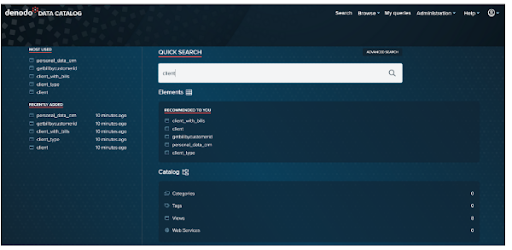
The first example comes from the Data Catalog’s home page.

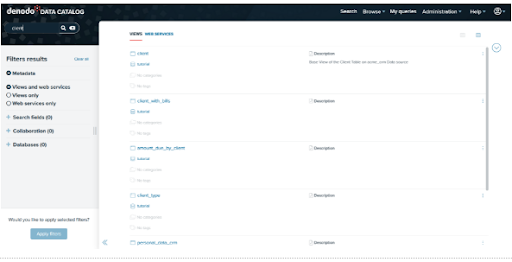
Let’s use the Business Analyst’s scenario to look at a simple use case: searching for clients by typing in client and pressing enter.

denodo data catalog

Here are the outcomes of our search. Starting with Data Catalog 8.0, this search will look for views or web services that include the query terms in the element’s metadata, such as:

  • It has a name.
  • It is described.
  • The names of the fields in which it operates.
  • The descriptions of its various fields.
  • The values of any custom properties that have been assigned to it.

denodo data catalog 1

For instance, let’s click on the view client to go to the summary of the selected view:

denodo data catalog 2

For the time being, we have conducted a search in the Virtual DataPort metadata. In the following section, we’ll look into the Data Catalog’s more advanced features!

Denodo Training

  • Master Your Craft
  • Lifetime LMS & Faculty Access
  • 24/7 online expert support
  • Real-world & Project Based Learning

Exploring the features of Data Catalog:

We’ll now look at the features in the Data Catalog that allow for more in-depth interrogation of a view. This includes the following:

  • Filtering and querying results from a view
  • Results are being saved to a file.
  • Developing new fields
  • Queries saved
  • Investigating viewpoint relationships
  • Investigating data ancestry
  • Views with related fields can be queried

Exploration of Data Catalog Views:

We chose our client view from the previous section. We can now look through the contents of this view.

Summary Tab:

We could see a summary of the selected view under the Summary Tab. It will display the metadata of the selected view, such as the database name, the list of categories, the list of tags, and collaboration information provided by the user, such as Endorsement and Warnings. You can edit the view’s description by clicking the Edit button next to the Description option. If the view is deprecated, an indication will appear at the top of the summary tab.

Furthermore, the Summary tab includes buttons such as Add Tags/Categories , Collaborative effort possibilities further to create custom the view, and Connection URLs, Tableau to display different opportunities to link to the view/datasource.

denodo data catalog 3

Schema tab:

Under the Schema Tab, we can see the view’s schema, which includes the view description as well as all of the fields and types. We can add a field description by clicking the Edit button next to the column. We can also use the search option at the top of each section to look for fields, data types, and descriptions.

denodo data catalog 4

Query Tab:

The Query Tab is the following tab. Ad-hoc queries can be run against the view here (the query is created graphically).

Business Intelligence & Analytics, denodo-data-catalog-description-3, Business Intelligence & Analytics, denodo-data-catalog-description-6

Subscribe to our YouTube channel to get new updates..!

Select all of the following fields for our view and drag them into the Output columns area.

client_id

name

surname

Client_type

denodo data catalog 5

Click on the execute to get the results.

denodo data catalog 6

Editing of data catalog metadata:

In this segment, we would then look at the metadata characteristics of the Data Catalog. Users could use Denodo Data Catalog to append tags and categories to views, and also keep updating the view as well as field descriptions, with such a function.

In our instance, we will: (1) add explanations to the customer fields in addition to allowing for more particular discovery of such a view, (2) add tags and categories, and (3) implement those to our client view.

Data catalog Metadata:

The capacity to exhibit view metadata, such as the View Description and Field Descriptions, is a good feature of the Data Catalog. Then see how we can make that data more modifiable.

Editing view and field descriptions:

  • Browse to the Client View’s Summary page and click the Edit option beside Description.
  • Add the necessary descriptions to the View and then click Ok.
  • Similarly, you can add a description to fields by going to the Schema tab and clicking on the Edit button next to each one.
  • The new descriptions are now visible in the view. These descriptions are saved as metadata in the Data Catalog.

Adding of tags and categories in data catalog metadata:

Tags and Categories are useful for allowing users to search the Data Catalog more precisely. While the number of Data Sources and Views in our tutorial is small, maintaining good Categorization and Tagging habits will pay off in the long run by allowing users to navigate the Data Catalog more easily.

In order to add categories follow the below mentioned points.

  • Navigate to Administration > Configuration and Management.
  • Click the Categories option in the Administration window’s Catalog Management section.
  • Select the + Add Category option.
  • Make a category with the following information:
    • Customer’s name
    • Customer data sources
  • Make a new category with the following information:
    • CRM (Customer Relationship Management)
    • Customer is the parent of the Acme crm System.
  • Make a final category with the following information:
    • Name: Billing 
    • Description: Billing
    • Parent:customer

Denodo Training

Weekday / Weekend Batches

Adding tags:

  • Navigate to Administration > Configuration and Management.
  • Click the Tags option in the Administration window’s Catalog Management section.
  • Click the + Add Tag icon to add a new Tag with the following information:
    • Name:JDBC 
    • Description: JDBC data sources
  • Creating another tag with the following data.
    • Name:SOAP
    • Description:SOAP data sources

We can easily modify the views for adding tags and categories as well.

                            Get ahead in your career with our Denodo Tutorial!

Recommendation and collaboration in data catalog:

Recommendations in data catalog:

The AI Feature Package includes Automatic recommendation of datasets in the Data Catalog to assist you in discovering new elements among your company’s data resources.

This feature displays individualized recommendations based on earlier activity in the Data Catalog, like datasets which are most utilised, lately used, suggested, and so on.

Go to the Data Catalog’s homepage to see the recommendations.

The homepage displays a collection of products provided by various topics, such as one titled Recommended to you. This dataset recommendation is really only accessible only with the AI Feature Pack.

Collaboration in data catalog:

In the collaboration there are 3 options such as endorsements, warnings and decrepation notes.

Endorsements seem to be comments made by users on a view or a webservice to express their support. A user can only endorse a perspective or web service once, which means whenever a new comment is added, the prior endorsement is removed.

Warnings have been used by customers to write and exhibit “advise against” texts on opinions and web services. A consumer could only add one warning to a view as well as web service.

Deprecations have been used to notify people that a feature has become outdated and should no longer be used. A consumer could only write one deprecation for a perspective as well as web application.

Conclusion:

In the above blog post we had clearly discussed the dendo data catalog, data catalog metadata, adding of tags and categories, recommendations, collaboration etc in a more detailed way. If you have any doubts please drop your query in the comments section to get them clarified.

Other Related Articles:


Source link