Air Canada’s new Airbus A321XLR aircraft takes flight


Would you take a long-haul flight on a narrow-body aircraft?

That’s the gamble 25-plus airlines have now made, ordering more than 500 total frames of the revolutionary new Airbus A321XLR aircraft.

With a range of up to 4,700 nautical miles (just over 5,400 miles), longer than New York to Rome, the impressive capabilities of this aircraft open up new route possibilities that may not warrant a wide-body aircraft, as well as giving airlines the flexibility to use a narrow-body aircraft on popular routes during low-demand travel periods.

Air Canada’s first passenger flight on this aircraft took off on Tuesday on a short hop between the airline’s two eastern hubs, Montreal-Trudeau International Airport (YUL) and Toronto Pearson Airport (YYZ). TPG was invited on board in business class to experience this historic moment: the first Canadian narrow-body aircraft with lie-flat seats.

Related: On board the world’s first Airbus A321XLR, the aircraft that could revolutionize transatlantic travel

Air Canada Airbus A321XLR
BEN SMITHSON/THE POINTS GUY

How the Airbus A321XLR fits into Air Canada’s fleet and strategy

Air Canada has taken delivery of the first of 30 Airbus A321XLR aircraft on order. Four more frames should join the fleet by the end of this year, with the remaining 25 to be delivered by 2029, though these deadlines could slip.

The airline also has options for 10 additional orders, with deliveries between 2030 and 2032.

Air Canada has been looking for a mid-size aircraft larger than a Boeing 737 or Airbus A320 that has the range to operate mid and long-haul flights with the comfort more similar to a wide-body jet.

The airline plans to base these new jets in Montreal (and eventually Toronto) to serve smaller airports in Europe that don’t have enough demand for regular wide-body service. The first jet will operate to Toulouse, France — home to the aircraft’s manufacturer — starting June 15. Additional XLR services to Nantes and Berlin are planned once the airline receives more frames.

Reward your inbox with the TPG Daily newsletter

Join over 700,000 readers for breaking news, in-depth guides and exclusive deals from TPG’s experts

Air Canada Airbus A321XLR
BEN SMITHSON/THE POINTS GUY

Business class on Air Canada’s Airbus A321XLR

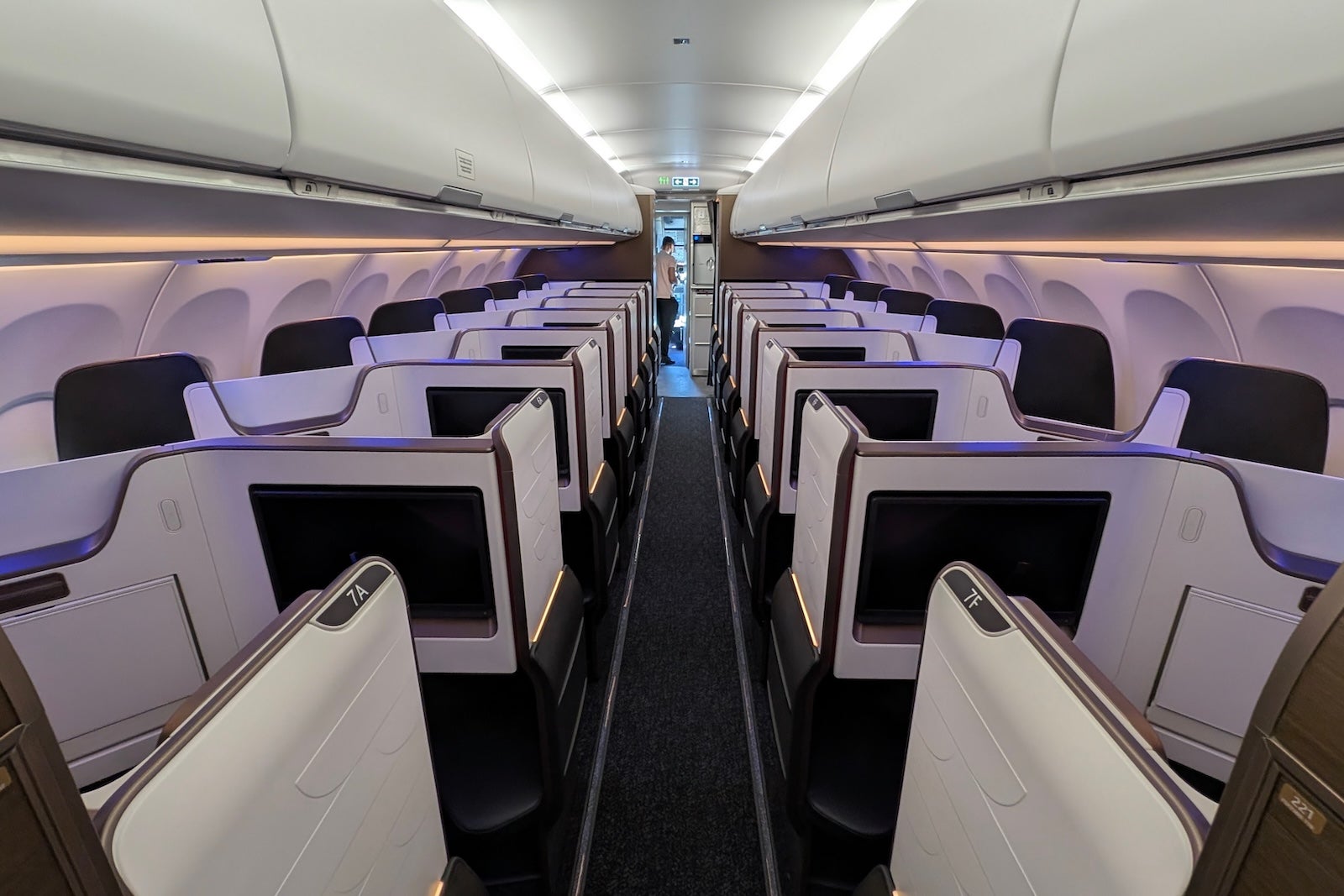
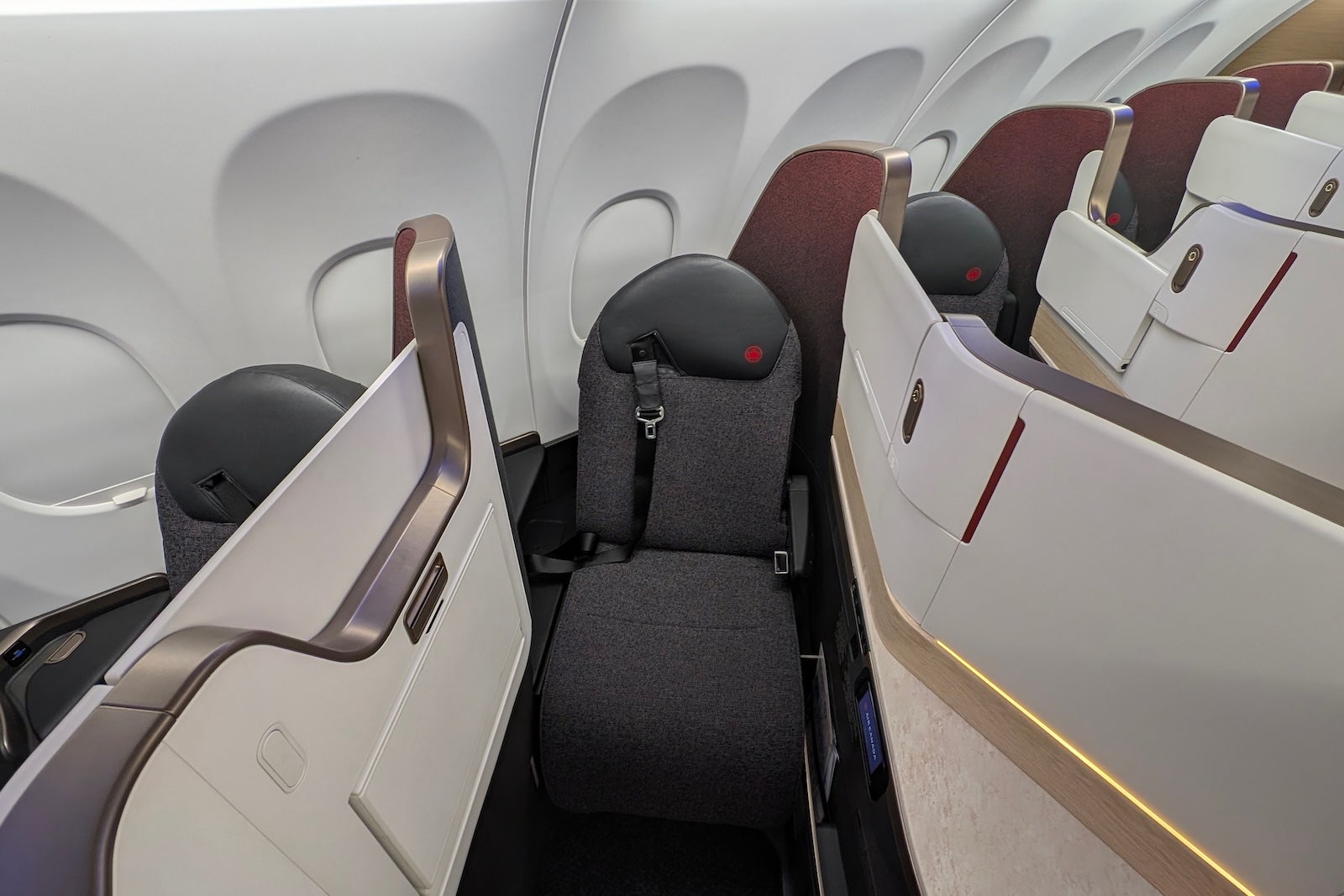
The XLR features 14 lie-flat Signature Class seats in a 1-1 configuration, all with direct aisle access and 21 inches of seat width. Air Canada uses the Collins Aerospace Aurora suite product, which anyone who has traveled on American Airlines’ new XLR aircraft will recognize, though the cabin has six fewer seats than American’s 20-seat cabin and feels intimate.
Air Canada Airbus A321XLR
BEN SMITHSON/THE POINTS GUY

Each seat faces the aisle (away from the window) in a herringbone layout, which may be polarizing for passengers who would prefer to look out the window, since you really need to twist your neck or torso to see outside.

As all passengers board through the front of the business-class cabin, premium passengers might not be so keen to use early group boarding and then face every passenger walking past their direct line of sight to the economy cabin behind.
Air Canada Airbus A321XLR
BEN SMITHSON/THE POINTS GUY

A key difference between the seats of Air Canada and American Airlines XLR aircraft is the absence of sliding doors. This was a deliberate decision by Air Canada to maximize the aisle space and because the relatively low height of the seat walls gave the doors limited privacy benefits.

As you cannot see any other passengers while seated, the lack of doors didn’t feel like a deal-breaker and did feel slightly more private than the Iberia XLR business-class seats.
BEN SMITHSON/THE POINTS GUY

While a reverse herringbone layout might have been more popular with passengers in a new narrow-body aircraft (I was blown away by Italy’s ITA Airways A320 business-class product), Delta Air Lines can attest to the risk of delays from trying to get these highly customizable new seat types certified in 2026.
Air Canada A321XLR aircraft
BEN SMITHSON/THE POINTS GUY

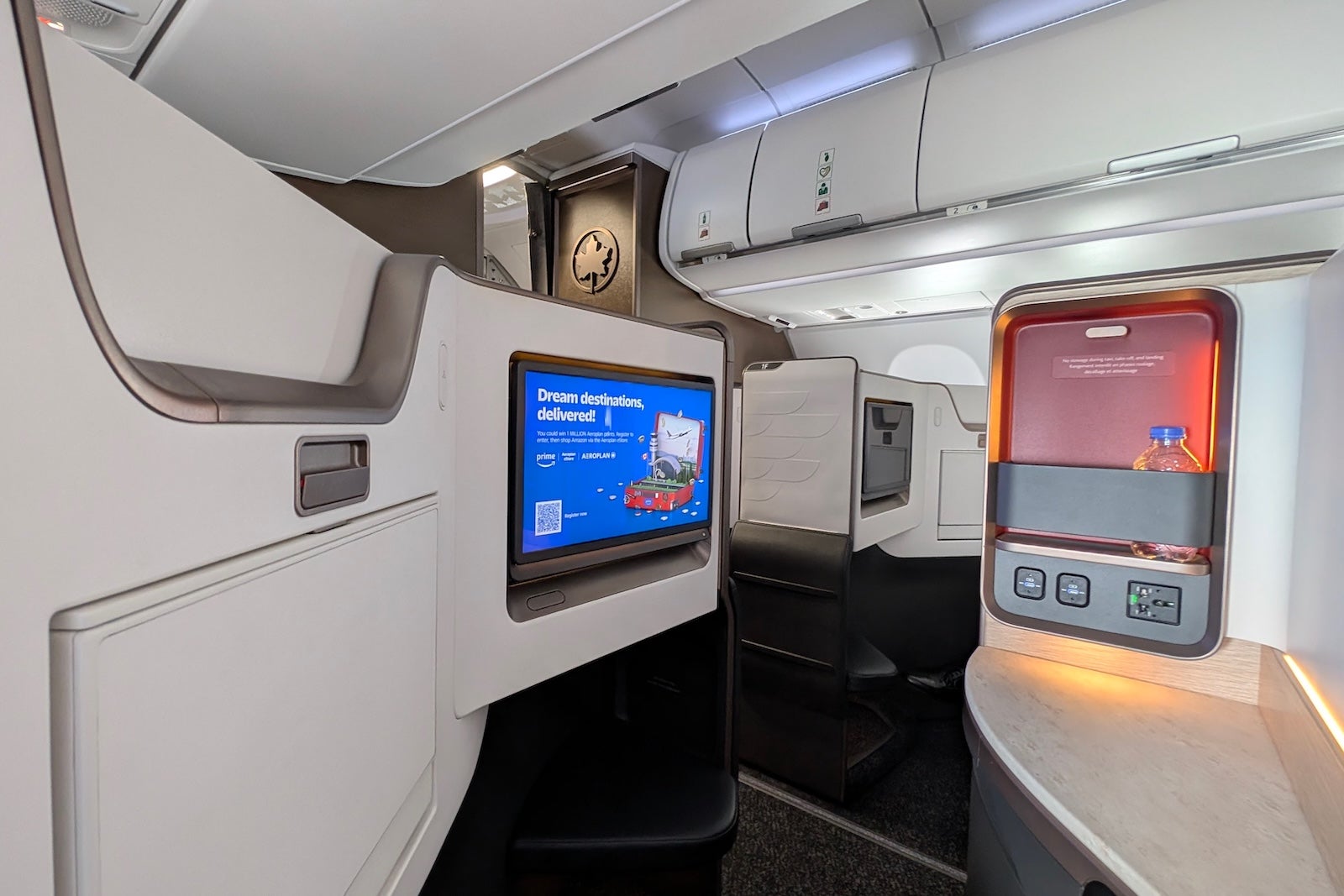
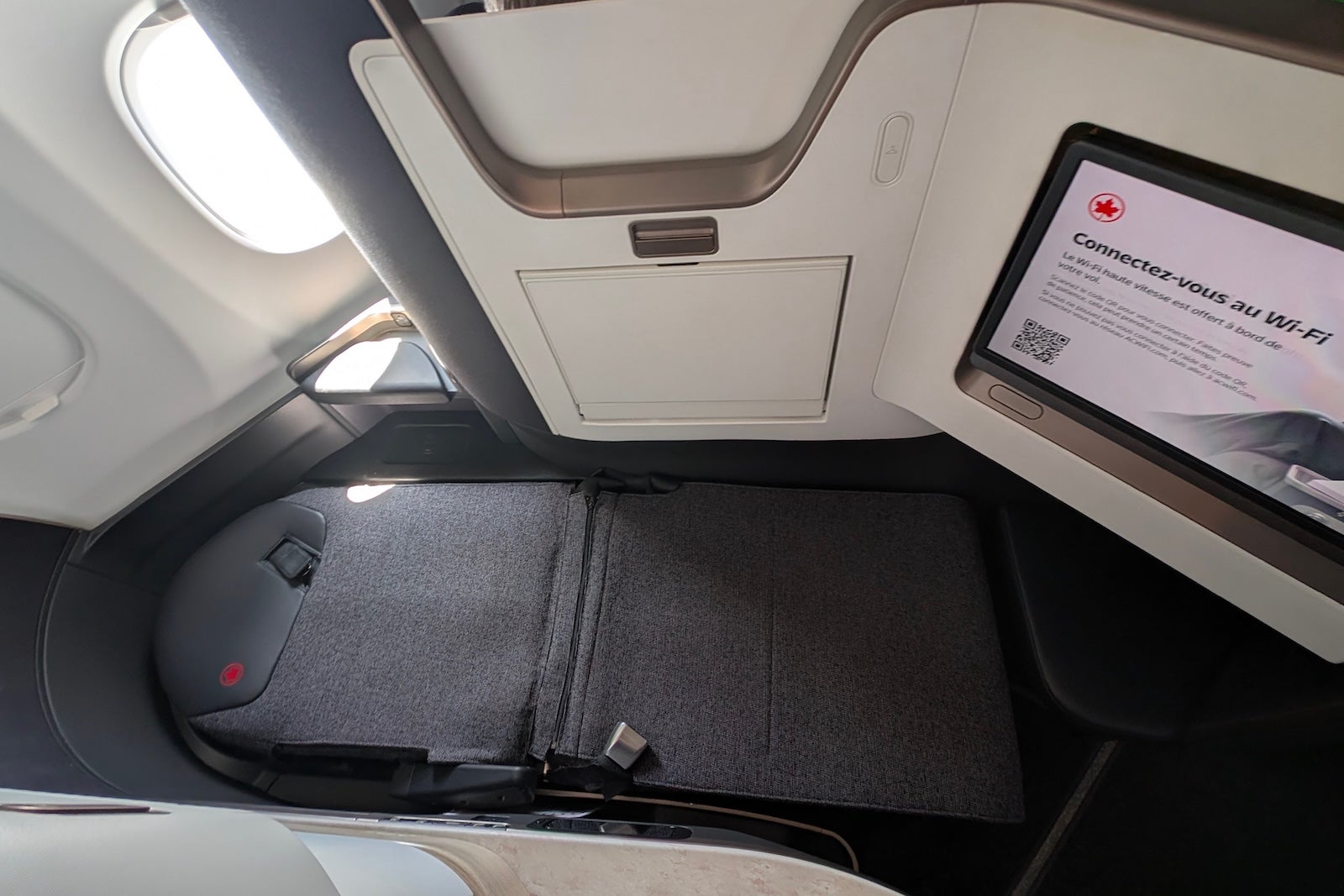
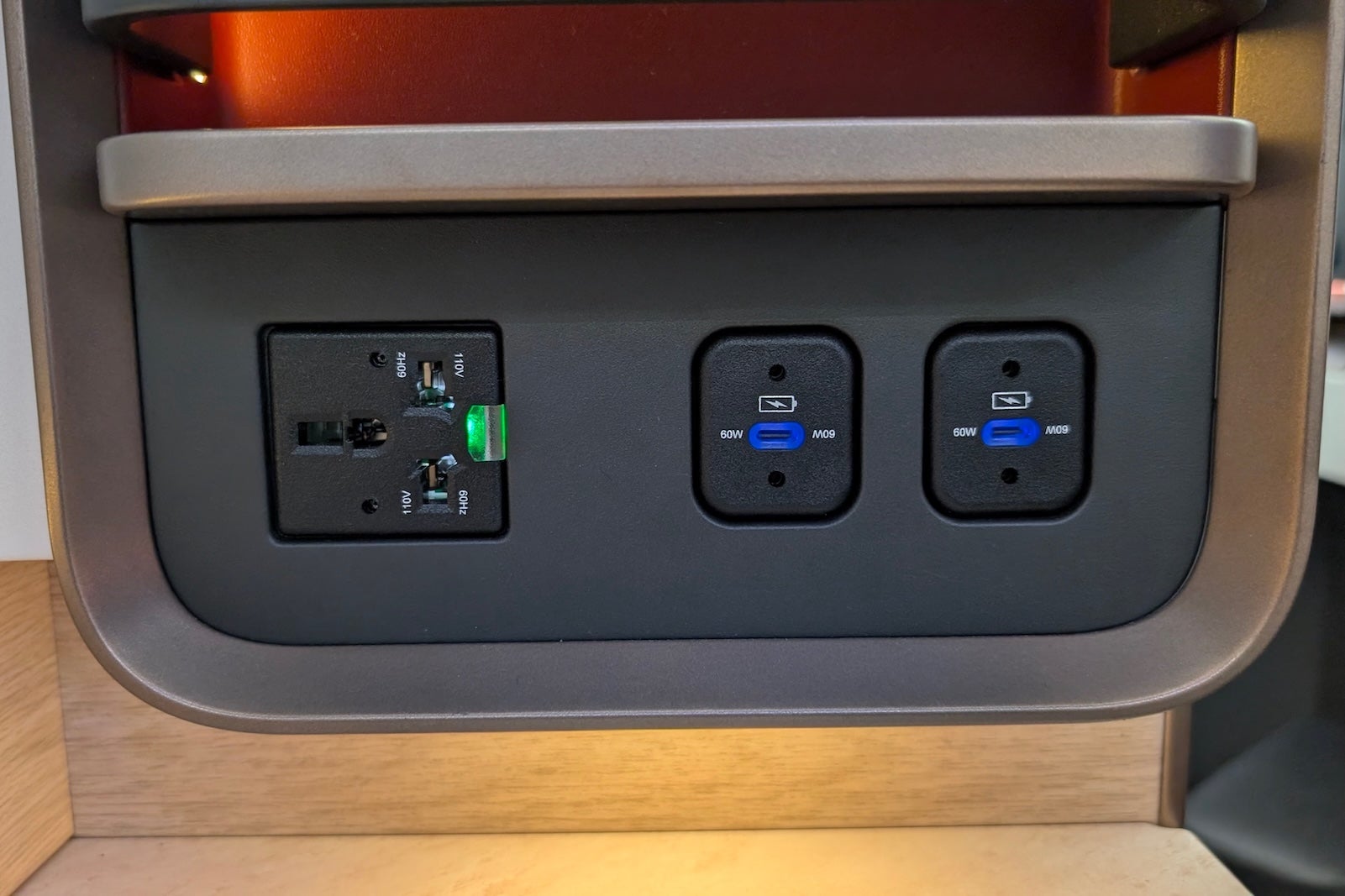
In the absence of a sliding door, passengers can enjoy upgraded tech in Signature class, including a 19-inch 4K OLED seatback screen that stays deployed during meal service, wireless charging, Bluetooth audio and multiple USB-C charging ports.
Air Canada A321XLR
BEN SMITHSON/THE POINTS GUY

There is also a neat privacy screen that can be raised and lowered if you are traveling with a companion and should make conversation easier than being seated across the aisle from each other.
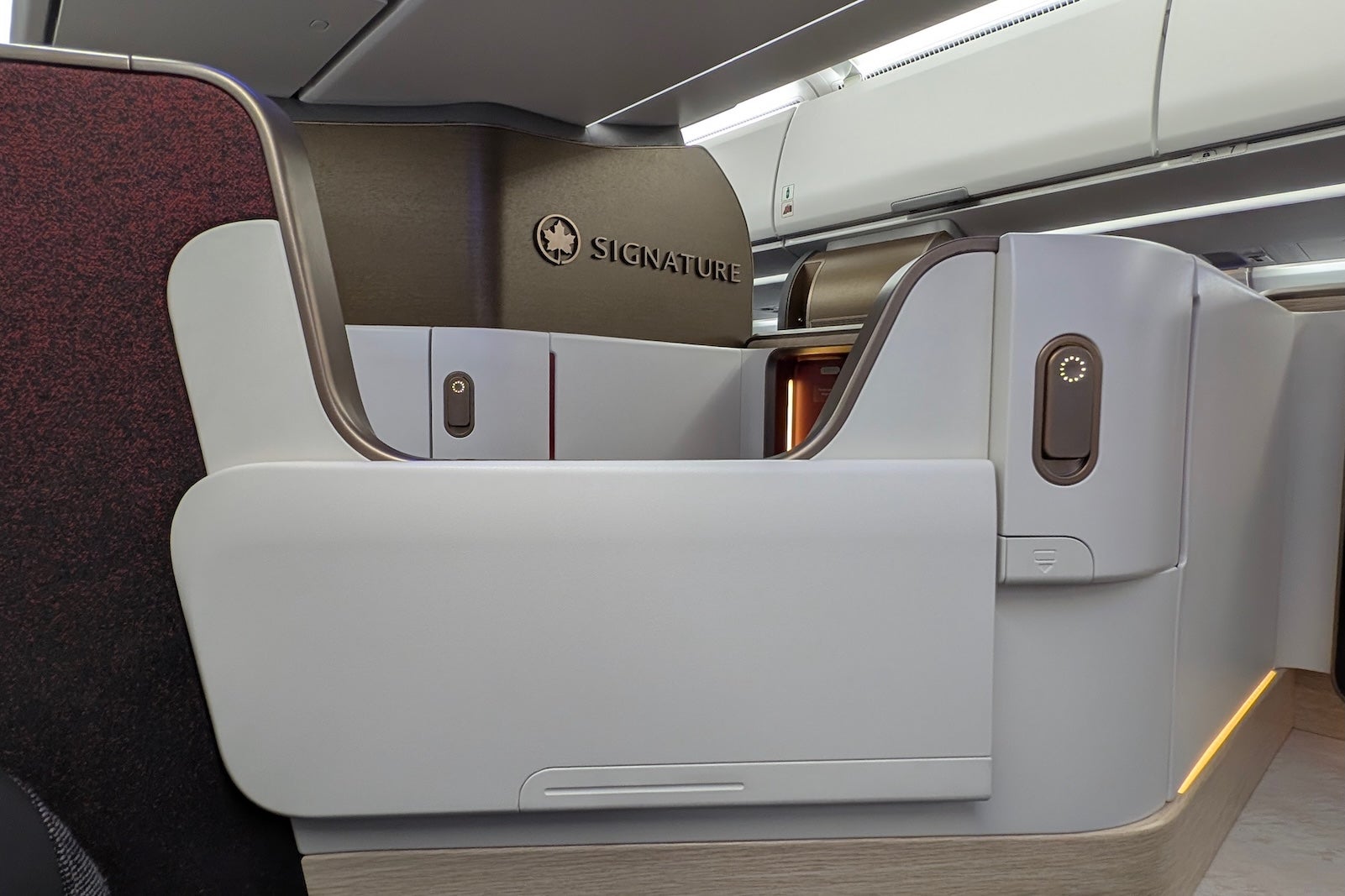
BEN SMITHSON/THE POINTS GUY

The two seats in row one are branded “Signature Class Plus” and offer marginally more room thanks to an additional high shelf, but should not be considered a super business-class product like United’s new Polaris Studio suites.
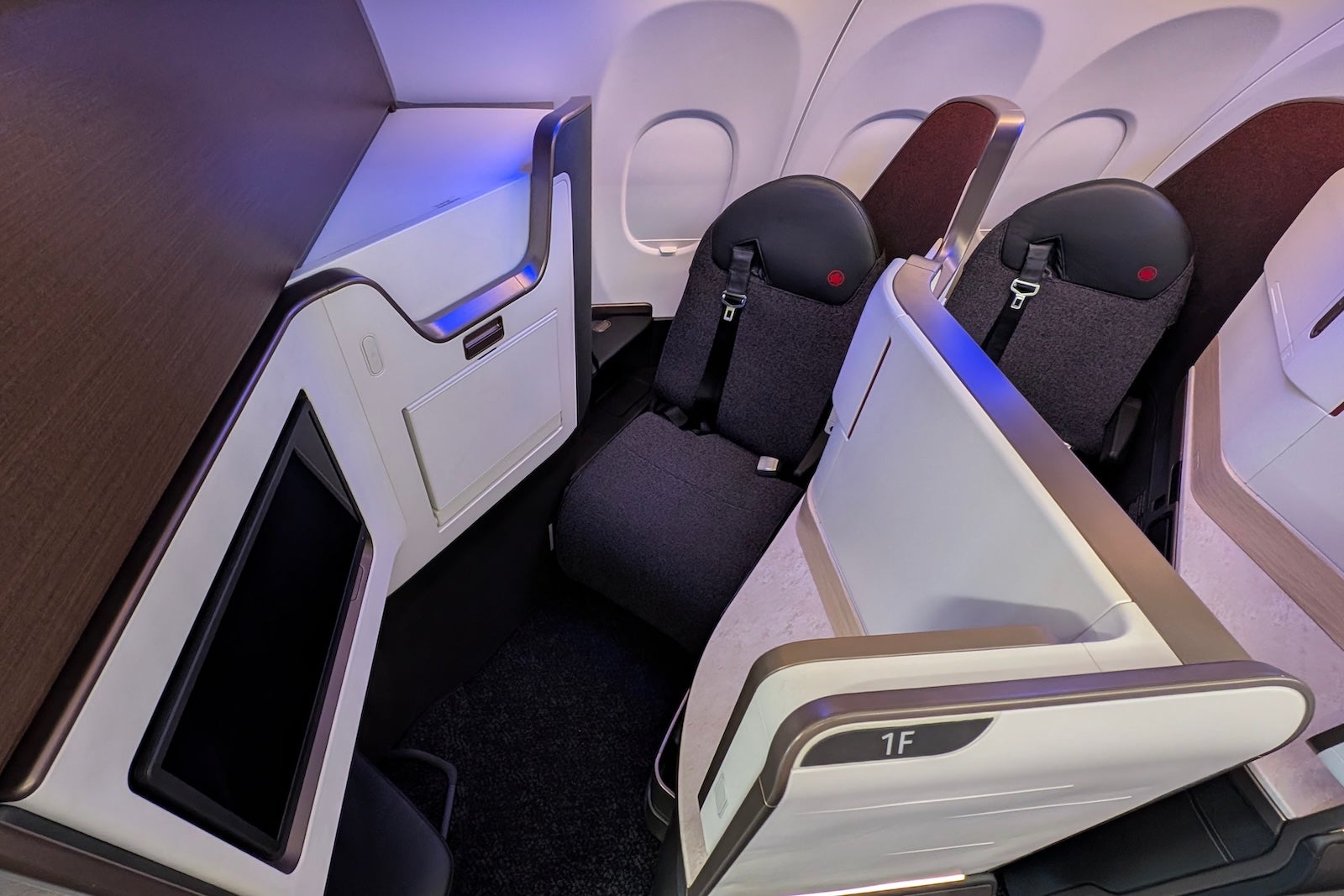
Air Canada Airbus A321XLR
BEN SMITHSON/THE POINTS GUY

There is one bathroom for the 14 business-class seats at the front of the aircraft next to the cockpit.

No premium economy class

Air Canada has decided not to install premium economy on its newest long-haul jet, despite offering this “between economy and business” class on all wide-body aircraft.

Premium economy has had mixed appeal with full-service XLR operators — American and United have installed 12 seats each across 3 rows in a 2-2 configuration, while Iberia and Aer Lingus have not (noting Aer Lingus does not operate premium economy on any other aircraft, either).

Related: United unveils 3 luxe new planes, ‘Coastliner’ with Polaris for cross-country routes

Air Canada Airbus A321XLR
BEN SMITHSON/THE POINTS GUY

Economy class on Air Canada’s Airbus A321XLR

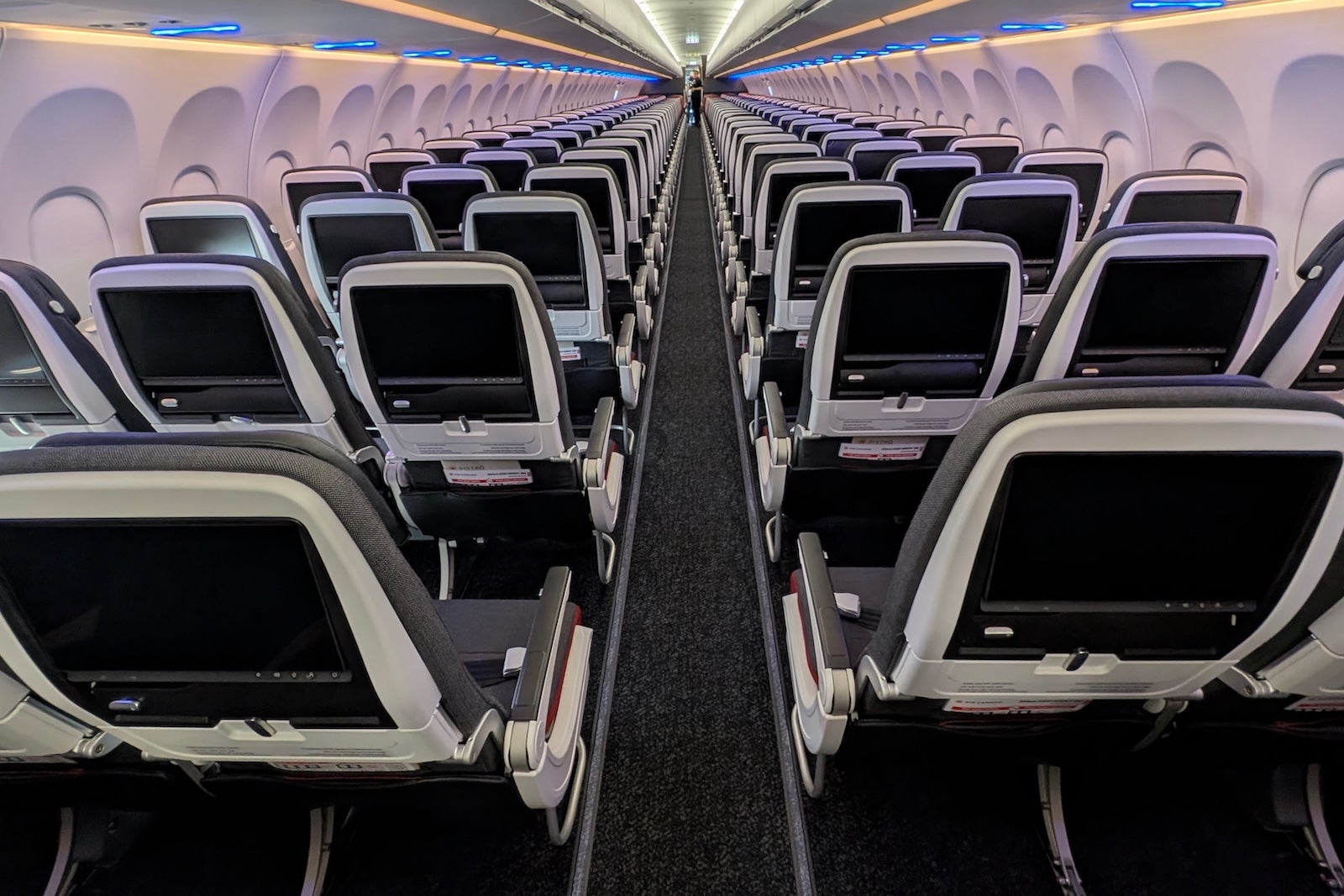
Those passengers traveling in economy class will find 168 Collins Aerospace Meridian+ slimline seats with 18 inches of width, 31 inches of legroom arranged in a 3-3 configuration, including 36 extra legroom “Preferred+” seats with 34 to 35 inches of legroom in rows 12 to 15 and 19 to 20. It’s about as comfortable as economy class gets.
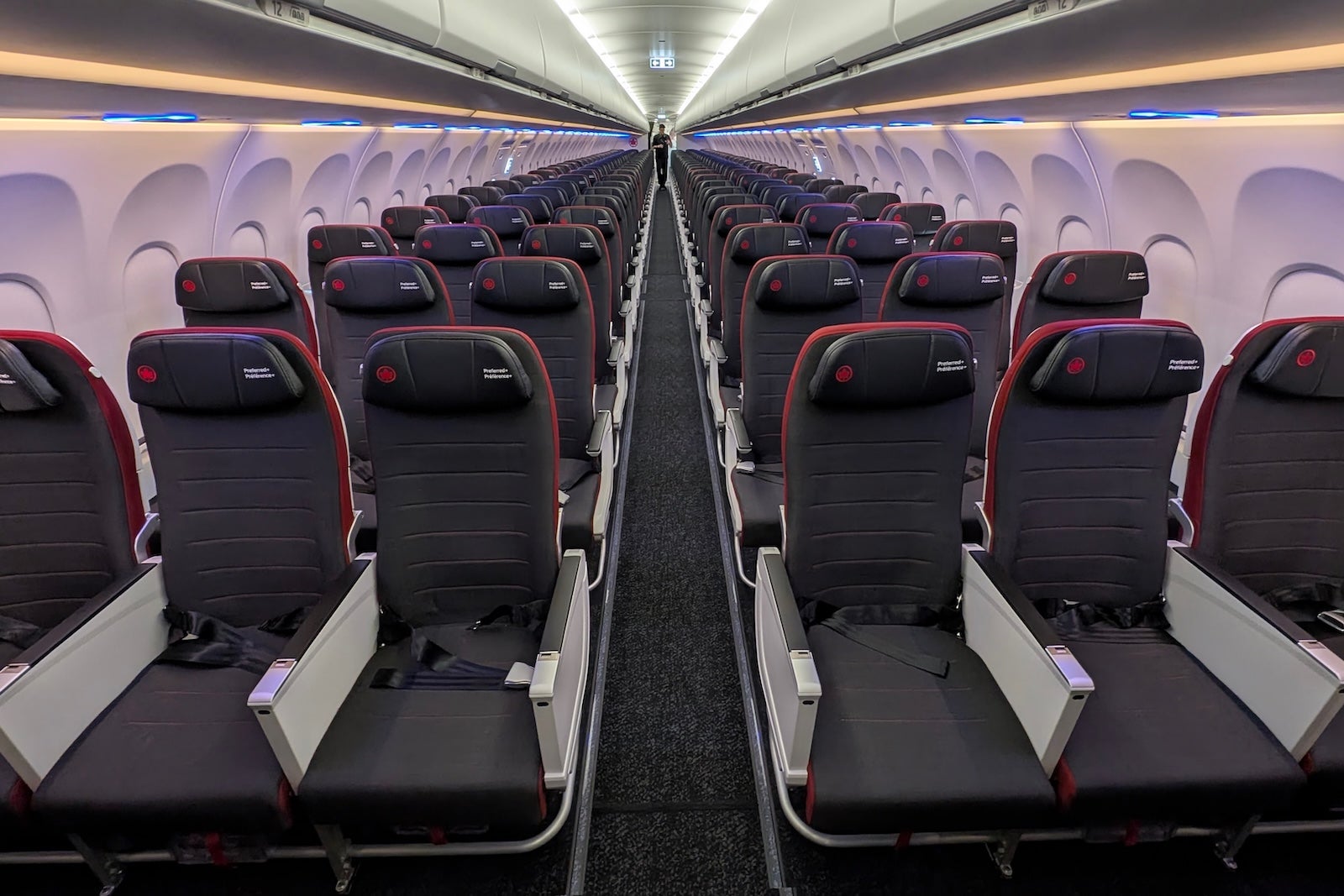
Air Canada Airbus A321XLR
BEN SMITHSON/THE POINTS GUY

Larger overhead storage bins should mean fewer passengers will need to gate check bags.
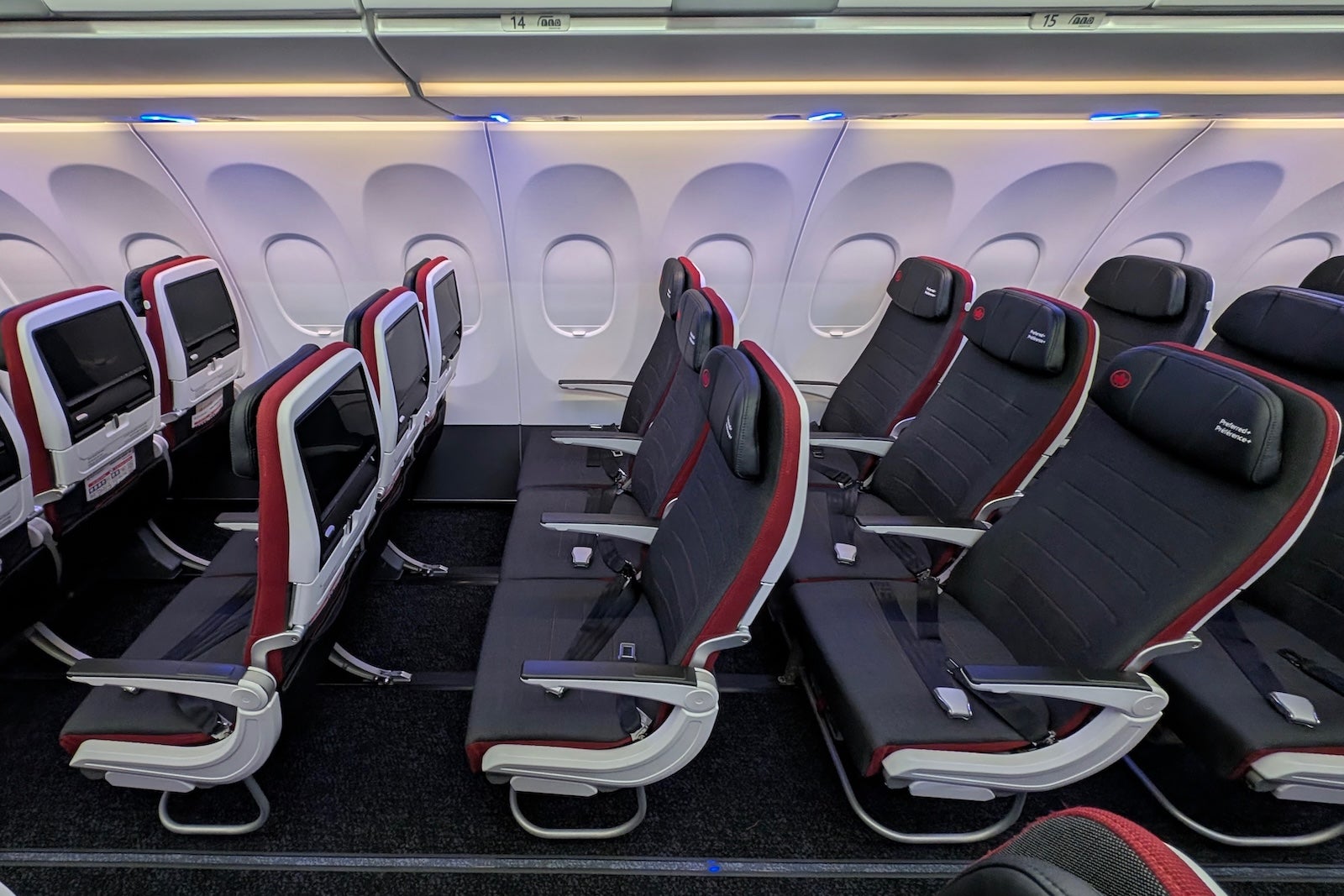
Air Canada Airbus A321XLR
BEN SMITHSON/THE POINTS GUY

Economy passengers can also enjoy upgraded tech, with 13-inch 4K OLED seatback screens, USB-C charging ports, a bi-fold tray table and a tablet holder.
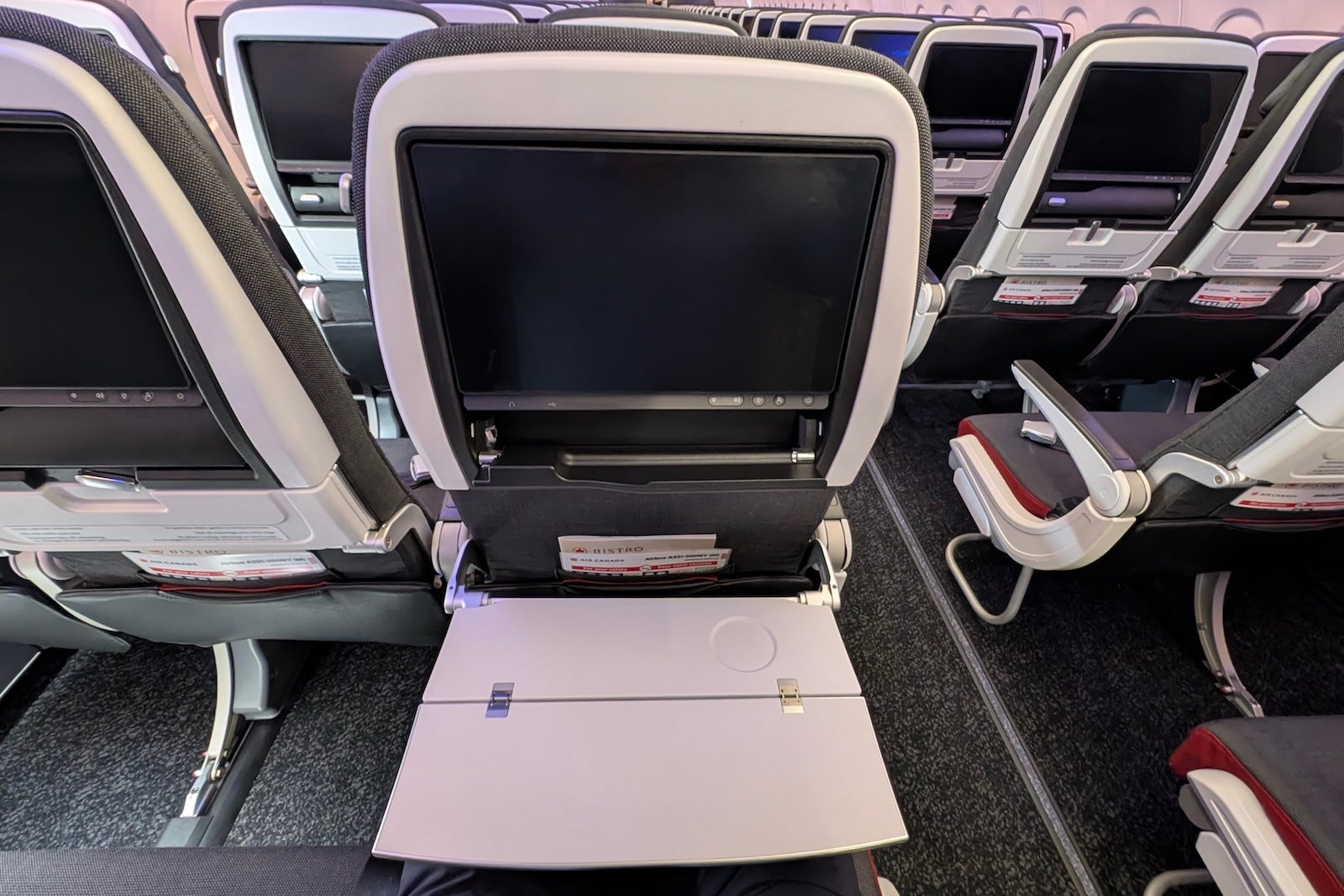
Air Canada Airbus A321XLR
BEN SMITHSON/THE POINTS GUY

The 168 passengers must share three lavatories, all located at the rear of the aircraft, so it’s advisable to avoid rows 36 to 39 of this plane, where passengers will inevitably line up on longer flights.
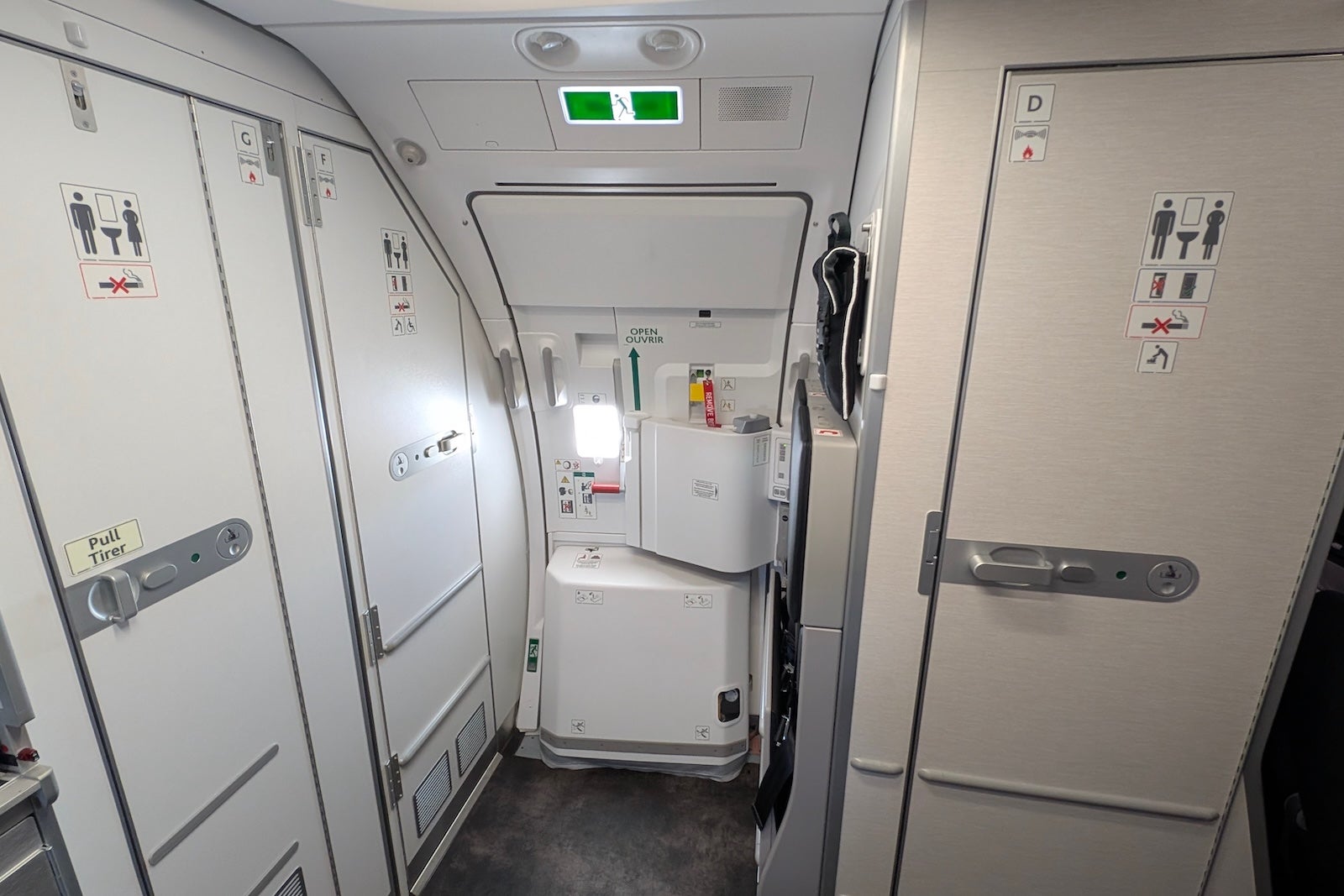
Air Canada Airbus A321XLR
BEN SMITHSON/THE POINTS GUY

What it was like on Air Canada’s inaugural Airbus A321XLR flight

Air Canada chose a rather unassuming route for the first XLR passenger flight, a short domestic hop from Montreal to Toronto, a route the airline operates more than a dozen times daily, primarily on narrow-body aircraft with standard recliner seats.

A gate celebration was set up, complete with a DJ spinning party tunes, balloons, a red carpet and plenty of Air Canada and Airbus novelty props for photo opportunities.

Air Canada Airbus A321XLR
BEN SMITHSON/THE POINTS GUY

Pistachio croissants, themed cookies and coffee were also available to help passengers get into the celebratory spirit.

BEN SMITHSON/THE POINTS GUY

Executives from Airbus and Air Canada gave speeches to commemorate the occasion (which were mostly delivered in French) before a ceremonial ribbon-cutting and boarding right on schedule.
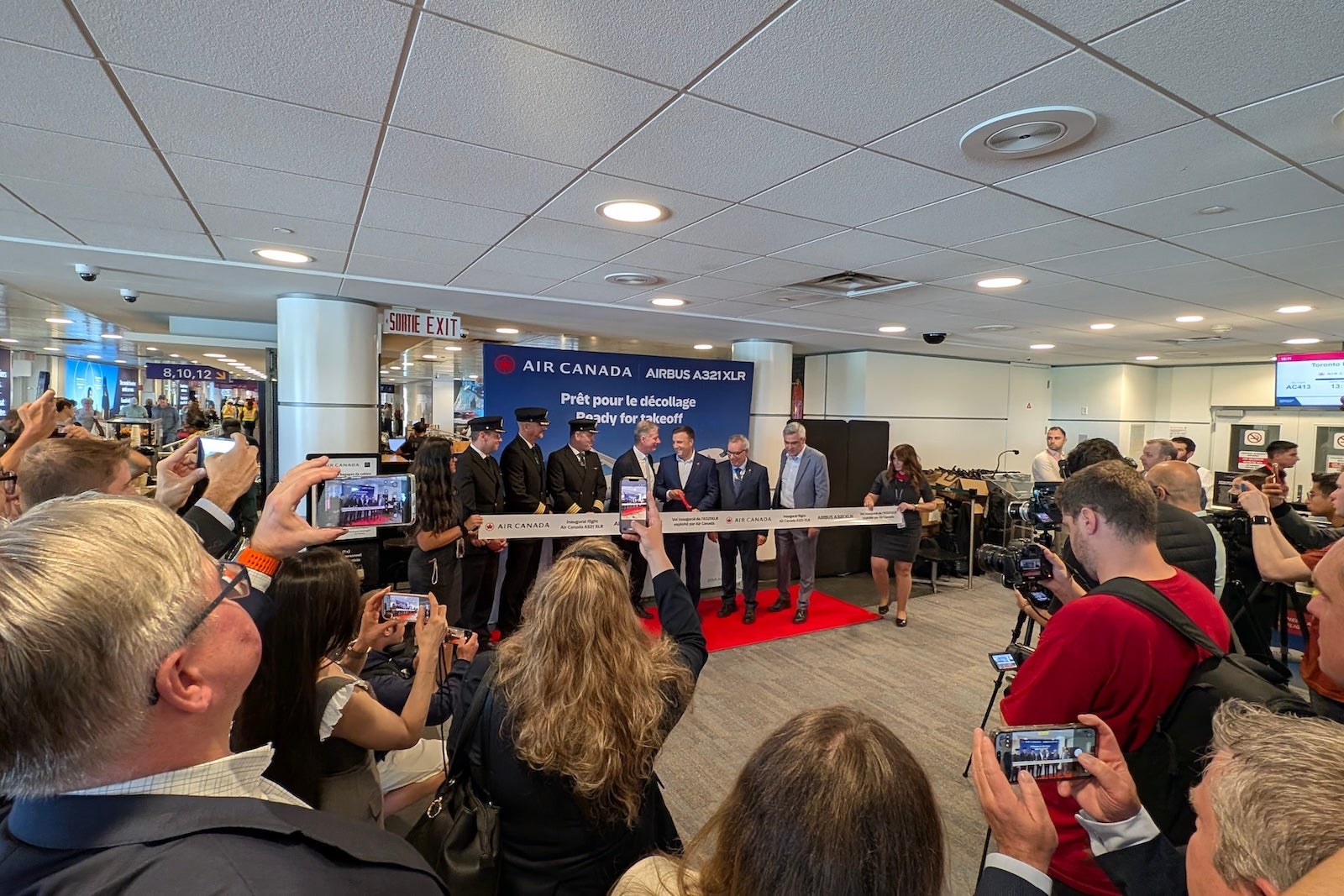
Air Canada Airbus A321XLR
BEN SMITHSON/THE POINTS GUY

A large number of invited media and suppliers were in attendance for the flight, including representatives from seat manufacturer Collins Aerospace and Panasonic, who performed various quality assurance tests during their flight to ensure everything worked as it should on a regular passenger flight.

Regular passengers appeared somewhat bewildered at the level of activity when they arrived at the gate, but there were plenty of audible gasps and photos taken when they stepped onboard and saw the shiny new seats.
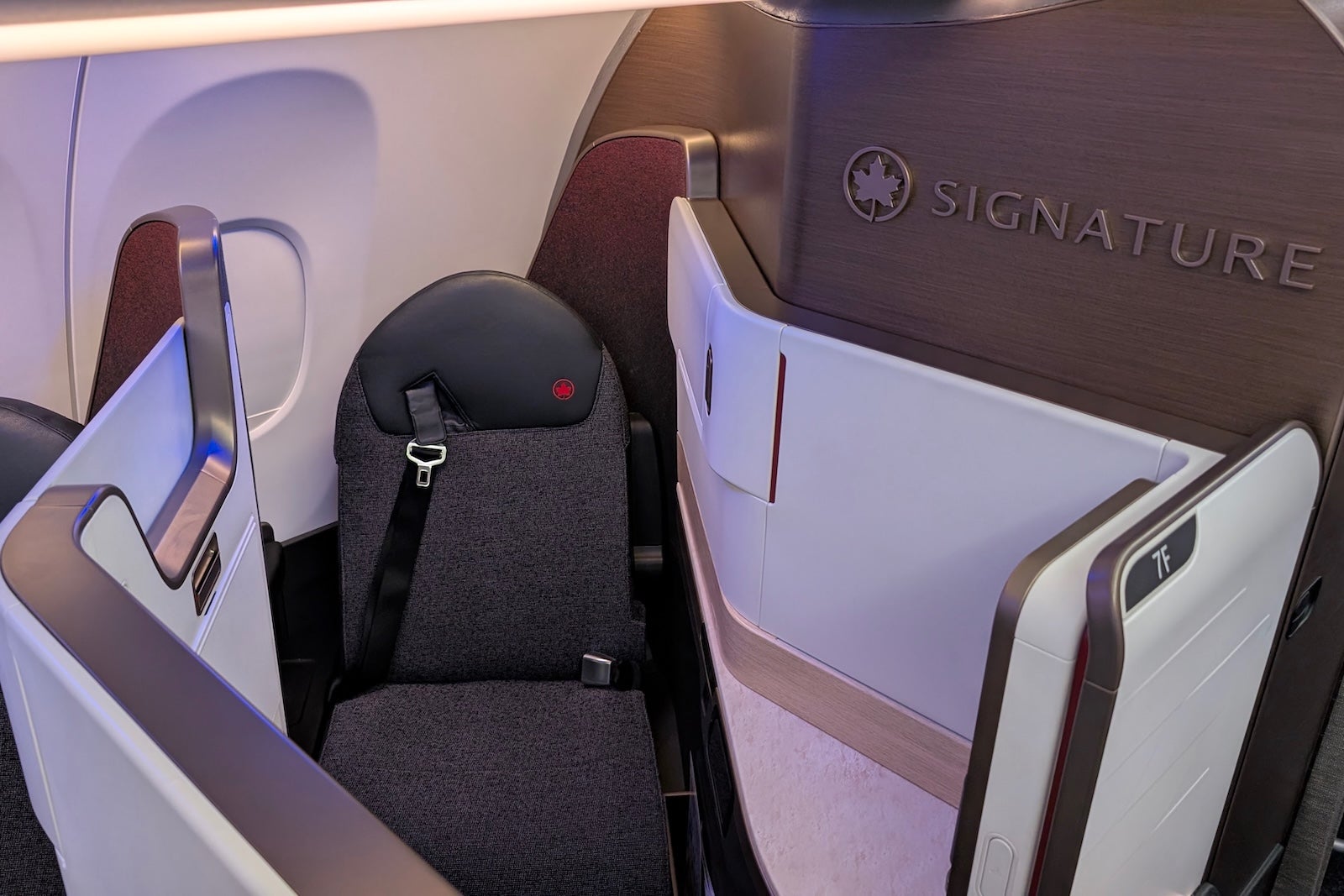
Air Canada A321XLR aircraft
BEN SMITHSON/THE POINTS GUY

Wi-Fi worked from gate to gate, and while it was not Starlink-level speeds, I recorded downloads of a respectable 30 Mbps, free for Aeroplan members.

With a snappy 50-minute flight time, the crew had precious little time to service passengers, but managed a full drinks service and a hot snack of a grilled cheese sandwich, which was small but tasty, before our descent into Toronto.

BEN SMITHSON/THE POINTS GUY

How to book Air Canada’s XLR with points and miles

Air Canada’s Aeroplan loyalty program is a transfer partner of most major transferable currencies and redemption prices on its own “metal,” like the XLR, meaning prices rise and fall depending on demand. I found flights on the XLR from Montreal to Toulouse starting at:

  • 31,400 Aeroplan points in economy class; and
  • 65,200 Aeroplan points in business class,
  • plus 80.41 Canadian dollars in taxes and fees (about $58).

You can also book Air Canada flights through Star Alliance partner programs, such as United MileagePlus, where rates to Europe will cost you 44,000 United miles in economy class and 88,000 United miles in business class one-way, plus the same taxes and fees as Aeroplan charges.
Air Canada A321XLR
BEN SMITHSON/THE POINTS GUY

Bottom line

It’s an exciting new chapter for Air Canada as the airline introduces the Airbus A321XLR to its fleet, the first Canadian airline to offer lie-flat seats on a narrow-body aircraft.

The XLR’s revolutionary range allows nonstop flights from Toronto and Montreal deep into mainland Europe, opening up new route options and points and miles redemptions, which will only increase as the airline takes delivery of its remaining 29 XLR orders over the coming years.

Related reading:


Source link

Leave a Reply

Subscribe to Our Newsletter

Get our latest articles delivered straight to your inbox. No spam, we promise.

Recent Reviews


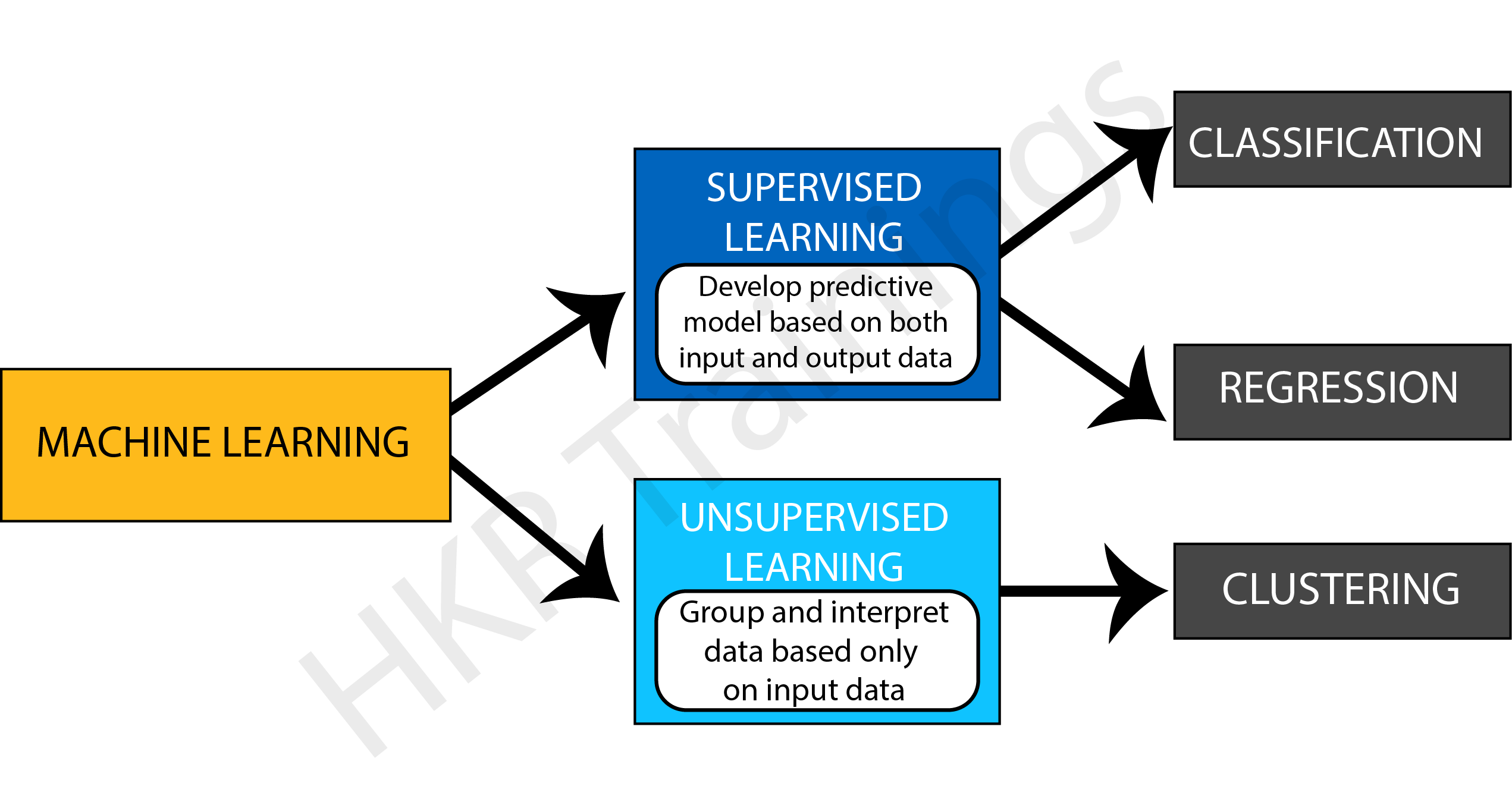
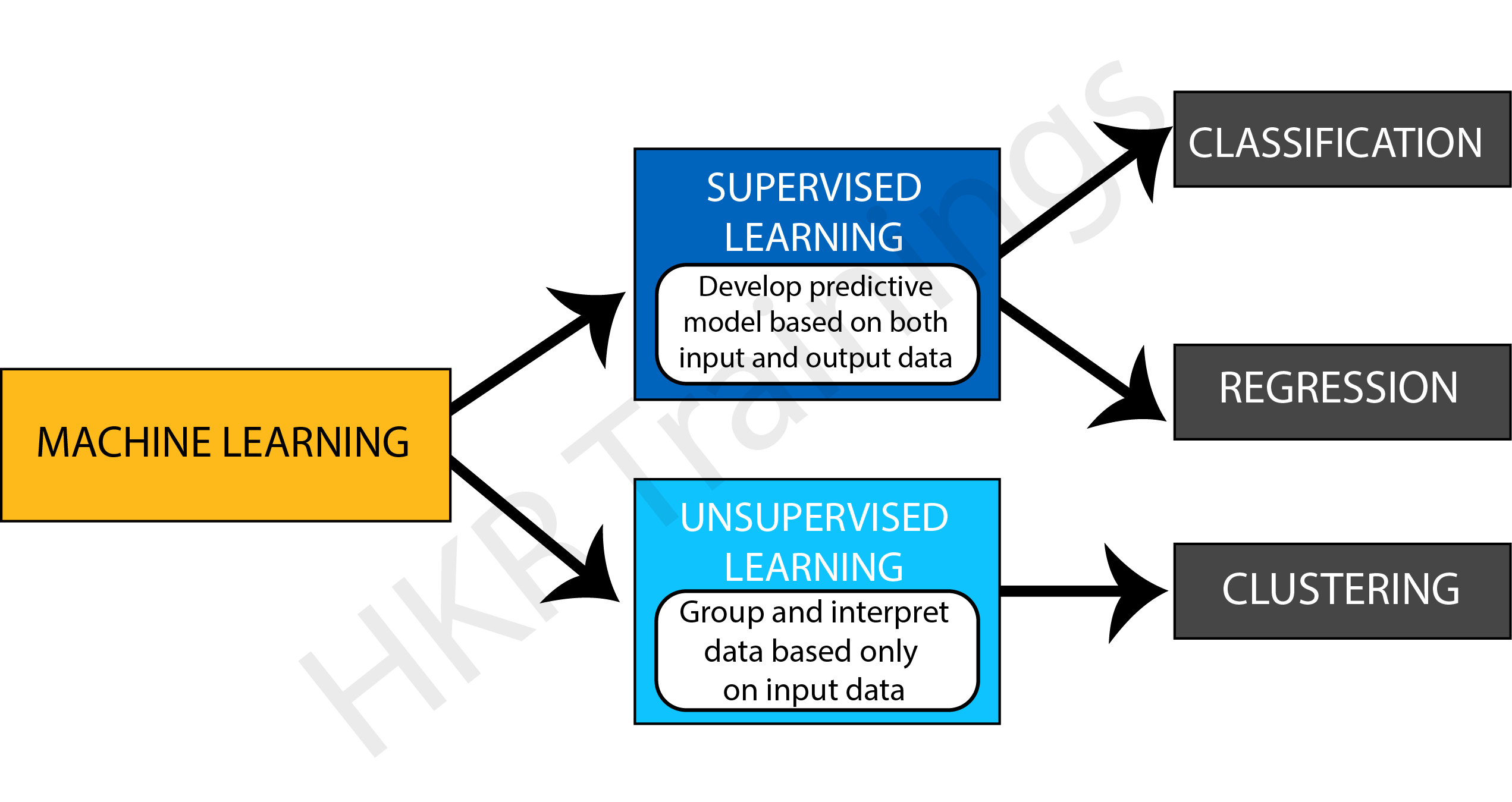
The Classification algorithm is a supervised learning method that trains data to determine the category of future observations. This is why firstly, let us understand what is supervised learning.

What is Supervised Learning

Understanding Supervised Learning

Supervised learning develops a function to predict a defined label based on the input data.

The model in Supervised Learning learns by action. During training, the model examines which label is related to the given data and, as a result, can identify patterns between the data and particular labels.

Let us understand supervised learning with an example of Speech Recognition. It is an application where you train an algorithm with your voice. Virtual assistants such as Google Assistant and Siri, which recognize and respond to your voice, are the most well-known real-world supervised learning applications.

Supervised Learning might sort data into categories (a classification challenge) or predict a result (regression algorithms). This article will specifically address everything we need to know about classification in Machine Learning.

What is Classification in Machine Learning?

The process of recognizing, interpreting, and classifying objects or thoughts into various groups is known as classification. Machine learning models use a variety of algorithms to classify future datasets into appropriate and relevant categories with the help of already-categorized training datasets.

Classification in Machine Learning

In other words, classification is a type of “pattern recognition.” In this case, classification algorithms applied to training data detect the same pattern (same number sequences, words, etc.) in consecutive data sets.

Want to Become a Master in Machine Learning? Then visit here to Learn Machine Learning Training

Types of Classification Models

There are four primary classification tasks you could come across:

  • Binary Classification
  • Multi-Class Classification
  • Multi-Label Classification
  • Imbalanced Classification

Binary Classification

The term “binary classification” refers to tasks that can provide one of two class labels as an output. In general, one is regarded as the normal state, while the other is abnormal. The following examples can assist you in better comprehending them.

For example, for email spam detection, the normal condition is “not spam,” whereas the abnormal state is “spam.” “Likewise, Cancer not found” is the normal condition of an activity involving a medical test, whereas “cancer identified” is the abnormal state.

The normal state class is usually allocated the class label 0, whereas the abnormal state class is assigned the class label 1.

Some of the popular algorithms used for binary classification are:

  • Decision Trees
  • Logistic Regression
  • Support Vector Machine
  • k-Nearest Neighbors
  • Naive Bayes

Machine Learning Training

  • Master Your Craft
  • Lifetime LMS & Faculty Access
  • 24/7 online expert support
  • Real-world & Project Based Learning

Multi-Label Classification

We refer to multi-label classification tasks as those in which we need to assign two or more distinct class labels that can be predicted for each case. A simple example is photo classification, in which a single shot may contain many items, such as a puppy or an apple, and so on.  In this type of classification, you can predict many labels rather than just one.

The most common algorithms are:

  • Multi-label Random Forests
  • Multi-label Decision trees
  • Multi-label Gradient Boosting

Multi-Class Classification

Tasks that have two or more class labels are called multi-class classification.

The multi-class classification does not differentiate between normal and abnormal results. 

In some situations, the number of class labels might be rather big. For instance, a model may predict that a photograph belongs to one of thousands or tens of thousands of faces in a facial recognition system. Examples are classified into one of several known classes.

Some of the popular algorithms used for multi-class classification are:

  • Naive Bayes
  • k-Nearest Neighbors
  • Random Forest
  • Gradient Boosting
  • Decision Trees

Imbalanced Classification

Imbalanced Classification refers to tasks in which the number of items in each class is distributed unequally. In general, unbalanced classification problems are binary classification tasks in which most of the training dataset belongs to the normal class and just a small percentage to the abnormal class.

Learners in Classification Problem

There are two types of learners in a classification problem, namely:

  • Eager Learners
  • Lazy Learners

Eager Learners

Eager learning occurs when a machine learning algorithm constructs a model shortly after obtaining training data. It’s named eager because the first thing it does when it obtains the data set is, it creates the model. The training data is then forgotten. When new input data arrives, the model is used to evaluate it. The vast majority of machine learning algorithms are eager to learn.

Lazy Learners

Lazy learning, on the other hand, occurs when a machine learning algorithm does not develop a model immediately after receiving training data but instead waits until it is given input data to analyze. It’s named lazy because it waits until it’s absolutely essential to construct a model if it builds any at all. It only saves training data when it receives it. When the input data arrives, it uses the previously stored data to evaluate the output. Instead of learning a discriminative function from the training data, the lazy learning algorithm “memorizes” the training dataset. The eager learning algorithm, on the other hand, learns its model weights (parameters) during training.

Types of Machine learning Classification Algorithms

Classification algorithms use input training data in machine learning to predict the likelihood or probability that the following data will fall into one specified category. One of the most popular classifications used to sort emails into “spam” and “non-spam” categories, as employed by today’s leading email service providers.

They are two types of classification models, namely:

  • Linear Models
  • Non-linear Models

1. Linear Models

Support Vector Machine

Support Vector Machine

The support vector machine (SVM) is a frequently used machine learning technique for classification and regression problems. It is, however, mostly employed to tackle categorization difficulties. SVM’s main goal is to determine the best decision boundaries in an N-dimensional space that can classify data points, and the optimal decision boundary is known as the Hyperplane. The extreme vector is chosen by SVM to locate the hyperplane, and these vectors are referred to as support vectors.

Logistic Regression
Logistic Regression

In logistic regression, the sigmoid function returns the probability of a label. It is used widely when the classification problem is binary, for example, true or false, win or lose, positive or negative.

Logistic regression is used to determine the right fit between a dependent variable and a set of independent variables. Because it quantifies the factors that lead to categorization, it beats alternative binary classification algorithms like KNN.

Enroll in our Machine Learning With Python Training program today and elevate your skills!

HKR Trainings Logo

Subscribe to our YouTube channel to get new updates..!

2. Non-Linear Models

Decision Tree

Decision Tree

The classification model is developed using the decision tree algorithm as a tree structure. The data is then divided down into smaller structures and connected to an incremental decision tree to complete the process. The final output looks like a tree, complete with nodes and leaves. Using the training data, the rules are learned one by one, one by one. Every time a rule is learned, the tuples that cover the rules are removed. The technique is repeated on the training set until the termination point is reached.

The tree is built using a recursive top-down divide and conquer method. A leaf symbolizes a classification or decision, and a decision node will contain two or more branches. The root node of a decision tree is the highest node that corresponds to the best predictor, and the best thing about a decision tree is that it can handle both category and numerical data.

Kernel SVM

A kernel in SVM is a function that assists in problem resolution. They provide you shortcuts so you don’t have to complete hard calculations. Kernel is remarkable since it allows us to go to higher dimensions and do smooth calculations. It is possible to work with an infinite number of dimensions with kernels.

K-Nearest Neighbor

The K-Nearest Neighbor technique divides data into groups based on the distance between data points and is used for classification and prediction. The K-Nearest Neighbor algorithm implies that data points near together must be similar. Hence, the data point to be classed will be grouped with the closest cluster.

Naive Bayes

The classification algorithm Naive Bayes is based on the assumption that predictors in a dataset are independent. This implies that the features are independent of one another. For example, when given a banana, the classifier will notice that the fruit is yellow in color, rectangular in shape, and long and tapered. These characteristics will add to the likelihood of it becoming a banana in its own right and are not reliant on one another. Naive Bayes is based on the Bayes theorem, which is represented as:

P(A|B) = (P(A) P(B|A)) / P(B)

 Here:
         P(A | B) = how likely B happens
         P(A) = how likely A happens
         P(B) = how likely B happens
         P(B | A) = how likely B happens given that A happen

Stochastic Gradient Descent

It is an extremely effective and simple method for fitting linear models. If the sample data is vast, Stochastic Gradient Descent is beneficial. For classification, it provides a variety of loss functions and penalties.

The only benefit is the ease of implementation and efficiency. Still, stochastic gradient descent has several drawbacks, including the need for many hyper-parameters and sensitivity to feature scaling.

Random Forest

Random Forest

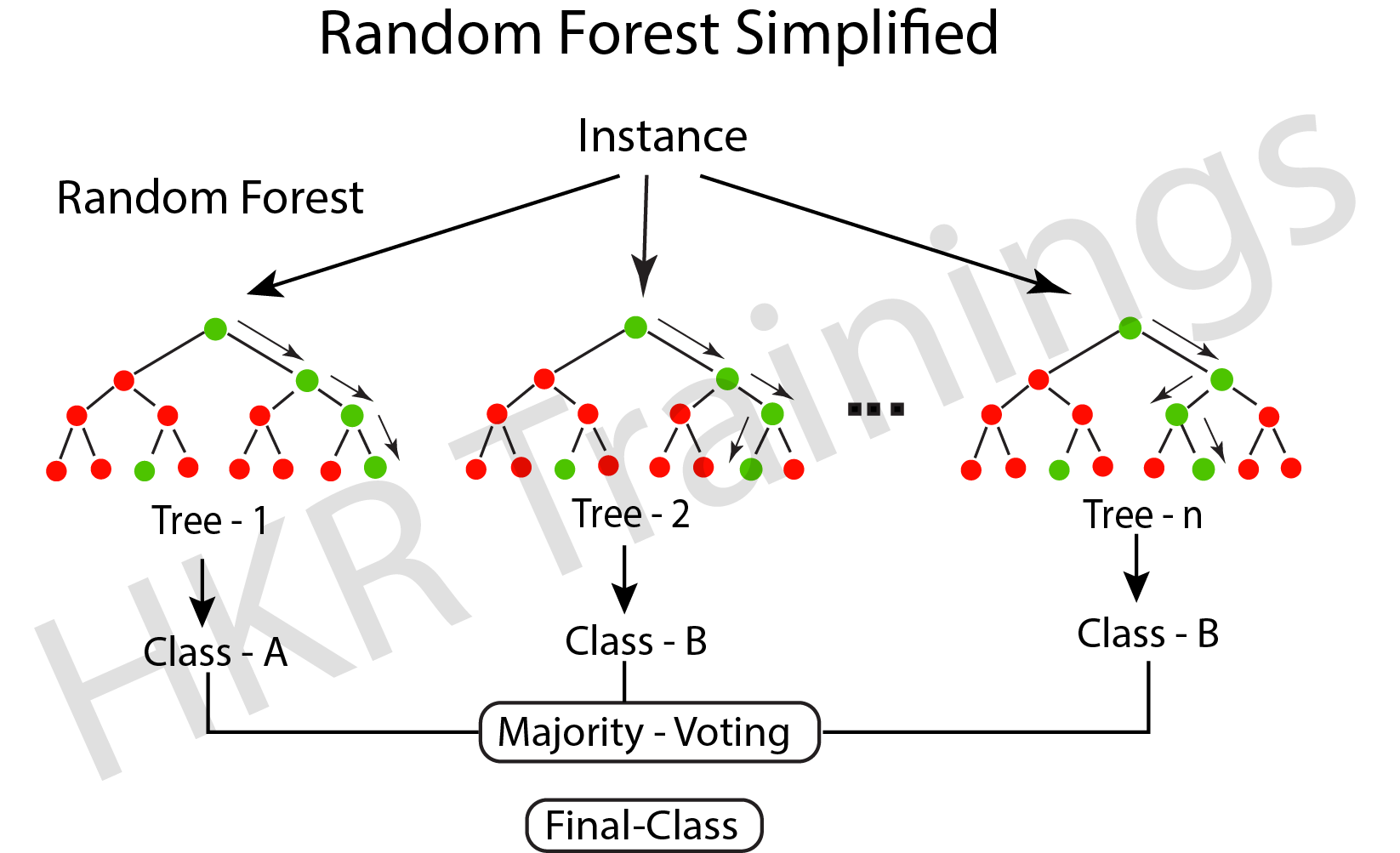
Random decision trees, also known as random forest, may be used for classification, regression, and other tasks. It works by building many decision trees during training and then outputs the class that is the individual trees’ mode, mean, or classification prediction.

A random forest (meta-estimator) fits several trees to different subsamples of data sets and averages the results to increase the model’s predicted accuracy. The sub-sample size is similar to the original input size; however, replacements are frequently used in the samples.

Artificial Neural Networks

Artificial Neural Networks

A neural network uses a model inspired by neurons and their connections in the brain to convert an input vector to an output vector. The model comprises layers of neurons coupled by weights that change the relative relevance of different inputs. Each neuron has an activation function that controls the cell’s output (as a function of its input vector multiplied by its weight vector). The output is calculated by applying the input vector to the network’s input layer, then computing each neuron’s outputs via the network (in a feed-forward fashion).

Machine Learning Training

Weekday / Weekend Batches

Conclusion

In this blog, we looked at what Supervised Learning is and its sub-branch Classification, some of the most widely used classification models, and how to predict their accuracy and see whether they are trained correctly. 

Related Articles:

Feature Selection Techniques In Machine Learning


Source link