Did Chrome Just Install a Massive AI Model on Your Device Without Telling You? Yes, Probably


You didn’t install it. You weren’t asked. You may not have even known it was there. But if you use Google Chrome on a desktop computer, there’s a reasonable chance that a 4GB AI model called Gemini Nano is sitting on your hard drive right now, placed there automatically by Chrome sometime between late April and early May 2026. Security researcher Alexander Hanff flagged the silent rollout, which affects eligible devices running recent versions of Chrome and offers no consent screen, no pop-up and no setting to straightforwardly prevent it. Privacy advocates say the practice may violate European data law. Here’s how to check your machine — and remove the file, at least temporarily.

The mysterious file in question is Gemini Nano, an AI model that runs on devices such as smartphones and laptops rather than in the cloud. According to Alexander Hanff, a Swedish computer scientist and lawyer known as That Privacy Guy, it’s been installed on some people’s Chrome browsers without permission. You won’t know when it’s been downloaded onto your device, either. 

Hanff said Gemini Nano will only be installed if the device meets the hardware requirements. It’s unknown how many people have gotten the install.

Gemini Nano performs tasks such as detecting scam phone calls, helping you write text messages, summarizing recordings and analyzing Pixel phone screenshots. It’s not to be confused with the AI Mode pill in the address bar. If you use AI Mode, your queries are routed to Google Gemini servers, not to Gemini Nano.

AI Atlas

A Google spokesperson told CNET that Gemini Nano will automatically uninstall if the device doesn’t have enough resources, such as processing power, RAM memory, storage space or network bandwidth. 

“In February, we began rolling out the ability for users to easily turn off and remove the model directly in Chrome settings,” the spokesperson said. “Once disabled, the model will no longer download or update.”

Google gives more information about on-device generative AI models in Chrome on this web page.

How to get rid of the AI model 

If you want to remove the 4GB AI model from your device, first check whether it’s installed. 

Hanff said Chrome users will not know they have Gemini Nano unless they search for it, because “Chrome did not ask” and “Chrome does not surface it.”

The easiest way to remove Gemini Nano from your device is to uninstall Chrome.

On a Mac

If you’re using a Mac, open Finder by clicking the blue smiling face icon on the far left of the dock or pressing Command (\⌘) + N on an empty spot on the desktop.

Then, click Go in the menu bar and hold the Option key so that Library appears in the dropdown menu. Click Library, then navigate to Application Support > Google > Chrome > Default. See if there’s a folder called OptGuideOnDeviceModel. If the folder exists and contains a file named weights.bin, the AI model was installed.

To permanently remove it on a Mac, open Chrome and click the three-dot menu in the top-right corner. Then click Settings, then System and toggle off On-device AI.

On a Windows device

If you’re running a Windows device, there are a few ways to check whether Gemini Nano is installed.

One way is via a Run Command. Press the Windows key and R, paste in %LOCALAPPDATA%\Google\Chrome\User Data\OptGuideOnDeviceModel and then press Enter. If that file comes up, see if weights.bin is in there.

You can also use File Explorer to check whether the AI model is installed. Navigate to C:\Users\[YourUsername]\AppData\Local\Google\Chrome\User Data\OptGuideOnDeviceModel and look for weights.bin.

To get rid of the AI model in Windows, follow these steps:

Open Chrome, navigate to Settings > System, and toggle off On-device AI.

While still in Chrome, type chrome://flags in the address bar and search for “optimization guide.” Then, set “Enables optimization guide on device” to Disabled.

Then restart Chrome by completely closing it, using the menu to exit, not just closing windows.

Finally, delete local files by navigating to \AppData\Local\Google\Chrome\User Data and deleting the OptGuideOnDeviceModel folder.

Watch this: Google I/O 2026: New Gemini, Smart Glasses and a Whole New Laptop OS. Here’s What to Expect

Why does it matter?

Hanff said the push might be intended to help Google cut costs by moving AI work off its own servers and onto your computer.

“Running inference on users’ own hardware allows them to push ‘AI features’ without the compute costs,” Hanff told CNET.

But Hanff suggested there could be legal ramifications, at least in Europe. He suggested that the Gemini Nano install could constitute a breach of the European Union’s General Data Protection Regulation’s principles of lawfulness, fairness and transparency. Hanff said that, considering the potential environmental impacts, Google should have announced it under the Corporate Sustainability Reporting Directive.

“Google has given us every reason not to trust them with a history spanning two decades of global privacy violations at massive scale,” Hanff told CNET. “So, I suspect they figured asking permission (what the law requires) would hinder their ability to push this model and, of course, whatever comes after it.”


Source link

Leave a Reply

Subscribe to Our Newsletter

Get our latest articles delivered straight to your inbox. No spam, we promise.

Recent Reviews


What is Power BI?

Power BI is a cloud-based business analysis and intelligence agency developed by Microsoft. It is a compilation of business intelligence and data analytical techniques, such as software services, applications and data connectors. We can use data sources extracted into Power BI to visualize and analyze data using shared reports, dashboards, and apps.Power BI is a user-friendly tool that offers remarkable drag-and-drop features and self-service abilities.

Become a Power BI Certified professional by learning this HKR Power BI Online Training !

Microsoft is offering three types of Power BI platforms:

  • Desktop Power BI(A desktop application)
  • Power BIService (SaaS i.e., Software as a Service)
  • Mobile Power BI (For iOS and Android devices)

We can also deploy Power BI on both on-site and cloud platforms. 

Why Power BI?

Power BI is an integrated system with several various types of data under its supervision.There seems to be a cloud-based BI service called Power BI Services that is used to display and communicate dashboards.A desktop-based report functionality known as the Power BI Desktop.Another useful service is Power BI Embedded, which keeps running on the Azure cloud platform and can be used for reporting, ETL and data analysis.

Now we discuss why it is an important tool in the present market.

  • One can easily do real time analysis in power bi by creating direct connections with the data sets.
  • Can take the advantage of the custom visualizations.
  • Can get the quick insights of the data.
  • Power BI marketplace as on-site communications make data transfer secure and technology scalable and reliable.
  • You can attach to other services via Power BI, such as SQL Server Analysis Services (SSAS), Microsoft Excel, etc.
  • Power BI is a new age application that helps state-of-the-art technologies such as HTML 5.0, column store databases, cloud computing, mobile apps, etc. This helps to
  • keep Power BI at the top and famous, as it is continuously equipped with the latest features.

Power BI Training

  • Master Your Craft
  • Lifetime LMS & Faculty Access
  • 24/7 online expert support
  • Real-world & Project Based Learning

Now we will get into the power bi components in detail.

Power BI Components:

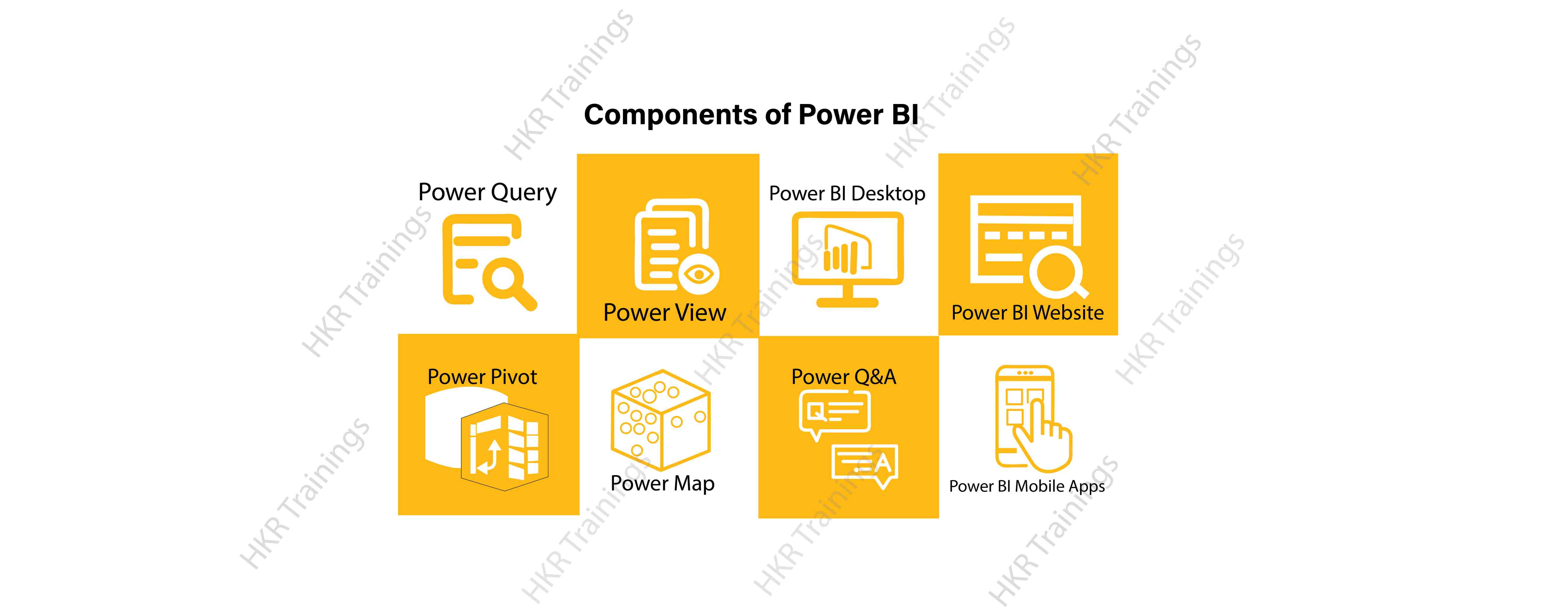
Here are the lists of power BI components. They are:

  • Power Query
  • Power Pivot
  • Power View
  • Power Map
  • Power Q&A
  • Power BI Desktop
  • Power BI Website
  • Power BI Mobile Apps

Power BI Components

Now start discussing each and every component of power BI in detail.

Top 50 frequently asked Power BI Interview Questions !

Power Query:

Power Query is one of the most essential components of Power BI. This would be included in your Excel or could be used as a Power BI Desktop component. Using Power Query, you can uninstall data from multiple data sources and retrieve data from a wide variety of different databases, such as Oracle, SQL Server, MySQL, and other databases. You can also retrieve data from records such as text files, CSV files, etc.

Power BI provides you a powerful GUI so that you really can change and use the information you need, such as date and time changes, add columns, modify types and content, and a variety of options. It includes a small language, Power Query M Formula Language, as a code that is more powerful than a GUI.Power Query Formula Language in Power BI is highly secure and optimized for the development of highly highly scalable mashup queries accessible to Power BI Desktop and Power Query. It has several features that cannot be made available by a GUI.

Power Pivot:

Power Pivot is a data designing and information technology engine. It’s being used to model static and dynamic data. You can establish or generate relations between various tables in Power Pivot and quantify values that can be considered in Pivot tables. It provides a tremendous opportunity to build your design.The language used mostly by Power BI Pivot is Data Analysis Expression (DAX), a highly functional language. 

HKR Trainings Logo

Subscribe to our YouTube channel to get new updates..!

Power View:

Power View is a major aspect of Power BI data visualization. It is an immersive device that connects to data sources and collects metadata that can be used for data collection. There are a lot of image processing blueprints in the Power View list. With Power View, you could even process the data for each visualization element or for the entire report. Slicers can be used to make better dicing of the information.Power View reports are responsive; the user can illustrate some of the data or components in Power View to communicate directly with each other.

Power Map:

Power Map is used to display spatial information in 3D mode. As soon as the visual interface is rendered in 3D mode, it offers some other dimension. In Power Map, one characteristic can be assumed to be the length of a column in 3D and another attribute to be a heatmap view. The data can be illustrated on the basis of a geographical location. Geographical locations may be a country, state, city, or street address.In order to get the best view, Power Map works with Bing Maps related to geographical latitude or longitude or country, state, city or street address data.

Power Q&A:

Power BI Q&A is a common language engine for questionnaires about your data model. After you have assembled and updated your data model on the Power BI website, you or your customers can ask questions, if any, and find solutions to those questions. There are a few shortcut keys and hints for the development of your framework so that it can respond to questions in the most effective manner possible.

For data visualization, Power Q&A works with Power View so that users can ask any questions, such as the amount of clients per state, and the question is responded in the form of a map view with numbers shown as bubbles by Power Q&A.

Want to know more about Power BI,visit here Power BI Tutorial !

Power BI Desktop:

Power BI Desktop is a continuous improvement of the Power BI suit. This is an embedded development tool for Power Query, Power Pivot and Power View. It allows you to build advanced queries, models, and reports. Power BI Desktop makes it easy to advance your BI skills and your data analytics experience.

Power BI Website:

Power BI solutions can be compiled on the Power BI website. You can generate dashboards for your news stories and share them with others, and you can also generate content directly on the Power BI website. With the Power BI website, you can conduct slice and dice online operations using a web browser, and you don’t even need any other tools.

Power BI Mobile Apps

Power BI Mobile Apps has three mobile operating system (OS) providers: Android, iOS, and Windows. These frameworks give you lots of an immersive view of Power BI reports and dashboards. You could even share them with your mobile app. A fraction of the documents can be displayed and a note can be written and shared with others. 

To gain in-depth knowledge with practical experience in Power BI, Then explore hkr’s Power BI Training In Hyderabad !

Power BI Training

Weekday / Weekend Batches

Conclusion:

In the above content, we had covered all the important components of power BI in detail. One can take a sound knowledge in the power BI technology by learning each and every components of the power BI architecture. However, the above stated information is strong enough to make you realize the importance of the power BI in corresponding to the data visualization, data analysis, etc.

Related Articles:


Source link