Hades 2, the Award-Winning Sequel, Joins Xbox Game Pass in April


Hades 2 was selected as one of CNET’s best games of 2025, but don’t take our word for it. The game won Best Action Game at the 2025 Game of the Year awards, Best Game on Steam Deck at the Steam Awards and a bevy of other accolades after its release. If you haven’t had the chance to play this stellar sequel yet, you can on Xbox Game Pass starting on April 14.

Xbox Game Pass, a CNET Editors’ Choice award pick, offers a wide selection of games you can play on your Xbox Series X, Xbox Series S, Xbox One and PC or mobile device for as little as $10 a month. And with a subscription to the higher-tiered Game Pass Ultimate ($30 a month), you can access hundreds of games, including Day One releases, each month. 

Here are the games Microsoft plans to bring to Game Pass in April. You can also check out other games the company added to the service in March, including Cyberpunk 2077.


DayZ

Coming to PC on April 8, joining Game Pass Ultimate, Game Pass Premium, Game Pass Essential and PC Game Pass.

This online multiplayer survival game is coming to PC. An unknown virus has turned the population of the post-Soviet country of Chernarus into zombies, and you’re one of the last few survivors. You’ll have to scavenge for supplies among the ruins while fighting off zombies and other survivors alike. But how far will you go to save yourself?


Endless Legend 2 (Game preview)

New to Game Pass Premium on April 8. Previously on Game Pass Ultimate and PC Game Pass.

Lead your faction to build a great empire that can crush your enemies in this fantasy strategy game. You can play as warriors descended from the stars, cursed knights or hive-minded beasts, but each faction has its strengths, weaknesses and unique philosophies that can influence the rest of the game. And fending off enemies is just one challenge in this game. You’ll have to adapt to the changing environment as well. Will you expand as the tides reveal new treasures, or focus on improving your defenses?


FBC: Firebreak

New to Game Pass Premium on April 8. Previously on Game Pass Ultimate and PC Game Pass.

The Federal Bureau of Control is under attack from otherworldly forces, and it’s up to you and your versatile unit to restore order. You’ll fight chaotic entities, leeches and a monster made of sticky notes using guns, grenades and other supernatural weapons. You can play this first-person shooter game on your own or take on the chaos of the FBC with friends in three-player co-op. 


Planet Coaster 2

Coming to Game Pass Ultimate, Game Pass Premium and PC Game Pass on April 9.

This might not be the classic RollerCoaster Tycoon, but it’s close enough. You’ll build your own roller coasters and water slides, manage your amusement park and create unforgettable experiences for your guests. It’s unclear if you can launch your coasters off the rails into waiting crowds. Will report back later.


Tiny Bookshop

Coming to Game Pass Ultimate, Game Pass Premium and PC Game Pass on April 10.

I have long dreamed of opening my own bookshop, and until I come into a lot of money, this game will have to do. You can stock your bookshop with different genres and items for sale, set up shop in scenic locations — like near a lighthouse — and get to know the locals in this cozy management game.


Football Manager 26 (PC and console)

New to Game Pass Premium on April 13. Previously on Game Pass Ultimate and PC Game Pass.

Get ready for a more immersive matchday experience in the latest installment of the Football Manager franchise. You can build a star-studded squad with new transfer tools, and this entry features official Premier League licenses and women’s football for the first time in the series’ history.


Hades 2

Coming to Game Pass Ultimate, Game Pass Premium and PC Game Pass on April 14.

Following the events of the original game, the Titan of Time Chronos has returned and laid waste to the Underworld and Earth. As the immortal princess Melinoe, you’re tasked with stopping the titan and restoring the mythic world. Each time you venture out, you’ll learn more about the world around you and discover the true cause of all the destruction and pain.


Replaced

Coming to Game Pass Ultimate and PC Game Pass on Day One on April 14.

Can AI ever be human? I’m not talking about ChatGPT or Gemini, but REACH, an AI trapped in a human’s body, in this narrative platformer game. You’ll explore an alternate 1980s America that’s scarred from nuclear catastrophe as you try to uncover the secrets of the Phoenix Corps, the same group that created you. It’s a cyberpunk Frankenstein with plenty of exploration and fluid action sequences.


The Thaumaturge

Coming to Game Pass Ultimate, Game Pass Premium and PC Game Pass on April 14.

By definition, a thaumaturge is a miracle worker or magician, and in this roleplaying game, you’re a master of mystical arts that allow you to peer into the hearts and minds of others. After the death of your father, you returned to an alternate 1900s Warsaw to investigate his death, fight supernatural forces and uncover the truth. 


The Elder Scrolls IV: Oblivion Remastered

New to Game Pass Premium on April 16. Previously on Game Pass Ultimate and PC Game Pass.

Key art of a man in armor standing in front of a flaming glyph and burning castle with the words "The Elder Scrolls IV: Oblivion Remastered" behind him.

Bethesda

A fanatical cult is trying to open gates to the demonic realm of Oblivion, and it’s up to you to stop them and seal the gates forever in the remastered version of this open-world RPG. You can rediscover the world of Cyrodiil (or experience it for the first time in updated glory), encounter unique characters and save the land. 


EA Sports NHL 26

Coming to Game Pass Ultimate and PC Game Pass on April 16.

As the NHL regular season winds down, the playoffs and the fight for the Stanley Cup are heating up. And with the latest installment in this EA Sports franchise, you can ensure your favorite team brings home the cup. This entry in the series introduces new gameplay mechanics, such as Ice Q 2.0 and a goalie crease control system, to add additional challenges. So if you want to see the Florida Panthers win the cup back-to-back, or you want to make absolutely sure that never happens, this game is for you.


Call of Duty: Modern Warfare

Coming to Game Pass Ultimate, Game Pass Premium and PC Game Pass on April 17.

Modern Warfare redefined the Call of Duty series when it was released almost 20 years ago, and the rebooted version of the classic game drops you right back to where it started. You’ll control CIA and SAS special forces as they attempt to stop rebels from the fictional Republic of Urzikstan. And if the campaign’s not enough, you can hone your skills in the immersive, fast-paced multiplayer.


Little Rocket Lab

New to Game Pass Premium on April 21. Previously on Game Pass Ultimate and PC Game Pass.

Your family’s dream project has been to build a rocket, and you’re going to fulfill their dream in this cozy, machine-building RPG. But first, you have to build clever contraptions, convert local resources and become the heart of your community before you can complete your ultimate rocket-building task.


Sopa: Tale of the Stolen Potato

New to Game Pass Premium on April 21. Previously on Game Pass Ultimate and PC Game Pass.

Miho goes to the pantry to grab a potato for his grandmother’s soup when he lands in a fantastical land. Now he has to find his way back home by following in the footsteps of a mysterious traveler from long ago. You’ll meet quirky characters, gather exotic ingredients and take in vibrant environments in this world of magical realism inspired by Latin America.


Vampire Crawlers

Coming to Game Pass Ultimate and PC Game Pass on Day One on April 21.

From the creators of the indie darling Vampire Survivors comes this turn-based, deck-building, roguelite game. You’ll explore dungeons that might look familiar to Vampire Survivors veterans, fight monsters and build chaotic, broken decks along the way. So be tactical in your choices or blast away every chance you get!


Kiln

Coming to Game Pass Ultimate and PC Game Pass on Day One on April 23.

Kiln is about creating beautiful pottery filled with artistry and wonder… and smashing it all to pieces in the arena. This online, multiplayer party brawler pits you against others to see which pottery design can withstand the heat and which can dish out a beating.


Two games come to Game Pass Essential subscribers on April 8

Game Pass Essential costs $10 a month and offers access to a relatively small library of games compared to Game Pass Premium and Ultimate. While Microsoft doesn’t regularly add many games to Essential’s library, it’s adding these two on April 8.

Games leaving the service on April 15

While Microsoft is adding the above games to Game Pass, it is also removing five games from the service on April 15, including GTA 5. That means you still have a little time left to complete your main campaign and any sidequests before you’ll have to buy these games separately.

For more on Xbox, discover other games available on Game Pass now, read our hands-on review of the gaming service and learn which Game Pass plan is right for you.


Source link

Leave a Reply

Subscribe to Our Newsletter

Get our latest articles delivered straight to your inbox. No spam, we promise.

Recent Reviews


SCCM Client Installation – Table of Content

Introduction to SCCM

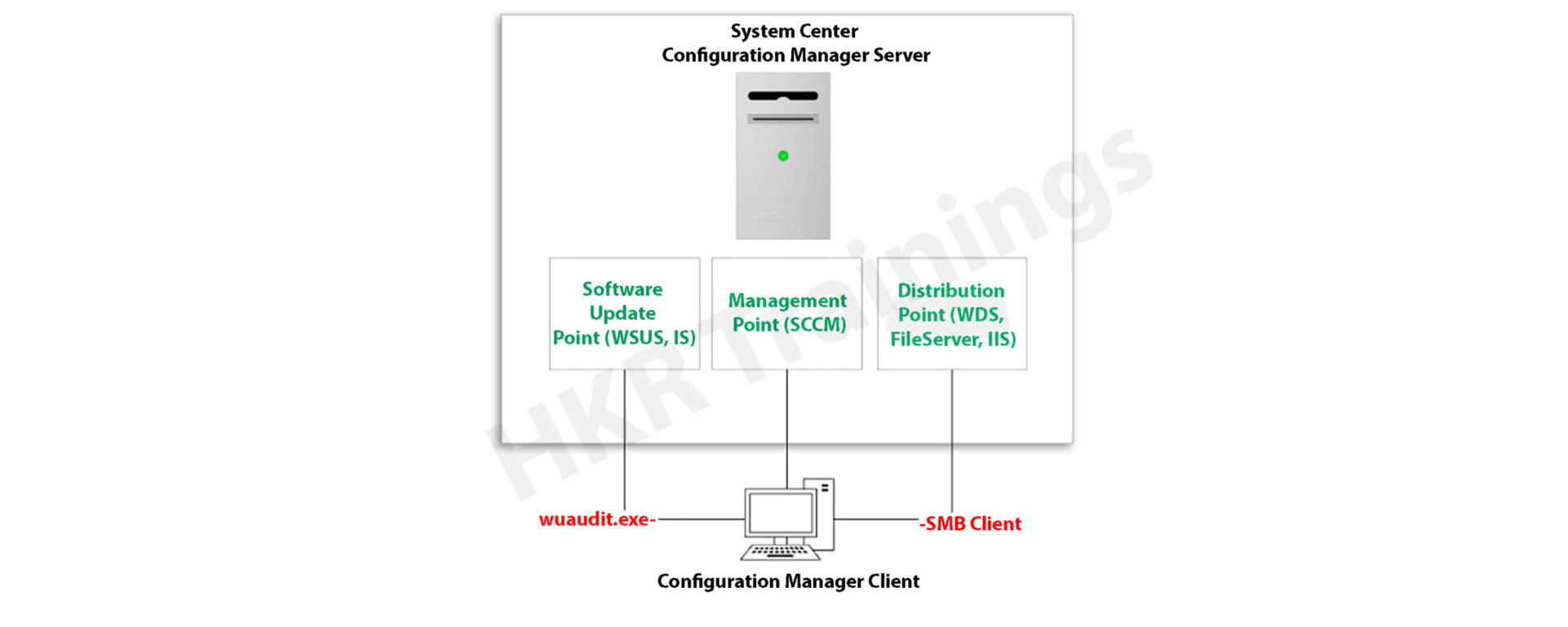
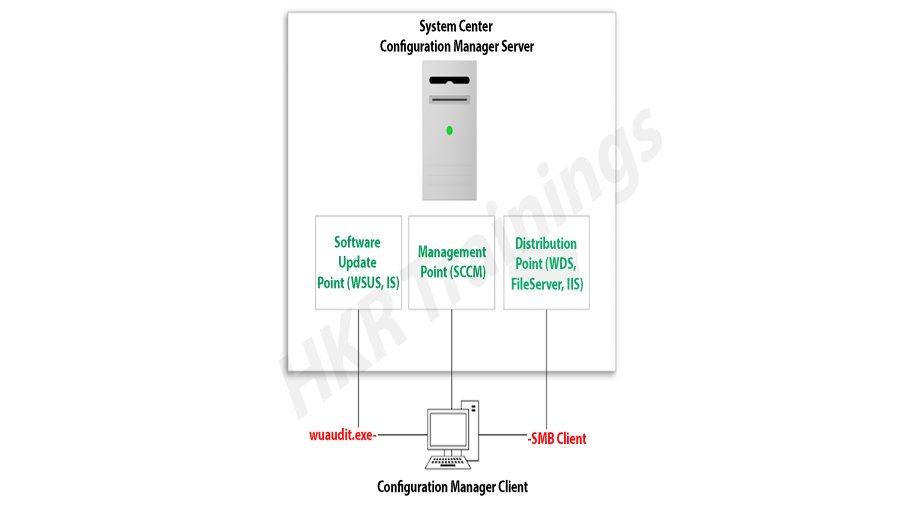
Microsoft System Center Configuration Manager (SCCM), a modern product from Microsoft, is designed to streamline the management and updating of software products. SCCM stands out for its highly adaptable, automated approach to deploying and configuring various devices, including desktops and laptops, starting from any initial state, such as bare-metal deployments. This tool empowers IT admins by offering an end-to-end solution for Windows installation and configuration. It simplifies the delivery of apps, patches, and security updates through a unified distribution system. 

A standout feature of SCCM is its capacity to manage many computers running various OS like Windows, Linux, UNIX, and iOS, demonstrating its versatility in diverse IT environments.

Get ahead in your career by learning SCCM through hkrtrainings Microsoft SCCM Online Course

SCCM Client Installation

SCCM: Installation Guide

The installation process for SCCM 2012 R2 is outlined in a series of steps crafted to simplify the user experience. The process begins with setting up the primary server and accompanying SQL server, typically housed on the same device.

Step1: Prepare active directory for configuration manager

a) Create the system management container:

Please navigate to the domain controller, load the ADSI file, and edit it. In the system OU, create a new object named ‘System Management.’

Complete the wizard, closing the ADSI editor. Grant control of the system to the configuration system server for the new system configurator object.

Create the system management container

Choose the container and click next.

container

Enter the name of system management and click next

system management

b)Complete the wizard browser and close the ADSI editor.

Now pass the system control to the configuration system server to the newly created system configurator object, this can be done by using the navigation, choose the folder -> existing object -> create the new objects.

wizard browser

ADSI

Check all the boxes (use the right tick) and complete the browser wizard.

Step2: Extend the system configuration Schema:

Navigate to \SMSSetup\bin\x64, accessing the folder controlling the system schema rules. Ensure the account used is a member of the AD admins’ group. Run Extadsch.exe as an admin and verify the successful extension in the Extadsch.log file.

system configuration Schema

Log into Extadsch.log file-> it will take you to the root, C: Drive. Check for the entry then you will notify with a message as “successfully extended to the active schema director”.

<02-02-2013 23:21:22=””> successfully extended the schema directory.

To check the activity of extadsch.exe -> go to the directory file “ConfigMgr_ad_schema.idf” that is located in the same folder in the system.

Step 3: Install the Site server prerequisites:

Essential SCCM site server management components include BITS, Remote Differential Compression, .NET Framework 3.5, and IIS components.

a. BITS

b. Access the remote differential compression

c. .NET framework 3.5

d. IIS components.

Step 4: Install the window assessments and Deploy kits (Windows ADK):

Download ADK 8.1 and follow the installation steps, including running the adksetup.exe file, accepting licenses, and choosing components like User State Migration Tools and Windows Deployment Tools.

a. Run the executable file adksetup.exe file -> accept the license agreements -> it will download and install the.Net framework 4.5.

Install the window assessments

Now restart the system when you accessed,

restart

If you have any doubts on SCCM, then get them clarified from SCCM Industry experts on our SCCM Tutorial !

SCCM Training

  • Master Your Craft
  • Lifetime LMS & Faculty Access
  • 24/7 online expert support
  • Real-world & Project Based Learning

After that system setup will resume-> accept the default location-> click next.

system setup

Select to join the CEIP -> click next

join the CEIP

Now accept the license agreements

Install the component and click the “install” button

  • User state migration tools
  • Windows deployment tools
  • Windows pre installment environment (windows PE).

install

installl

Once they complete the installation and click close.

installation and click close

HKR Trainings Logo

Subscribe to our YouTube channel to get new updates..!

Step 5: Install the SQL server:

For the SCCM database, install SQL Server 2012 by running the setup.exe file and following the installation wizard.

Run the executable file -> setup.exe

Install stand-alone SQL database server

Install the SQL server

Click OK-> it will open the new browser;

open the new browser

Install the product key -> run in evaluation mode -> click next

product key

Accept the SQL license agreement -> click next -> add any product updates-> click next -> now it’s time to choose the installation features -> click next

                                   Check out here for frequently asked  SCCM Interview Questions & Answers

Set SQL to run with adding an appropriate domain name, network service, and local system account.

Step6: Install the SCCM R12:

Execute the splash.hta file and follow the guided installation process. It includes selecting the primary site installation, entering the license key, and configuring SQL database server settings.

1. Run the splash.hta -> click install

Install the SCCM R12

Now click next

click next

Choose to install the primary site-> click next

primary site

Enter the license key->click next

Now accept the license key -> click next

license key

SCCM Training

Weekday / Weekend Batches

 Accept the pre-required license agreement->click next

 license agreement

Create any file solder to store the installation updates and Store the SCCM executable file in any folder-> click next

SCCM executable file

Updates will download -> installation begins-> select any language for the SCCM server-> click next.

Choose any client language-> click next-> enter the 3 digit site code and add the description.

Choose to run SCCM installation as a stand-alone -> click next

SCCM installation as a stand-alone

Click yes to accept -> select the default database server configuration-> click next.

Now specify the path to store the SQL database server and log files-> click next to set the current server -> set the configure the communication on each site system role”-> next install both MP and DP -> site server -> SCCM will begin the installation-> close the browser when it completes.

Launch the SCCM console -> make sure that all the database entries you have done are right -> start monitoring the workspace -> site status.

Launch the SCCM console

This finishes the installation process of SCCM.

Functionalities of SCCM:

The updated version of SCCM software adds much functionality to the applications. Let me explain them one by one;

Site infrastructure:

Supports Microsoft Office 365 file updates and features keyboard shortcuts for easy navigation within the configuration manager.Under the site infrastructure we can see the following features;

  • Site infrastructure’s client peer cache will support the updating of files for Microsoft office 365 and distributed express installed files for configuration of Microsoft Windows 10.
  • With the addition to this, there are few functionalities available such as,
  1. Ctrl + D -> this keyword indicates the detailed panel
  2. Ctrl +I -> this keyword indicates the breadcrumb bar
  3. Ctrl + L -> this keyword indicates the search field
  4. Ctrl + M -> this keyword indicates the main central panel
  5. Ctrl + T -> this indicates the top node in the navigation panel.
  • This central administration site and primary configuration sites both include the configuration manager updates. Rest tolls will be used for downloading or replicating problems.
  • With the help of this update, the configuration console manager can be measured and display them on the user interface applications.

Related article : SCCM Deployment

Compliance settings:

Include various device settings adjustments, such as password encryption, name modification, and storage settings.

The settings are as follows;

  • Password -> device encryption
  • Device ->
  1. Modification of device name
  2. Modification of region settings (only desktops)
  3. Language setting modifications
  4. Modification of power and sleep settings
  5. Modification of system time and language settings
  • Storage -> it uses only the private storage
  1. Auto-update available for the apps
  2. Available store-oriented app launch
Application management:

It facilitates script deployment for client device management, including PowerShell script integration and result analysis.In this application management configuration setting, users can deploy the scripts to manage the client devices in the form of packages and programming codes. The following actions included are,

  • Users can run the script on-premises managed windows and windows client PCs.Here no need to deploy the scripts, they only run in real-time client devices.
  • Importing of PowerShell scripts to the system configuration manager
  • Edit the whole script from the system configuration console.
  • Need to mark the scripts whether it is approved or denied
  • Finally, examine the results which will return the script in the configuration manager console.
Operating system deployment:
  • Collapsible task sequence groups: this deployment version will expand and collapse the task management, sequence groups. Here user can expand or collapse all the groups or individual groups at once.
  • Hardware inventory collects the secured boot information: this hardware inventory collects information such as client enabled boot data. This information will be stored in the SMS_firmware class and enabled in the hardware inventory by default.

Software updates

Improvements to express the update download time:

Features improvements in express update download times, Microsoft Surface driver updates management and configurations for Windows Update for Business deferral policies.

Manage Microsoft Surface driver updates:

Here user can use the configuration manager to manage any Microsoft software driver updates.

Configure Windows Update for Business deferral policies:

Now you can configure the whole deferral policies for windows 10 quality features and also quality updates for the windows 10 software devices. This will manages the windows updates directly which will be used for the business later. You can manage the business referral policies in any newly updated system as follows; Software library -> Windows 10 servicing.

Improved user notifications for Microsoft office 365 Updates:

Improvements will be made to leverage the Microsoft office click-to-run user experience when a client installs new office 365b software updates. This update should consist of pop-up and in-app notifications.

Reporting:

Integrates with Windows Analytics for insights into the software environment.

Using windows Analytics with configuration manager:

Windows analytics is nothing but a collection of solutions that run on the Microsoft operational management suite. This solution allows users to form any kind of insight into the current state of the software environment. Devices in the software environment also report the telemetry data. The data can be accessed through the operations management suite web portals.

Mobile device management:

Updates to Android devices for work-sharing configuration management:

Includes updates for Android work profile settings and enrollment restrictions for Android and iOS devices.

Android and IOS enrollment restrictions:

Here users can be allowed to specify the enrollment in any personal Android or IOS devices. With the Android devices, there is a limit restriction on enrollment but with the IOS devices, users can easily block the enrollment with the help of Apple device enrollment settings.

Protect devices:

Newly software update includes the specific trust files and data folders options in Device Guard policy settings. And also advanced capabilities are added to this device guard policy management.

Advantages of SCCM:

There are a lot of advantages of using SCCM, let me explain them one by one,

  • Empowers User Productivity: It allows users to access necessary devices and applications while ensuring corporate compliance and control.
  • Unified Infrastructure: It offers a single platform for managing physical, virtual, and mobile devices.
  • Efficient Change and Configuration Management: It provides tools for seamlessly managing software changes and configurations on the Microsoft platform.
  • Rapid Software and Update Deployment: It facilitates quick and cost-effective distribution of software apps and updates, including security patches.
  • Comprehensive Hardware and Software Inventory Management: It streamlines hardware and software inventory collection and management.
  • Operating System Deployment: It supports efficient deployment of operating systems across various devices.
  • Software Usage Metering: It monitors and reports software usage, aiding and resource management.
  • Affordable IT Management Solution: It offers a cost-effective solution for comprehensive IT management.
  • Database Growth Tracking: Enables monitoring of SQL Server database growth for optimized database management.
  • Remote Computer Control: It allows remote control of computers for troubleshooting and support.
  • Enhanced IT Environment Visibility: It provides greater insight into the IT infrastructure, improving decision-making and management.

Conclusion

In this blog, I have tried my best to explain the key factors involved in installing SCCM software and its advantage. SCCM is a popular Microsoft product; SCCM is used to update system management. The complete SCCM installation guide enables you to become a master in this. This blog may help a few of those who are Windows server professionals, and also for Microsoft social community forums.

Related articles:


Source link