How Small Businesses Can Understand Their Data


For many small businesses, data is everywhere.

Sales reports, customer activity, website traffic, inventory levels, etc the numbers keep growing. But understanding what those numbers actually mean over time is often much harder.

Most teams rely on spreadsheets or basic dashboards. They can see what happened yesterday or last week, but they struggle to answer a more important question:

Is this normal, or is something changing?

Key Takeaways

  • Looking at trends over time helps small businesses understand whether performance is improving, declining, or part of a regular pattern.
  • Isolated numbers can be misleading, but seeing how data evolves makes it easier to identify patterns and early warning signs.
  • Modern data tools allow teams to identify trends and understand what’s happening without needing technical expertise.
  • Better understanding of data helps businesses respond earlier, plan more confidently, and avoid overreacting to short-term fluctuations.

Why Looking at Trends Matters More Than Daily Numbers

A single number rarely tells you much on its own.

A drop in sales might seem worrying, but it could be part of a regular pattern. A sudden spike might look like success, but it might not last. Without context, it’s easy to misinterpret what’s really happening.

The real insight comes from seeing how things evolve over time.

When you start looking at trends instead of isolated numbers, you begin to understand:

  • whether performance is improving or declining
  • whether changes are temporary or part of a larger shift
  • whether patterns repeat over time

For small businesses, this kind of understanding can make the difference between reacting late and acting early.

small-businesses-can-understand-their-data

The Problem: Most Analysis Requires Technical Skills

Traditionally, analysing trends properly has required:

  • data scientists
  • custom scripts
  • or complex tools

For most small businesses, that’s not realistic.

Hiring technical specialists is expensive, and building custom analysis workflows takes time that most teams simply don’t have.

As a result, many businesses operate with limited visibility into how their data is actually behaving.

A Simpler Way to Understand What’s Happening

What’s changing is that modern data tools are starting to remove that barrier.

Instead of needing technical expertise, business teams can now:

  • see how their data changes over time
  • identify trends automatically
  • understand whether something is unusual

This makes it easier to answer everyday questions like:

Is this drop in sales part of a pattern?

Have we seen this before?

Is something starting to go wrong?

Understanding overall trends helps identify whether performance is improving, declining, or staying stable over time.

Spotting Patterns That Affect Your Business

Many businesses experience patterns they don’t immediately recognise.

For example:

  • sales might increase at certain times of the month
  • customer activity may slow down during specific periods
  • demand might follow seasonal cycles

Without seeing these patterns clearly, it’s easy to mistake normal behaviour for a problem or miss early warning signs entirely.

Recognising recurring patterns helps businesses understand seasonal trends and plan more effectively.

Big impact on cash flow of a electrical services company call

Making Better Decisions Without Guesswork

When you can see how your data behaves over time, decision-making becomes much clearer.

Instead of reacting to individual numbers, you can understand the bigger picture. You’re no longer guessing whether something is wrong — you can see it.

This allows small businesses to:

  • respond earlier to problems
  • plan more confidently
  • avoid overreacting to short-term fluctuations

Most importantly, it removes the need to rely on technical experts just to understand what’s going on.

Keeping Your Data Consistent as You Grow

As businesses grow, another challenge appears: consistency.

Different tools, processes, and team members can introduce small differences in how data is recorded or interpreted. Over time, this can lead to confusion and unreliable reporting.

Using consistent rules and definitions across your data helps ensure that everyone is working from the same information. This becomes increasingly important as operations expand.

Final Thought

Small businesses don’t need more data. They need better understanding.

As tools evolve, it’s becoming easier to see how data changes over time without needing specialist skills. That shift gives small teams the ability to make smarter decisions, respond faster, and stay in control as they grow.

Learn more on how to be on top of your data with the new digna release.

Want to learn the proven strategies top business coaches use? Try searching ‘business coach near me‘ to connect with an expert in your area!

Frequently Asked Questions

1. Why is looking at trends more useful than looking at daily numbers?

Looking at trends is more useful because a single number does not provide enough context on its own. Trend analysis helps businesses see whether performance is improving, declining, or following a normal pattern over time.

2. Why do small businesses struggle to analyze data trends?

Small businesses often struggle because traditional trend analysis usually requires technical skills, custom scripts, or complex tools. Hiring specialists or building custom workflows is often too expensive and time-consuming.

3. How does understanding data trends help small businesses make better decisions?

Understanding data trends helps small businesses respond earlier to problems, plan more confidently, and avoid overreacting to short-term fluctuations. It gives teams a clearer view of what is changing over time without relying on guesswork.

scaling small businesses with Google Business Page


Source link

Leave a Reply

Subscribe to Our Newsletter

Get our latest articles delivered straight to your inbox. No spam, we promise.

Recent Reviews


What is Power BI?

Power BI is a cloud-based business analysis and intelligence agency developed by Microsoft. It is a compilation of business intelligence and data analytical techniques, such as software services, applications and data connectors. We can use data sources extracted into Power BI to visualize and analyze data using shared reports, dashboards, and apps.Power BI is a user-friendly tool that offers remarkable drag-and-drop features and self-service abilities.

Become a Power BI Certified professional by learning this HKR Power BI Online Training !

Microsoft is offering three types of Power BI platforms:

  • Desktop Power BI(A desktop application)
  • Power BIService (SaaS i.e., Software as a Service)
  • Mobile Power BI (For iOS and Android devices)

We can also deploy Power BI on both on-site and cloud platforms. 

Why Power BI?

Power BI is an integrated system with several various types of data under its supervision.There seems to be a cloud-based BI service called Power BI Services that is used to display and communicate dashboards.A desktop-based report functionality known as the Power BI Desktop.Another useful service is Power BI Embedded, which keeps running on the Azure cloud platform and can be used for reporting, ETL and data analysis.

Now we discuss why it is an important tool in the present market.

  • One can easily do real time analysis in power bi by creating direct connections with the data sets.
  • Can take the advantage of the custom visualizations.
  • Can get the quick insights of the data.
  • Power BI marketplace as on-site communications make data transfer secure and technology scalable and reliable.
  • You can attach to other services via Power BI, such as SQL Server Analysis Services (SSAS), Microsoft Excel, etc.
  • Power BI is a new age application that helps state-of-the-art technologies such as HTML 5.0, column store databases, cloud computing, mobile apps, etc. This helps to
  • keep Power BI at the top and famous, as it is continuously equipped with the latest features.

Power BI Training

  • Master Your Craft
  • Lifetime LMS & Faculty Access
  • 24/7 online expert support
  • Real-world & Project Based Learning

Now we will get into the power bi components in detail.

Power BI Components:

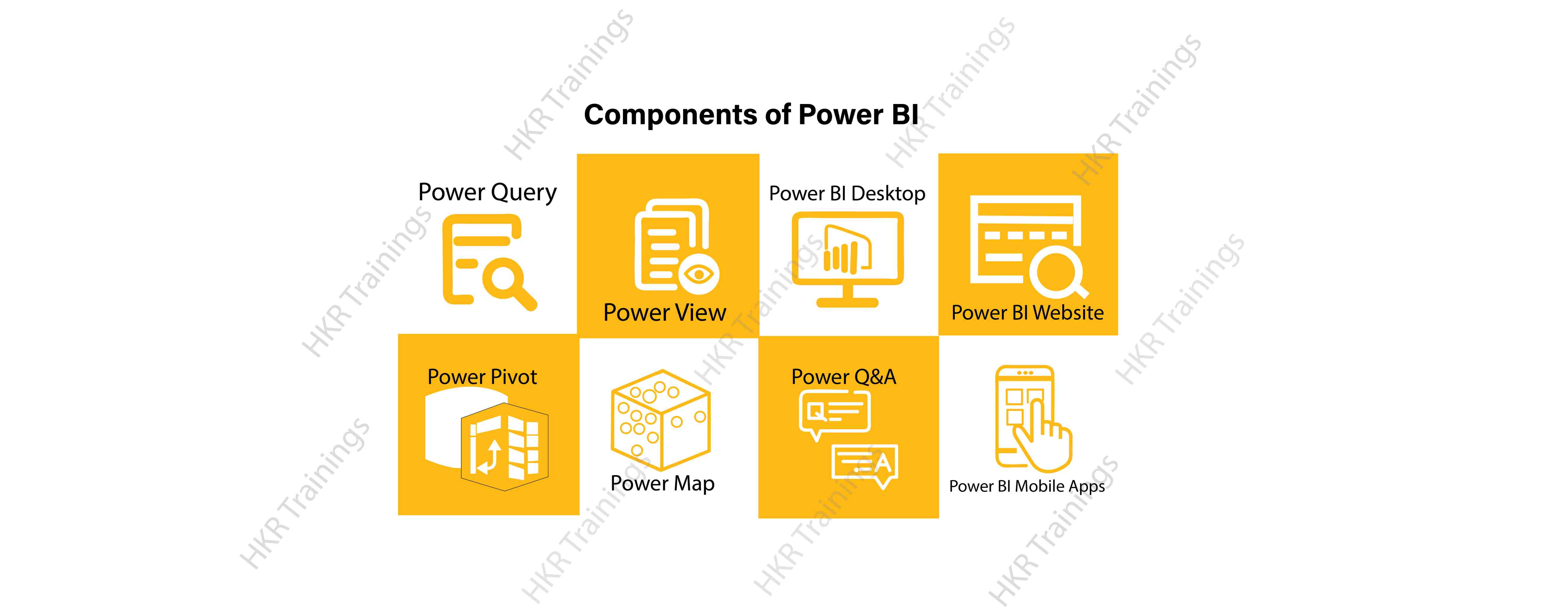
Here are the lists of power BI components. They are:

  • Power Query
  • Power Pivot
  • Power View
  • Power Map
  • Power Q&A
  • Power BI Desktop
  • Power BI Website
  • Power BI Mobile Apps

Power BI Components

Now start discussing each and every component of power BI in detail.

Top 50 frequently asked Power BI Interview Questions !

Power Query:

Power Query is one of the most essential components of Power BI. This would be included in your Excel or could be used as a Power BI Desktop component. Using Power Query, you can uninstall data from multiple data sources and retrieve data from a wide variety of different databases, such as Oracle, SQL Server, MySQL, and other databases. You can also retrieve data from records such as text files, CSV files, etc.

Power BI provides you a powerful GUI so that you really can change and use the information you need, such as date and time changes, add columns, modify types and content, and a variety of options. It includes a small language, Power Query M Formula Language, as a code that is more powerful than a GUI.Power Query Formula Language in Power BI is highly secure and optimized for the development of highly highly scalable mashup queries accessible to Power BI Desktop and Power Query. It has several features that cannot be made available by a GUI.

Power Pivot:

Power Pivot is a data designing and information technology engine. It’s being used to model static and dynamic data. You can establish or generate relations between various tables in Power Pivot and quantify values that can be considered in Pivot tables. It provides a tremendous opportunity to build your design.The language used mostly by Power BI Pivot is Data Analysis Expression (DAX), a highly functional language. 

HKR Trainings Logo

Subscribe to our YouTube channel to get new updates..!

Power View:

Power View is a major aspect of Power BI data visualization. It is an immersive device that connects to data sources and collects metadata that can be used for data collection. There are a lot of image processing blueprints in the Power View list. With Power View, you could even process the data for each visualization element or for the entire report. Slicers can be used to make better dicing of the information.Power View reports are responsive; the user can illustrate some of the data or components in Power View to communicate directly with each other.

Power Map:

Power Map is used to display spatial information in 3D mode. As soon as the visual interface is rendered in 3D mode, it offers some other dimension. In Power Map, one characteristic can be assumed to be the length of a column in 3D and another attribute to be a heatmap view. The data can be illustrated on the basis of a geographical location. Geographical locations may be a country, state, city, or street address.In order to get the best view, Power Map works with Bing Maps related to geographical latitude or longitude or country, state, city or street address data.

Power Q&A:

Power BI Q&A is a common language engine for questionnaires about your data model. After you have assembled and updated your data model on the Power BI website, you or your customers can ask questions, if any, and find solutions to those questions. There are a few shortcut keys and hints for the development of your framework so that it can respond to questions in the most effective manner possible.

For data visualization, Power Q&A works with Power View so that users can ask any questions, such as the amount of clients per state, and the question is responded in the form of a map view with numbers shown as bubbles by Power Q&A.

Want to know more about Power BI,visit here Power BI Tutorial !

Power BI Desktop:

Power BI Desktop is a continuous improvement of the Power BI suit. This is an embedded development tool for Power Query, Power Pivot and Power View. It allows you to build advanced queries, models, and reports. Power BI Desktop makes it easy to advance your BI skills and your data analytics experience.

Power BI Website:

Power BI solutions can be compiled on the Power BI website. You can generate dashboards for your news stories and share them with others, and you can also generate content directly on the Power BI website. With the Power BI website, you can conduct slice and dice online operations using a web browser, and you don’t even need any other tools.

Power BI Mobile Apps

Power BI Mobile Apps has three mobile operating system (OS) providers: Android, iOS, and Windows. These frameworks give you lots of an immersive view of Power BI reports and dashboards. You could even share them with your mobile app. A fraction of the documents can be displayed and a note can be written and shared with others. 

To gain in-depth knowledge with practical experience in Power BI, Then explore hkr’s Power BI Training In Hyderabad !

Power BI Training

Weekday / Weekend Batches

Conclusion:

In the above content, we had covered all the important components of power BI in detail. One can take a sound knowledge in the power BI technology by learning each and every components of the power BI architecture. However, the above stated information is strong enough to make you realize the importance of the power BI in corresponding to the data visualization, data analysis, etc.

Related Articles:


Source link