How to Create VisualForce Page in Salesforce


Visualforce in Salesforce ​- Table of Content

What is Visualforce in Salesforce? 

Visualforce in Salesforce refers to a designed and implemented framework, allowing the developers to build custom user interfaces and sophisticated interfaces that can be hosted On The Lightning platform natively. Visualforce is also a Framework that includes a tag-based markup language. It is quite similar to the HTML (hypertext markup language) and the standards controllers from the server-side. All these are used to perform the database operations, like database queries, saving of information, etc.

In simple terms, Visualforce is the markup language or tag-based language which is similar to both HTML and XML language and is developed by salesforce.com. Salesforce Visualforce includes action controllers. The tags are referred to as components as well. Visualforce makes use of the XML-like syntax to create differently and designing of the pages and utilizes the Apex for the backend implementation of the business logic.

In Visualforce, each Visualforce tag is corresponding to a fine-grained component. It could be either a related list, field or a section of the page. Visualforce in Salesforce maintains a behavior that allows the visual force components to be controlled. They can either be controlled by using the same logic that is used in the standard Salesforce pages, or developers are allowed to create their own logic with the controller class that is most commonly written in Apex.

The architecture of Visualforce in Salesforce:

Let us gain an understanding of the architecture of Visualforce in Salesforce. The below diagram represents the architecture of Visualforce. It helps us to understand how the actual process goes when the developer creates a page when a user requests any page.

Architecture of Visualforce in Salesforce, Salesforces, visualforce-in-salesforce-description-0

After the developer completes writing the Visualforce page and saves it to the platform, the next action is with the platform application server. The platform application server will try to compile the markup into an abstract set of instructions that can be easily understood by the visual force renderer. Once the compilation is done, if there are any errors generated, the save will be aborted, and the errors generated will be reported to the developer. If there are no errors then instructions will be saved in the metadata repository and will be sent to the visual force renderer. The responsibility of the render is to turn the instructions into HTML language, refresh the developer’s view along with providing instantaneous feedback. This feedback includes the changes that were made in the markup.

Wish to make a career in the world of salesforce? Start with HKR’S Salesforce Course in Hyderabad!

Salesforce Training

  • Master Your Craft
  • Lifetime LMS & Faculty Access
  • 24/7 online expert support
  • Real-world & Project Based Learning

The above diagram will help you in gaining an understanding of how the process flows when the non-developer user requests a Visualforce page. As the pages are already compiled into the instructions, the application server will be responsible for retrieving the page from the metadata repository and sending the same to the visual force render for the conversion into HTML language.

Visualforce pages and controllers: 

As developers play a key role in the organization, the developers are allowed to use Visualforce in order to create a visual force page definition. There are two different elements in the page definition. They are: 

1. Visualforce markup and 

2. visual force controller 

Let us gain an understanding of each element briefly. 

Visualforce markup: Visualforce markup refers to the visualforce tags, javaScript, HTML, or any other code that is embedded within the single Al tag. Markup element usually defines user interface components that have to be included in the page and also defines the way that they should appear

Visualforce controllers: The visual force controller refers to the set of instructions that have been used to specify what exactly happens when the user interacts with particular components at a specified point in the associated visualforce markup. The action could be either when the user clicks a button or a link. The controllers also provide the flexibility to access the data and also modify the component behavior that is usually displayed on a page.

  • In visualforce, the developer is allowed to create or use either a standard controller provided by the Lightning platform for adding custom controller logic. 
  • Standard controller refers to the controller that consists of the same logic and functionality that is used in the standard Salesforce page. 
  • Standard list controller is the controller that will help you in any living or creating the visual force pages it can be displayed or can act as a set of records. 
  • A custom controller is referred to as a controller that has a class written in Apex which helps in implementing all the pages logic without utilizing the standard controller.


Creation of a visual force page: 

Create a visualforce page in the Developer Console. Here is a step-by-step guide that will help you in creating the visualforce page. 

1. Navigate to the link Developer Console. Click on the options File -> New -> Visualforce Page. A new window will appear asking for a page name. You will need to name the page. You will need to write below.

Architecture of Visualforce in Salesforce, Salesforces, visualforce-in-salesforce-description-0, , Salesforces, visualforce-in-salesforce-description-1, Creation of a visualforce page, Salesforces, visualforce-in-salesforce-description-2

Click on save followed by preview. This will give you a new page which will result in the following screenshot.
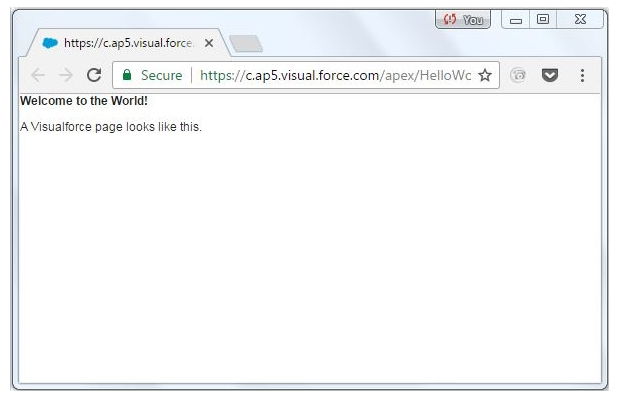
Architecture of Visualforce in Salesforce, Salesforces, visualforce-in-salesforce-description-0, , Salesforces, visualforce-in-salesforce-description-1, Creation of a visualforce page, Salesforces, visualforce-in-salesforce-description-2, give you a new page, Salesforces, visualforce-in-salesforce-description-3

Adding of components: 

The next part is to add the components to the program that you have already created. Let us learn about how to add some user interface components to the program that is created.

Wish to make a career in the world of salesforce? Start with HKR’S  salesforce online training!

Architecture of Visualforce in Salesforce, Salesforces, visualforce-in-salesforce-description-0, , Salesforces, visualforce-in-salesforce-description-1, Creation of a visualforce page, Salesforces, visualforce-in-salesforce-description-2, give you a new page, Salesforces, visualforce-in-salesforce-description-3, , Salesforces, visualforce-in-salesforce-description-4

Subscribe to our YouTube channel to get new updates..!

You will be able to add a block and a section in that block using the following code that is represented below. 

Architecture of Visualforce in Salesforce, Salesforces, visualforce-in-salesforce-description-0, , Salesforces, visualforce-in-salesforce-description-1, Creation of a visualforce page, Salesforces, visualforce-in-salesforce-description-2, give you a new page, Salesforces, visualforce-in-salesforce-description-3, , Salesforces, visualforce-in-salesforce-description-4, section in that block, Salesforces, visualforce-in-salesforce-description-5

Once you click on preview, the below output will be appearing.

Architecture of Visualforce in Salesforce, Salesforces, visualforce-in-salesforce-description-0, , Salesforces, visualforce-in-salesforce-description-1, Creation of a visualforce page, Salesforces, visualforce-in-salesforce-description-2, give you a new page, Salesforces, visualforce-in-salesforce-description-3, , Salesforces, visualforce-in-salesforce-description-4, section in that block, Salesforces, visualforce-in-salesforce-description-5, below output, Salesforces, visualforce-in-salesforce-description-6

Benefits of Visual Force: 

Visualforce has advantages of services, allowing the users to utilize and help the organizational developers. 

1. User-friendly development: Using Visualforce, the developers are allowed to edit the visual force markup within the same page displayed along with the resulting page. It also helps the developers instantly verify the added result that was just saved in the code. Visualforce consists of the editor pane that loves Syntax highlighting and autocompletion. It also provides extensive support for quick fixes, which helps developers create the components immediately as and when required.

Enroll in our Visual Studio Team Services Training program today and elevate your skills!

Salesforce Training

Weekday / Weekend Batches

2. Model view controller style development: Visualforce comes up with a model view controller development pattern that helps provide a clear vision about the view of the application and the controller that determines how the application would work. It was an architecture that would love the designers and the developers to spread the word among themselves by Building New applications. The designers are also allowed to focus on the look and feel of the user interface by the developers involved in working on the business logic that helps in driving the application. 

3. Integration with other web-based user interface technologies: Visualforce is rendered into HTML, allowing the designers to use Visualforce tags that include the standard HTML, flash javaScript, or any code that can be executed within an HTML page. 

4. Data-driven defaults: Visualforce components are rendered intelligently by the platform and display the appropriate interface for every field. 

5. Concise syntax: Visualforce pages are responsible for implementing the same functionality by utilizing 90% of code lines. 

6. Automatically upgradeable: There is no need to write the Visualforce pages repeatedly when the other parts of the lightning platform are upgraded. The pages are represented and stored in the metadata. They are also upgraded automatically along with the other part of the system.

Click here to get frequently asked Salesforce interview questions & answers

Conclusion

Visualforce in Salesforce is the platform that helps organizations deal with all the database operations and the development of the applications. As every organization is involved in working with the applications, an individual must have an idea about different platforms in Salesforce. Hence I would recommend you to get trained and certified in Salesforce, which would help you develop a better career ahead,

Related Articles:


Source link

Leave a Reply

Subscribe to Our Newsletter

Get our latest articles delivered straight to your inbox. No spam, we promise.

Recent Reviews


Introduction to the Ariba Network:

Ariba is a hosted service that helps suppliers and buyers to establish a relationship and conduct transactions online. As a supplier, you might already have an existing relationship with customers who invite you to collaborate and form a relationship on the Ariba network. Most of the buying organizations (buyers), make use of the Ariba network to enable electronic processing of orders and invoices with existing suppliers. Once a supplier accepts an invitation, the buyers can able to view the supplier’s catalogs and place the orders. Now suppliers can receive your orders, create, and send order confirmations, advanced shipment notices, and invoices if the buyers accept these documents. Then buyers finally will send the payment documents to the supplier to document about invoices. Both the buyers and sellers use the Ariba network as a chain to establish their business network. 

 Become a SAP Arbic Certified professional by learning this HKR SAP AribaTraining !

Benefits of using the Ariba Network:

The following are the primary benefits of using the Ariba network;

Respond to the business opportunities

Ariba network enables suppliers to search for and attend to online sourcing opportunities created by buying organization views. A business opportunity might request various information such as RFI (remote function call), a request for quote (RFQ), and a request for proposal (RFP) or a negotiation.

Automate the business processes

Ariba network enables buyers and suppliers to automate their certain tasks such as creating business aspects, offering improved business practices, and also reduces the costs.

Publish and control access to electronic catalogs

with the help of the Ariba network, suppliers have full control over which customers hold access to their catalogs. This approach enables suppliers to generate catalogs that consist of the special items or any contract prices for specific customers.

Conduct business in a secure and reliable environment

Ariba network is one of the most secured e-commerce service providers and provides different reliability features. The reliability features include catalog security, transaction security, and transaction reliability.

SAP Ariba Training

  • Master Your Craft
  • Lifetime LMS & Faculty Access
  • 24/7 online expert support
  • Real-world & Project Based Learning

Types of Ariba business network:

Below are the types of Ariba business networks such as;

  • Buying organization view.
  • Suppliers view 
  • Purchase order life cycle  

Let us know them one by one;

Buying organization view

Buying organization view can make use of the SAP procurement solutions such as SAP Ariba buying and invoicing to create purchase orders and enable to send them through the Ariba network to the respective customers.
Buying an organization view can also able to use SAP Ariba commerce Automation to transmit cXML documents between the external ERP system and Ariba network applications. In the SAP Ariba network, each buying organizations have access to buying accounts on buyers.ariba.com. 

Buying organization uses the SAP Ariba network for the following purposes:

  • To search for suppliers with products and services they need 
  • To Invite suppliers to form a trading partnership 
  • To send purchase orders and receive invoices 
  • To Receive order confirmatIons and ship notices 
  • To Send payment documents
  • Run reports on their suppliers

With the help of SAP Ariba discovery, the buying organizations can search for suppliers, publish postings for the goods and services, receive bids, and reward supplier products.

Suppliers view

A supplier in an Ariba network that sells any type of products or services. One more benefit of using the SAP Ariba network for the suppliers’ view is that suppliers can hold more than one account on supplier.ariba.com. 

Below are the possibilities that Suppliers view the offer, they are;

  • Access a network of high-volume buying organizations. 
  • Connect with specific buying organizations that are interested in the supplier’s products or services. 
  • Publish catalogs containing information and pricing that are customized for specific customers. 
  • Categorize products and services so that customers can find them when searching by category.
  • Select a routing method for the documents that best fit the supplier’s business needs—suppliers can receive documents through email, fax, online (using your Ariba Network inbox and outbox), cXML, or EDI, and send documents online.
  • Conduct transactions electronically by sending purchase order confirmations, invoices, and other documents. Ariba Network provides fast transmission, tracking, and processing of transactions.

 Become a SAP Certified professional by learning this HKR SAP Training in Bangalore !

The purchase order life cycle

Once suppliers successfully create their catalog files that define the products and services, they upload each detail on the Ariba network portal for validations and publish catalogs to the specific customers. 

Below are the possibilities that the purchase order life cycle offer;

  • Their customer uses their procurement application to browse catalogs for products and services and initiate purchase requisitions, which are routed through their organizations for approval.
  • Upon approval, the customer’s procurement application automatically converts the requisitions to purchase orders and sends them in cXML format to Ariba Network. 
  • Ariba Network sends the purchase orders to the supplier’s account where they can view them in their online inbox and receive them according to the selected routing method.
  •  If the customer’s business rules allow suppliers to send order confirmatIons, ship notices, and invoices through Ariba Network, suppliers can then send order fulfillment information and invoices electronically to their customers. 

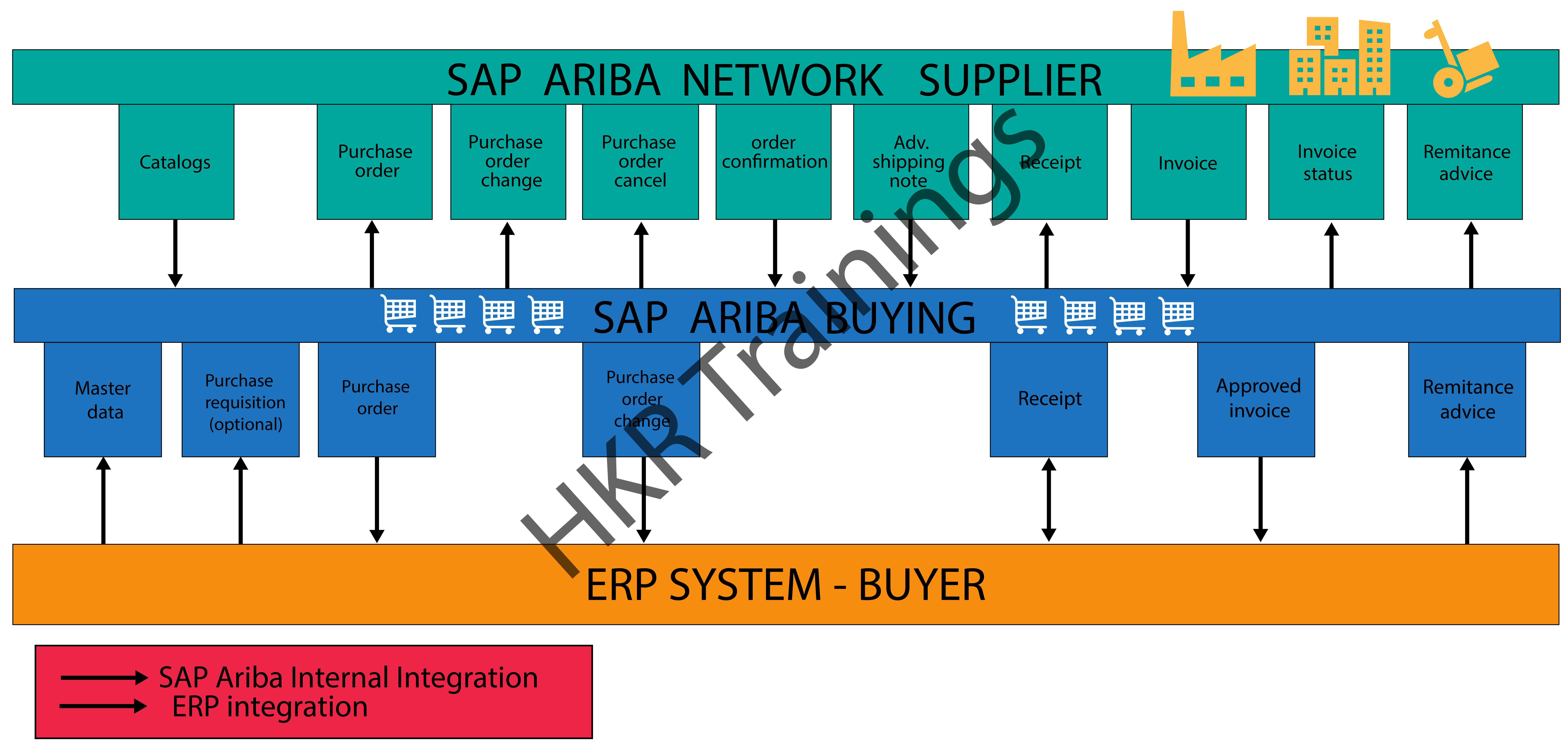
The below diagram illustrates the overall Ariba network type cycle:

Ariba network type cycle

HKR Trainings Logo

Subscribe to our YouTube channel to get new updates..!

Ariba network sign-in configuration set up( with the help of SAP Cloud platform identity Authentication services):

Buyers users can login into the Ariba network’s buyers account with the help of SSO (single sign-on) authentication with SAML 2.0 through the SAP cloud identity authentication services. The main purpose is to configure the SAP Ariba network with a cloud platform is to provide secured authentications. These buyers support only new users onboarded using SAP identity access management. The Ariba network validates the username and distinguishes between native Ariba network users and users from the SAP cloud platform identity authentication service, whereas non-native users are redirected to the SAP cloud platform identity authentication service for authentication. So the native Ariba network users need to enter their password and sign in as usual. 

Here we are going to explain how the high-level workflow of users signing into the Ariba network is as follows:

1.A user enters the username in the Ariba Network sign-in page and clicks Next.

2. Ariba Network distinguishes between native and non-native Ariba Network users and redirects them to the relevant sign-in page.

Non-native users

1.Users are redirected to the SAP Cloud Platform Identity Authentication Service for authentication.

2. SAP Cloud Platform Identity Authentication Service validates the user-entered credentials and redirects the user to Ariba Network.

Native Ariba network users

1.Users are redirected to an Ariba Network sign-in page.

2. Ariba Network validates the user-entered credentials and displays the home page.

Connecting to Ariba Network using SAP Ariba cloud integration gateway:

The SAP Ariba cloud integration gateway is a fully self-service gateway that allows suppliers to integrate and configure to Ariba Network and perform online transactions seamlessly. 

With the help of the SAP Ariba cloud integration you can perform the below things:

  • Configure your integration between Ariba Network and your ERP application to manage one or more buyer-supplier trading relationships.
  • Specify the mapping configuratIon. 
  • Validate and self-test transaction documents.
  • Monitor and track the integration lifecycle overall.

 Become a SAP Arbic Certified professional by learning this HKR SAP AribaTraining in Mumbai !

SAP Ariba Training

Weekday / Weekend Batches

 Conclusion

The main aim of using the Ariba network is to have a good relationship between buyers and suppliers to sell or purchase their products and also enable them to do transactions over the internet. We hope that through this post you might have learned fundamental concepts such as introduction to the Ariba network, the purpose of using the Ariba network, Types, and the configuration setups.

Related Articles:


Source link