Lenovo IdeaPad Slim 5x Review: Low-Cost Copilot Plus PC Has Appeal, Limits


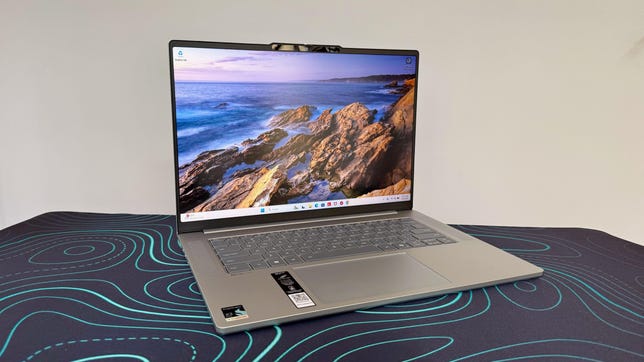
Lenovo IdeaPad Slim 5x Gen 11 laptop on a black desk mat with green swirls

Lenovo IdeaPad Slim 5x Gen 11

The Lenovo IdeaPad Slim 5x is a budget-friendly, 15-inch Copilot Plus PC built on the Qualcomm Snapdragon X2 platform. It’s a machine aimed squarely at people who want long battery life, whisper-quiet operation and dependable everyday performance in a slender chassis. To hit its sub-$1,000 price, the IdeaPad Slim 5x features Qualcomm’s entry-level Snapdragon X2 Plus chip and the minimum 16GB of RAM needed to meet Microsoft’s definition of a Copilot Plus PC.

For a budget laptop, the IdeaPad Slim 5x does a lot right. It’s a practical offering for a standard day at the office, including browsing, email, streaming and light productivity, and its Arm-based design helps keep it efficient and cool. What keeps it from being an easy recommendation for everyone is the same thing that holds back most Windows-on-Arm laptops: software compatibility remains a real consideration, at least in some specific use cases. And gaming performance is average at best from the integrated Qualcomm Adreno GPU. 

The 15.3-inch display makes the IdeaPad Slim 5x a bit of a tweener, sandwiched between more commonplace 14- and 16-inch laptops. The Acer Aspire 16 AI offers a roomier 16-inch panel at a lower price and only a slightly heavier weight, and the HP OmniBook 5 14 is more compact and portable with its 14-inch display but offers even longer battery life. This trio of budget laptops features Snapdragon X series processors, but the IdeaPad Slim 5x has the advantage of being the newest of the three, and its Snapdragon X2 chip outpaces both the two older X1 machines.

Lenovo IdeaPad Slim 5x Gen 11

Price as reviewed $850
Display size/resolution 15.3-inch 1,920×1,200 120Hz touchscreen IPS LCD
CPU Snapdragon X2 Plus X2P-42-100
Memory 16GB LPDDR5X-9523
Graphics Qualcomm Adreno X2-45
Storage 512GB SSD
Ports 2 x USB-C (10Gbps), 2 x USB-A (10Gbps), HDMI 2.1, microSD card slot, combo audio
Networking Wi-Fi 7 and Bluetooh 5.4
Operating system Windows 11 Home Arm64
Weight 3.1 pounds (1.4 kg)

The IdeaPad Slim 5x falls roughly in the middle of Lenovo’s broader IdeaPad lineup, which includes options with AMD and Intel processors, as well as the 3x and 7x Snapdragon X-based series, sized between 14 and 16 inches. Some of the 7x SKUs include the more advanced Snapdragon X2 Elite rather than the X2 Plus, which this model is built around.

The IdeaPad Slim 5x starts at $850 at Lenovo. We tested this entry-level model, but Lenovo offers a handful of upgrades. You can double the RAM to 32GB for an eye-watering $290 (thanks, RAMageddon) and bump the storage up from 512GB to 1TB for an also hefty $150.

Lenovo IdeaPad Slim 5x gray top cover against a gray wall

Matt Elliott/CNET

Two other upgrades are much more attainable, and we recommend both. It costs only $30 to swap out the basic 1,920×1,20-pixel, 120Hz IPS display for a 2.5K (2,560×1,600), 165Hz OLED panel. That’s a no-brainer for the added pixels alone, to say nothing about the better contrast and faster refresh rate, unless you require a touchscreen. The IPS offers touch support; the OLED doesn’t. You can also outfit the laptop with a bigger battery, going from a 54.7-watt-hour unit to 70 watt hours for just $10. The IdeaPad Slim 5x we tested offers great battery life, but more is always better.

The Lenovo IdeaPad Slim 5x starts at £1,310 in the UK and AU$1,699 in Australia

Lenovo IdeaPad Slim 5x performance

The processor at the heart of the IdeaPad Slim 5x, the Snapdragon X2 Plus X2P-42-100, is clearly tuned for efficiency first. That said, it manages to feel snappy in the ways that matter most for a mainstream productivity laptop. Apps open promptly, multitasking is smooth with 16GB of memory, and the machine feels comfortable handling a standard mix of browser tabs, Office work and streaming. It performed quite well against comparable machines in our benchmarks, and it should satisfy anyone looking for a reliable office notebook.

Its limitations show up when you push beyond that. The Adreno X2-45 integrated graphics are fine for light creative work, but this is not the laptop for serious gaming or any sustained graphics-heavy workloads.

Lenovo IdeaPad Slim 5x laptop with Qualcomm Snapdragon X Plus sticker in the corner

Matt Elliott/CNET

Qualcomm leads the way with laptop battery life, and the IdeaPad Slim 5x continues its run of success. The IdeaPad Slim 5x lasted 20.5 hours on our online streaming battery drain test, which was a half an hour shorter than the Acer Aspire 16 AI and nearly eight hours shorter than the HP OmniBook 5 14, but much longer than similarly priced laptops such as the Intel-based Lenovo IdeaPad 5i 16 and AMD-based Dell 14 Plus 2-in-1.

Another important note here: While Windows-on-Arm has made vast strides in terms of software compatibility, there are still issues. I was unable to get my VPN client to function on the IdeaPad Slim 5x, for instance, which has been an issue on other Arm machines, likely because of driver problems. I also couldn’t run Valorant, because its kernel-level anti-cheat system, Riot Vanguard, is incompatible with Arm architecture. You can check the apps you use to see if they have native Arm versions with this Window-on-Arm compatibility tool.

Practical, not premium design

The IdeaPad Slim 5x keeps the design language simple and practical, which suits the price. It’s solid enough for daily use, though nothing about it stands out as especially premium. While it’s fairly lightweight for its size at just over 3 pounds, it’s not featherlight or ultra-slim like some other ultraportables. It sits in the middle of the 14-inch HP OmniBook 3 14 (2.85 pounds) and the 16-inch Acer Aspire 16 AI (3.45 pounds) in size and weight.

Lenovo IdeaPad Slim 5x keyboard and touchpad

Matt Elliott/CNET

The 15-inch chassis gives the keyboard enough room to avoid feeling cramped, and it feels responsive for a chiclet-style, low-profile deck. The touchpad is generously proportioned and precise, though not luxurious in the way that glass alternatives feel.

For an IPS panel, the display is one of the strongest parts of this configuration. It delivers a bright, color-accurate picture and is what I’d call a “workmanlike” panel that reflects the price. I liked getting touch support at this price and the anti-glare finish that keeps glare and reflections away. Lab testing with a Spyder X Elite colorimeter showed a peak of 432 nits of brightness, which is very respectable for a budget laptop. Color performance was also solid, with full sRGB coverage and measured results of 77% AdobeRGB and 78% P3. It’s suitable for everyday photo work and media consumption, though it won’t rival a creator-grade panel.

Lenovo IdeaPad Slim 5x IPS display

Matt Elliott/CNET

Sound quality is something of an issue. The two 2-watt speakers sounded distractingly tinny at times, especially when the treble was peaking, and the volume was underwhelming. The FHD webcam also didn’t blow me away. It looked a bit grainy when video was full-screened, and didn’t hold up to fast motion particularly well. 

The port allotment is relatively generous with two USB-C, two USB-A and an HDMI port along with a microSD card slot, but the USB-C ports are disappointingly slow. They are of the USB 3.2 Gen 2 variety, which offers just 10Gbps speed compared with the 40Gbps you’d get from Thunderbolt 4.

Lenovo IdeaPad Slim 5x ports

Matt Elliott/CNET

Should I buy theLenovo IdeaPad Slim 5x?

The Lenovo IdeaPad Slim 5x offers solid value for students or office workers looking for a portable, dependable daily driver. It’s wholly unobtrusive, in both the positive and negative sense, but it’s a good fit for those looking for a productivity machine and want to spend significantly less than $1,000.

The problem with the IdeaPad Slim 5x, insofar as there is one, is that it’s a middling package overall. While the lows aren’t cripplingly low, the highs aren’t particularly high. It’s got a strong battery, but not the best-in-class. The highlight is the bright, responsive touchscreen, and brighter still is the option to upgrade to a higher-res OLED panel (albeit without touch support) for only an extra $30. 

The review process for laptops, desktops, tablets and other computerlike devices consists of two parts: performance testing under controlled conditions in the CNET Labs and extensive hands-on use by our expert reviewers. This includes evaluating a device’s aesthetics, ergonomics and features. A final review verdict is a combination of both objective and subjective judgments. 

The list of benchmarking software we use changes over time as the devices we test evolve. The most important core tests we’re currently running on every compatible computer include Primate Labs Geekbench 6, Cinebench 2024, PCMark 10 and 3DMark Fire Strike Ultra

A more detailed description of each benchmark and how we use it can be found on our How We Test Computers page. 

Geekbench 6 CPU (multi-core)

Lenovo IdeaPad Slim 5x Gen 11 12268HP OmniBook 5 14 11379Dell 14 Plus 2-in-1 10554Acer Aspire 16 AI 10521Lenovo IdeaPad 5i 16 2-in-1 Gen 10 10388MacBook Neo 8958

Note: Longer bars indicate better performance

Geekbench 6 CPU (single-core)

MacBook Neo 3541Lenovo IdeaPad Slim 5x Gen 11 3302Dell 14 Plus 2-in-1 2792Lenovo IdeaPad 5i 16 2-in-1 Gen 10 2645HP OmniBook 5 14 2395Acer Aspire 16 AI 2139

Note: Longer bars indicate better performance

Cinebench 2024 CPU (multi-core)

Lenovo IdeaPad Slim 5x Gen 11 702Acer Aspire 16 AI 677HP OmniBook 5 14 675Dell 14 Plus 2-in-1 537Lenovo IdeaPad 5i 16 2-in-1 Gen 10 530MacBook Neo 333

Note: Longer bars indicate better performance

Cinebench 2024 CPU (single-core)

MacBook Neo 143Lenovo IdeaPad Slim 5x Gen 11 133Dell 14 Plus 2-in-1 111HP OmniBook 5 14 110Lenovo IdeaPad 5i 16 2-in-1 Gen 10 109Acer Aspire 16 AI 96

Note: Longer bars indicate better performance

3DMark Steel Nomad

Lenovo IdeaPad Slim 5x Gen 11 413Lenovo IdeaPad 5i 16 2-in-1 Gen 10 380MacBook Neo 367HP OmniBook 5 14 228Acer Aspire 16 AI 227Dell 14 Plus 2-in-1 220

Note: Longer bars indicate better performance

Online streaming battery drain test

HP OmniBook 5 14 28 hr, 19 minAcer Aspire 16 AI 21 hr, 9 minLenovo IdeaPad Slim 5x Gen 11 20 hr, 37 minDell 14 Plus 2-in-1 14 hr, 55 minMacBook Neo 13 hr, 26 minLenovo IdeaPad 5i 16 2-in-1 Gen 10 12 hr, 30 min

Note: Longer bars indicate better performance

System configurations

Lenovo IdeaPad Slim 5x Gen 11 Microsoft Windows 11 Home; Qualcomm Snapdragon X2 Plus X2P-42-100; 16GB DDR5 RAM; Qualcomm Adreno Graphics; 512GB SSD
HP OmniBook 5 14 Microsoft Windows 11 Home; Qualcomm Snapdragon X Plus X1P-42-100; 32GB DDR5 RAM; Qualcomm Adreno Graphics; 1TB SSD
Acer Aspire 16 AI Microsoft Windows 11 Home; Qualcomm Snapdragon X X1-26-100; 16GB DDR5 RAM; Qualcomm Adreno X1-45; 512GB SSD
Lenovo IdeaPad 5i 16 2-in-1 Gen 10 Microsoft Windows 11 Home; Intel Core Ultra 7 255U; 16GB DDR5 RAM; Intel Graphics; 1TB SSD
Dell 14 Plus 2-in-1 Microsoft Windows 11 Home; AMD Ryzen AI 5 340; 16GB DDR5 RAM; AMD Radeon 840M Graphics; 512GB SSD
MacBook Neo Apple MacOS Tahoe 26.3.1; Apple A18 Pro (6‑core CPU, 5‑core GPU); 8GB LPDDR5; 256GB SSD


Source link

Leave a Reply

Subscribe to Our Newsletter

Get our latest articles delivered straight to your inbox. No spam, we promise.

Recent Reviews


Last updated on
Jan 19, 2024

Cyber Security VS Software Engineering – Table of Content

What is Cyber Security?

The cyber security industry is a fascinating field in the IT sector and apt for those who are ready to accept the challenges. The term cyber security can be defined as it is a type of IT application that designs and implements secure network solutions specially designed to act as a shield against hackers, persistence attacks, and any cyber-attacks.

Cyber security engineers are those who involve in designing and implementing security solutions to defend against various threats, cyber-attacks, and malware attacks. They are also involved in testing and monitoring the system devices to make us assure that all the system devices are up-to-date and ready to defend against any type of attack.

Wish to make a career in the world of Cyber Security? Start with Cyber Security Training!

What is Software Engineering?

Software engineering is also known as a Software architect or programming engineer, which involves analyzing the specific needs and creating the tools that are required to build software-related applications as per your or your client’s requirement.  The software engineer should have knowledge of software design, computer programming skills, such as python, Java, JS, Ruby, and other operating system knowledge like UNIX, and LINUX.  

Software developers are those who create software applications from already existing software applications whereas Software engineers are those who create the frameworks on the new software product which you are going to build.

Cyber Security Training

  • Master Your Craft
  • Lifetime LMS & Faculty Access
  • 24/7 online expert support
  • Real-world & Project Based Learning

Cyber security VS Software Engineering:

In this section, we explain the major differences between cyber security and software engineer as per a few categories. Let’s start;

1. Cyber security VS software engineering: Roles and responsibilities

 First, start with knowing the roles and responsibilities of aby cyber security engineer:

  •   Cyber security engineers or we can call them cyber security analysts they involve in implementing and creating plans, security portals to protect the computer network integrity, mobile devices from any kind of malware attacks or ransom attacks.
  • They are responsible for creating software and updating the computer hardware devices to implement security-related plans.
  • The information security analyst must involve in the constant monitoring of the networking devices to have a security breach.
  • They must involve in creating security incident responses to help minimize the damage caused by any type of malware attack.
  • Experienced cyber security professionals involved in communicating the plans or protocols to work enough to detect the intruders.
Software engineering roles and responsibilities:
  • Software engineers are responsible for building, maintaining, evaluating, and testing the new software.
  • They should have a deep understanding of information systems,  information technology, and programming. 
  • Sometimes they involve in developing the applications and should have a piece of knowledge in mathematics, and algorithms.

2. Cyber security and software engineering skills and qualifications:

Cyber Security Skills and qualifications:

  • Candidates must hold a bachelor’s degree in computer science, and IT system engineering.
  • They should possess a minimum of two years of work experience in cybersecurity-related roles such as incident detection, responses, and forensics. 
  • Should have experience with the functionalities, operations, and maintenance of firewalls and various forms of endpoint system device security.
  • Must have proficiency in languages and tools such as C++, Java, Node, Python, Go, Power shells, and Go.
  • They should have the ability to work in fast-paced work environments, often under some work pressure.
  • Posses the right eye for details and must have outstanding problem-solving skills.
  • Must have a piece of up-to-date knowledge of cyber security industries, trends, and hacker tactics.
Software engineers skills and qualifications:
  • Strong knowledge in engineering, computer science, and mathematics.
  • Should have strong experience in software development.
  • Should have proven programming experience (various programming language skills).
  • Experience in using different kinds of tools and techniques the software development.
  • Creative and adaptive at problem-solving.
  • Deep knowledge of concepts and algorithms.
  • Strong coding knowledge is a plus.

3. Cyber security and software engineers salary:

Cyber security engineer salary:

According to ziprecruiters.com, an average salary for any cyber security engineer earns $49, 750 and a software security architect earns $135,800.

Software engineer salary:

According to indeed.com, an average salary for any software engineer earns $50, 000 and an experienced software architect earns $111, 430.

If you have any doubts on Cyber Security, then get them clarified from Industry experts on our Cyber Security Tutorial !

HKR Trainings Logo

Subscribe to our YouTube channel to get new updates..!

4. Cyber security and software engineers: career path

Cyber Security Career path

In the cyber security field, you will get to see various kinds of specializations. Let us know them;

  • Cyber security analyst: should have a piece of strong knowledge of analytical and thinking. They must be creative problem solvers.
  • Cyber security engineers: they should have experience in different operating systems and strong experience in various database platforms.
  • Cyber security managers or administrators: should have a strong experience with firewalls, and a basic understanding of proxy servers, packet shapers, and load balancers.\
  • Cyber security consultants: must have an in-depth knowledge of IT security measures and protocols, and methods to detect intruders. Must have experience in finding and repairing the damages. 
  • Information security Analyst: Experience in providing IT support, and have an organized or in-depth knowledge of intrusion detection systems. Effective problem solver, organized, and detail-oriented.
Software engineer career path:

Below are the few niches where you can get specialized;

  • System engineers: should have a basic understanding of principles and techniques. They must be able to use databases and MYSQL.
  • Full-stack engineer: must have a strong coding knowledge, able to manage both front-end and back-end development tasks. Understanding of system protocols and techniques. 
  • Software engineers: a deep understanding of the developments, coding, building, and deploying applications. Should be proficient with various and multiple coding knowledge. Must have hands-on experience in software-oriented architecture. Able to work independently and must involve in team building. 
  • IT security specialists: must have an in-depth knowledge of IT security tools, anti-virus software management, content filtering, and firewalls. Should have experience with coding, and be able to identify any malicious attacks.
  • Cloud engineers: able to create roadmaps that take you into the storage capacity, and should be a problem solver. Should be able to communicate with all the levels of employees.
  • Take your career to next level in Cyber Security. Enroll now to get Cyber Security Training In London!

5. Cyber security and software engineers: Certification lists

Cyber security engineer certification lists:

Below is the list of major cyber security engineer certifications:

  • COBIT 5 control objectives for information and related technologies.
  • COBIT 5 Professional certification.
  • CompTIA security+certification -SYO-601.
  • CISA certification and training
  • CND – certified network defender
  • CHFI – Computer hacking forensic investigator certification
    CISSP certification
Software engineer certification lists:

Below is the list of major software engineer certification lists:

  • Certified secure software lifecycle professionals.
  • Certified software development professionals
  • Certified software engineer
  • CIW web development professionals
  • C programmer certification
  • C++ certified associate
  • MYSQL Oracle certification
  • Microsoft fundamental certifications 
  • aws associate certification
  • Salesforce fundamental certifications

Which career is best for you?

Here we are going to list out a few reasons to choose the best career;

You should consider cyber security if;

  • You intend to get a 4-years of degree
  • You can handle anxiety or work pressure
  • You can communicate verbally and orally.
  • You enjoy solving puzzles
  • You can multi-task 

You should consider software engineer if;

  • You like to learn things hands-on (real-time).
  • You have a genuine interest in programs or coding
  • You are a self-learner 
  • You are a good team handler 
  • You are unique, creative, and innovative.

frequently asked Cyber security Interview questions and Answers !!

Cyber Security Training

Weekday / Weekend Batches

Final words:

It is very difficult to say which one is the best without determining the parameters for that. If you are someone who has a desire to get a college degree, then we must say the cyber security profession is the easy choice for you. Suppose if you are more interested in self-learning, then cyber security would be a difficult field for you. If you are someone who has a desire to learn to code, then you can choose the software engineering field. But both careers require mathematical knowledge, and how the algorithm works. So our advice is to choose the right profession based on your priority, and educational background. We must say it’s a wise decision to take! In this Cybersecurity VS software engineer post, we have mentioned important differentiations based on a few parameters. Hope you found this information helpful.

Related Articles:

  1. 1.Cyber Security VS Data Science
  2. 2.Cyber security Technologies
  3. Quickbooks Interview Questions


Source link