This week’s lineup leans less on spectacle than on structure—who gets to speak, who gets recorded and how stories move through time. Across stages, galleries and even Wikipedia pages, these events track the systems that shape cultural memory, from youth authorship to institutional visibility.
Blues Night: Cornbread Harris at Sacred Heart Music Center in Duluth — March 27
At 98, Cornbread Harris plays less like a legacy act than a living throughline in Minnesota music history, connecting early rock and roll to present-day blues traditions. This Duluth performance, paired with a talk by biographer Andrea Swensson, frames his career not just as longevity but as influence, tracing a lineage that runs through Twin Cities clubs and into the national sound.
‘The Welkin’ at Gremlin Theatre in St. Paul — Through March 29
Lucy Kirkwood’s “The Welkin” enters its final weekend with a premise that feels pointedly current: who gets believed, and by whom. Set in 1759 but circling questions of authority and gendered judgment, this production by Frank Theatre leans into the friction between collective decision-making and individual truth, with direction by Wendy Knox keeping the moral spectacle anchored in lived experience.
‘Art+Feminism Wikipedia Edit-A-Thon’ at Macalester College in St. Paul — March 28
Part workshop, part corrective, the Art+Feminism Edit-A-Thon treats Wikipedia as a site of cultural repair, addressing the long-standing gender gap in who gets documented and how. Hosted at Macalester, the event connects local participation to a global effort that has reshaped thousands of entries since 2014, making visible the labor behind representation.
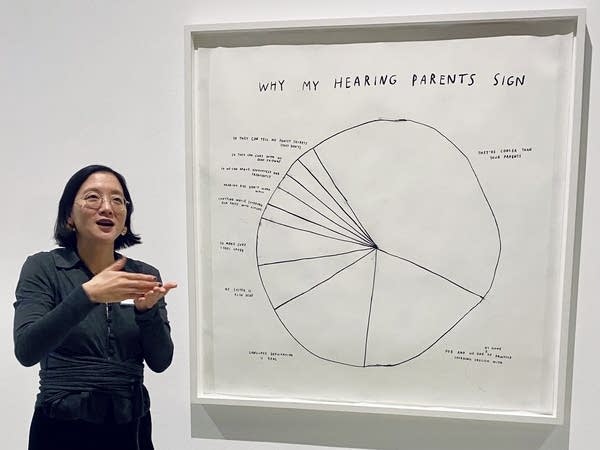
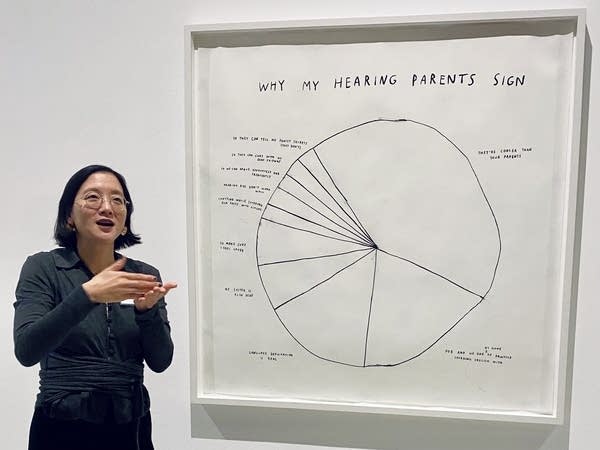
Artist Christine Sun Kim with one of her artworks during a tour Thursday, of the new exhibition "Christine Sun Kim: All Day All Night" at the Walker Art Center in Minneapolis.
Alex V. Cipolle | MPR News
‘Christine Sun Kim: All Day All Night’ at Walker Art Center in Minneapolis — March 28–Aug. 30
Christine Sun Kim’s first major survey arrives at the Walker with a conceptual clarity that reframes sound as social and political rather than purely auditory. Working across drawing, video and installation, Kim channels her experience as a deaf artist into sharp, often wry meditations on language and power, expanding how audiences understand both communication and access.
‘Be Heard Youth Poetry Slam Final’ at Guthrie Theater in Minneapolis — March 28
The final bout of the Be Heard Youth Poetry Slam brings months of writing and competition onto a single stage, where teen poets compress personal and collective stakes into performance. Organized by TruArtSpeaks, the event situates youth voice within Minnesota’s literary ecosystem, positioning spoken word as both artistic practice and civic expression.
‘The Choreography’ at Rochester Art Center in Rochester — Through March 2027
Alexandra Beaumont’s textile-driven practice treats movement as both subject and structure, folding dance into fabric in ways that read as personal and archival at once. “The Choreography” brings together works from her “Techniques for Ecstasy” series alongside a new large-scale installation, using the Rochester Art Center as a space where embodiment and material memory accumulate over time.
Taken together, they sketch a Twin Cities arts scene defined less by finished work than by ongoing process—revision, performance and the quiet work of being heard.
Selenium is an open-source, most popular web automation testing tool that supports multiple browsers & OS. XPath in Selenium is an XML Path and a syntax useful for locating an element on a web page. Locating any element on the web page uses XML path or XPath expression. Further, XPath in Selenium is useful for navigating through the HTML structure of the web page.
Moreover, XPath uses HTML DOM structure to find any element on a web page for both HTML and XML documents.
The syntax for XPath In Selenium
XPath in Selenium holds the element’s location on the web page. The basic syntax for XML Path Selenium is as follows-
Xpath=//tagname[@attribute="value"]
The meaning of each expression in the syntax is-
// : Choose the existing node.
Tagname: Particular node’s tagname.
@: This symbol denotes the “Select” attribute.
Attribute: Node’s attribute name.
Value: Attribute’s Value.
Become a master of Selenium by going through this HKRSelenium Training!
XML Document
The XML documents are the text files that contain XML data, including elements and other markups, in a sequential package. Further, it can include a wide variety of data such as numbers databases, numbers of a mathematical equation, etc. You can understand XML document with an example:-
Kumar
AK & Co.
032456123
Here, the above code is divided into two parts- Document Prolog & Document Elements. Let us discuss them in brief.
Document Prolog
The document prolog appears at the top of the document, beforE the root document element. It includes XML and Document type declaration.
Document Elements
These major building blocks of XML segregate the document into different sections. Each of these document sections perform a particular purpose. Moreover, you can easily segregate a document into different sections so that search engines can use it. Further, these document elements can be the containers having text and other elements combined.
Types of XPath
Absolute XPath:
Relative XPath:
Absolute XPath
In Selenium, the absolute XPath is the direct path to find the element. This Xpath begins with the “/” (Slash) symbol and helps select the element from the root. The major drawback of this XPath is that if you change the path of the element or attribute, the absolute XPath will fail.
Relative XPath:
The Relative XPath in Selenium begins with the double forward slash “//” symbol and from the middle of the HTML DOM. You can search elements anywhere on the web page as it doesn’t need to write a lengthy Xpath. This XPath is mainly considered as it is not a complete path from the root element.
For example: //input[@id=‘ap_email’]
Suppose You launch Google Chrome and navigate to google.com. Then locate the search bar utilising XPath. By analysing the web element there is an input tag and attributes like class and id. Utilise the tag name and given attributes to create XPath that will locate the search bar.
If you want to Explore more about Selenium? then read our updated article –Selenium Tutorial
Click the Elements tab and press Ctrl + F to open a search box in chromes developers tool. Write XPath string selector and it will try to search based on that criteria. In the image given above, it has an input tag. //input implies tagname. Use the name attribute and pass ‘q’ as its value. It provides XPath expression as shown below:
//input[@name=’q’]
It has focused on the element that implies this specific element was located utilising XPath.
If you want to Explore more about Selenium? then read our updated article –Selenium Tutorial!
Check out our Latest Tutorial video. Register Now Selenium Online Course to Become an expert in Selenium.
Acquire Selenium with jenkins certification by enrolling in the HKR Selenium with jenkins Training program in Hyderabad!
Selenium Certification Training
Master Your Craft
Lifetime LMS & Faculty Access
24/7 online expert support
Real-world & Project Based Learning
XPath Functions
Automation utilizing Selenium is unquestionably an incredible innovation which gives numerous approaches to distinguish an article or component on the website page. Be that as it may, in some cases we do deal with issues in recognizing the articles on a page that have similar credits. Some cases can be: components having similar credits and names or with more than one button with similar name and ids. It’s trying to train selenium to distinguish a specific item on a website page and it is the place where XPath functions to serve as the hero.
Selenium involves different functions. The three of the most broadly utilized functions are given below:
1) Basic XPath
The basic XPath expression selects nodes or a list of many nodes based on various elements or attributes such as ID, Name, ClassName, etc. It selects them from the XML documents. The syntax we can use for the basic XPath is –
Xpath=//input[@name="uid"
2.Contains()
It is a method used in XPath expression when the value of an attribute or element dynamically changes. You can easily find the elements with a partial text using the “Contains” feature in the XPath expression. Now understand this with the below example.:-
Xpath=//*[contains(@type,'sub')]
The above example denotes that the full value of the element type is submitted, but we use the partial text ‘sub’ here to find the element. Thus, in the above example, we tried to find the element by giving a partial text of the attribute “submit”.
3) Using OR & AND
Here, we use two conditions, first or second condition, among which one condition must be “True” to execute it. This method is still applicable if any one or both conditions are “true”. It means that any conditions should be true to find the element. The expression we can use for this is-
Xpath=//*[@type="submit" or @name="btnReset"]
The above XPath expression will help determine whether a single or both conditions are ‘True’.
Similarly, in the “And” XPath expression, also we use two conditions, but both conditions should be “true” to locate the element. If any one of the conditions becomes “false”, then the expression cannot find the element. The syntax we can use for this function is-
Xpath=//input[@type="submit" and @name="btnLogin"]
4) Xpath Starts-with
The function Xpath-Starts-with() in the Xpath functions is useful to find the element whose attribute value changes in some conditions. Here the value changes with the refresh of the page or by performing dynamic actions on the webpage. In this method, the initial text of the attribute should be in parallel to locate the element whose attribute value changes interactively.
Further, you can also find the elements whose attribute value doesn’t change or remain static. You can understand this function’s use by the following example:-
Xpath=//label[starts-with(@id,'message')]
The above syntax shows that two different elements start with the initial id “message”. Here, you can use the Xpath-starts with function to check whose attribute value changes or remains static.
Subscribe to our YouTube channel to get new updates..!
5) XPath Text() Function
In Selenium WebDriver, the function XPath Text() is a built-in function useful to locate elements based on the web element’s text. Using this function, you can find the same text element. Moreover, the elements that you locate must be in a string format.
Xpath=//td[text()='UserID']
Using the above expression having text function, you can locate the element that will show the exact match of the text.
6) XPath axes methods
This method in XPath functions is useful for finding complex or changing elements. However, we can see the following XPath axes methods which we can use:-
a) Following- It is useful to select all the elements in the document of the existing node(). The expression you can use for this method is-
Xpath=//*[@type="text"]//following::input
b) Ancestor- The ancestor axes method is useful to select all the ancestor elements of the existing node, like parents, grandparents, etc. Here, the expression you can use is-
c) Child- This axes method selects all the child elements in the documents’ current node. The expression you can use here is-
Xpath=//*[@id='java_technologies']//child::li
d) Preceding- This method helps select the nodes that come before the existing ones. Here is the example expression:-
Xpath=//*[@type="submit"]//preceding::input
The above expression helps to identify all the input elements before the currently given nodes.
e) Following-sibling- This method helps to select the following siblings of the existing node. All the siblings will be equivalent to the existing node, and the method will find the sibling next to the existing node. Moreover, the syntax you can use here for this method is-
f) Parent- It helps to select the parent from the existing node of the element. The following is the syntax you can use here.
Xpath=//*[@id='rt-feature']//parent::div
Many div(s) match with the parent, but if you want to focus on a specific element. For this you can use the below xpath syntax-
Xpath=//*[@id='rt-feature']//parent::div[1]
g) Self- In this method, it selects the existing node where it selects itself only. That means the node here is the “self”. The expression you can use for self is-
Xpath =//*[@type="password"]//self::input
h) Descendant- It helps to select the descendants of the existing element where it recognizes all the element descendants of the existing element.
Xpath=//*[@id='rt-feature']//descendant::a
Selenium Certification Training
Weekday / Weekend Batches
Conclusion
XPath or an XML Path is used to locate any element or navigate through the HTML structure of a webpage. It is generally used for automation purposes and in cases where it is difficult to find elements using locators like name, class, ID, etc. However, it is the most important among the locators useful in Selenium to identify web elements. Also, it is a handy locator for the testers of web pages.
Thus, learning about XPath in Selenium will help you quickly identify a web element on a web page.
To provide the best experiences, we use technologies like cookies to store and/or access device information. Consenting to these technologies will allow us to process data such as browsing behavior or unique IDs on this site. Not consenting or withdrawing consent, may adversely affect certain features and functions.
Functional
Always active
The technical storage or access is strictly necessary for the legitimate purpose of enabling the use of a specific service explicitly requested by the subscriber or user, or for the sole purpose of carrying out the transmission of a communication over an electronic communications network.
Preferences
The technical storage or access is necessary for the legitimate purpose of storing preferences that are not requested by the subscriber or user.
Statistics
The technical storage or access that is used exclusively for statistical purposes.The technical storage or access that is used exclusively for anonymous statistical purposes. Without a subpoena, voluntary compliance on the part of your Internet Service Provider, or additional records from a third party, information stored or retrieved for this purpose alone cannot usually be used to identify you.
Marketing
The technical storage or access is required to create user profiles to send advertising, or to track the user on a website or across several websites for similar marketing purposes.