OMRON Healthcare and Tricog Health strengthen collaboration in India with Tricog CardioCheck (TCC)


AI-powered ECG analysis enables rapid risk assessment and supports early detection of heart disease risk

KYOTO, Japan, Apr 23, 2026 – OMRON Healthcare Co., Ltd., a global leader in clinically proven medical devices for home health monitoring and treatment, today announced the integration of its ECG-enabled upper arm blood pressure monitors with Tricog Health Pte. Ltd.’s clinically validated AI-powered cardiac triage service, Tricog CardioCheck (TCC). The service is scheduled for rollout at health centers across India from April 2026.
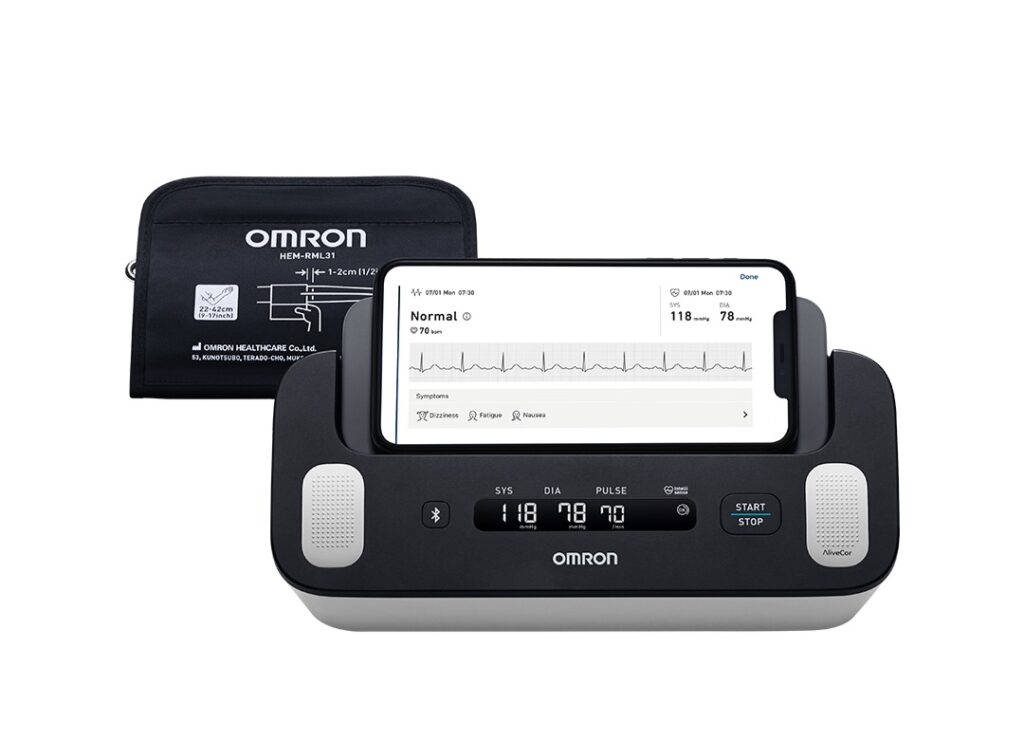
Tricog CardioCheck (TCC) enables ECG data recorded using OMRON Healthcare’s Complete™ blood pressure monitors with integrated ECG monitoring to be transmitted to the cloud and analyzed by Tricog’s AI algorithms. Within approximately 10 seconds, the system provides a three-level risk assessment, supporting patient triage and timely clinical evaluation.

Results are displayed via a dedicated smartphone application designed for healthcare professionals, allowing front-line care providers to review patient risk levels in real time and quickly determine the need for further examination, even where a cardiology specialist is not immediately available.

Cardiovascular disease represents a growing public health challenge in India, with the number of patients projected to increase from approximately 110 million today to 230 million by 2050. At the same time, access to specialized care remains limited, with far fewer cardiology specialists per capita than Japan or the United States and limited access to facilities equipped for advanced cardiac testing.

While early identification can be crucial to the effective management of cardiovascular conditions such as heart failure and heart attacks, helping to reduce the risk of serious complications including strokes, many cases go undetected until overt symptoms begin to develop.

By integrating ECG measurement into routine blood pressure monitoring at clinics, Tricog CardioCheck (TCC) supports the identification of patients whose underlying conditions may otherwise go undiagnosed. Furthermore, the system enables cardiovascular screening to be incorporated into existing workflows without significantly increasing operational burden, facilitating earlier detection and more timely referral for further evaluation.

Since its initial investment in Tricog in fiscal year 2023, OMRON Healthcare has continued to strengthen its partnership with the company in order to address key healthcare challenges in India. Through ongoing collaboration, both companies aim to expand access to innovative diagnostic solutions and contribute to improving cardiovascular health outcomes across the country.

About OMRON Healthcare

Committed to advancing health and empowering people worldwide to live life to the fullest, OMRON Healthcare is a global leader in the field of clinically proven, innovative medical equipment for home health monitoring and treatment. Aiming to realize its vision, “Going for ZERO, Preventive Care for the Health of Society,” the company develops products for cardiovascular condition management, respiratory care, and pain therapy. Building on this, it has introduced a new digital health ecosystem that bridges patients and healthcare professionals, helping to reduce cerebro-cardiovascular events, the worsening of respiratory diseases, and limitations caused by chronic pain.

With over 400 million units sold globally, OMRON provides the world’s most recommended blood pressure monitors by healthcare professionals. Throughout its history, OMRON Healthcare has striven to improve lives and contribute to a better society by developing innovations that help people prevent, treat, and manage their medical conditions, providing products and services in over 130 countries.

For more information, please visit: 
Website: https://healthcare.omron.com/
LinkedIn: https://www.linkedin.com/company/omron-healthcare-co-ltd-/

Media enquiries

This press release is disseminated by Kyodo PR on behalf of OMRON Healthcare. For more information or for interview opportunities, please contact:

OMRON Healthcare Press Desk: omronhealthcare-pr@kyodo-pr.co.jp


Source link

Leave a Reply

Subscribe to Our Newsletter

Get our latest articles delivered straight to your inbox. No spam, we promise.

Recent Reviews


What is salesforce apex class

Class is a kind of template Which is created from apex objects that are created, they consist of other classes with the user defined methods, variables and static initialization code. After when we save successfully, variables are invoked by other apex codes helped in methods which have been designated with web services keyword. It enables us to create and manage the apex classes from setup in a quick find box, They use developer console for additional development functionality. They may write class methods according to the syntax outlined in apex code developer’s guide.

By consuming a WSDL document which is stored on a local drive, they can develop automatically. Which allows the developers to make call outs for the external services in apex. In developer edition organization we can create, edit, delete or add the user interface of salesforce. By using the metadata API deployment only we can change apex, salesforce supports its users by providing its extensions for visual codes or for its migration tools, but not the part of our salesforce and also for the purposes of subscription agreements. By creating an apex class, we can perform various actions.  

Wish to make a career in the world of salesforce? Start with HKR’S  salesforce online training !

How to create class 

We create it in apex from developers console, along with salesforce eclipse IDE and from apex class details page. For creating a class, the developer needs to follow the following steps. 

  • First we need to go and click on the name developer console, 
  • next have to click on the file next and then on the apex class.

How to create class

For creating class from salesforce IDE, we require some steps they are, 

  • first we have to open force.com eclipse id,
  • then need to create the new project by clicking on file, new and then on apex class,
  • finally provide the name for it and click on Ok, finally our class is ready to use. 

creating from salesforce IDE

Creating the class by using apex class detail page is another way for creating class, for this we need to follow some steps they are, 

  • we need to click on the name 
  • have to click on setup. Then have to search for apex class 
  • choose the link to open apex class detail page, 
  • finally click new and provide the name for that new class, then class is ready for use. 

apex class

Salesforce Training

  • Master Your Craft
  • Lifetime LMS & Faculty Access
  • 24/7 online expert support
  • Real-world & Project Based Learning

Structure of the class

The structure of the class includes syntax that contains the combination of the access modifiers, sharing modes, class name, and also class body, we may look at all the further options.

Structure of the class

Modifiers 

Salesforce apex classes include three kinds of access modifiers, they are private, public and global.

  • Private: When we declare our access modifier as private, then the class will be known for local only. We cant access our class outside of the particular piece as default classes have these modifiers. 
  • Public: When we declare our class as public, that will be accessible for all codes of apex irrespective of our organization, if we have defined methods along with web services keyword, we have to declare the containing class with the global keyword. 
  • Global: When we declare our class as global, we will gain access to all apex codes irrespective of our organizations. If we have defined a method with a web service keyword, we must declare a containing class with the global keyword. 

Sharing modes of the class

It allows different methods for sharing the class they are, with sharing, which give respect for the user access settings and profile permissions. 

  • Without sharing: When a user doesn’t have accessed at least 10 records from 30, then all the 30 will update the running class in system mode. Which is defined with the without sharing keyword known as system mode.
  • Virtual: when we use the keyword virtual that indicates the class, that can allow extend and override. When methods need overridden, then they should declare with the keyword virtual.
  • Abstract: When we declare the class as abstract, it contains only signatures of methods which are not actual implementations. 

Class methods and constructions

For defining methods, we need to specify the following.

  • Need modifiers like public or private, which may be optional.
  • Value of the returned data by the methods like string or integer, when the method doesn’t return the value we can use Void.
  • It requires a list of input parameters that are used for the method, which is separated by commas, and enclosed in parenthesis. When there are no parameters, we may use the set of empty parentheses. 
  • Methods body requires to enclose in braces, the code of the method includes the local declaration. 

We can use the following syntax for defining methods.

Class methods and constructions

Variables

We need to follow to specify the following to declare the variable. 

  • It allows modifiers like public, final, and static. 
  • It includes data types like string and boolean, and the variable requires the name and value.
  • The following is the syntax to defining a variable.

Variables

Apex properties 

It is similar to variables. We can do additional things with code for the property value before it returned. Those properties may use to validate the date just before when the data are changed. We need to follow this syntax in the body to declare a property. 

Apex properties

Cloud Technologies, salesforce-apex-classes-description-3, Cloud Technologies, salesforce-apex-classes-description-8

Subscribe to our YouTube channel to get new updates..!

Salesforce Apex Pros

There is no need for purchasing the infrastructure. It provides security for applications with full authentication for the process to access the applications. It is easy to develop that exist on applications, which provides on demand and different tenant salesforce back end databases. 

Click here to get frequently asked Salesforce interview questions & answers

Salesforce Apex  Cons

Unlike other programming languages it is not easy to create threads, not possible for temporary files in apex. Which is important to keep in mind that the application created by them must be able to handle multiple documents, and all the requests return a huge collection of records from the database, those cannot show elements on the user interface. 

Salesforce Training

Weekday / Weekend Batches

Conclusion:

Class is a blueprint from where objects are created, these classes are similar to java classes. Invoice processor describes the class with all actions and methods which can be performed on the invoice, that is in context. Knowledge and development of the platform are required, apex is one of the best programming languages That has to be used with salesforce, Which assumes it like we already have set up salesforce to be used for our apex programming.

Related Articles:


Source link