Quality coffee, Ojibwe bonds build business in MN


MiigWitches Brew

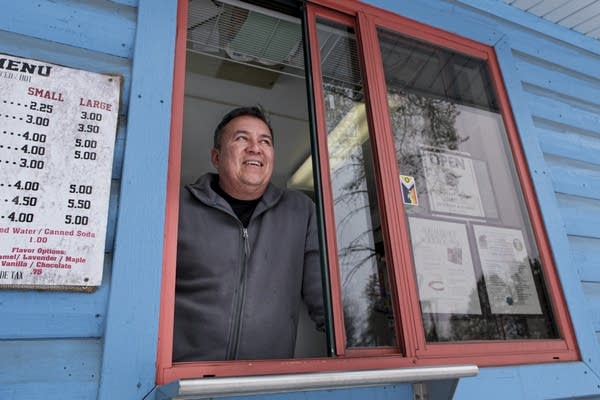
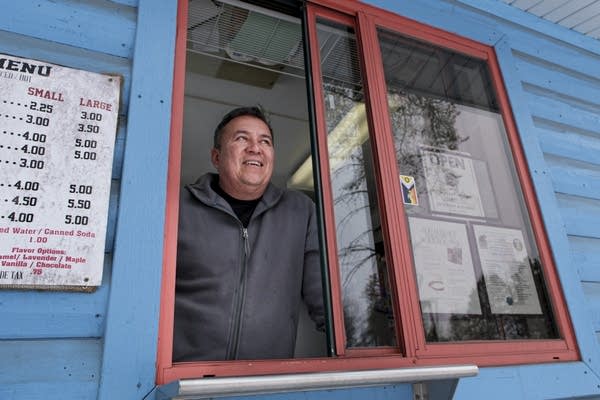
Nestled among the pine trees along a stretch of Big Lake Road sits a tiny blue building. If the signs are out on the roadside, the coffee kiosk is open for business.

Jackson Ripley and his family opened the shop MiigWitches Brew in 2024, fulfilling a dream that began years earlier when the COVID-19 pandemic was in full effect. His spouse, Lyz Jaakola, found the kiosk for sale online in 2020, fully equipped as a coffee shop.

“ We had been doing nothing but drinking coffee, being at home, and I'd slowly start getting into more, different variations of coffee with using a mocha pot, thinking about espresso,” Ripley said. “And so I said, ‘Yeah, let's try it.’”

Ripley, 55, wanted to bring quality coffee to his community on the Fond du Lac Reservation in northeastern Minnesota. He and his family’s business have found success while prioritizing community over profits.

“That was kind of like our business mindset is that we would just serve the community and hopefully we’d make a little bit of money.”

‘Close to family, to friends, to culture’

As vehicles make their way down the drive, Ripley often recognizes the car or work truck and is already making the drink by the time the customer pulls up to the window.

Before the kiosk opened, customers living and working in the reservation community would need to press on a few more miles to the neighboring city of Cloquet.

The flagship coffee shop sits on Ripley’s family property on the reservation, about a mile from the tribal community center. His spouse is a tribal citizen of the Fond du Lac Band of Lake Superior Chippewa. Ripley is from the Mandan, Hidatsa and Arikara Nation in North Dakota.

MiigWitches Brew
Jackson Ripley holds a mug an artist made to look like the MiigWitches Brew logo — a cauldron with a floral design.
Leah Lemm | MPR News

They’ve raised their family at Fond du Lac. Ripley’s in-laws, who are elders, live with them. His kids work with him at the shop and he can pop out from time to time to address his in-laws' needs.

“I feel like it's important for Native people to give back, or to be there for their families,” he said.

Proximity to family was a motivator in choosing a location for the business. And that’s not rare.

In a survey of 400 Native entrepreneurs, respondents said some of the perceived advantages to opening on tribal lands were financial benefits, familiarity with the location and being “close to family, to friends, to culture,” said Casey Lozar, director of the Center for Indian Country Development at the Federal Reserve Bank of Minneapolis.

‘The heart is always in it’

Miigwech means “thank you” in the Ojibwe language. Ripley credits Jaakola, 57, with the shop's clever name. Combining coffee, language and magic, the name became MiigWitches Brew. The logo is a cauldron with Ojibwe florals.

MiigWitches Brew is expanding. A year and a half after opening the kiosk, the family added another location 10 miles away at the Fond du Lac Tribal and Community College.

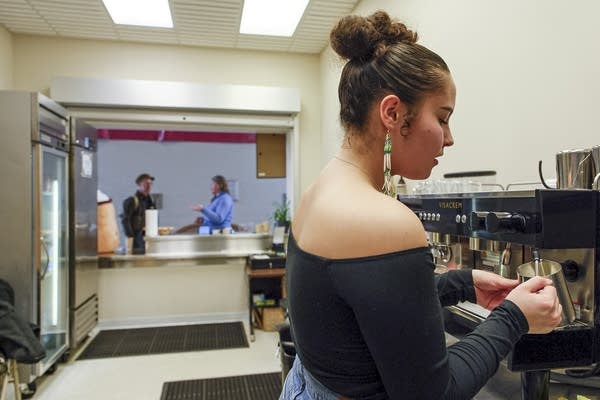
Jezlyn Abramowski expertly chats with customers while crafting coffee orders in a space that once served concessions during sporting events.

Abramowski, a Fond du Lac Band member, works as a barista while taking a leave of absence from her university studies. She said she needed time to address her mental health and that MiigWitches Brew is the right place for that.

“I feel like the heart is always in it, and you’re always serving your community, your people,” Abramowski said. “Especially up here on the rez, I feel like it's become a really essential part of our community to have MiigWitches Brew.”
MiigWitches Brew
Jezlyn Abramowski prepares a coffee order at MiigWitches Brew's second location at the Fond du Lac Tribal and Community College.
Leah Lemm | MPR News

Abramowski finds comfort in working at a business that supports her values and makes space for cultural ceremonies and events.

“Working for an Ojibwe business has been extremely healing for me as an Anishinaabekwe living in the world that we're living in right now.”

Perks that matter

The circle of support also extends to other local small businesses. Ripley sources his coffee beans from a roaster on the North Shore, and he gets his treat supply from a nearby Indigenous baker. For MiigWitches Brew’s signature drink, the maple latte, he gets maple syrup from a local Native farm.

“What we see from our Native entrepreneurs is, really, we prioritize supporting each other over making an outrageous profit,” said Andrea Reese, CEO of the Mni Sota Fund. The Mni Sota Fund is a Native community development financial institution that supports entrepreneurs through business loans and workshops.

“We’re just really rooted in values and culture, so that support of and for our community is really prioritized over anything else.”

Amid the sounds of steaming milk, vehicles pulling up to the kiosk window, and laughter with customers, Ripley has found a rhythm. There are hints that there may be even more opportunities to enjoy MiigWitches Brew in the near future via a mobile coffee shop.

He says he may not be the main breadwinner in his family, but he gets to bring good coffee to his community and he’s present for their kids. And for Ripley, those are the perks that matter.

This story comes from the Upper Midwest Newsroom, a public media collaboration between Wisconsin Public Radio, South Dakota Public Broadcasting, Prairie Public in North Dakota, and Minnesota Public Radio News made possible by the Corporation for Public Broadcasting.




Source link

Leave a Reply

Subscribe to Our Newsletter

Get our latest articles delivered straight to your inbox. No spam, we promise.

Recent Reviews


Introduction to SAP SD (Sales and Distribution):

SAP SD (Sales and distribution) is one of the significant functional modules of any enterprise resource planning (ERP). The SAP SD module helps in the bills management, shipping, services, transportation, and selling of the products. This functional module is closely integrated with other modules like Material Management (MM), product planning (PP), and logistics. 

 Become a SAP SD Certified professional by learning this HKR SAP SD Training !

SAP SD: creating master and material data

Master data management is a key factor in the SAP sales and distribution functional module. 

Primarily, there are two levels of master data available they are;

First, let’s discuss the first level;

   a. Customer master data.

   b. Material master and 

   c. Pricing conditions

Now discuss the second level;

It includes only;

Output conditions

It’s time for us to know how to create customer master records;

In general, the master record consists of information about the business transactions and also information about the customers where the organization uses this information to collaborate with them. 

Let us know the important transactions being used in the creation of customer master records.

  • XD01, XD02, and XD03 -> used to create/ modify/ display the customer data.
  • VD01, VD02, and VD03 -> used to create/ modify/ display the sales data.
  • FD01, FD02, and FD03 -> used to create/modify/ display the customer company code.
  • XD04 and XD05 -> display the change document and used to block the customers (global orders, delivery, and billing, etc).
  • XD06 and XD07 -> used for deletion of unwanted data and create contact person details.

To create a master data all you need to do is use an account group;

  • Use the T-codes XD01, VD01, and FD01.

*Note: XD01 -> this includes the sales area details, and that will be stored in the tables like KNA1, KNVV, and KNB1.

             VD01 -> this includes the sales data and no company code data will be included.

              FD01 -> this includes all about the company code levels, and the data will be stored in the tables KNA1 and KNB1.

  • The steps included are, 

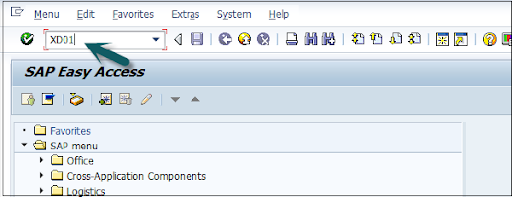
Open the SAP editor, then enter the T-code “XD01”, as shown below;

XD01

  • Then the new window will open, enter the following details;

               a. First, choose the account group from the given list

               b. Enter the customer number and select the proper company code.

  • Now enter the sales area details like;   

              a. Sales organization 

              b. Distribution channel 

              c. Various divisions details.

  • Once you have entered all the details, click on “Tick mark” as shown below;

Tick mark

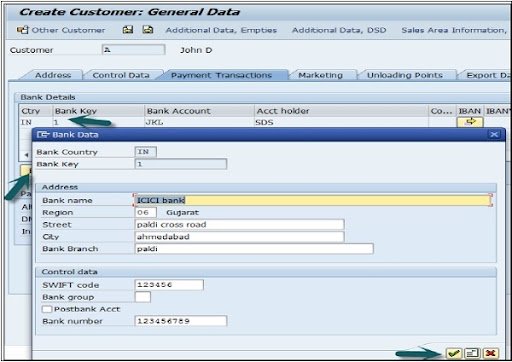
  • In the next step, enter the general details like title, name, address, company code data, and sales area data, etc.

enter the general details

  •  The next step is to add the control data details, and the image as given below;

control data details

  • Now go to the sales area details and enter the details like shipping data, partner function, and customer pricing, etc.

sales area details

  • Click on the “save” button to view the customer details;

save data

Top 30 frequently asked SAP SD Interview Questions !

SAP SD Training

  • Master Your Craft
  • Lifetime LMS & Faculty Access
  • 24/7 online expert support
  • Real-world & Project Based Learning

SAP SD: creating partner function

The partner function in SD allows users to identify which partner functions need to be performed with the business process. Consider a simple example; when all the customer functions are performed by partner function, this process is known as an obligatory function in Sales and distribution.

Related Articles SAP SD Modules !

All the partner functions can be categorized on the basis of a partner type. The partner types can be named as;

1. Partner type customers consist of four sub-modules;

        a. Sold to party type

        b. Ship to party type 

        c. Bill to party type 

        d. Payer 

2. Partner type contact persons 

3. Partner type vendors 

4. Forwarding agents 

5. Employee responsible 

6. Sales personnel type 

7. Partner type personnel

Related Articles SAP SD Flow ! 

In the below section, we would like to mention a few important partners type and their core functionalities ;

Customer type -> Sold-to-party 

                             Payers 

                             Ship-to-party 

                             Bill-to-party 

Vendors type -> Forwarding agents (fwdg agents)

Human resource type -> Employee responsible
                                       Sales personnel 

Contact person types -> contact person (CP)

Now it’s time for us to know how to create the partner functions;

The steps included are;

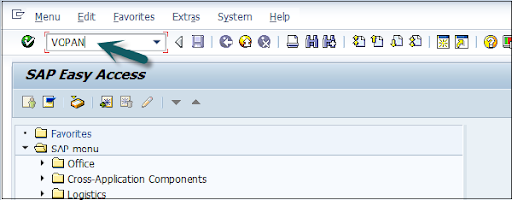
  • First, go to the SAP Access window -> type the T-code VOPAN as shown below;

VOPAN

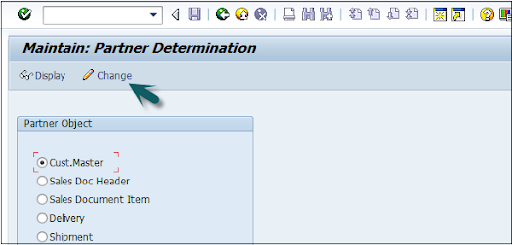
  • Then a new window will pop up -> select the partner type -> then click on the change button.

select the partner type

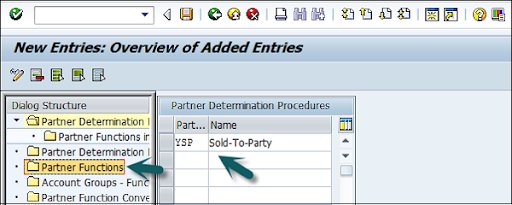
  • This window also opens the new browser -> click on the partner determination procedures -> click on the partner function that is available on the left panel as shown in the below image;

click on the partner determination procedures

  • Click on the new entries;

Click on the new entries

  • The last step includes entering the general information like name, type, and customerd

entering the general information

  • Now click on the “Save” button to save all the details which you have entered. 
SAPS, sap-sd-tutorial-description-6, SAPS, sap-sd-tutorial-description-12

Subscribe to our YouTube channel to get new updates..!

SAP SD: Creating a material stock

Suppose you have already adopted SAP in the organization and now it’s time to add all your stock in the Sales and distribution module. 

The steps included creating a material stock;

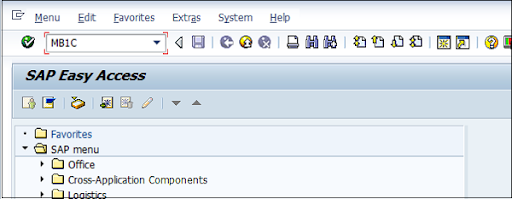
  • Use the transaction code MB1C and movement type 561 to receive the purchase order.

MB1C

  • Now a new window will pop up, enter the date, storage, plant, and movement type details as shown below;

new window

  • Now select the movement as per your requirements-> click enter as shown in the below image;

movement as per your requirements

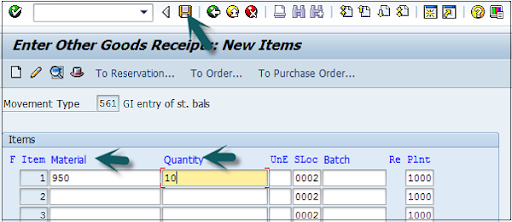
  •  A new window will pop up, now enter the material code ->create the quantity for the stocks -> click save as shown below;

create the quantity for the stocks

  • Finally, a material document with a stock number will be displayed.

SAP SD Training

Weekday / Weekend Batches

SAP SD: pre-sales order activities 

All sales order activities can be divided into pre-order and post-order sales activities. Pre-order sales take place before the product is sold out and post-order sales take place after the product is sold out. 

There are two types of pre-sales order activities that take place, they are;

Related Articles SAP SD Tables ! 

Inquiries 

Inquiries are nothing but questionaries about if the product is available or not, the cost of the products, and the delivery of the product. 

The t-codes which are used to perform inquiries;

1. VA11: Create inquiry logistics -> sales and distribution -> sales -> inquiry -> create.

2. VA12: Change inquiry

3. VA13: display or inquiry search

Quotations:

A quotation is a legal document or blueprint, which enables customers to know about the products or services. 

The following are the T-codes used to create the quotations:

1. VA21: Creating a quotation.

2. VA22: Changing of quotation.

3. VA23: display or quotation search

First, let’s start with creating inquiries:

Foremost, an inquiry is not about the blueprint or a document, but it is all about information that is related to products or materials, and goods quality.

The navigation is as follows:

First, go to the logistics -> sales, and distributions -> click on “sales” -> Inquiry -> create a T-code (VA11).

Note: when you use this T-code, create the below details to access this t-code.

Inquiry type -> ZEC 1 (IECPP inquiry)

Sales organization ->  4000

Distribution channel -> 40

Division ->  00

The steps included are;

  • Open the SAP easy access menu -> enter the T-code VA11 as shown below;

VA11

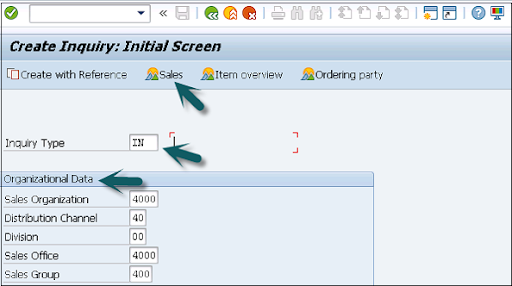
  • Now enter the Inquiry type as “IN” -> then organizational details -> click on save button as shown in the below image;

organizational details

  • Now the new window will pop up -> enter the partner functions such as; sold-to-party and shift-to-party -> enter the material code -> quanity details -> click save.

sold-to-party and shift-to-party

A message like inquiry type “123456789” will be created and displayed. 

Benefits of using SAP Sales and Distribution:

{ Related Articles: SAP SD Training in Pune }

The following are the benefits of using SAP sales and distribution;

  • SAP Sales and distribution helps to track the overall sales distributions.
  • Helps to track organizational sales data along with the team performance.
  • Recording pre-order and post-order sales activities.
  • Define the important process for the sales and distribution methods.
  • Helps users to categorize the diverse sales and distribution process.
  • Offers effective management in order to manage the material management, pricing, and stocks.

Conclusion:

From this article, we can consider that Sales and distribution is an important functional module. In every ERP based organization, they prefer to adopt Material management along with sales and distribution to manage/track the overall sales. I hope this SAP SD tutorial may help a few SAP communities to learn, and explore the basic sales knowledge. 


Source link