Sonos Brings Tab Navigation, Speaker Sorting And More To Its App


Sonos has added some handy quality-of-life updates to its mobile app.

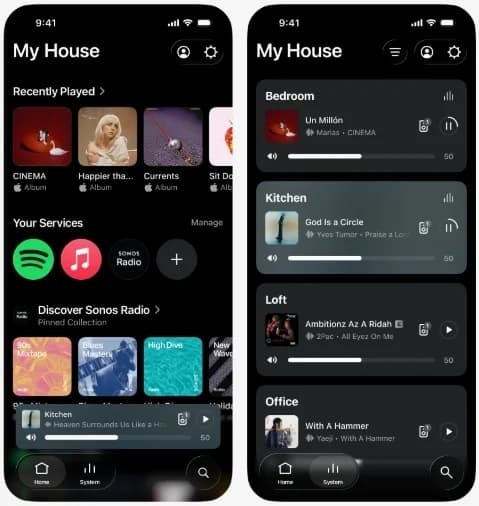
Sonos has released an app update that includes features such as tabbed browsing and a way to sort your speakers. The tabs are optional, and you can enable them by switching on the Enable Improved Navigation option in the app settings. These will let you access the system, search and home screens with a single tap at the bottom of the screen, perhaps making it a little easier and faster to get to key features of the app.

In the system tab, you’ll see a list of your speakers and headphones. You’ll be able to sort them in a number of ways, such as alphabetically, frequently used speakers and those that are currently playing audio. You can also pin speakers or rooms to the top of the list. This sorting feature will be more useful for folks that have a bunch of Sonos devices throughout their home rather than, for instance, only a home cinema setup.
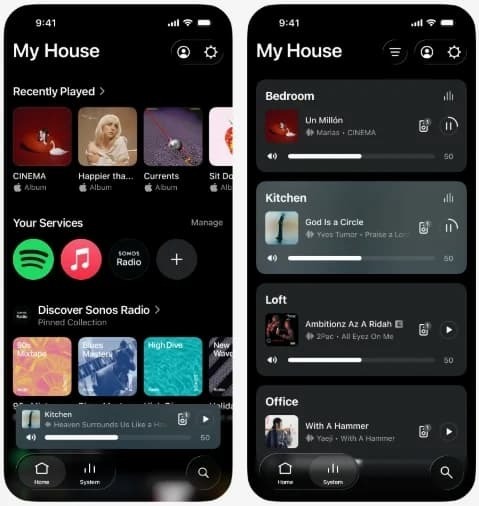
There are other fresh bits and bobs as part of this update. On iOS, users will have access to a new-look volume interface with a dynamic slider. The background colors on the Now Playing screen will reflect the album art of what you’re listening to. One other useful tweak means you’ll be able to swipe to delete something from your favorites. There are bug fixes and performance updates too.

None of these features are particularly groundbreaking, but they’re nice quality-of-life updates. Sonos is rolling out the update over a couple of weeks, so you might not have access just yet. 

A little over two years ago, Sonos released a major app update that was so disastrous, it led to a change in the company’s leadership. The app is in a much better place these days, though it wouldn’t be surprising if Sonos engineers still held their breath every time they click the “deploy app update” button.


Source link

Leave a Reply

Subscribe to Our Newsletter

Get our latest articles delivered straight to your inbox. No spam, we promise.

Recent Reviews


Create your own widgets using Gemini’s natural language features.

Wear OS 7 is now live for the last three Pixel Watches, Google announced. The update gives users a bunch of nice features, particularly around the interface, notifications and Gemini Intelligence. You’ll also see better battery life with the update to go along with the Pixel Watch 4‘s fast-charging capabilities.

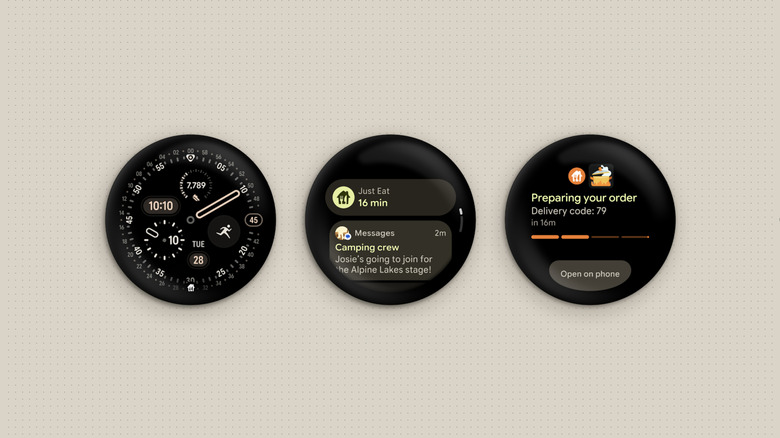
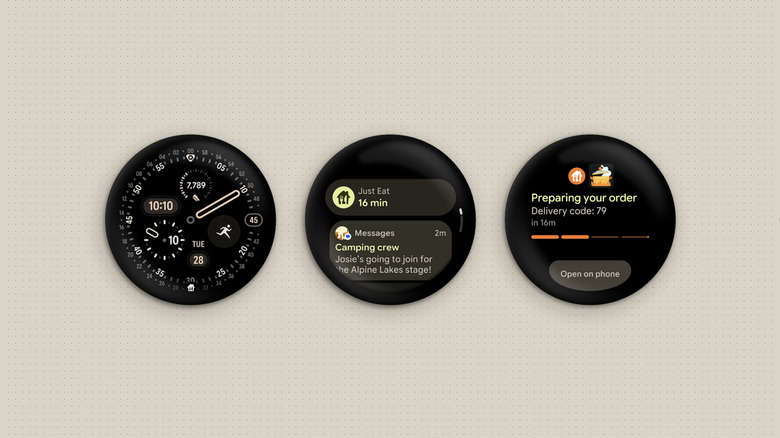
First announced last month at I/O 2026, Wear OS 7 carries over some Android 17 design tweaks, lays the groundwork for new Gemini Intelligence features and adds new glanceable design elements. To start with, the new Create My Widget function lets you build custom dashboards (Wear Widgets), using natural language via Gemini Intelligence. It also introduces Live Updates, showing information for things like game scores, workout progress and food delivery arrival times as shown above. 

Another key feature is connected device control. Wear OS 7 now lets you control your earbuds or Google’s Android XR smartglasses coming later this year. If you take a photos with those glasses, for instance, you can instantly review them on a Pixel Watch. You can also control what’s playing on your headphones, home speakers and other audio devices. 

Gemini also powers multi-step automation, letting you use natural language to reserve a spin class or make a restaurant order. Gemini’s Neural Express design language is now on Wear OS 7 as well, giving you “helpful” suggestions based on your chat, Gmail and search histories.

The new update will even boost your battery life, providing on average a 10 percent improvement, Google says. Wear OS 7 is now rolling out to Pixel Watch 2, Pixel Watch 3 and Pixel Watch 4 owners. There’s now word yet on when it’s coming to Samsung Galaxy Watches and other Wear OS devices. 


Source link