TSA PreCheck Touchless ID is now live at more than 60 airports


In recent months, there haven’t been many positive developments surrounding airport security in the U.S. After all, it was only a few weeks ago that the partial government shutdown led to major backups at many of the nation’s busiest hubs.

But we do have one piece of good news to share: One of the best new security shortcuts is now widely available at airports across the country.

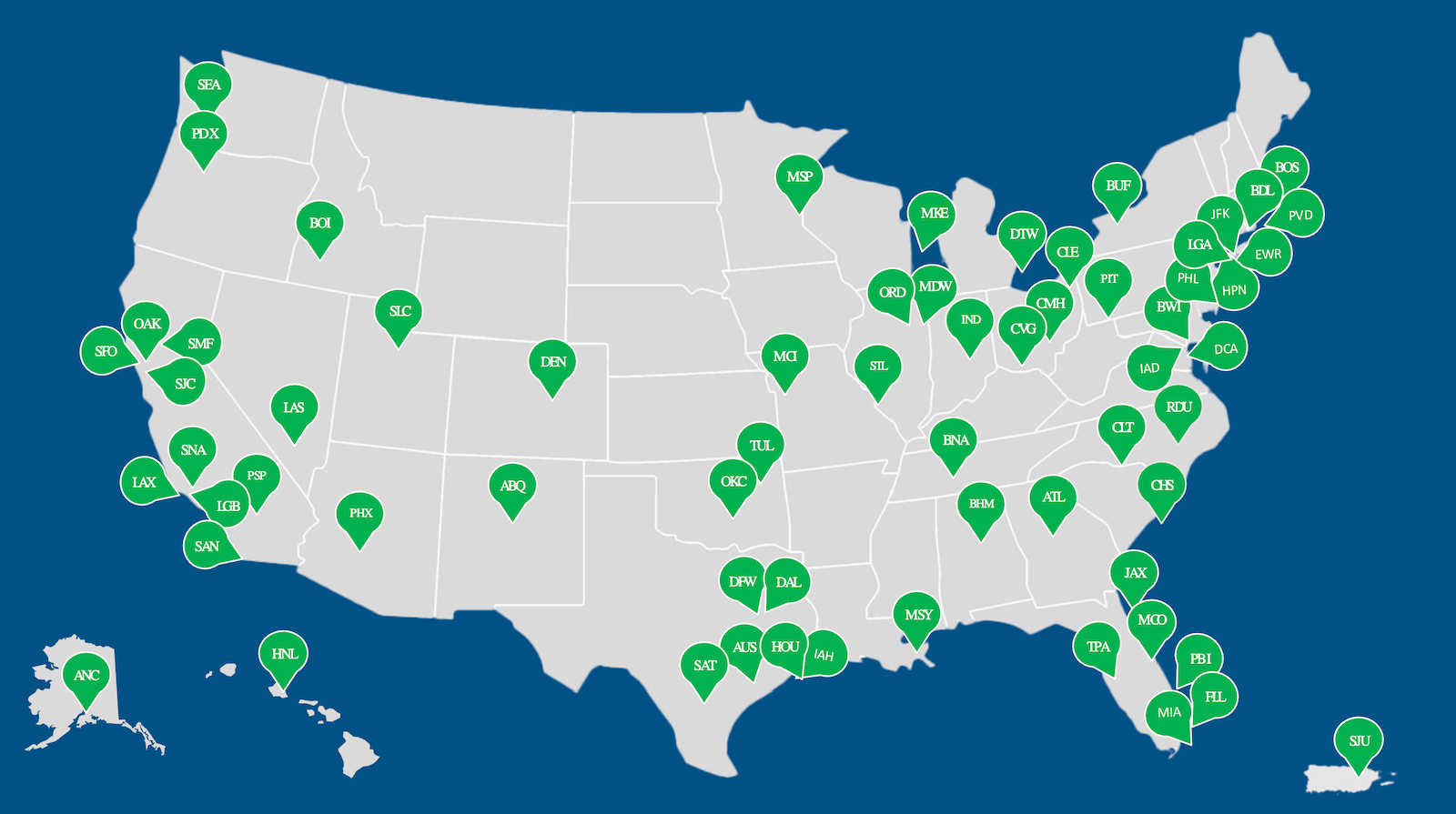
The new TSA PreCheck Touchless ID program is officially available at more than 60 airports nationwide.

Late last month — in the midst of all the checkpoint chaos — the Transportation Security Administration quietly wrapped up an aggressive rollout of the fast-tracked, hands-free security lanes.

The below map from the TSA shows all the airports where the program is now available:
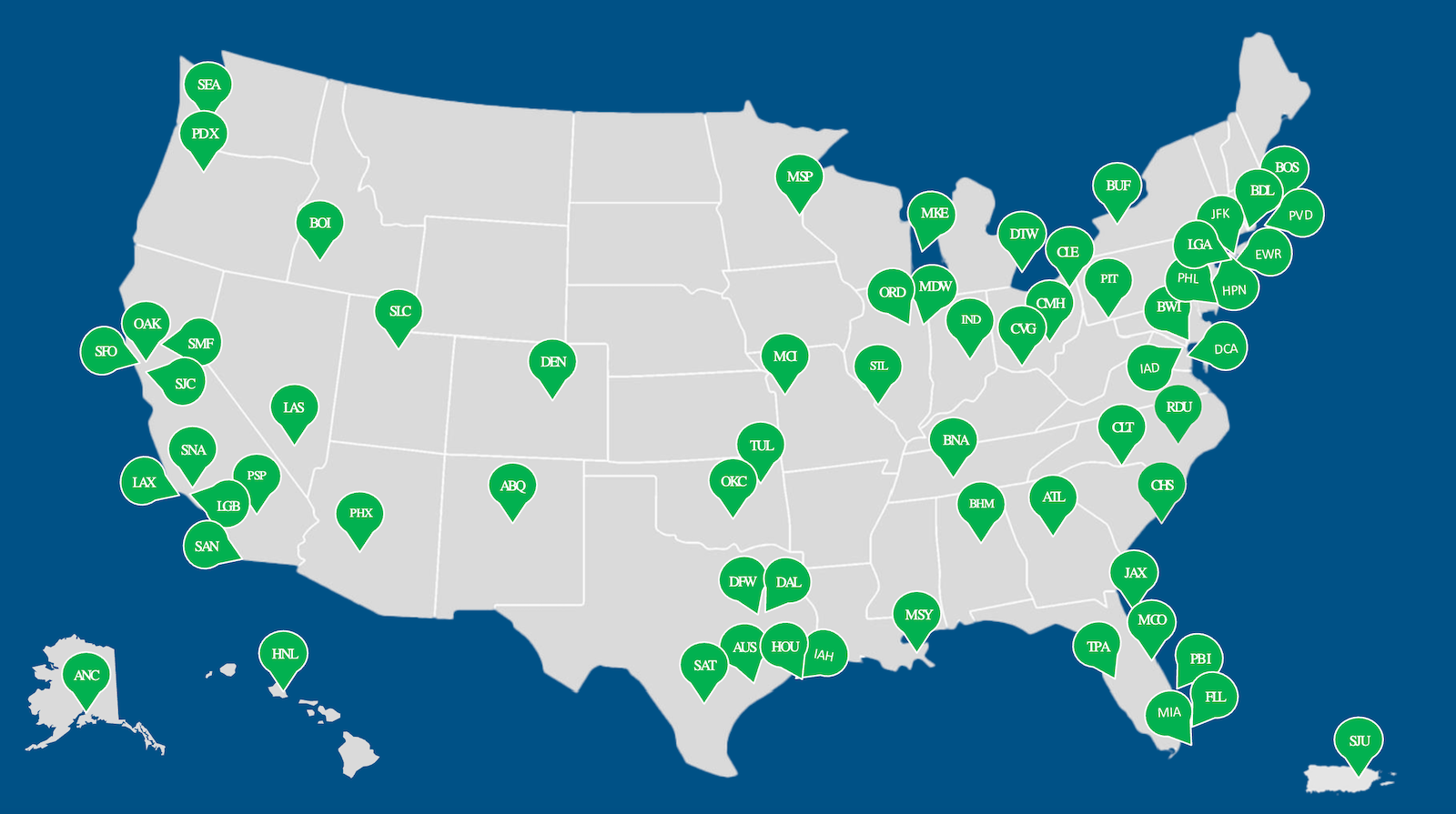
TSA PreCheck Touchless ID locations as of April 2026. TSA

Fast expansion in 2026

Until just a few months ago, TSA PreCheck Touchless ID was only available at a short list of major hubs.

But in January, TPG reported the TSA was on the cusp of rapidly expanding the service to 50 additional U.S airports by spring. And despite a monthslong partial government shutdown (which technically is still ongoing), the TSA did, in fact, meet that target.

As shown in the map, the service is now available at nearly every major hub as well as at a significantly expanded array of medium-sized airports — from the world’s busiest to the airports in Jacksonville, Boise and Albuquerque.

Personally, I was happy to see the technology come online in recent weeks at my home airport, Raleigh-Durham International Airport (RDU) in North Carolina.

Reward your inbox with the TPG Daily newsletter

Join over 700,000 readers for breaking news, in-depth guides and exclusive deals from TPG’s experts

What is TSA PreCheck Touchless ID?

TSA PreCheck Touchless ID is available at no added cost to all TSA PreCheck members and to travelers who access the TSA PreCheck lanes by way of a Global Entry membership.

Read more: Best credit cards for Global Entry and TSA PreCheck

These separate lanes allow flyers to skip the normal TSA PreCheck line and skip pulling out their boarding pass or ID; instead, the TSA verifies passenger identities via a quick photo.

It’s a similar experience to using the paid Clear service, but — again — doesn’t come at any additional cost beyond the TSA PreCheck (or Global Entry) application fee you pay every five years.
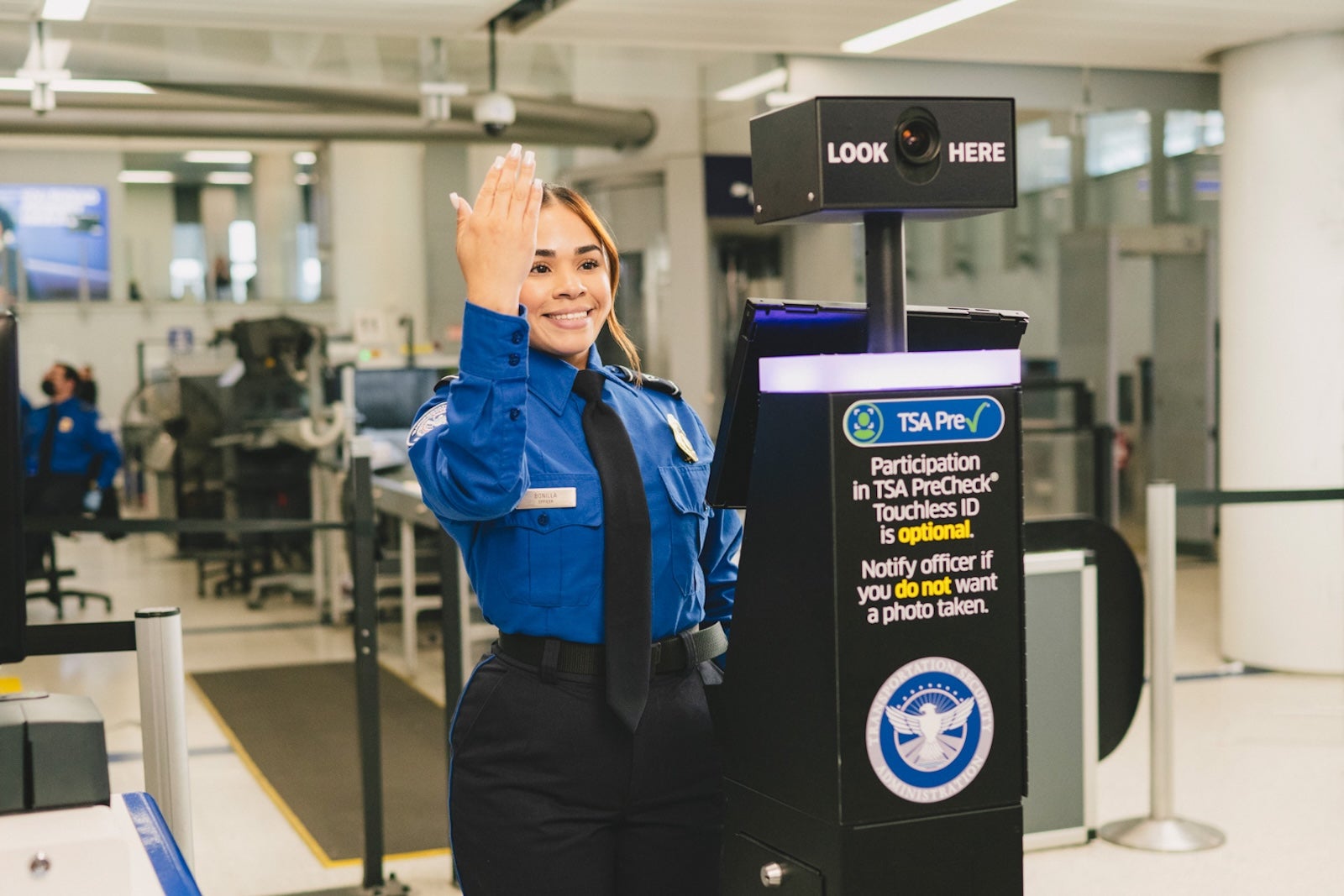
TSA PreCheck Touchless ID. JASON LEE/TSA

For many travelers across the country, these lanes were among the best “hacks” to avoid long lines when long lines boiled over at the peak of the shutdown.

The program is optional, but you must opt in ahead of time through your airline’s profile. Learn more about how to do that here.

Important details to know

Even if you opt into the process and your departure airport is listed as having the service, don’t automatically assume that you’ll be able to access TSA PreCheck Touchless ID.
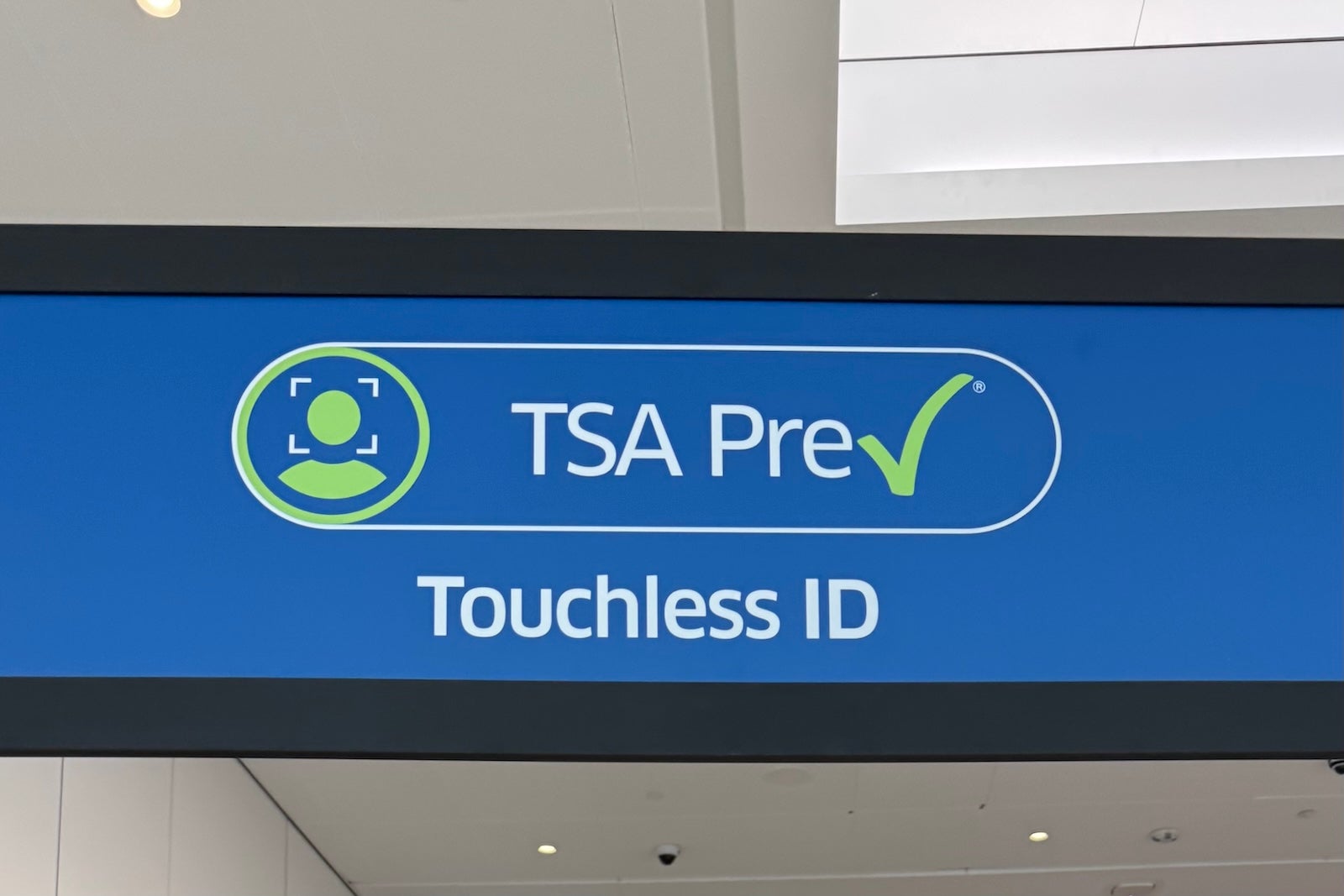
TSA PreCheck Touchless ID lane at Los Angeles International Airport (LAX). SEAN CUDAHY/THE POINTS GUY

While the speedy new lanes are now at 60-plus airports, the TSA notes that the option is not available in every terminal at every hub.

For that reason, you certainly should still bring a valid Real ID or approved alternative with you to the airport for your flight. (Plus, I’ve had plenty of cases where I’ve reached the checkpoint only to learn the technology was temporarily out of service.)

Six major airlines participate in the program, and several have linked to a full list of every airport where their flyers can access the Touchless ID service:

It’s not clear whether we’ll see the Touchless lanes at even more (and smaller) airports in the future.

Related reading:


Source link

Leave a Reply

Subscribe to Our Newsletter

Get our latest articles delivered straight to your inbox. No spam, we promise.

Recent Reviews


SD Tables in SAP:

The SAP SD module is built on tables and uses them to store data. We’ll go through SAP SD tables and their relationships in this tutorial. SAP SD tables are critical storage for corporate data connected to SAP ERP software’s sales and distribution activities. The SD tables are basically divided into three parts:

These are the SD module’s building blocks, and it’s only natural to address tables in this sequence. Please look at the slides to see how the tables from different blocks were connected. Being an expert in SAP SD necessitates an understanding of these relationships. 

 Become a SAP SD Certified professional by learning this HKR SAP SD Training !

1) Sales

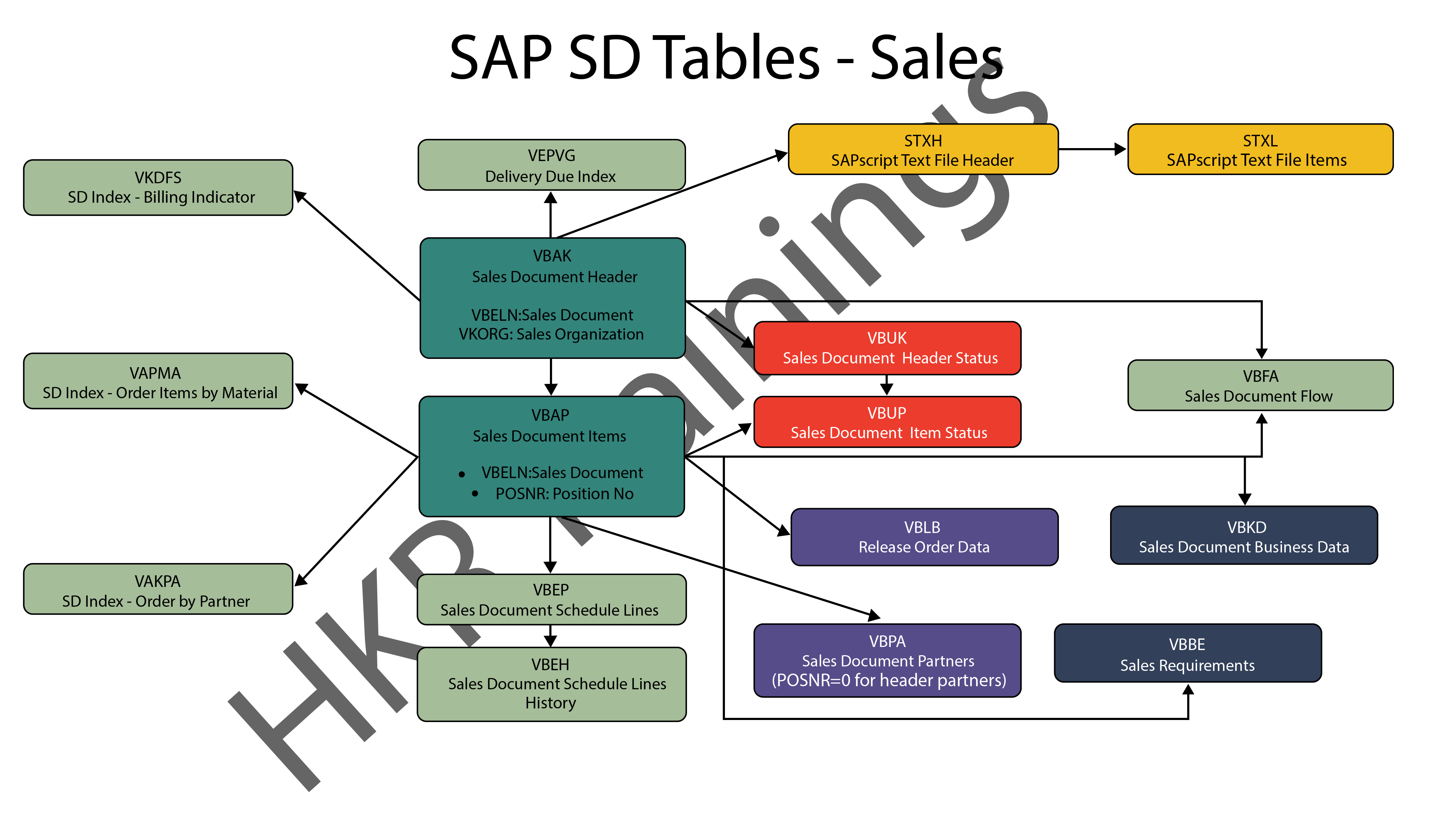
In SAP SD, the first block is about sales procedures.This indicates that the SAP SD tables in this block would be related to sales orders, quotations, and other similar transactions. We designed a visual slide that lists all of the tables and their relationships. 

SAP SD Sales

2) Shipping

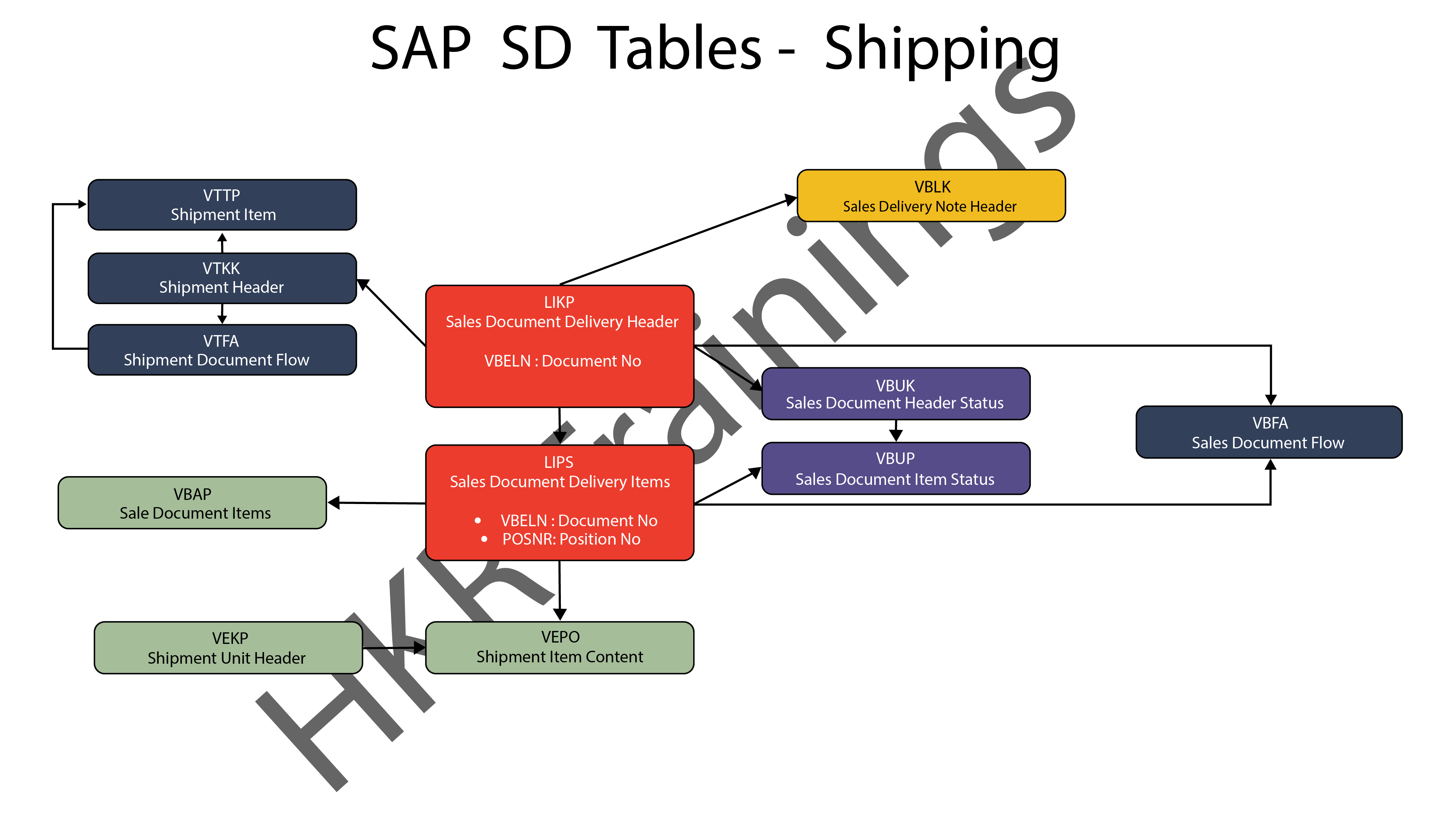
ThIs section is about SAP SD’s shipping processes. In this section, SAP SD tables deal with inbound and outbound deliveries, as well as shipments. Likewise, we’ve created a visual slide with links illustrating table relationships. 

SAP SD Shipping

SAP SD Training

  • Master Your Craft
  • Lifetime LMS & Faculty Access
  • 24/7 online expert support
  • Real-world & Project Based Learning
3) Billing

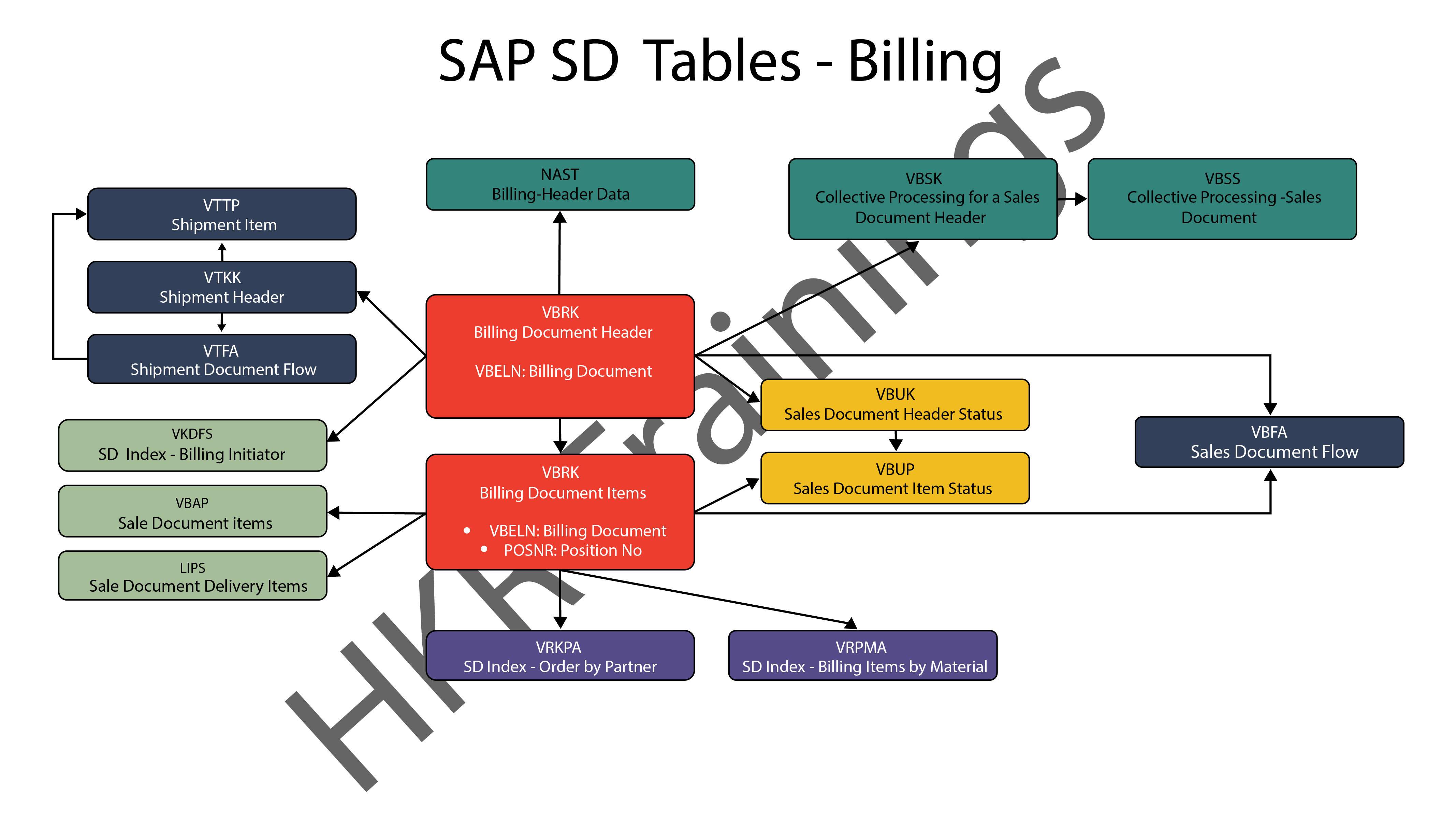
The billing feature of SAP SD is the last but not least. SAP has a variety of tables which are used to support a company’s billing procedures. Billing documents, as well as other related data, such as output conditions, are saved in these tables by SAP. 

SAP SD Billing

Want to know more about SAP SD,visit here SAP SD Tutorial !

SAP SD Significant Tables for Sales and Distribution

The following are the SAP SD tables for customers, sales documents, delivery documents, billing documents, shipping unit.

1) Customers

KNA1: General Data

KNB1: Customer Master – Co. Code Data (payment method, reconciliation acct)

KNB4: Customer Payment History

KNB5: Customer Master – Dunning info 

KNBK: Customer Master Bank Data

KNKA: Customer Master Credit Mgmt.

KNKK: Customer Master Credit Control Area Data (credit limits)

KNVV: Sales Area Data (terms, order probability)

KNVI: Customer Master Tax Indicator

KNVP: Partner Function key

KNVD: Output type

KNVS: Customer Master Ship Data

KLPA: Customer/Vendor Link

2) Sales Documents

VBAKUK: VBAK + VBUK

VBUK: Header Status and Administrative Data

VBAK: Sales Document – Header Data

VBKD: Sales Document – Business Data

VBUP: Item Status

VBAP: Sales Document – Item Data

VBPA: Partners

VBFA: Document Flow

VBEP: Sales Document Schedule Line

VBBE: Sales Requirements: Individual Records

Top 30 frequently asked SAP SD Interview Questions !

3) SD Delivery Document

LIPS: Delivery Document item data, includes referencing PO

LIKP: Delivery Document Header data

4) Billing Document

VBRK: Billing Document Header

VBRP: Billing Document Item

5) SD Shipping Unit

VEKP: Shipping Unit Item (Content)

VEPO: Shipping Unit Header

Acquire SAP Basis certification by enrolling in the HKR SAP Basis Training in Pune!

SAPS, sap-sd-tables-description-2, SAPS, sap-sd-tables-description-4

Subscribe to our YouTube channel to get new updates..!

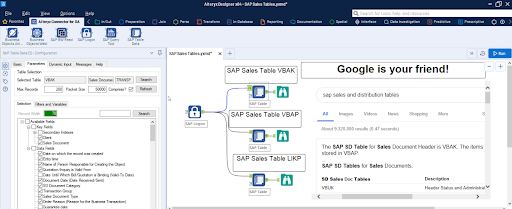
The most significant SAP Sales and Distribution (SD) tables for Alteryx users

For users of Alteryx and the DVW Alteryx Connector for SAP, we’ll now look at the most significant SAP Sales and Distribution (SD) tables 

SAP Sales and Distribution table

Related Articles SAP SD Modules !

The following SAP systems contain SAP Sales and Distribution tables:

  • SAP ECC 
  • SAP ERP
  • SAP S/4HANA

SAP Transaction Tables for Sales and Distribution (SD)

The SAP SD transaction tables for sales, delivery and billing process is as follows: 

1) Sales Document Tables

The documents of SAP Sales include:

  • Inquiries
  • Quotations
  • (Sales) Orders
  • Contracts
  • Credit Memo Requests
  • Debit Memo Requests 

The following are the most important tables in a sales document:

  • VBAK – Sales Document: Header Data
  • VBAP – Sales Document: Item Data 

SAP SD Training

Weekday / Weekend Batches


2) Delivery Document Tables

The documents of SAP Delivery include:

  • Delivery / Shipping Notifications
  • Deliveries

The key Delivery Document tables are:

  • LIKP – SD Document: Delivery Header Data
  • LIPS – SD document: Delivery: Item data 

Related Articles SAP SD Flow ! 

3) Billing Document Tables

The documents of SAP Billing include:

  • Invoices
  • Credit Memos
  • Debit Memos
  • Intercompany Invoices

The key Billing Document tables are:

  • VBRK – Billing Document: Header Data
  • VBRP – Billing Document: Item Data

Master Data Tables for SAP Sales and Distribution (SD)

  • KNA1 – General Data in Customer Master
  • KNB1 – Customer Master (Company Code)
  • KNKK – Customer master credit management: Control area data
  • KNVV – Customer Master Sales Data 

Data Tables for SAP Sales and Distribution (SD) Configuration

  • TVFK – Billing: Document Types
  • TVFKT – Billing: Document Types: Texts
  • TVKO – Organizational Unit: Sales Organizations
  • TVZB – Customers: Terms of payment 
  • TVZBT – Customers: Terms of Payment Texts

Conclusion:

We hope this blog is very helpful in knowing various tables discussed on SAP SD.   


Source link