
4 reasons why I love my Sapphire Reserve card


I’ve been collecting points and miles via credit cards for over two decades, and it takes a lot to impress me. Sure, I spread the love around with my 25+ open, active credit cards — but for one to earn a spot near the top of my wallet, I need a really solid value proposition.

For years, one of those cards has been the Chase Sapphire Reserve® (see rates and fees), which is currently offering 150,000 bonus points earned after spending $6,000 on purchases in the first three months from account opening. This is the card’s best-ever public offer.

Even after last year’s overhaul with an increased annual fee, which sadly hit my account on Nov. 1, 2025, this card has been a key part of my rewards strategy for years — a fact reinforced by a recent trip to Atlanta to catch a Bruno Mars concert with my family.

NICK EWEN/THE POINTS GUY

Here are 4 of the biggest reasons I love my Sapphire Reserve.


Best-ever public offer: Earn 150,000 bonus points with the Chase Sapphire Reserve. Apply now!


Flexible travel credit

Let’s start with the easiest one: the card’s $300 annual travel credit.

Each year, you’ll enjoy up to $300 in statement credits for any travel purchases charged to the card. While other premium cards impose restrictions on their credits, like limiting them to certain fees or requiring purchases through a specific site, the Sapphire Reserve requires no hoops. Charge travel purchases; get statement credits. It’s so simple.

Here’s how I utilized this perk over the last five years:

  • 2021: A Hertz rental car and part of a Disney cruise
  • 2022: Multiple (smaller purchases) for parking, tolls, trains — plus a city tour and an intra-Europe upgrade on Iberia
  • 2023: Multiple ride-hailing services and subways in New York City, plus parking purchases in Europe
  • 2024: Parking, a Lyft ride, two sightseeing tours in Vienna and part of a hotel stay
  • 2025: A flight booked through the Chase Travel℠ portal

Reward your inbox with the TPG Daily newsletter

Join over 700,000 readers for breaking news, in-depth guides and exclusive deals from TPG’s experts

These all posted automatically within a day or two of the purchase, making this one of the easiest credit card perks out there. And the best part is that you don’t have to use it all at once.

Hotel and dining credits

Beyond the travel credit, the Sapphire Reserve offers multiple additional statement credits each year, and two of my personal favorites involve hotel stays and restaurant purchases.

First, cardmembers enjoy up to $500 in annual statement credits (split into two, up-to-$250 credits) for prepaid stays of two nights or more at properties in The Edit, Chase’s luxury hotel collection. These high-end hotels belong to some of the best brands in the world, including Four Seasons, St. Regis, Shangri-La and Rosewood.

But more importantly, stays include a number of valuable add-ons, including:

  • Daily breakfast for two
  • An on-property benefit worth up to $100
  • Complimentary Wi-Fi
  • A space-available room upgrade (when available)
  • Early check-in and late checkout (when available)

My first 2026 credit came in handy for the concert, as we opted to stay at the Ritz-Carlton Atlanta. The two-night stay in a deluxe room cost $872.72 but dropped to $622.72 after the $250 credit was applied. Plus, since many properties in The Edit now count as loyalty-eligible stays, I earned over 20,000 Marriott Bonvoy points for the stay.

The hotel is in downtown Atlanta and is easily accessible from the airport via public transportation. And while there were no upgrades available, we still had a really comfortable stay.

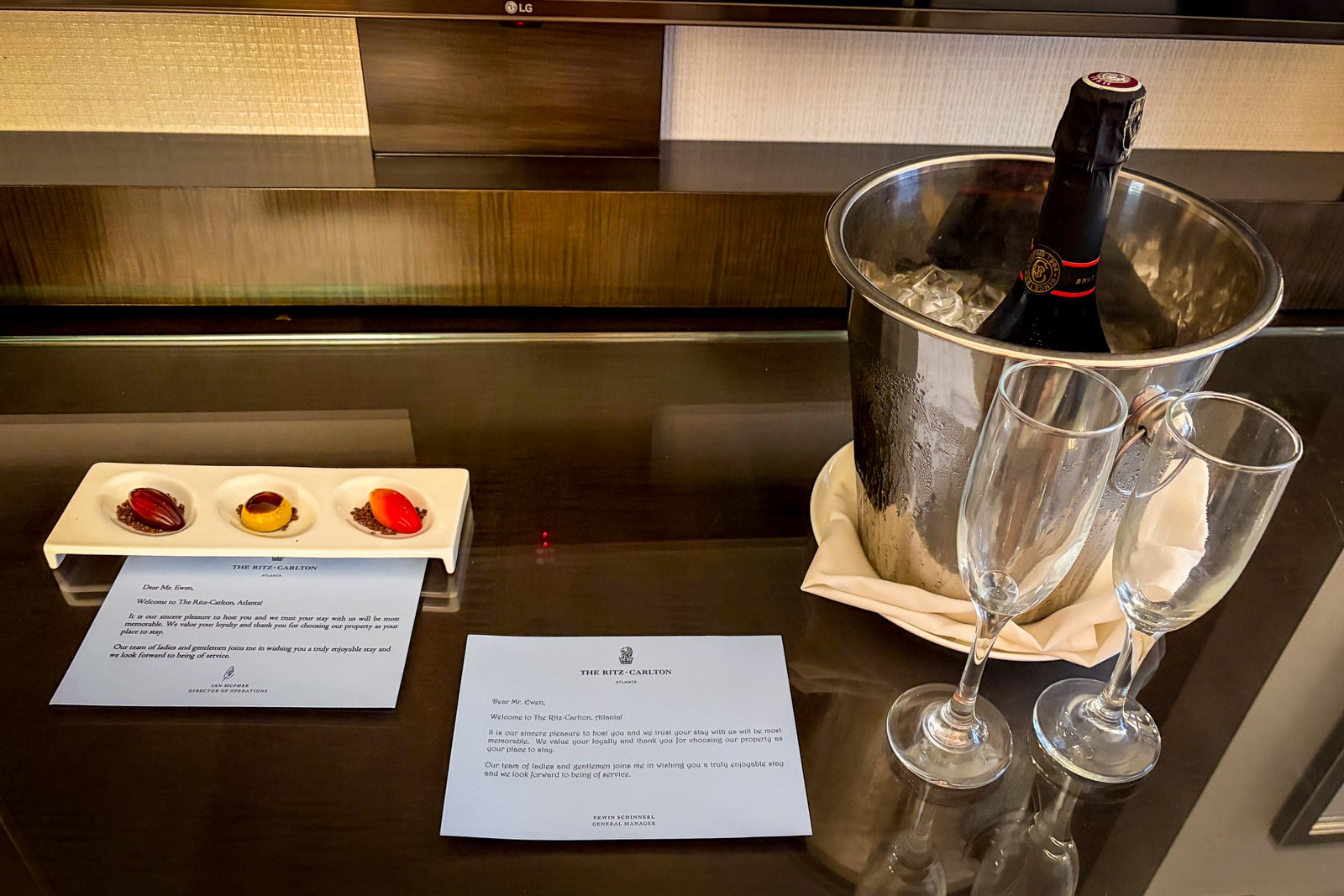
We received a pair of lovely welcome amenities — chocolates and a bottle of sparkling wine — along with notes from two different managers.
NICK EWEN/THE POINTS GUY

Breakfast was served in AG Steakhouse, where we received an $80 credit ($40 per person) each morning. This easily covered a couple of entrees plus drinks, though with my daughter’s kids breakfast, we went just a few bucks over each morning.


We also opted to burn the on-property credit for dinner our first night, also at AG Steakhouse. We were celebrating a big work accomplishment for my wife, so we splurged for the seafood tower, which did not disappoint. The cocktails were spectacular, as was the southern tartare. And upon checkout, I had a $100 credit toward the meal on my folio.

During our time in Atlanta, we also used part of the card’s annual dining credit.

Each year, cardmembers receive up to $300 in statement credits (up to $150 from January to June and up to $150 from July to December) at a curated set of OpenTable restaurants through Sapphire Reserve Exclusive Tables. There are several eligible spots in Atlanta, but we went with The Optimist, a self-proclaimed “seaside fish camp experience” in the city. No prepayment, payment or reservation through OpenTable is required.

Our afternoon reservation coincided with happy hour, where we polished off three orders of a baker’s dozen oysters plus fresh haddock chowder and a spicy kale salad. And when our waitress mentioned roasted oysters, we couldn’t resist adding them to our order.

There was even a three-hole mini golf course on the grounds, but it was drizzling during our meal, so we had to skip it.

Just two days after my visit, the $150 credit was posted to my account.

Travel protections

Statement credits get a lot of coverage, but there’s another set of benefits on the card that I love — and they’ve saved me over $1,000 in unexpected costs over the years.

I’m referring to the Sapphire Reserve’s suite of travel protections, which includes:

These come into effect when you use the Sapphire Reserve for eligible purchases, and they offer valuable peace of mind when things go wrong, which I’ve experienced on three separate occasions.

In 2019, I was flying back from Chile when a power outage shut down the computer system at Santiago’s Arturo Merino Benitez International Airport (SCL). Our flight to Lima’s Jorge Chavez International Airport (LIM) was delayed, which meant we missed our connecting flight to Miami International Airport (MIA). We were rebooked the next day, and because this delay resulted in an unexpected overnight stay (and since I charged the taxes and fees on the award ticket to my Sapphire Reserve), I knew we were eligible for trip delay reimbursement.

So, I booked the JW Marriott, and after a pair of Uber rides plus a lovely dinner in the Miraflores area of the city, we had spent an additional $383.26. Upon returning home, I submitted a claim for reimbursement (with full documentation). Within six weeks, I had my money back.

Then, in January 2022, we were booked on a long-weekend trip to Cozumel, Mexico, but 48 hours before we left, I was hit with a nasty bout of COVID-19. Our hotel room was refundable, but our American flight was booked with British Airways Avios, which meant a $55 cancellation fee per person. Since I once again charged the taxes and fees on the award ticket to my Sapphire Reserve, I knew I could invoke the trip cancellation coverage on the card — and sure enough, I was reimbursed $165 in just a few weeks.

Finally, we spent part of last year’s holiday break in Canada, which included a rental car from Avis. I declined the additional coverage at the airport and charged the entire rental to my Sapphire Reserve in order to use the card’s primary car rental coverage. And sure enough, at some point on the trip, a small crack appeared in the windshield. It grew to several inches long by the time I returned the car, and the company filed a claim for damages. Once again, I knew I was covered.

I submitted documentation to Chase’s benefits provider, and my claim was approved within a month, covering the $541.92 expense.

Read more: Why a Chase Sapphire Reserve card is the best premium card for rental cars

All told, that’s $1,090.18 in extra expenses that I didn’t need to cover, just because I used my Sapphire Reserve for the corresponding purchases.

Combining rewards for valuable redemptions

But perhaps my favorite feature of the Sapphire Reserve involves the redemption options via Chase Ultimate Rewards and how easy it is to combine rewards from my other four cards:

The information for the Chase Freedom has been collected independently by The Points Guy. The card details on this page have not been reviewed or provided by the card issuer.

All four of these cards are technically billed as cash-back products, with more limited, fixed-value redemption options.

However, since I have the Sapphire Reserve, I can easily move the points earned on those cards into my Sapphire Reserve account. This effectively converts them into full-fledged Ultimate Rewards points.

NICK EWEN/THE POINTS GUY

I pursue the same strategy for my wife’s points as well, since she has her own Freedom Unlimited and Ink Business Cash cards. As an eligible household member, I can instantly move her cash-back rewards to my Sapphire Reserve.

Doing so unlocks some of my favorite redemptions through Chase, including transferring points to partners like World of Hyatt and Air Canada Aeroplan. It also means I can access Points Boost, which can push the value of each Chase point as high as 2 cents per point (or even higher at select properties in The Edit).

Related: Points Battle: 2 trips, 250,000 points, and the Chase Sapphire Reserve Card — who will win?

Bottom line

The Chase Sapphire Reserve has been a mainstay in my wallet for years, as there’s a lot to love about the card — from the variety of valuable statement credits to the extensive travel protections and lucrative redemption options.

I didn’t even touch on the issuer’s fantastic Sapphire Lounges, which won the 2026 TPG Award for best credit card lounge network. I can still access those locations with my wife and daughter (for free), a notable differentiator from other premium products.

It’s true that the card has a high annual fee, but I easily cover it (and then some) with the benefits above.

With the card’s highest-ever public welcome offer, now could be a great time to consider adding it to your wallet.

To learn more, read our full review of the Chase Sapphire Reserve.


Apply here: Earn 150,000 bonus points after spending $6,000 on purchases in the first three months from account opening with the Chase Sapphire Reserve.


Source link

Leave a Reply

Subscribe to Our Newsletter

Get our latest articles delivered straight to your inbox. No spam, we promise.

Recent Reviews


Isolation Levels in SQL Server – Table of Content

Introduction to Isolation levels in SQL server:

Isolation in database servers is specifically defined at the database levels,which will help the user to manage many database operations.One important thing about isolation in the database servers is that others can also see the changes made by database experts. Before in the legacy system (older system) of the database, this type of functionality had been implemented systematically and with the latest version, you will get this option by default. In the n-tier system architectures, a combination of both stored procedures and data transaction management system is required to send and receive the information from multiple sources. 

 To gain in-depth knowledge with practical experience in SQL server, then explore  SQL server Training !

Different types of isolation levels:

There are 5 types of isolation levels are available such as;

1. Read committed

2. Read uncommitted

3. Repeatable Read

4. Serializable

5. Snapshot

Let’s discuss them in brief;

The syntax is as follows

SET TRANSACTION1 ISOLATION LEVEL
{
READ Uncommitted
I READ Committed
I REPEATABLE READ
I SNAPSHOT
I SERIALIZABLE
}

To select the options choose the following navigation is as follows,

Go to SSMS tools menu -> under the Query execution -> select advanced, -> then user need to drop-down the dialog box to set the transaction isolation levels-> now it’s time for modification.

IMAGE

Prerequisites’:

 1. Scripted needed to write the sample table creation

 2. Data population details.

The following simple program explains the complete prerequisites:

CREATE TABLE Dept

(

   DeptId1 INTR Primary key,

   DeptName Varchar (200),

   DeptDesc   varchar (400),

)

INSERT INTO Dept

(deptId, deptName, deptDesc)

VALUES

(201, ‘information science and Engineering’, ‘Undergraduate and Postgraduate courses in information science and Engineering’),

(202, ‘Computer science and Engineering’, ‘Undergraduate and Postgraduate courses in computer and science engineering’),

CREATE Table1 Exam

(

   ExamID INTG PRIMARY KEY,

   ExamName VARCHAR (200),

  ExamName VARCHAR (400)

)

INSERT INTO Exam

(examId, examname, examDesc)

VALUES

(301, ‘PYTHON’, ‘Theory paper and Lab assignment in Python’),

(302, ‘Data Structure management’, ‘Theory paper and Lab assignment in Data structure management system’),

CREATE TABLE1 StudentMarks

(

StudentID INTG IDENTITY (1, 2) PRIMARY key,

   DeptId INTG,

  ExamId INTG,

   MarksObtained INT

)

SELECT COUNT (1) FROM StudentMarks

…….2387516

…….Insert the records in StudentMarks repeatedly

INSERT INTO StudentMarks (deptId, examId, marksObtained)

VALUES

 (105, 205, 95)

…..duplicate the record number to increase the count

INSERT INTO StudentMarks (deptId, examId, marksObtained)

SELECT deptId, examId, marksObtained FROM StudentMarks

Isolation Levels in detail:

Here I am going to discuss the features and limitations of Isolation levels. We can execute these different levels of isolations with the help of two concurrent data transactions by executing them with two different scripts from any two different database users’ sessions, where they can access the same resources. The important thing is that the output will be different for different concurrent data transactions.

The code and examples for each isolation levels are as follows,

1. Read Uncommitted:

Here the data transaction running in this level will not share any kind of issues and locks being used to prevent error transactions. With the help of the Read uncommitted isolation level,users can also perform any data modification operations.

Let us consider the two transaction examples,

Transaction1 (query1.sql) will be started like this,

BEGIN TRANSACTION1

UPDATE StudentMarks

SET marksObtained = 100

WHERE deptId = 105 AND examId = 205

In this case, the Transaction1 execution continues, now we are going to start the Transaction2 (query2. Sql),

The following code explains the Transaction2,

BEGIN TRANSACTION2

SELECT marksObtained

FROM StudentMarks

WHERE deptId = 105 AND examId = 205 AND studentId = 2

COMMIT TRANSACTION2

Now the TRANSACTION1(query1.Sql) is committed and executed.

Output:

…….

UPDATE Exam

SET examDesc = ‘theory papers and lab assignment exam in Python’

WHERE examId = 205

UPDATE StudentMarks

SET marksObtained = 90

WHERE deptId = 105 AND ExamId = 205

COMMIT TRANSACTION

SQL Server Certification Training

  • Master Your Craft
  • Lifetime LMS & Faculty Access
  • 24/7 online expert support
  • Real-world & Project Based Learning

2.READ Committed:

In this READ committed isolation level, the data transactions issues will be locked at the time of data modification, and also it will not allow the other transactions to read/ write the modified data which is not yet committed. One more important thing is that the Read Committed level of Isolation level will prevent the Dirty Data Read issue. The behavior of the READ COMMITTED level depends on the full set of the READ_COMMITTED_SNAPSHOT option. If the READ_COMMITTED_SNAPSHOT is set to OFF, and it will prevent the other data transactions from modifying the data rows until the other transaction is completed. If the READ_COMMITTED_SNAPSHOT is set to ON, the modified row version will be used to represent each transactional statement by allowing consistent data.

To understand this level of Isolation, the query2.Sql data script will be executed once the starting of query1. Sql. In Query1.Sql, the MarksObtained data column will be set to 72 at the starting of the first updated statement. Then the second MarkObtained data column will be set to 82 in their third updated statements. At the end of the first query transaction 1, the value 82 will be committed.

Query transaction 2 will start once the first transaction updates statement is executed. Query Transaction 2 reads Value 72. But this MarksObtainbed data value is not the committed one. Now it’s time to read the uncommitted modified data they are also known as dirty read. Once the execution of the first Query1.sql script finished, then the second Query2. Sql will be executed again. This time, this query2.sql will produce the output as 82, which will be the least committed data values by transaction 1.

Programming Example:

Start with Transaction (qusery1. sql) , this transaction will be started as below,

BEGIN TRANSACTION

UPDATE StudentMarks

SET marksObtained = 72

WHERE deptId = 105 AND examId = 205

…..

Here the Transaction 1 (Query1. Sql) execution continues and transaction 2 (Query2.Sql) will be started, and committed as well.

The programming code is as follows,

BEGIN TRANSACTION

SELECT marksObtained

FROM StudentMarks

WHERE deptId = 105 AND examId = 205 AND studentId = 1

COMMIT TRANSACTION

Here the Transaction 1 (Query1. Sql) is finished.

…….

UPDATE Exam

SET examDesc = ‘Theory paper and Lab Assignment in Python’

WHERE examId = 205

UPDATE StudentMarks

SET marksObtained = 72 ….. 92

WHERE deptId = 105 AND examId = 205

COMMIT TRANSACTION

Example 2:

In this example, the option READ_COMMITTED_SNAPSHOT will be SET to ON. The ALTER command statement needs to be executed to set the SNAPSHOT property with this READ COMMITTED isolation level.

ALTER DATABASE

SET READ_Committed_SNAPSHOT  ON

Here query2.Sql transaction script commands will be executed, once after the Query1.Sql is finished. In the Query1, the marksobtained column will be set to 72 in the first UPDATE command statement. In the next execution, the column value will be set to 82 in the third UPDATE command statement. At the end of transaction 1, the marks value82 will be committed.

In the next step, we are going to use the SELECT statement in query TRANSACTION 2, where this transaction will not wait for the TRANSACTION1 to be committed or executed. The SELECT statement will return the last committed data instant where Query1. Sql is still running. The final output you will get is 72.

BEGIN TRANSACTION

UPDATE StudentMarks

SET marksObtained = 72

WHERE deptId = 105 AND examId = 205 Here the TRANSACTION1 (query1. Sql) execution continues until the TRANSCATION2 (query2.sql) get started and committed.

BEGIN TRANSACTION

SELECT marksObtained

FROM StudentMarks

WHERE deptId = 105 AND examId = 205 AND studentId = 2

COMMIT TRANSACTION

Now TRANSACTION 1 (query1.sql) is finished.

….

Update Exam

SET examDesc = ‘theory paper and Lab Assignments in Python’

WHERE examId = 205

UPDATE StudentMarks

SET marksObtained = 72……82

WHERE deptId = 105 AND examId = 205

COMMIT TRANSACTION

Example 3:

In this example, TRANSACTION 1 will retrieve the column values for examId 205 from the Exam table. After this statement gets executed, it will execute the two UPDATE statements for the StudentMarks columns.

The first execution of the SELECT statement will give the examDesc value as follows,

ExamDesc = ‘Corrected: Theory paper and Lab Assignment in Python ‘.

Here the TRANSACTION 4 (query4.Sql) command script will be executed, once after the TRANSACTION 3 (query3.Sql). When the previous StudentMarks update statements being executed by TRANSACTION 1(query1.Sql) and TRANSACTION 2 (query2.Sql).

The Query is as follows;

BEGIN TRANSACTION

SELECT examId, examName, examDesc

FROM Exam

WHERE examId = 205

……….

The above program indicates that the transaction1 execution continues. Now TRANSACTION2 started and committed,

BEGIN TRANSACTION

UPDATE Exam

SET examDesc = ‘Corrected: Theory paper and LAB Assignment in PYTHON’

WHERE examID = 205

COMMIT TRANSACTION

The TRANSACTION2 is committed and completed.

OUTPUT:

UPDATE StudentMarks

SET marksObtained = 72

WHERE deptId = 105 AND examId = 205

UPDATE StudentMarks

SET marksObtained = 82

WHERE deptId = 105 AND examID = 205

SELECT examId, examName, examDesc

FROM Exam

Where examID = 205

COMMIT TRANSACTION

 To gain in-depth knowledge with practical experience in MS SQL server, then explore  MS-SQL Training!

Business Intelligence & Analytics, isolation-levels-in-sql-server-description-0, Business Intelligence & Analytics, isolation-levels-in-sql-server-description-1

Subscribe to our YouTube channel to get new updates..!

3.Repeatable Read:

In this level of isolation, statements never read the data which has been modified but not yet committed. One important thing is that, no any other transaction can modify the data that will be read by the current transaction until it completes. Here user can make use of the shared locks to place all the data read by each and every statement in the transaction. This also helps to prevent the other transactions from modifying or changing any data rows that have been read by the transaction.

This level of isolation starts from the beginning, takes all the previous transactions and their commitments. Now let’s start with our actual code example, in this case, TRANSACTION 1 retrieves the data column from examId from the Exam table. After this statement has been executed, the batch command executes the two UPDATES statements for the StudentMarks table. Again the same SELECT statement will be executed. The following examples will explain the scenario,

BEGIN TRANSACTION

SELECT examId, examName, examDesc

FROM Exam

WHERE examId = 205

In this example, TRANSACTION 1(query3. Sql) will continue its execution and TRANSACTION 2 (query4.Sql) will be started and tries to modify the command examDesc. But the TRANSACTION 1 is used for reading purposes and the data record will be locked for updating until the next transaction 1 committed.

BEGIN TRANSACTION

Update Exam

SET examDesc = ‘corrected: theory paper and Lab assignment in Python’

WHERE examId = 205

COMMIT TRANSACTION

Now the TRANSACTION1 (Query3. Sql) will be completed.

UPDATE StudentMarks

SET marksObtained = 82

WHERE deptId = 105 AND examId = 205

UPDATE StudentMarks

SET marksObtained = 83

WHERE deptID = 101 AND examID = 205

SELECT examId, examName, examDesc

FROM Exam

WHERE examId = 205

COMMIT TRANSACTION

The next example shows the second occurrence of the SELECT statement in any Transactions which will now retrieve the extra record.

BEGIN TRANSACTION

SELECT examId, examName, examDesc

FROM Exam

WHERE examName = ‘PYTHON’

Here the TRANSACTION 1 execution continues and TRANSACTION 2 (query6. Sql) will be started and committed.

BEGIN TRANSACTION

SELECT examId, examName, examDesc

FROM Exam

WHERE examName = ‘Python’

Now start with transaction6,

BEGIN TRANSACTION

INSERT INTO Exam

(examId, examName, examDesc)

VALUES

(201, ‘Python’, ‘Duplicate_value: Corrected: theory paper and Lab Assignment in Python’)

COMMIT TRANSACTION

TRANSACTION 1 (Query5. Sql) is completed

OUTPUT:

UPDATE StudentMarks

SET marksObtained = 61

WHERE deptId = 105 AND examId = 205

UPDATE StudentMarks

SET marksObtained = 72

WHERE deptId =105 AND examId = 205

SELECT examId, examName, examDesc

FROM EXAM

WHERE examName = ‘Python’

COMMIT TRANSACTION

4.SERIALIZABLE:

In the Serializable isolation level, the statement commands cannot read the data which has been modified but not yet committed by any other transaction. No, any other transactions can perform data modification that will only read by the current transaction. One important thing is that other transactions cannot add new rows with any new key values that will be read by any statements in the current Transaction levels.

In the following example, TRANSACTION 1 (query5. Sql) will retrieve the EXAM column values such as exam name = ‘Python’. Once this Transaction executes, the two UPDATE statements available for the StudentMarks table and finally make use of the SELECT statement to retrieve the EXAM column data for examName = ‘Python’ will be executed again.

Once the SELECT statement execution finishes, TRANSACTION 2 starts that is (query8. Sql). This TRANSACTION now tried to add new record into the ExamName = ‘Python’ and commit the change. Let’s see the programming example,

At first, the transaction 1 (Query5. Sql) is started as shown in the example,

BEGIN TRANSACTION

SELECT examId, examName, examDesc

FROM Exam

WHERE examName = ‘Python’

Here the Transaction 1 execution continues and TRANSACTION 2 (query8. Sql) now started. Transaction 2 or (query8. Sql) should wait until any changes made to the TRANSACTION 1 has been completes.

BEGIN TRANSACTION

INSERT INTO Exam

(examId, examName, examDesc)

VALUES

( 205, ‘Python’, ‘Duplicate: Corrected: Theory paper and Lab assignment in Python’)

COMMIT TRANSACTION

TRANSACTION 1 (Query5. Sql) is completed.

UPDATE StudentMarks

SET marksObtained = 72

WHERE deptId = 105 AND examId = 205

UPDATE StudentMarks

SET marksObtained = 82

WHERE deptId = 105 AND examId = 205

SELECT examId, examName, examDesc

FROM Exam

WHERE examName = ‘Python’

COMMIT TRANSACTION

SQL Server Certification Training

Weekday / Weekend Batches

5.Snapshot Isolation

In this isolation level, the data read by any transaction statement will be transferred to the Concurrent version of the data. Here the data modification will be made by other transactions only when the starts of the currently available transaction are not visible to any other current TRANSACTION. SNAPSHOT level of transactions will not request “lock” when reading or retrieving the data. SNAPSHOT transactions do not block reading any other transactions from writing the data.

The command ALLOW_SNAPSHOT_ISOLATION Sql database option should be set to “ON”,before starting any transaction with the SNAPSHOT isolation level.

ALTER DATABASE

SET ALLOW_SNAPSHOT_ISOLATION ON

Here the READ_COMMITTED_SNAPSHOT database option determines the behavior of any default READ COMMITTED isolation levels when the snapshot isolation level will be enabled in the Sql database.

If the READ_COMMITTED_SNAPSHOT Sql database option is set to ON, the in-built database engine uses the row versioning and snapshot isolation level as the default systems.

ALTER DATABASE

SET READ COMMITTED SNAPSHOT ON.

THE SIGNIFICANCE OF DIFFERENT ISOLATION LEVELS:

The following are the important significances of different isolation levels:

  • Only one type of isolation level can be set at a time, and it has remained unchanged until it is being changed or modified.
  • The lower isolation levels may increase the isolation ability of multiple users to access the different data at the same time and also increases the concurrency effects.
  • As per the latest research, the higher level isolation level reduces the concurrency effects and this stage of isolation level needs more system resources and increases the data transaction chances.
  • The lowest isolation level – READ uncommitted is one of the default isolation levels which prevents the dirty reads by specifying appropriate statements.
  • Repeatable read isolation level is more restrictive and it encompasses READ COMMITTED. This additionally specifies that no other transactions can modify or remove any kind of data that has been read by the current data transaction. One important thing is that the Concurrency level is lower for READ_COMMITTED statements.
  • The highest isolation level, SERIALIZABLE – guarantees that a transaction will retrieve the same accurate data each time it repeats the read operations.
  • SNAPSHOT isolation specifies that the readable data within the data transaction will never reflect changes made by other simultaneous transactions.

INSIGHT:

In this blog, I have tried my best to explain the important concepts of different isolation levels in SQL servers.As I have explained there are mainly 5 types of Isolation levels are available, these isolation levels will help to maintain the data concurrency and also maintain the accuracy level while performing data transactions. I hope this blog may help a few of you to gain valuable knowledge on isolation levels and also enables you to interact with many social community experts.

Related Articles:

1. Exception Handling in SQL Server

2. SQL Server Joins

3. SQL Server Data Tools

4. Normalization in SQL Server


Source link