SAP SD Tables | Complete Guide on SAP Sales & Distribution Tables


SD Tables in SAP:

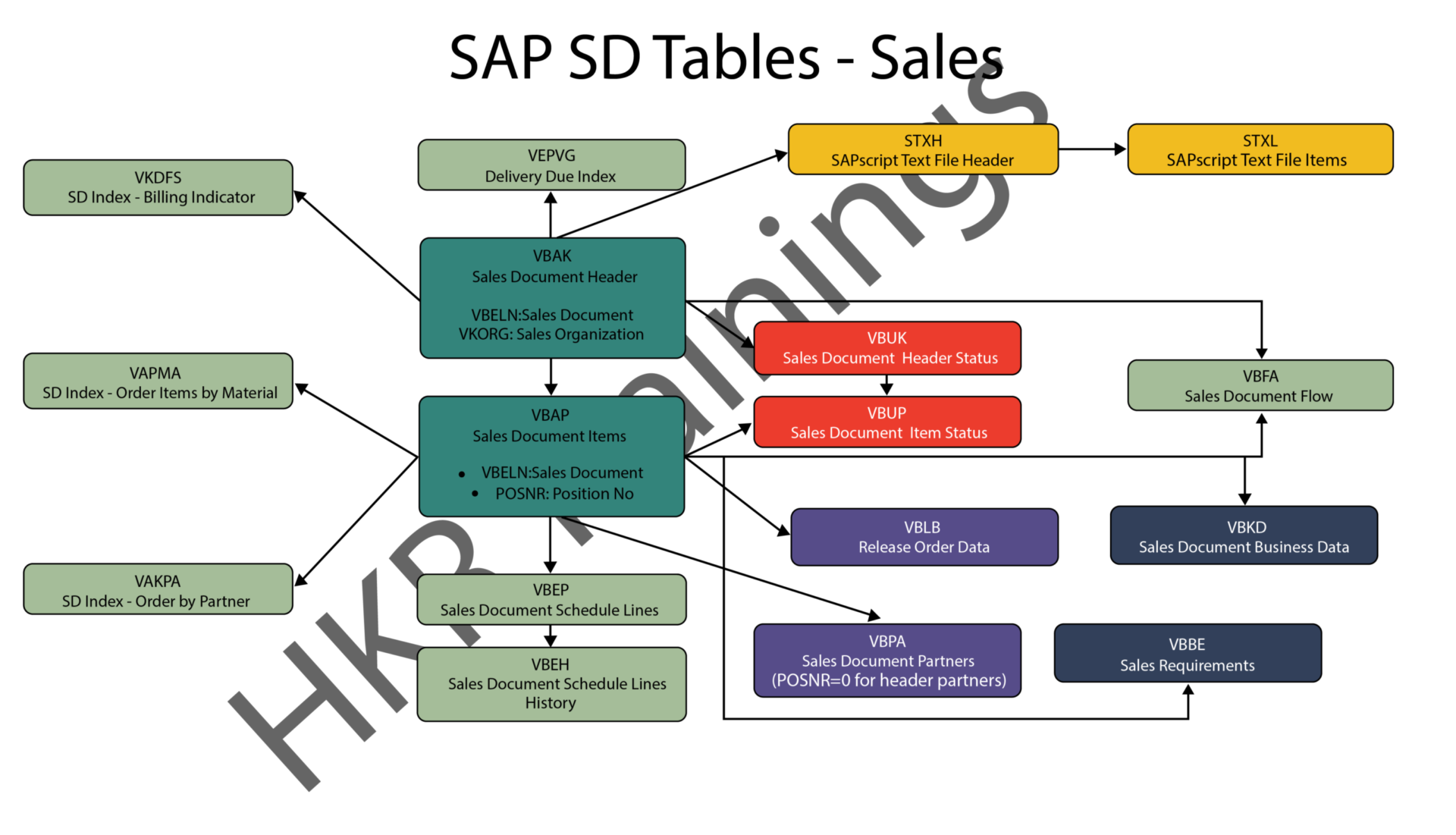
The SAP SD module is built on tables and uses them to store data. We’ll go through SAP SD tables and their relationships in this tutorial. SAP SD tables are critical storage for corporate data connected to SAP ERP software’s sales and distribution activities. The SD tables are basically divided into three parts:

These are the SD module’s building blocks, and it’s only natural to address tables in this sequence. Please look at the slides to see how the tables from different blocks were connected. Being an expert in SAP SD necessitates an understanding of these relationships. 

 Become a SAP SD Certified professional by learning this HKR SAP SD Training !

1) Sales

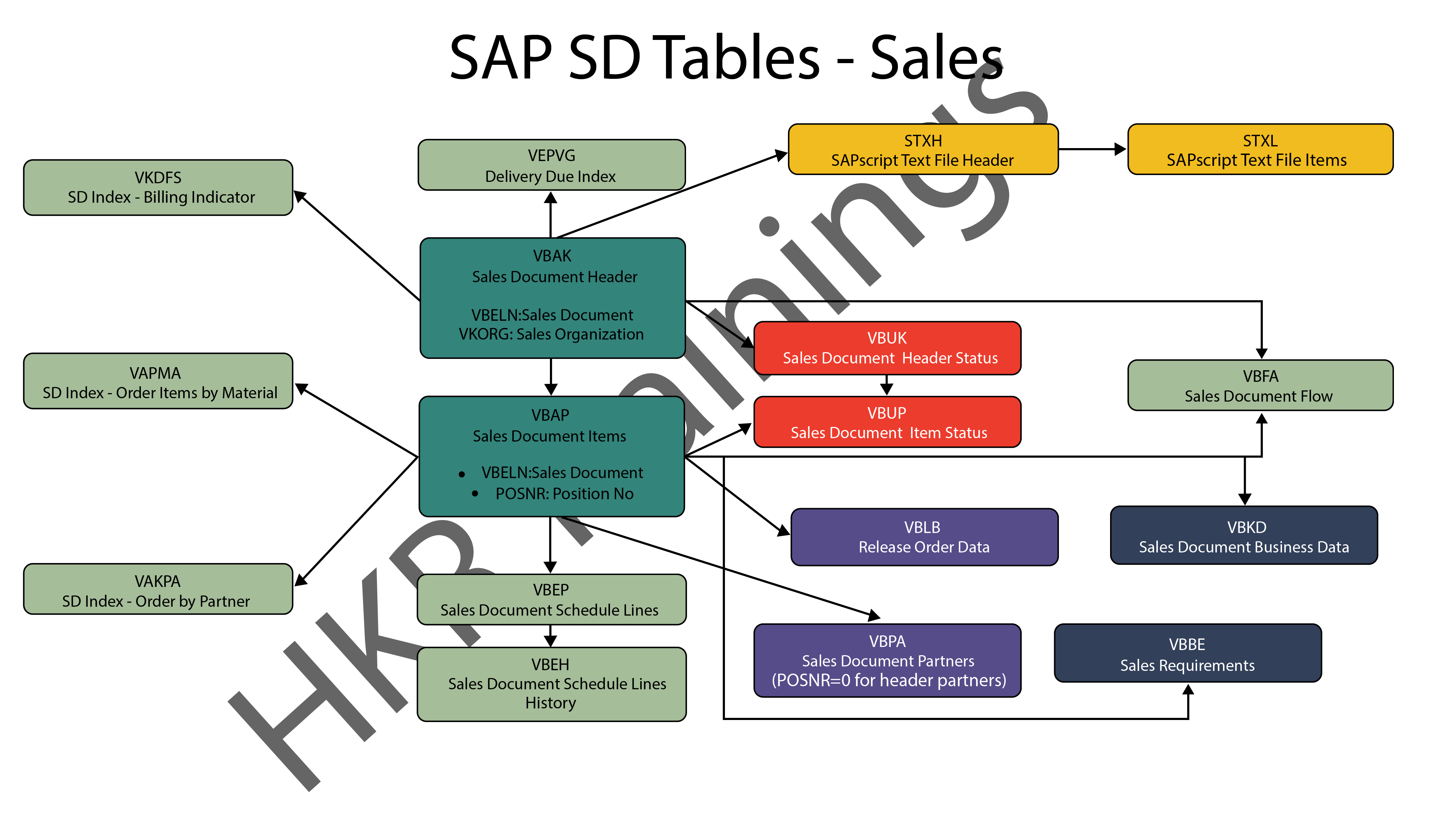
In SAP SD, the first block is about sales procedures.This indicates that the SAP SD tables in this block would be related to sales orders, quotations, and other similar transactions. We designed a visual slide that lists all of the tables and their relationships. 
SAP SD Sales

2) Shipping

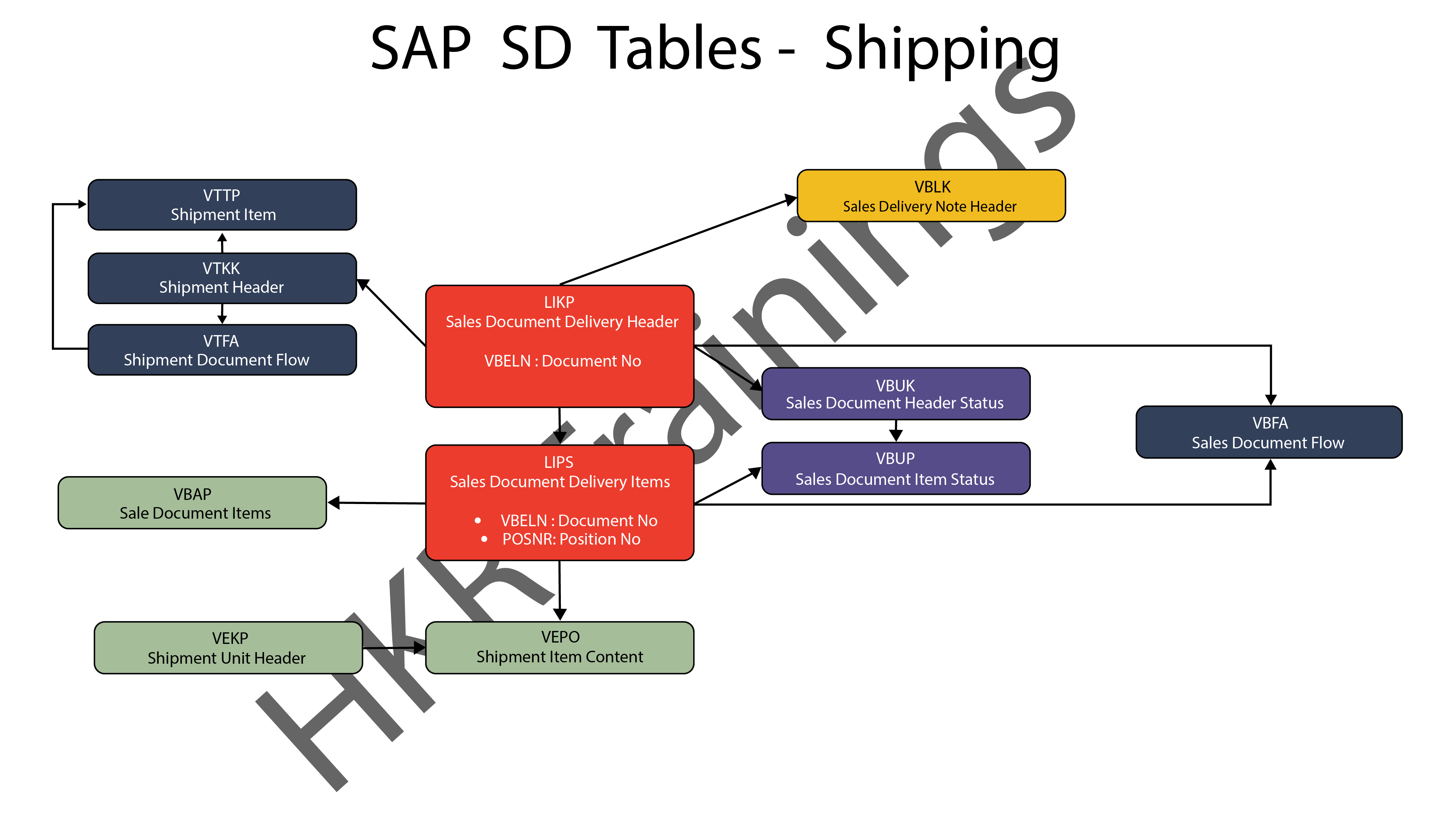
ThIs section is about SAP SD’s shipping processes. In this section, SAP SD tables deal with inbound and outbound deliveries, as well as shipments. Likewise, we’ve created a visual slide with links illustrating table relationships. 
SAP SD Shipping

SAP SD Training

  • Master Your Craft
  • Lifetime LMS & Faculty Access
  • 24/7 online expert support
  • Real-world & Project Based Learning
3) Billing

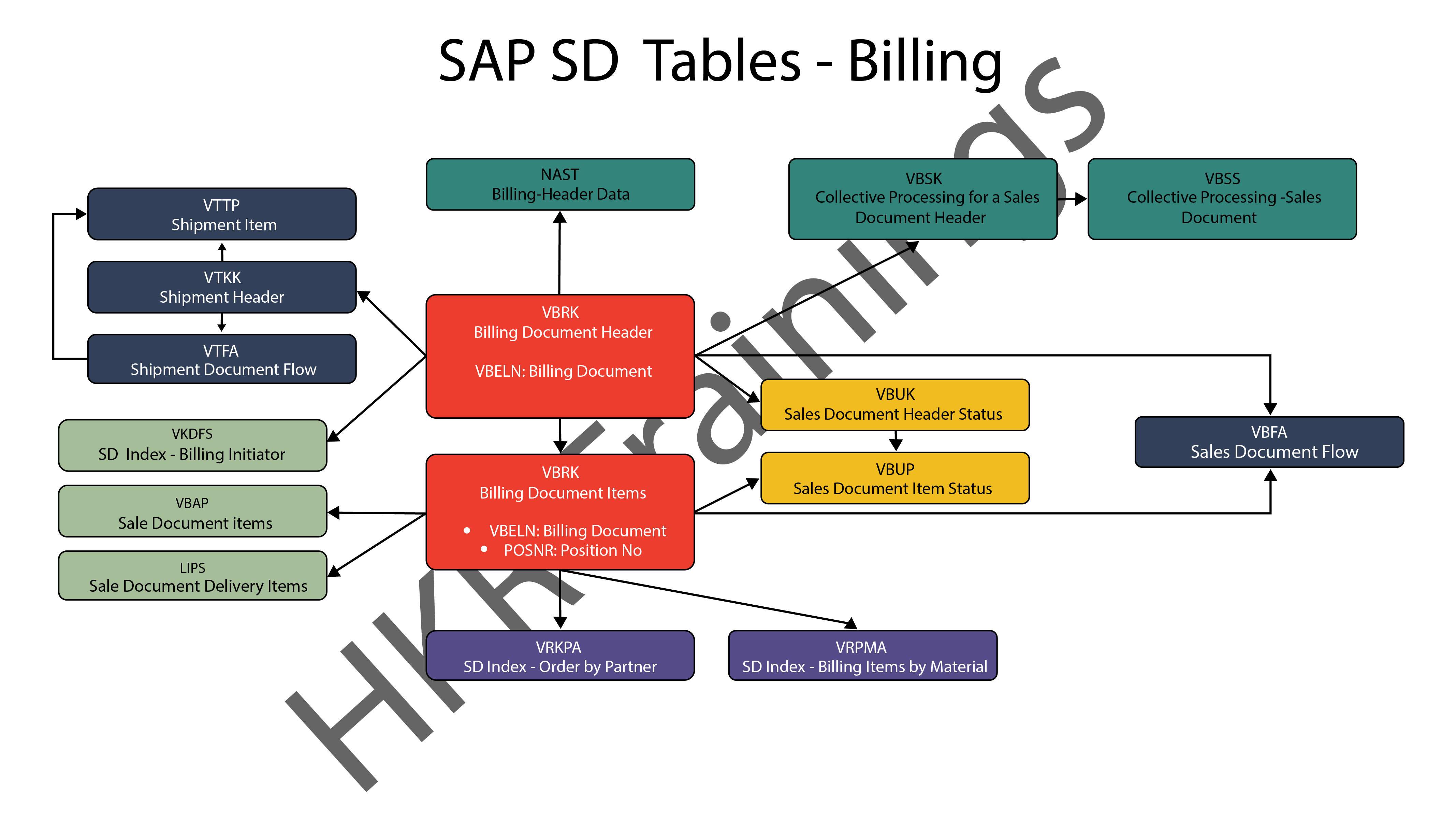
The billing feature of SAP SD is the last but not least. SAP has a variety of tables which are used to support a company’s billing procedures. Billing documents, as well as other related data, such as output conditions, are saved in these tables by SAP. 
SAP SD Billing

Want to know more about SAP SD,visit here SAP SD Tutorial !

SAP SD Significant Tables for Sales and Distribution

The following are the SAP SD tables for customers, sales documents, delivery documents, billing documents, shipping unit.

1) Customers

KNA1: General Data

KNB1: Customer Master – Co. Code Data (payment method, reconciliation acct)

KNB4: Customer Payment History

KNB5: Customer Master – Dunning info 

KNBK: Customer Master Bank Data

KNKA: Customer Master Credit Mgmt.

KNKK: Customer Master Credit Control Area Data (credit limits)

KNVV: Sales Area Data (terms, order probability)

KNVI: Customer Master Tax Indicator

KNVP: Partner Function key

KNVD: Output type

KNVS: Customer Master Ship Data

KLPA: Customer/Vendor Link

2) Sales Documents

VBAKUK: VBAK + VBUK

VBUK: Header Status and Administrative Data

VBAK: Sales Document – Header Data

VBKD: Sales Document – Business Data

VBUP: Item Status

VBAP: Sales Document – Item Data

VBPA: Partners

VBFA: Document Flow

VBEP: Sales Document Schedule Line

VBBE: Sales Requirements: Individual Records

Top 30 frequently asked SAP SD Interview Questions !

3) SD Delivery Document

LIPS: Delivery Document item data, includes referencing PO

LIKP: Delivery Document Header data

4) Billing Document

VBRK: Billing Document Header

VBRP: Billing Document Item

5) SD Shipping Unit

VEKP: Shipping Unit Item (Content)

VEPO: Shipping Unit Header

Acquire SAP Basis certification by enrolling in the HKR SAP Basis Training in Pune!

SAPS, sap-sd-tables-description-2, SAPS, sap-sd-tables-description-4

Subscribe to our YouTube channel to get new updates..!

The most significant SAP Sales and Distribution (SD) tables for Alteryx users

For users of Alteryx and the DVW Alteryx Connector for SAP, we’ll now look at the most significant SAP Sales and Distribution (SD) tables 
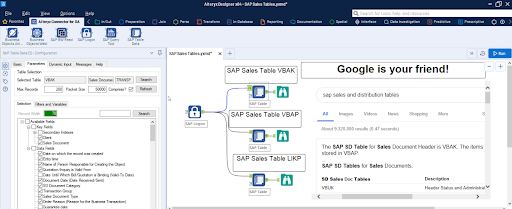
SAP Sales and Distribution table

Related Articles SAP SD Modules !

The following SAP systems contain SAP Sales and Distribution tables:

  • SAP ECC 
  • SAP ERP
  • SAP S/4HANA

SAP Transaction Tables for Sales and Distribution (SD)

The SAP SD transaction tables for sales, delivery and billing process is as follows: 

1) Sales Document Tables

The documents of SAP Sales include:

  • Inquiries
  • Quotations
  • (Sales) Orders
  • Contracts
  • Credit Memo Requests
  • Debit Memo Requests 

The following are the most important tables in a sales document:

  • VBAK – Sales Document: Header Data
  • VBAP – Sales Document: Item Data 

SAP SD Training

Weekday / Weekend Batches


2) Delivery Document Tables

The documents of SAP Delivery include:

  • Delivery / Shipping Notifications
  • Deliveries

The key Delivery Document tables are:

  • LIKP – SD Document: Delivery Header Data
  • LIPS – SD document: Delivery: Item data 

Related Articles SAP SD Flow ! 

3) Billing Document Tables

The documents of SAP Billing include:

  • Invoices
  • Credit Memos
  • Debit Memos
  • Intercompany Invoices

The key Billing Document tables are:

  • VBRK – Billing Document: Header Data
  • VBRP – Billing Document: Item Data

Master Data Tables for SAP Sales and Distribution (SD)

  • KNA1 – General Data in Customer Master
  • KNB1 – Customer Master (Company Code)
  • KNKK – Customer master credit management: Control area data
  • KNVV – Customer Master Sales Data 

Data Tables for SAP Sales and Distribution (SD) Configuration

  • TVFK – Billing: Document Types
  • TVFKT – Billing: Document Types: Texts
  • TVKO – Organizational Unit: Sales Organizations
  • TVZB – Customers: Terms of payment 
  • TVZBT – Customers: Terms of Payment Texts

Conclusion:

We hope this blog is very helpful in knowing various tables discussed on SAP SD.   


Source link

Leave a Reply

Subscribe to Our Newsletter

Get our latest articles delivered straight to your inbox. No spam, we promise.

Recent Reviews


PeopleSoft applications are intended to meet your most demanding business needs and provide your organization with the ability to:

  • Carry out efficiently despite the complexity.
  • Adapt to an evolving workforce with ease.
  • Make smart decisions.
  • It cuts costs while doing more out of less.
        Get ahead in your career by learning PeopleSoft Admin Course through hkrtrainings PeopleSoft Admin Online Training! 

What does PeopleSoft mean?

PeopleSoft is a set of applications that medium to large companies integrate as the workforce management solution. PeopleSoft is an application that belongs to the Oracle software product family. The PeopleSoft app was initially designed for human resource and financial support, but after that, it has expanded with a greater number of applications and tools for common business operations. Some of the uses that corporations and businesses have to integrate PeopleSoft involve many different aspects related to management, such as communications, material and payroll management. In this blog, let us learn about Peoplesoft Modules. So, let’s get started with Peoplesoft modules.

PeopleSoft Admin Training

  • Master Your Craft
  • Lifetime LMS & Faculty Access
  • 24/7 online expert support
  • Real-world & Project Based Learning

Peoplesoft Modules: 

PeopleSoft Enterprise has been evaluated based on support for eight-core modules that offer a total of 3,539 features. Following are the eight modules of Peoplesoft:

  • Peoplesoft Financials
  • Peoplesoft Human Resources
  • Peoplesoft Manufacturing management
  • Peoplesoft Inventory management
  • Peoplesoft Purchasing management
  • Peoplesoft Quality management
  • Peoplesoft Sales management
  • Product technology

Basically, PeopleSoft applications are the tools used by large organizations to manage customer relationships using Customer Relationship Management systems effectively, human resources using Human Resource Management System, enterprise performance using Enterprise Performance Management system and financial and supply chain using Financial and Supply Chain Management System.

Click here to get latest Peoplesoft Admin interview questions and answers for 2021!

Peoplesoft HCM:

PeopleSoft Human Capital Management allows users to perform day-to-day HR tasks and analyze organization and employee data through analytics. It is a set of Peoplesoft modules that are used for managing HR and employee functions. The HCM package includes the following modules: 

  • The HR module keeps data on positions and employees. The data stored and updated in this module refers to information about employees, jobs, positions, benefits and compensation.
  • The recruitment Solution module includes Candidate Gateway and Talent Acquisition Manager. The purpose of the Talent Acquisition Manager is to create job postings, screening, interview and correspond with candidates, extend job postings by electronic means, and prepare the candidates for hire. The Candidate Gateway allows internal and external candidates to see, search, apply for the jobs, manage their application, and provide personal information cover letters, employment references, and other documents.
  • The benefits module administers several benefit programs, which includes health and life insurance, savings, leave, and reimbursement of care for dependants.
  • Two Peoplesoft Modules which will work together for calculating the employee time and managing pay are Payroll and timekeeping. Timekeeping is used as a time reporting system that is fully integrated into Payroll. 
  • The Absence Management module monitors and processes unpaid and paid leaves, as well as accruing leave according to the employee’s years of service. Absence Management is completely embedded with the timekeeping and payroll modules. 
  • PeopleSoft Commitment Accounting is the HR budgeting module that allows users to assign salary costs to various sources of financing.

Acquire Peoplesoft certification by enrolling in the HKR Peoplesoft HRM Functional Interview Questions

Enterprise Integrations, peoplesoft-modules-description-0, Enterprise Integrations, peoplesoft-modules-description-1

Subscribe to our YouTube channel to get new updates..!

Peoplesoft CRM:

Peoplesoft CRM offers Customer Relationship Management that has been customized to your industry business processes, customer strategies, and success criteria. PeopleSoft Customer Relationship Management is an application family from Oracle’s PeopleSoft product line. 

Peoplesoft Customer Relationship Management offers:

  • CRM Analytics
  • CRM Portal pack
  • Marketing Solution
  • Sales Solution
  • Service Solution

Benefits of Peoplesoft CRM:

  • Appropriate for your industry as well as business processes
  • Meets the strategies and needs of your customers
  • Matches your schedule, user and budget expectations

    Get ahead in your career by learning PeopleSoft CRM Course through hkrtrainings PeopleSoft CRM Online Training! 

Peoplesoft ERP: 

PeopleSoft ERP is an on-site application designed to deliver complete business process management and support to organizations, starting with administrative functions such as HR and finance and expanding to managing the supply chain. The highlight of PeopleSoft ERP has always been Human Capital Management (HCM), an important objective of many companies, considering the need to hire, management and development of appropriate talent in a highly competitive market. As an on-site system, PeopleSoft is capable of operating in Windows, UNIX, Linux, and IBM environments.

Some of the main functional categories in Peoplesoft ERP are: 

HCM: Functions based on HR policies and reporting capable of integrating local regulations and customs of every country from where its employees are from. The HCM component comprises workforce management, which manages labour scheduling, time and absence tracking, workload forecasting and compliance with labour laws and wage rules.

PeopleSoft HCM’s talent management capability can be integrated into PeopleSoft as well as the other HR software. It includes every phase of the talent lifecycle such as planning, recruiting, learning and career development, performance, compensation, success planning, talent reviews, measuring and reporting. In addition, it also includes customized HR self-service for the employees according to the role of every employee, employee’s native language as well as the other operational requirements.

Financial Management: It comprises credit to cash workflows, asset lifecycle management, financial analysis, financial control and reporting, procure to pay workflows, governance, risk and compliance functions, treasury management, travel and expense management along with financial services and public sector organizations applications.

Supplier relationship management: It is an integrated set of procurement applications for vendor management aimed at reducing expenditures of goods and services, simplifying procure to pay processes and supporting policy compliance.

Supply Chain Management: It Synchronizes supply chain activities by handling customer orders from beginning to end, that includes distribution of inventory and fulfilment of orders and managing inventory at various warehouse locations.

PeopleTools and technology: A set of application development tools for building and customization of PeopleSoft applications. It can be particularly helpful for organizations wishing to customize their ERP system further.

Enterprise services automation: A set of PeopleSoft applications specifically tailored for project-based organizations and departments. The software allows these organizations to develop basic business processes which support the full lifecycle management of projects at the operations and financial level, from project selection, staffing and planning, to cost control, execution, and analysis. The Activities supported through the software consist of program management, project analysis, proposal management, costing and discovering, contracts, billing grants and expenses. 

The latest version of PeopleSoft is PeopleSoft 9.2. It is designed to allow the users to navigate online screens more easily through a comprehensive textual search. Additionally, version 9.2 introduces mobile capabilities for inventory, requisitioning and enterprise directories; “Smart HR” template-based transactions; and the capability to massively approve a general ledger.

[Related Article : CRM Online Training]

PeopleSoft Admin Training

Weekday / Weekend Batches


Conclusion:

Peoplesoft is most commonly used by medium-sized companies and large companies in a variety of public and private sector industries. The PeopleSoft software and the underlying technologies are licensed, and the price of the software is determined according to the module. This allows sites to customize the PeopleSoft ERP system to their specific requirements and purchase only what they require, with the option to add other features in future. 

Other Related Blogs:


Source link