Nestled in the countryside of southern France is a sprawling industrial complex where scientists and engineers from around the world have converged to build the world’s largest-ever fusion reactor: a doughnut-shaped vacuum chamber designed to contain temperatures 10 times hotter than the core of the Sun.
At an estimated cost of $22 billion, the International Thermonuclear Experimental Reactor is the world’s biggest bet on fusion energy: a project so daunting in scale that longtime geopolitical rivals have pooled their resources to share in its potential risks and rewards.
ITER’s central solenoid (left) is the largest magnet in the world. It will play a key role in starting and maintaining ITER’s fusion reactions.
Celso Bulgatti/CNET
As ITER’s chief strategic advisor Laban Coblentz put it, “That China and Russia were going to collaborate with the US and Europe, and add in Korea, India, and Japan — that’s either genius or insane.”
Controlled fusion reactions produce millions of times more energy than the burning of fossil fuels, and four times more energy than the reactions powering traditional nuclear power plants — without the risk of meltdown, long-lasting radioactive waste and carbon emissions. All humans have to do is create the right conditions for it to happen, but that’s far easier said than done.
Watch this: 10 Times Hotter Than the Sun: Inside World’s Largest Fusion Reactor
Containing ITER’s 150-million-degree Celsius plasma will require superconducting magnets kept just a few degrees above absolute zero. To make that possible, engineers must place one of the hottest environments ever created right next to one of the coldest, with only a thin heat shield separating the two.
Cracks in the piping of this heat shield were discovered in 2020, along with distortions caused by welding and disruptions due to the COVID-19 pandemic, which led to a years-long delay in ITER’s timeline and the need for an additional $5 billion to cover repair costs. At the same time, private fusion startups have been multiplying, with many hoping to beat ITER to major milestones.
Cracks in ITER’s thermal shields were part of a series of setbacks that led to a years-long delay and a $5 billion increase in cost.
ITER
Despite the pressure and criticisms generated by these overruns and delays, the people I met at ITER all spoke about the project like an open book. “This is a publicly funded project,” said Javier Artola, a scientist working on modeling the behavior of ITER’s plasma. “It is the knowledge of the world.”
A publicly funded project like ITER helps de-risk the research and development needed for commercial-scale fusion, making it easier for private companies to place their own big bets on the technology. Every problem ITER solves is one less problem private fusion companies will have to figure out.
ITER scientist Javier Artola points out the different components powering the largest-ever tokamak.
Celso Bulgatti/CNET
Every member state of the ITER agreement (which includes more than 30 countries) will have access to all the science that comes out of ITER, and the construction of ITER itself is developing a global fusion energy supply chain. If the member states agree to share it with them, even non-member states may benefit from ITER’s science.
“We have become a model for how countries of unlike persuasion can work over decades, only through the shared vision of a better world that everybody wants for the next generations,” said Coblentz.
More than 30 countries are collaborating on ITER, each contributing components to the massive machine.
CRS
Fusion is one of those technologies that people often joke is always a decade away. But seeing firsthand what ITER is building gave me hope that we may truly be living in the last decade when fusion is still spoken of as a distant dream.
To see our journey into the heart of this one-of-a-kind experiment in fusion energy and international collaboration, check out the video in this article.
Selenium is an open-source, most popular web automation testing tool that supports multiple browsers & OS. XPath in Selenium is an XML Path and a syntax useful for locating an element on a web page. Locating any element on the web page uses XML path or XPath expression. Further, XPath in Selenium is useful for navigating through the HTML structure of the web page.
Moreover, XPath uses HTML DOM structure to find any element on a web page for both HTML and XML documents.
The syntax for XPath In Selenium
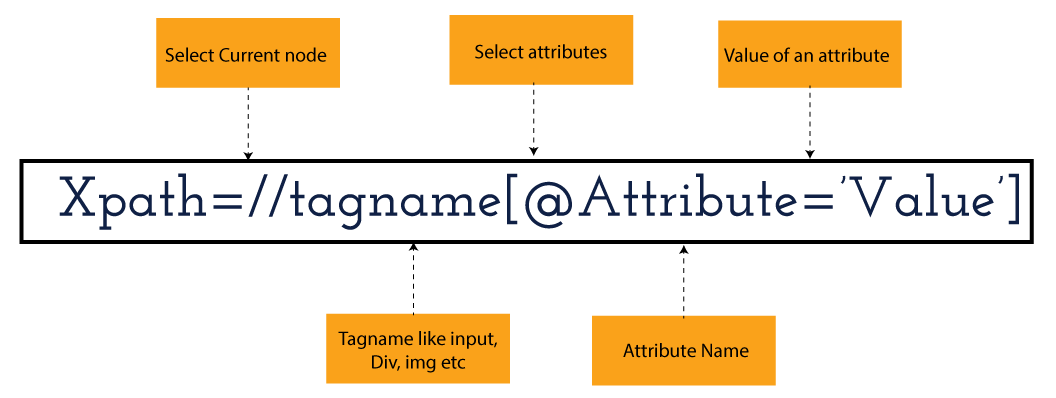
XPath in Selenium holds the element’s location on the web page. The basic syntax for XML Path Selenium is as follows-
Xpath=//tagname[@attribute="value"]
The meaning of each expression in the syntax is-
// : Choose the existing node.
Tagname: Particular node’s tagname.
@: This symbol denotes the “Select” attribute.
Attribute: Node’s attribute name.
Value: Attribute’s Value.
Become a master of Selenium by going through this HKRSelenium Training!
XML Document
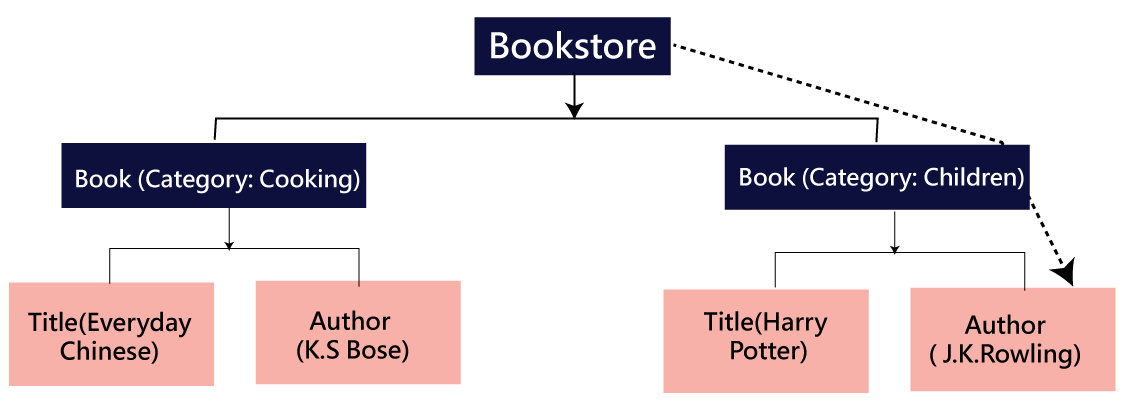
The XML documents are the text files that contain XML data, including elements and other markups, in a sequential package. Further, it can include a wide variety of data such as numbers databases, numbers of a mathematical equation, etc. You can understand XML document with an example:-
Kumar
AK & Co.
032456123
Here, the above code is divided into two parts- Document Prolog & Document Elements. Let us discuss them in brief.
Document Prolog
The document prolog appears at the top of the document, beforE the root document element. It includes XML and Document type declaration.
Document Elements
These major building blocks of XML segregate the document into different sections. Each of these document sections perform a particular purpose. Moreover, you can easily segregate a document into different sections so that search engines can use it. Further, these document elements can be the containers having text and other elements combined.
Types of XPath
Absolute XPath:
Relative XPath:
Absolute XPath
In Selenium, the absolute XPath is the direct path to find the element. This Xpath begins with the “/” (Slash) symbol and helps select the element from the root. The major drawback of this XPath is that if you change the path of the element or attribute, the absolute XPath will fail.
Relative XPath:
The Relative XPath in Selenium begins with the double forward slash “//” symbol and from the middle of the HTML DOM. You can search elements anywhere on the web page as it doesn’t need to write a lengthy Xpath. This XPath is mainly considered as it is not a complete path from the root element.
For example: //input[@id=‘ap_email’]
Suppose You launch Google Chrome and navigate to google.com. Then locate the search bar utilising XPath. By analysing the web element there is an input tag and attributes like class and id. Utilise the tag name and given attributes to create XPath that will locate the search bar.
If you want to Explore more about Selenium? then read our updated article –Selenium Tutorial
Click the Elements tab and press Ctrl + F to open a search box in chromes developers tool. Write XPath string selector and it will try to search based on that criteria. In the image given above, it has an input tag. //input implies tagname. Use the name attribute and pass ‘q’ as its value. It provides XPath expression as shown below:
//input[@name=’q’]
It has focused on the element that implies this specific element was located utilising XPath.
If you want to Explore more about Selenium? then read our updated article –Selenium Tutorial!
Check out our Latest Tutorial video. Register Now Selenium Online Course to Become an expert in Selenium.
Acquire Selenium with jenkins certification by enrolling in the HKR Selenium with jenkins Training program in Hyderabad!
Selenium Certification Training
Master Your Craft
Lifetime LMS & Faculty Access
24/7 online expert support
Real-world & Project Based Learning
XPath Functions
Automation utilizing Selenium is unquestionably an incredible innovation which gives numerous approaches to distinguish an article or component on the website page. Be that as it may, in some cases we do deal with issues in recognizing the articles on a page that have similar credits. Some cases can be: components having similar credits and names or with more than one button with similar name and ids. It’s trying to train selenium to distinguish a specific item on a website page and it is the place where XPath functions to serve as the hero.
Selenium involves different functions. The three of the most broadly utilized functions are given below:
1) Basic XPath
The basic XPath expression selects nodes or a list of many nodes based on various elements or attributes such as ID, Name, ClassName, etc. It selects them from the XML documents. The syntax we can use for the basic XPath is –
Xpath=//input[@name="uid"
2.Contains()
It is a method used in XPath expression when the value of an attribute or element dynamically changes. You can easily find the elements with a partial text using the “Contains” feature in the XPath expression. Now understand this with the below example.:-
Xpath=//*[contains(@type,'sub')]
The above example denotes that the full value of the element type is submitted, but we use the partial text ‘sub’ here to find the element. Thus, in the above example, we tried to find the element by giving a partial text of the attribute “submit”.
3) Using OR & AND
Here, we use two conditions, first or second condition, among which one condition must be “True” to execute it. This method is still applicable if any one or both conditions are “true”. It means that any conditions should be true to find the element. The expression we can use for this is-
Xpath=//*[@type="submit" or @name="btnReset"]
The above XPath expression will help determine whether a single or both conditions are ‘True’.
Similarly, in the “And” XPath expression, also we use two conditions, but both conditions should be “true” to locate the element. If any one of the conditions becomes “false”, then the expression cannot find the element. The syntax we can use for this function is-
Xpath=//input[@type="submit" and @name="btnLogin"]
4) Xpath Starts-with
The function Xpath-Starts-with() in the Xpath functions is useful to find the element whose attribute value changes in some conditions. Here the value changes with the refresh of the page or by performing dynamic actions on the webpage. In this method, the initial text of the attribute should be in parallel to locate the element whose attribute value changes interactively.
Further, you can also find the elements whose attribute value doesn’t change or remain static. You can understand this function’s use by the following example:-
Xpath=//label[starts-with(@id,'message')]
The above syntax shows that two different elements start with the initial id “message”. Here, you can use the Xpath-starts with function to check whose attribute value changes or remains static.
Subscribe to our YouTube channel to get new updates..!
5) XPath Text() Function
In Selenium WebDriver, the function XPath Text() is a built-in function useful to locate elements based on the web element’s text. Using this function, you can find the same text element. Moreover, the elements that you locate must be in a string format.
Xpath=//td[text()='UserID']
Using the above expression having text function, you can locate the element that will show the exact match of the text.
6) XPath axes methods
This method in XPath functions is useful for finding complex or changing elements. However, we can see the following XPath axes methods which we can use:-
a) Following- It is useful to select all the elements in the document of the existing node(). The expression you can use for this method is-
Xpath=//*[@type="text"]//following::input
b) Ancestor- The ancestor axes method is useful to select all the ancestor elements of the existing node, like parents, grandparents, etc. Here, the expression you can use is-
c) Child- This axes method selects all the child elements in the documents’ current node. The expression you can use here is-
Xpath=//*[@id='java_technologies']//child::li
d) Preceding- This method helps select the nodes that come before the existing ones. Here is the example expression:-
Xpath=//*[@type="submit"]//preceding::input
The above expression helps to identify all the input elements before the currently given nodes.
e) Following-sibling- This method helps to select the following siblings of the existing node. All the siblings will be equivalent to the existing node, and the method will find the sibling next to the existing node. Moreover, the syntax you can use here for this method is-
f) Parent- It helps to select the parent from the existing node of the element. The following is the syntax you can use here.
Xpath=//*[@id='rt-feature']//parent::div
Many div(s) match with the parent, but if you want to focus on a specific element. For this you can use the below xpath syntax-
Xpath=//*[@id='rt-feature']//parent::div[1]
g) Self- In this method, it selects the existing node where it selects itself only. That means the node here is the “self”. The expression you can use for self is-
Xpath =//*[@type="password"]//self::input
h) Descendant- It helps to select the descendants of the existing element where it recognizes all the element descendants of the existing element.
Xpath=//*[@id='rt-feature']//descendant::a
Selenium Certification Training
Weekday / Weekend Batches
Conclusion
XPath or an XML Path is used to locate any element or navigate through the HTML structure of a webpage. It is generally used for automation purposes and in cases where it is difficult to find elements using locators like name, class, ID, etc. However, it is the most important among the locators useful in Selenium to identify web elements. Also, it is a handy locator for the testers of web pages.
Thus, learning about XPath in Selenium will help you quickly identify a web element on a web page.
To provide the best experiences, we use technologies like cookies to store and/or access device information. Consenting to these technologies will allow us to process data such as browsing behavior or unique IDs on this site. Not consenting or withdrawing consent, may adversely affect certain features and functions.
Functional
Always active
The technical storage or access is strictly necessary for the legitimate purpose of enabling the use of a specific service explicitly requested by the subscriber or user, or for the sole purpose of carrying out the transmission of a communication over an electronic communications network.
Preferences
The technical storage or access is necessary for the legitimate purpose of storing preferences that are not requested by the subscriber or user.
Statistics
The technical storage or access that is used exclusively for statistical purposes.The technical storage or access that is used exclusively for anonymous statistical purposes. Without a subpoena, voluntary compliance on the part of your Internet Service Provider, or additional records from a third party, information stored or retrieved for this purpose alone cannot usually be used to identify you.
Marketing
The technical storage or access is required to create user profiles to send advertising, or to track the user on a website or across several websites for similar marketing purposes.