Reformer, Mat, Classical, Contemporary: Which Pilates Type Is Right For You?


Pilates types vary by approach, equipment, and goals.Credit: Thing Nong Nont / Getty Images
Pilates types vary by approach, equipment, and goals.
Credit: Thing Nong Nont / Getty Images
  • Pilates includes several styles, from classical and contemporary to clinical.
  • Mat Pilates uses body weight and floor exercises, while reformer Pilates uses spring-loaded equipment for added resistance.
  • Programs like Solidcore and Lagree use Pilates-inspired techniques but are not considered traditional Pilates.

Classical, contemporary, mat, reformer. There are many types of Pilates out there. Then you have [solidcore], Lagree, and hot pilates—it seems like every day, there's a new Pilates-based exercise trend taking over our social media feeds. So how can you make sense of it all?

With so many types of classes available, it may be hard to choose the right one for you. Here's a breakdown of the types of Pilates classes you may see.

First, What Is Pilates?

Developed by German physical trainer Joseph Pilates in the 1920s, Pilates is a controlled, low-impact, full-body exercise system designed to improve muscle strength and control, flexibility, posture, and balance.

Joseph Pilates became inspired to develop a strengthening regimen after growing up with asthma and rickets, a disease that causes soft, weak bones. He studied yoga, martial arts, Zen meditation, and Greek and Roman exercises. Later, he served as a hospital orderly rehabilitating soldiers during World War I. After experimenting with attaching springs to hospital beds to support soldiers' limbs during exercises, he found that it helped them recover faster.

From there, Joseph Pilates built a system of more than 500 repetitive exercises using either a mat or specialized apparatuses he designed himself, such as the reformer, Wunda Chair, or Spine Corrector. The movements were meant to be controlled, precise, symmetrical, and uniform.

Later, two of Joseph Pilates' students, Gail Eisen and Philip Friedman, synthesized his guidelines into the six core principles widely recognized today:

  • Centering
  • Concentration
  • Control
  • Precision
  • Breathing
  • Flowing Movement

Types of Pilates Based on Approach

There are three main approaches to Pilates.

1. Classical Pilates

Joseph Pilates' regimen is commonly referred to as Classical Pilates. Originally called Controlology, it involves a fixed sequence of exercises focused on precision and control.

Classical classes closely resemble Joseph Pilates's original method, incorporating his equipment and exercises. These moves are performed without modification, in the same order he originally came up with. They focus on posterior pelvic tilt, which involves tucking the tailbone and flattening the back to activate the core and protect the spine.

2. Contemporary Pilates

This form of Pilates blends classical principles with modern scientific developments and rehabilitation techniques. While it's based on Joseph Pilates's original method, it's influenced by updated knowledge on biomechanics and physical therapy.

Contemporary Pilates allows for modifications and variations, as well as greater flexibility in the order you perform the moves. Classes may involve additional small equipment, such as massage balls, that were not part of Joseph Pilates' original regimen. Some contemporary practices, such as STOTT Pilates, also emphasize a natural or neutral curve of the spine rather than a posterior pelvic tilt.

3. Clinical Pilates

By the 2000s, healthcare providers had modified Pilates techniques for use in clinical or therapeutic settings.

Known as clinical Pilates, this approach combines Pilates with the McKenzie rehabilitation method for treating musculoskeletal pain. It allows for modifications and places greater emphasis on individuals' needs and goals.

Types of Pilates Based on Equipment

Pilates may also be classified by the type of equipment used. These tools can all be used in classical, contemporary, or clinical Pilates.

1. Mat Pilates

Mat Pilates was the first system Joseph Pilates developed and is the foundation for all other Pilates regimens. He designed a strict sequence of 34 matwork exercises.

Participants sit or lie on a floor mat and use gravity to stabilize their core. This form typically involves bodyweight exercises such as leg circles and bridges, with a focus on breathing and execution.

2. Reformer Pilates

Originally designed by Joseph Pilates, a reformer is a specialized piece of large exercise equipment that encompasses a long, bed-like frame set low to the ground and a sliding horizontal platform attached to a system of pulleys or springs.

Participants stand, sit, kneel, or lie on the reformer and complete moves. The springs can be adjusted to increase resistance or provide more support for the movements.

Other Pilates Apparatuses

Pilates classes may incorporate a number of other apparatuses, including:

  • Wunda Chair: This resembles a backless chair, comprising a box-like wooden base with a padded seat and a spring-loaded pedal for resistance.
  • Barrel: This curved, padded structure resembles a barrel attached to ladder rungs and is designed for deep stretches and core exercises.
  • Spine Corrector: This is a smaller barrel structure with a flat step. Set low to the ground, this tool is used for floor exercises designed to improve posture, flexibility, and core strength.
  • Cadillac/Trapeze Table: This is a large structure comprising a padded platform and a four-post metal canopy frame with bars, springs, and straps that can be adjusted for support or resistance.
  • Tower: This wall unit, made up of springs, bars, and straps, is similar to a reformer but with a vertical frame. Tower classes may involve resistance training combined with mat exercises.

Where Do Pilates-Based Workouts Fit In?

Pilates has inspired countless exercise regimens, from Barre to HIIT Pilates. But while you may hear friends refer to their [solidcore], Lagree, or BODYROK class as "Pilates," these programs aren't technically Pilates—though they may incorporate some Pilates techniques.

Like reformer Pilates, these programs use spring-loaded machines and incorporate low-impact movements. However, they tend to be higher-intensity, place greater emphasis on strength training, and incorporate modern techniques such as progressive overload to maximize muscle fatigue.

They may also incorporate their own proprietary reformer-like machines. For example, Lagree uses a larger machine called the Megaformer, which offers more springs, attachments, and adjustments than a reformer, allowing for a wider range of uses.

So, Which Should You Choose?

Different types of Pilates and Pilates-based workouts may offer different benefits. For example, mat Pilates may be better for building a strong foundation, while reformer Pilates offers more intense strength training.

A healthcare provider can help you decide which regimen is right for you. And if you're a beginner, consider taking classes marketed as beginner-friendly to help prevent injuries.




Source link

Leave a Reply

Subscribe to Our Newsletter

Get our latest articles delivered straight to your inbox. No spam, we promise.

Recent Reviews


What is Power BI?

Power BI is a cloud-based business analysis and intelligence agency developed by Microsoft. It is a compilation of business intelligence and data analytical techniques, such as software services, applications and data connectors. We can use data sources extracted into Power BI to visualize and analyze data using shared reports, dashboards, and apps.Power BI is a user-friendly tool that offers remarkable drag-and-drop features and self-service abilities.

Become a Power BI Certified professional by learning this HKR Power BI Online Training !

Microsoft is offering three types of Power BI platforms:

  • Desktop Power BI(A desktop application)
  • Power BIService (SaaS i.e., Software as a Service)
  • Mobile Power BI (For iOS and Android devices)

We can also deploy Power BI on both on-site and cloud platforms. 

Why Power BI?

Power BI is an integrated system with several various types of data under its supervision.There seems to be a cloud-based BI service called Power BI Services that is used to display and communicate dashboards.A desktop-based report functionality known as the Power BI Desktop.Another useful service is Power BI Embedded, which keeps running on the Azure cloud platform and can be used for reporting, ETL and data analysis.

Now we discuss why it is an important tool in the present market.

  • One can easily do real time analysis in power bi by creating direct connections with the data sets.
  • Can take the advantage of the custom visualizations.
  • Can get the quick insights of the data.
  • Power BI marketplace as on-site communications make data transfer secure and technology scalable and reliable.
  • You can attach to other services via Power BI, such as SQL Server Analysis Services (SSAS), Microsoft Excel, etc.
  • Power BI is a new age application that helps state-of-the-art technologies such as HTML 5.0, column store databases, cloud computing, mobile apps, etc. This helps to
  • keep Power BI at the top and famous, as it is continuously equipped with the latest features.

Power BI Training

  • Master Your Craft
  • Lifetime LMS & Faculty Access
  • 24/7 online expert support
  • Real-world & Project Based Learning

Now we will get into the power bi components in detail.

Power BI Components:

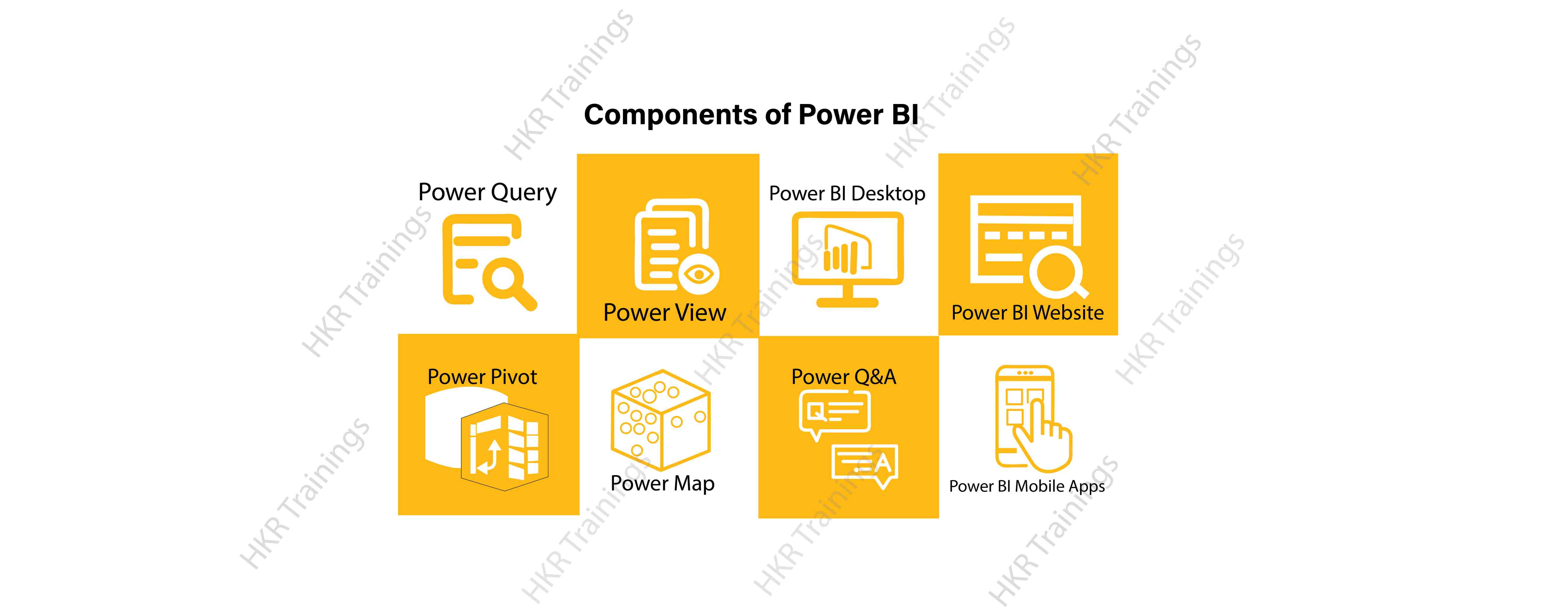
Here are the lists of power BI components. They are:

  • Power Query
  • Power Pivot
  • Power View
  • Power Map
  • Power Q&A
  • Power BI Desktop
  • Power BI Website
  • Power BI Mobile Apps

Power BI Components

Now start discussing each and every component of power BI in detail.

Top 50 frequently asked Power BI Interview Questions !

Power Query:

Power Query is one of the most essential components of Power BI. This would be included in your Excel or could be used as a Power BI Desktop component. Using Power Query, you can uninstall data from multiple data sources and retrieve data from a wide variety of different databases, such as Oracle, SQL Server, MySQL, and other databases. You can also retrieve data from records such as text files, CSV files, etc.

Power BI provides you a powerful GUI so that you really can change and use the information you need, such as date and time changes, add columns, modify types and content, and a variety of options. It includes a small language, Power Query M Formula Language, as a code that is more powerful than a GUI.Power Query Formula Language in Power BI is highly secure and optimized for the development of highly highly scalable mashup queries accessible to Power BI Desktop and Power Query. It has several features that cannot be made available by a GUI.

Power Pivot:

Power Pivot is a data designing and information technology engine. It’s being used to model static and dynamic data. You can establish or generate relations between various tables in Power Pivot and quantify values that can be considered in Pivot tables. It provides a tremendous opportunity to build your design.The language used mostly by Power BI Pivot is Data Analysis Expression (DAX), a highly functional language. 

HKR Trainings Logo

Subscribe to our YouTube channel to get new updates..!

Power View:

Power View is a major aspect of Power BI data visualization. It is an immersive device that connects to data sources and collects metadata that can be used for data collection. There are a lot of image processing blueprints in the Power View list. With Power View, you could even process the data for each visualization element or for the entire report. Slicers can be used to make better dicing of the information.Power View reports are responsive; the user can illustrate some of the data or components in Power View to communicate directly with each other.

Power Map:

Power Map is used to display spatial information in 3D mode. As soon as the visual interface is rendered in 3D mode, it offers some other dimension. In Power Map, one characteristic can be assumed to be the length of a column in 3D and another attribute to be a heatmap view. The data can be illustrated on the basis of a geographical location. Geographical locations may be a country, state, city, or street address.In order to get the best view, Power Map works with Bing Maps related to geographical latitude or longitude or country, state, city or street address data.

Power Q&A:

Power BI Q&A is a common language engine for questionnaires about your data model. After you have assembled and updated your data model on the Power BI website, you or your customers can ask questions, if any, and find solutions to those questions. There are a few shortcut keys and hints for the development of your framework so that it can respond to questions in the most effective manner possible.

For data visualization, Power Q&A works with Power View so that users can ask any questions, such as the amount of clients per state, and the question is responded in the form of a map view with numbers shown as bubbles by Power Q&A.

Want to know more about Power BI,visit here Power BI Tutorial !

Power BI Desktop:

Power BI Desktop is a continuous improvement of the Power BI suit. This is an embedded development tool for Power Query, Power Pivot and Power View. It allows you to build advanced queries, models, and reports. Power BI Desktop makes it easy to advance your BI skills and your data analytics experience.

Power BI Website:

Power BI solutions can be compiled on the Power BI website. You can generate dashboards for your news stories and share them with others, and you can also generate content directly on the Power BI website. With the Power BI website, you can conduct slice and dice online operations using a web browser, and you don’t even need any other tools.

Power BI Mobile Apps

Power BI Mobile Apps has three mobile operating system (OS) providers: Android, iOS, and Windows. These frameworks give you lots of an immersive view of Power BI reports and dashboards. You could even share them with your mobile app. A fraction of the documents can be displayed and a note can be written and shared with others. 

To gain in-depth knowledge with practical experience in Power BI, Then explore hkr’s Power BI Training In Hyderabad !

Power BI Training

Weekday / Weekend Batches

Conclusion:

In the above content, we had covered all the important components of power BI in detail. One can take a sound knowledge in the power BI technology by learning each and every components of the power BI architecture. However, the above stated information is strong enough to make you realize the importance of the power BI in corresponding to the data visualization, data analysis, etc.

Related Articles:


Source link