The hottest EVs from the 2026 New York Auto Show (plus one brawny concept)


With gas prices rising across the country, consumers are turning to electric vehicles as a way to save money on their commute. And while there weren’t a ton of all-new EVs on display at the 2026 New York International Auto Show, we did see some notable debuts from automakers including Subaru, Kia, Hyundai and more. So here’s a look at some of the most interesting upcoming EV models on display today, including a handful of previously announced vehicles that we haven’t had a chance to see in person before.

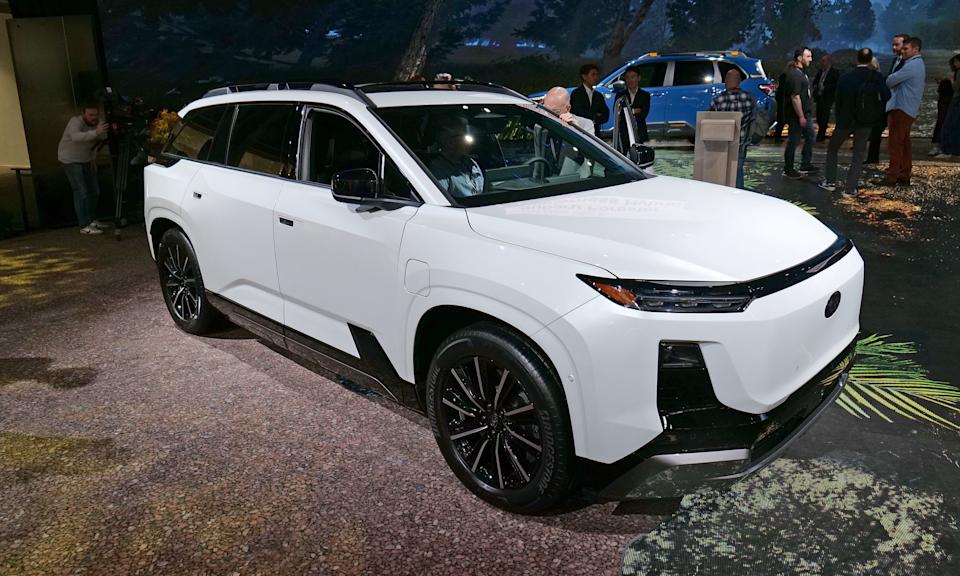
Subaru Getaway

Sadly, Toyota didn't bring the Highlander EV to the NY Auto Show, so I couldn't make a direct comparison to Subaru's new three-row EV SUV.

Sadly, Toyota didn’t bring the Highlander EV to the NY Auto Show, so I couldn’t make a direct comparison to Subaru’s new three-row EV SUV. (Sam Rutherford for Engadget)

Built on the same platform as Toyota’s Highlander EV, the Getaway isn’t just Subaru’s first three-row EV SUV, it’s also its most powerful with up to 420 horsepower. Naturally, the car comes standard with the company’s signature Symmetrical all-wheel drive tech while the 95.8kWh battery on the long-range model delivers more than 300 miles. Sadly, with a lackluster expected charging speed of 150kW, the Getaway will need about 30 minutes to bring its battery from 20 to 80 percent. The Getaway is expected to arrive sometime in late 2026, and while Subaru has yet to reveal official pricing, it’s also planning on releasing a more affordable standard range model with a 77kWh power pack in the first half of 2027.

Hyundai Boulder Concept

Hyundai's SangYup Lee on stage to show off the new Boulder SUV concept.

Hyundai’s SangYup Lee on stage to show off the new Boulder SUV concept. (Sam Rutherford for Engadget)

2026 marks the 40th anniversary of Hyundai’s entrance into the US auto market. To help celebrate the occasion, the company showed off a new concept car called the Boulder. While concrete details are sparse, the prominent grille and body on frame construction strongly suggest that it won’t be a full BEV (battery EV). We’re looking at a hybrid or range-extended EV at best. That said, the Boulder showcases what Hyundai is calling its “Art of Steel” design philosophy which looks to emphasize the strength, flexibility and beauty of its metal exterior while looking a lot more approachable than a Tesla Cybertruck. Notably, while there’s no guarantee that the Boulder will look this big and brawny if it ever reaches production, Hyundai says this platform will underpin a future midsize pickup slated to arrive sometime in 2030.

Kia EV3

After going on sale in Europe in late 2024, the Kia EV3 is finally coming to the US.

After going on sale in Europe in late 2024, the Kia EV3 is finally coming to the US. (Sam Rutherford for Engadget)

The EV3 has been on sale in Europe for about a year and a half, but today at the New York International Auto Show, Kia debuted the new 2027 model of EV3 that will go on sale here in the US sometime before the end of the year. As the smaller sibling to the EV9, the EV3 features a similar design that combines the chunky body of an SUV with clean, futuristic lines, but in a more compact vehicle similar in size to the Sportage. While Kia hasn’t released official pricing, the EV3 is expected to arrive in two main configurations: a standard-range model with a 58.3kWh battery and up to 220 miles of range that could start as low as $35,000, or a more premium long-range variant that promises 320 miles of range. Sadly, its 400-volt architecture means it won’t charge quite as quickly as some of Kia’s more premium EVs. But as a nice bonus, the company says the EV3 will come with vehicle-to-load technology, so you can use the car’s battery to power other devices like tools, lights or your home.

Genesis GV60 Magma

The GV60 Magma is drop dead gorgeous and a more luxurious take on the Ioniq 5.

The GV60 Magma is drop dead gorgeous and a more luxurious take on the Ioniq 5. (Sam Rutherford for Engadget)

While it shares the same chassis and platform as Hyundai’s Ioniq 5N, the Genesis GV60 Magma looks to deliver a more luxurious take on what an electric hot hatch can be. And it looks damn good, especially with its molten orange paint job. Compared to the regular GV60, the Magma features exclusive 21-inch wheels along with streamlined canards, a much larger rear wing and a redesigned bumper that delivers better airflow. But the best part is that while it might seem like a custom creation designed solely to get attention at car shows, Genesis is actually going to put this thing into production with an expected release some time in mid to late 2026.

Polestar 4 Arctic Circle Edition

Even away from the frozen north, the Polestar 4 Arctic Circle Edition looks fantastic.

Even away from the frozen north, the Polestar 4 Arctic Circle Edition looks fantastic. (Sam Rutherford for Engadget)

Yellow isn’t my favorite color, but between its striking paint job and new cold-weather augments, the Arctic Circle version of the Polestar 4 looks absolutely fantastic. It also features 20-inch wheels from OZ Racing, a bunch of extra exterior lights and a rack for skis. And because the Polestar 4 relies on rear-facing cameras and a display built into its rearview mirror, you can still see out the back without anything getting in the way. Unfortunately, because this is a one-off model built for the F.A.T. International Ice Race, you won’t be able to buy one for yourself.

Hyundai Ioniq 5 XRT

The Ioniq 5 XRT is basically a do-everything EV hot hatch.

The Ioniq 5 XRT is basically a do-everything EV hot hatch. (Sam Rutherford for Engadget)

A year and a half ago when I was in the market for a car, the Ioniq 5 was high on my short list. While I eventually went with a Mach-E, if this XRT edition had been available back then, it might have tipped the scales in Hyundai’s favor. This model combines the Ioniq 5’s signature pixelated good looks with some nice off-road touches to create a well-equipped midsize EV that can handle practically any situation. I especially like the addition of bright orange tow hooks that serve as a nice contrast to the subtle digital camo print on the XRT’s front bumper. And while its chunkier tires result in range that’s a touch lower than what you get from an equivalent Limited model (259 vs 269 miles), the XRT makes up for that by including Hyundai’s HTRAC All Wheel Drive system by default without a huge jump in price.

Corvette CX Concept

The CX Concept is meant to be a peek at what future Corvettes could be.

The CX Concept is meant to be a peek at what future Corvettes could be. (Sam Rutherford for Engadget)

With the 2026 Chevrolet Corvette ZR1X already boasting more than 1,200 horsepower, it’s kind of scary to think what the Corvette CX Concept could bring if it ever reaches production. Described as the vision of the future, the CX is Chevy’s take on an electrified hypercar while also serving as a template for future Corvettes as a whole. And while its proportions and styling are so extreme that it’s hard to believe they will make it onto a consumer vehicle, this thing sure is nice to look at.

Rolls Royce Spectre

If I had infinite money, the Spectre would definitely be in my dream three-car garage.

If I had infinite money, the Spectre would definitely be in my dream three-car garage. (Sam Rutherford for Engadget)

For a brand as old and steeped in tradition as Rolls Royce, it’s easy to forget that the luxury automaker began its transition to the EV era back in 2022. And while the company wasn’t officially in attendance at the New York Auto Show, Manhattan Motorcars was nice enough to bring a Spectre to the show floor for plebs like us to gawk at. In many ways, this car is an ideal showcase of the advantages of electrification, as the Spectre offers ample power (up to 650hp for the Black Badge variant) and massive torque, but without all the commotion you get from an internal combustion engine. Despite weighing around 6,500 pounds (making it one of the heaviest passenger cars on the market), it still delivers more than respectable range, with up to 277 miles depending on the specific config. Although, it’s not like any Spectre owners are actually going to take this thing on a cross-country road trip.


Source link

Leave a Reply

Subscribe to Our Newsletter

Get our latest articles delivered straight to your inbox. No spam, we promise.

Recent Reviews


SCCM Client Installation – Table of Content

Introduction to SCCM

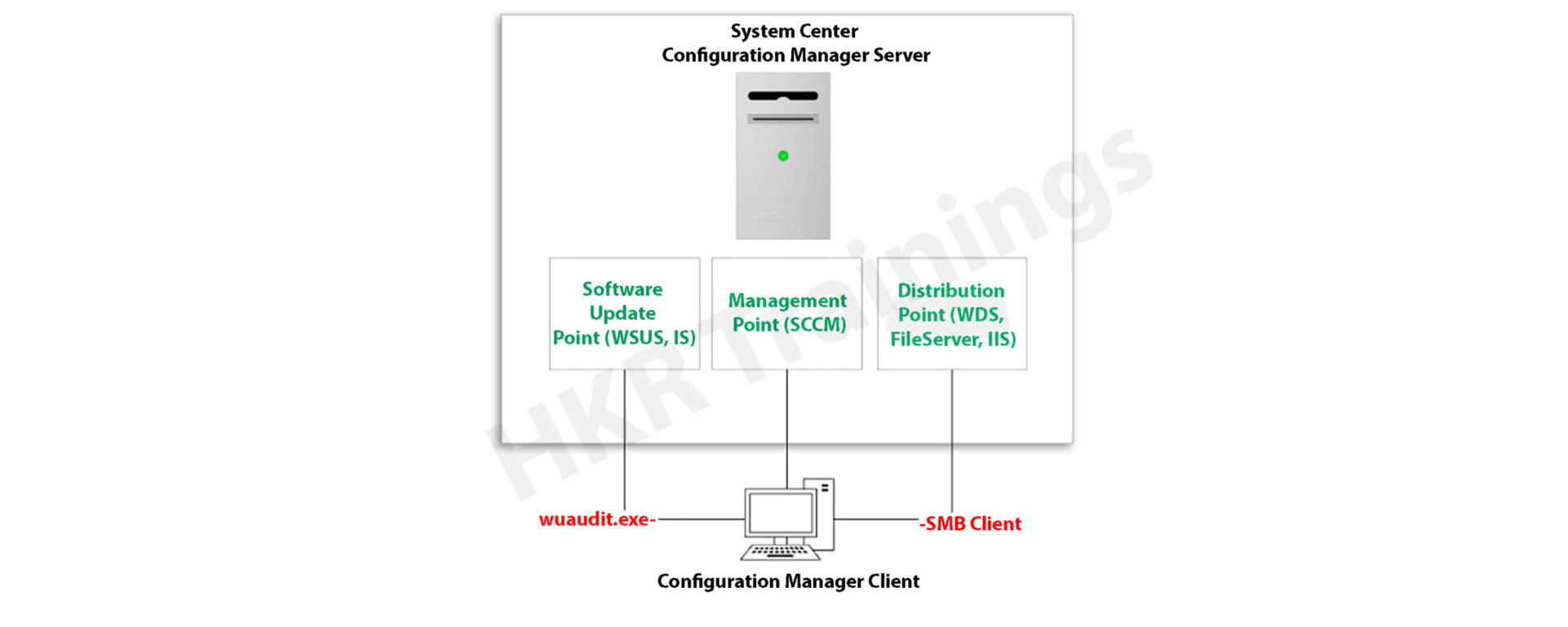
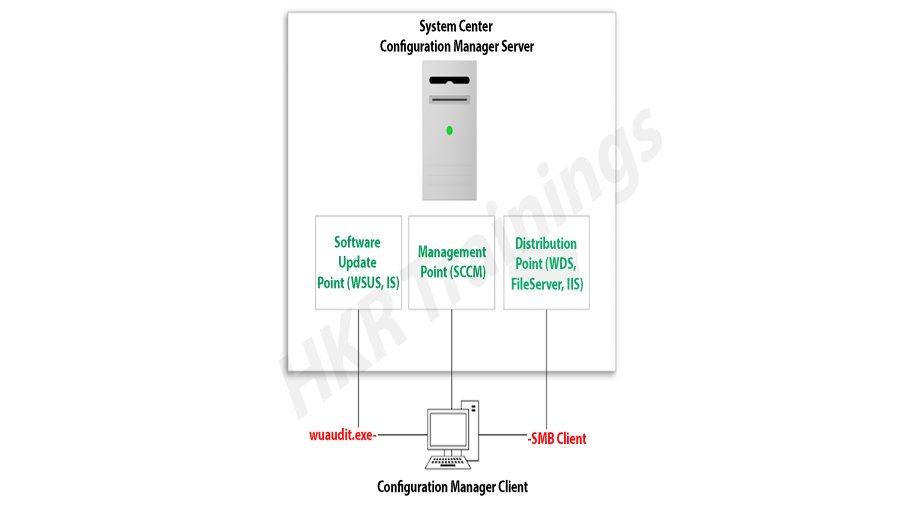
Microsoft System Center Configuration Manager (SCCM), a modern product from Microsoft, is designed to streamline the management and updating of software products. SCCM stands out for its highly adaptable, automated approach to deploying and configuring various devices, including desktops and laptops, starting from any initial state, such as bare-metal deployments. This tool empowers IT admins by offering an end-to-end solution for Windows installation and configuration. It simplifies the delivery of apps, patches, and security updates through a unified distribution system. 

A standout feature of SCCM is its capacity to manage many computers running various OS like Windows, Linux, UNIX, and iOS, demonstrating its versatility in diverse IT environments.

Get ahead in your career by learning SCCM through hkrtrainings Microsoft SCCM Online Course

SCCM Client Installation

SCCM: Installation Guide

The installation process for SCCM 2012 R2 is outlined in a series of steps crafted to simplify the user experience. The process begins with setting up the primary server and accompanying SQL server, typically housed on the same device.

Step1: Prepare active directory for configuration manager

a) Create the system management container:

Please navigate to the domain controller, load the ADSI file, and edit it. In the system OU, create a new object named ‘System Management.’

Complete the wizard, closing the ADSI editor. Grant control of the system to the configuration system server for the new system configurator object.

Create the system management container

Choose the container and click next.

container

Enter the name of system management and click next

system management

b)Complete the wizard browser and close the ADSI editor.

Now pass the system control to the configuration system server to the newly created system configurator object, this can be done by using the navigation, choose the folder -> existing object -> create the new objects.

wizard browser

ADSI

Check all the boxes (use the right tick) and complete the browser wizard.

Step2: Extend the system configuration Schema:

Navigate to \SMSSetup\bin\x64, accessing the folder controlling the system schema rules. Ensure the account used is a member of the AD admins’ group. Run Extadsch.exe as an admin and verify the successful extension in the Extadsch.log file.

system configuration Schema

Log into Extadsch.log file-> it will take you to the root, C: Drive. Check for the entry then you will notify with a message as “successfully extended to the active schema director”.

<02-02-2013 23:21:22=””> successfully extended the schema directory.

To check the activity of extadsch.exe -> go to the directory file “ConfigMgr_ad_schema.idf” that is located in the same folder in the system.

Step 3: Install the Site server prerequisites:

Essential SCCM site server management components include BITS, Remote Differential Compression, .NET Framework 3.5, and IIS components.

a. BITS

b. Access the remote differential compression

c. .NET framework 3.5

d. IIS components.

Step 4: Install the window assessments and Deploy kits (Windows ADK):

Download ADK 8.1 and follow the installation steps, including running the adksetup.exe file, accepting licenses, and choosing components like User State Migration Tools and Windows Deployment Tools.

a. Run the executable file adksetup.exe file -> accept the license agreements -> it will download and install the.Net framework 4.5.

Install the window assessments

Now restart the system when you accessed,

restart

If you have any doubts on SCCM, then get them clarified from SCCM Industry experts on our SCCM Tutorial !

SCCM Training

  • Master Your Craft
  • Lifetime LMS & Faculty Access
  • 24/7 online expert support
  • Real-world & Project Based Learning

After that system setup will resume-> accept the default location-> click next.

system setup

Select to join the CEIP -> click next

join the CEIP

Now accept the license agreements

Install the component and click the “install” button

  • User state migration tools
  • Windows deployment tools
  • Windows pre installment environment (windows PE).

install

installl

Once they complete the installation and click close.

installation and click close

HKR Trainings Logo

Subscribe to our YouTube channel to get new updates..!

Step 5: Install the SQL server:

For the SCCM database, install SQL Server 2012 by running the setup.exe file and following the installation wizard.

Run the executable file -> setup.exe

Install stand-alone SQL database server

Install the SQL server

Click OK-> it will open the new browser;

open the new browser

Install the product key -> run in evaluation mode -> click next

product key

Accept the SQL license agreement -> click next -> add any product updates-> click next -> now it’s time to choose the installation features -> click next

                                   Check out here for frequently asked  SCCM Interview Questions & Answers

Set SQL to run with adding an appropriate domain name, network service, and local system account.

Step6: Install the SCCM R12:

Execute the splash.hta file and follow the guided installation process. It includes selecting the primary site installation, entering the license key, and configuring SQL database server settings.

1. Run the splash.hta -> click install

Install the SCCM R12

Now click next

click next

Choose to install the primary site-> click next

primary site

Enter the license key->click next

Now accept the license key -> click next

license key

SCCM Training

Weekday / Weekend Batches

 Accept the pre-required license agreement->click next

 license agreement

Create any file solder to store the installation updates and Store the SCCM executable file in any folder-> click next

SCCM executable file

Updates will download -> installation begins-> select any language for the SCCM server-> click next.

Choose any client language-> click next-> enter the 3 digit site code and add the description.

Choose to run SCCM installation as a stand-alone -> click next

SCCM installation as a stand-alone

Click yes to accept -> select the default database server configuration-> click next.

Now specify the path to store the SQL database server and log files-> click next to set the current server -> set the configure the communication on each site system role”-> next install both MP and DP -> site server -> SCCM will begin the installation-> close the browser when it completes.

Launch the SCCM console -> make sure that all the database entries you have done are right -> start monitoring the workspace -> site status.

Launch the SCCM console

This finishes the installation process of SCCM.

Functionalities of SCCM:

The updated version of SCCM software adds much functionality to the applications. Let me explain them one by one;

Site infrastructure:

Supports Microsoft Office 365 file updates and features keyboard shortcuts for easy navigation within the configuration manager.Under the site infrastructure we can see the following features;

  • Site infrastructure’s client peer cache will support the updating of files for Microsoft office 365 and distributed express installed files for configuration of Microsoft Windows 10.
  • With the addition to this, there are few functionalities available such as,
  1. Ctrl + D -> this keyword indicates the detailed panel
  2. Ctrl +I -> this keyword indicates the breadcrumb bar
  3. Ctrl + L -> this keyword indicates the search field
  4. Ctrl + M -> this keyword indicates the main central panel
  5. Ctrl + T -> this indicates the top node in the navigation panel.
  • This central administration site and primary configuration sites both include the configuration manager updates. Rest tolls will be used for downloading or replicating problems.
  • With the help of this update, the configuration console manager can be measured and display them on the user interface applications.

Related article : SCCM Deployment

Compliance settings:

Include various device settings adjustments, such as password encryption, name modification, and storage settings.

The settings are as follows;

  • Password -> device encryption
  • Device ->
  1. Modification of device name
  2. Modification of region settings (only desktops)
  3. Language setting modifications
  4. Modification of power and sleep settings
  5. Modification of system time and language settings
  • Storage -> it uses only the private storage
  1. Auto-update available for the apps
  2. Available store-oriented app launch
Application management:

It facilitates script deployment for client device management, including PowerShell script integration and result analysis.In this application management configuration setting, users can deploy the scripts to manage the client devices in the form of packages and programming codes. The following actions included are,

  • Users can run the script on-premises managed windows and windows client PCs.Here no need to deploy the scripts, they only run in real-time client devices.
  • Importing of PowerShell scripts to the system configuration manager
  • Edit the whole script from the system configuration console.
  • Need to mark the scripts whether it is approved or denied
  • Finally, examine the results which will return the script in the configuration manager console.
Operating system deployment:
  • Collapsible task sequence groups: this deployment version will expand and collapse the task management, sequence groups. Here user can expand or collapse all the groups or individual groups at once.
  • Hardware inventory collects the secured boot information: this hardware inventory collects information such as client enabled boot data. This information will be stored in the SMS_firmware class and enabled in the hardware inventory by default.

Software updates

Improvements to express the update download time:

Features improvements in express update download times, Microsoft Surface driver updates management and configurations for Windows Update for Business deferral policies.

Manage Microsoft Surface driver updates:

Here user can use the configuration manager to manage any Microsoft software driver updates.

Configure Windows Update for Business deferral policies:

Now you can configure the whole deferral policies for windows 10 quality features and also quality updates for the windows 10 software devices. This will manages the windows updates directly which will be used for the business later. You can manage the business referral policies in any newly updated system as follows; Software library -> Windows 10 servicing.

Improved user notifications for Microsoft office 365 Updates:

Improvements will be made to leverage the Microsoft office click-to-run user experience when a client installs new office 365b software updates. This update should consist of pop-up and in-app notifications.

Reporting:

Integrates with Windows Analytics for insights into the software environment.

Using windows Analytics with configuration manager:

Windows analytics is nothing but a collection of solutions that run on the Microsoft operational management suite. This solution allows users to form any kind of insight into the current state of the software environment. Devices in the software environment also report the telemetry data. The data can be accessed through the operations management suite web portals.

Mobile device management:

Updates to Android devices for work-sharing configuration management:

Includes updates for Android work profile settings and enrollment restrictions for Android and iOS devices.

Android and IOS enrollment restrictions:

Here users can be allowed to specify the enrollment in any personal Android or IOS devices. With the Android devices, there is a limit restriction on enrollment but with the IOS devices, users can easily block the enrollment with the help of Apple device enrollment settings.

Protect devices:

Newly software update includes the specific trust files and data folders options in Device Guard policy settings. And also advanced capabilities are added to this device guard policy management.

Advantages of SCCM:

There are a lot of advantages of using SCCM, let me explain them one by one,

  • Empowers User Productivity: It allows users to access necessary devices and applications while ensuring corporate compliance and control.
  • Unified Infrastructure: It offers a single platform for managing physical, virtual, and mobile devices.
  • Efficient Change and Configuration Management: It provides tools for seamlessly managing software changes and configurations on the Microsoft platform.
  • Rapid Software and Update Deployment: It facilitates quick and cost-effective distribution of software apps and updates, including security patches.
  • Comprehensive Hardware and Software Inventory Management: It streamlines hardware and software inventory collection and management.
  • Operating System Deployment: It supports efficient deployment of operating systems across various devices.
  • Software Usage Metering: It monitors and reports software usage, aiding and resource management.
  • Affordable IT Management Solution: It offers a cost-effective solution for comprehensive IT management.
  • Database Growth Tracking: Enables monitoring of SQL Server database growth for optimized database management.
  • Remote Computer Control: It allows remote control of computers for troubleshooting and support.
  • Enhanced IT Environment Visibility: It provides greater insight into the IT infrastructure, improving decision-making and management.

Conclusion

In this blog, I have tried my best to explain the key factors involved in installing SCCM software and its advantage. SCCM is a popular Microsoft product; SCCM is used to update system management. The complete SCCM installation guide enables you to become a master in this. This blog may help a few of those who are Windows server professionals, and also for Microsoft social community forums.

Related articles:


Source link