YouTube Will Let You Turn Off Shorts, but Only on Mobile


You can stop scrolling: YouTube just gave iOS and Android users the power to turn YouTube Shorts off completely. 

YouTube’s short-form videos are similar to TikTok and Instagram Reels. The videos are designed to be quick bursts of content, but can lead to more screen time than you may have initially intended. YouTube is rolling out a solution, at least for those who use the YouTube mobile app.

The YouTube Shorts Timer lets you set how much time you want to spend watching YouTube Shorts. Or you can set the timer to zero to stop seeing YouTube Shorts altogether. Google has instructions to disable Shorts or enable the timer in the YouTube app. You can limit your Shorts scrolling session to 15, 30 or 45 minutes, or for an hour or two. When the timer is up, you’ll see a message that you’ve reached your set time limit, but you can dismiss it. Google also says you can set reminders for bedtime and breaks.

The ability to set the timer to zero minutes isn’t available for everyone yet. A Google spokesperson told CNET that the feature was made available first to parents linked to supervised accounts. It’s still rolling out to all other users.

youtube shorts screenshot

Screenshot by Dashia Milden/CNET

As a parent, I’m relieved to know parents now have more control over screen time through Google’s Family Link, an app and website for Google and YouTube parental controls. It also makes me wonder what other screen-time controls could be on the horizon. 

YouTube did not immediately respond to a request for comment. 

A recent Pew Research Center study of teens who use TikTok, Snapchat and Instagram found that their screen time on these social media apps affects their sleep and productivity. Meanwhile, teens are using these apps for entertainment and say that the apps help their friendships — which could be important for teens. However, parental controls, app settings and other timers, like Brick, could help if you’re consistent and set schedules to have screen time without impeding on your time to rest or complete other tasks. 

Last month, a California jury found YouTube and Instagram’s respective parent companies liable in a landmark civil case brought by a woman who claimed the apps were designed to be addictive to children. YouTube owner Google has said the platform is a streaming service, not a social media site, and plans to appeal.

YouTube says parents can use the timer to control how much time teens spend watching Shorts, including setting reminders for bedtime and breaks. Or parents can turn off Shorts in the YouTube mobile app by setting the timer to 0 minutes.

The feature is only available for mobile, so Shorts can’t yet be disabled on desktop. TikTok rolled out new time-management features last year, including a positive affirmations journal and missions to earn badges for reducing screen time. 


Source link

Leave a Reply

Subscribe to Our Newsletter

Get our latest articles delivered straight to your inbox. No spam, we promise.

Recent Reviews


SD Tables in SAP:

The SAP SD module is built on tables and uses them to store data. We’ll go through SAP SD tables and their relationships in this tutorial. SAP SD tables are critical storage for corporate data connected to SAP ERP software’s sales and distribution activities. The SD tables are basically divided into three parts:

These are the SD module’s building blocks, and it’s only natural to address tables in this sequence. Please look at the slides to see how the tables from different blocks were connected. Being an expert in SAP SD necessitates an understanding of these relationships. 

 Become a SAP SD Certified professional by learning this HKR SAP SD Training !

1) Sales

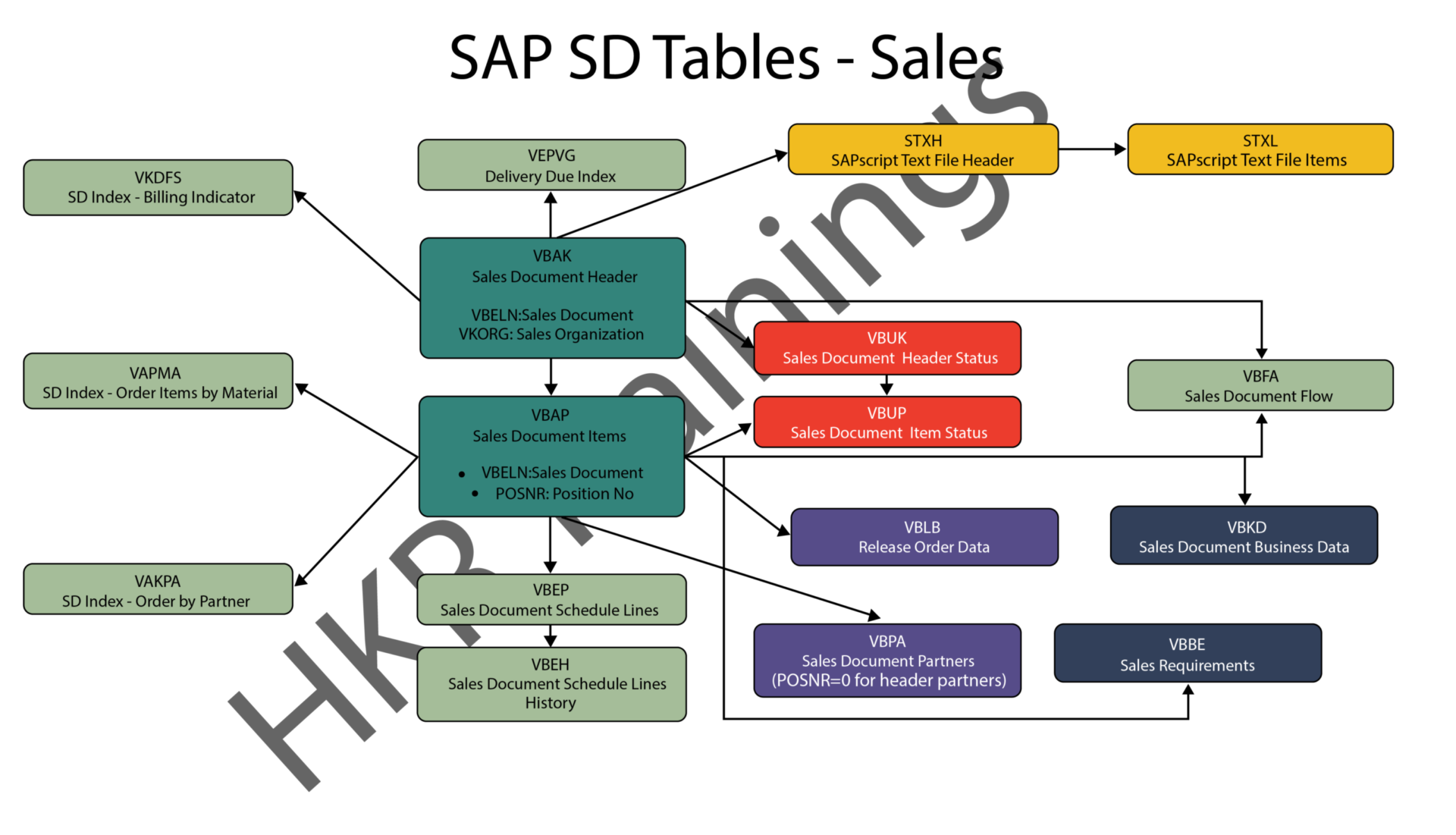
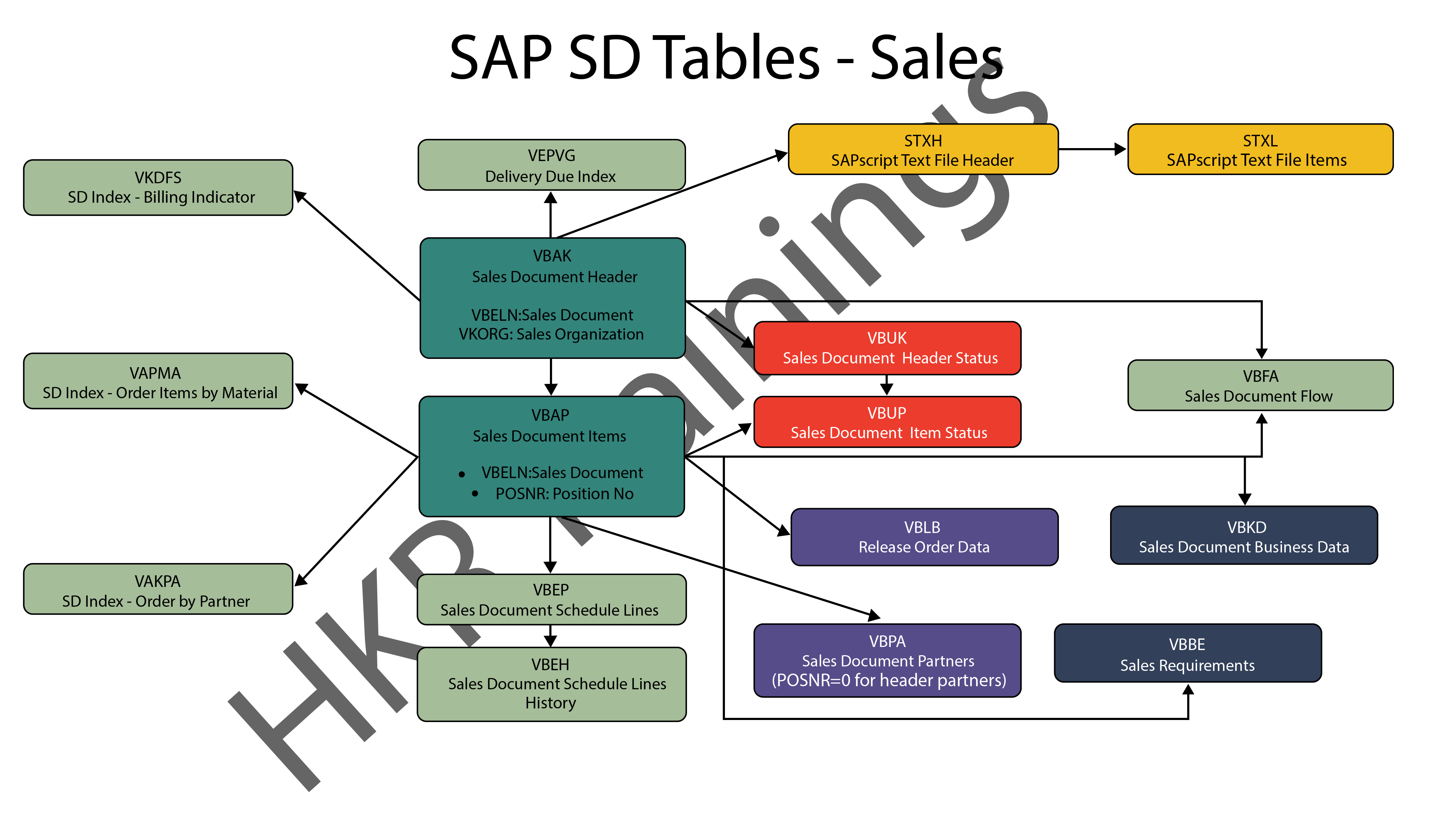
In SAP SD, the first block is about sales procedures.This indicates that the SAP SD tables in this block would be related to sales orders, quotations, and other similar transactions. We designed a visual slide that lists all of the tables and their relationships. 

SAP SD Sales

2) Shipping

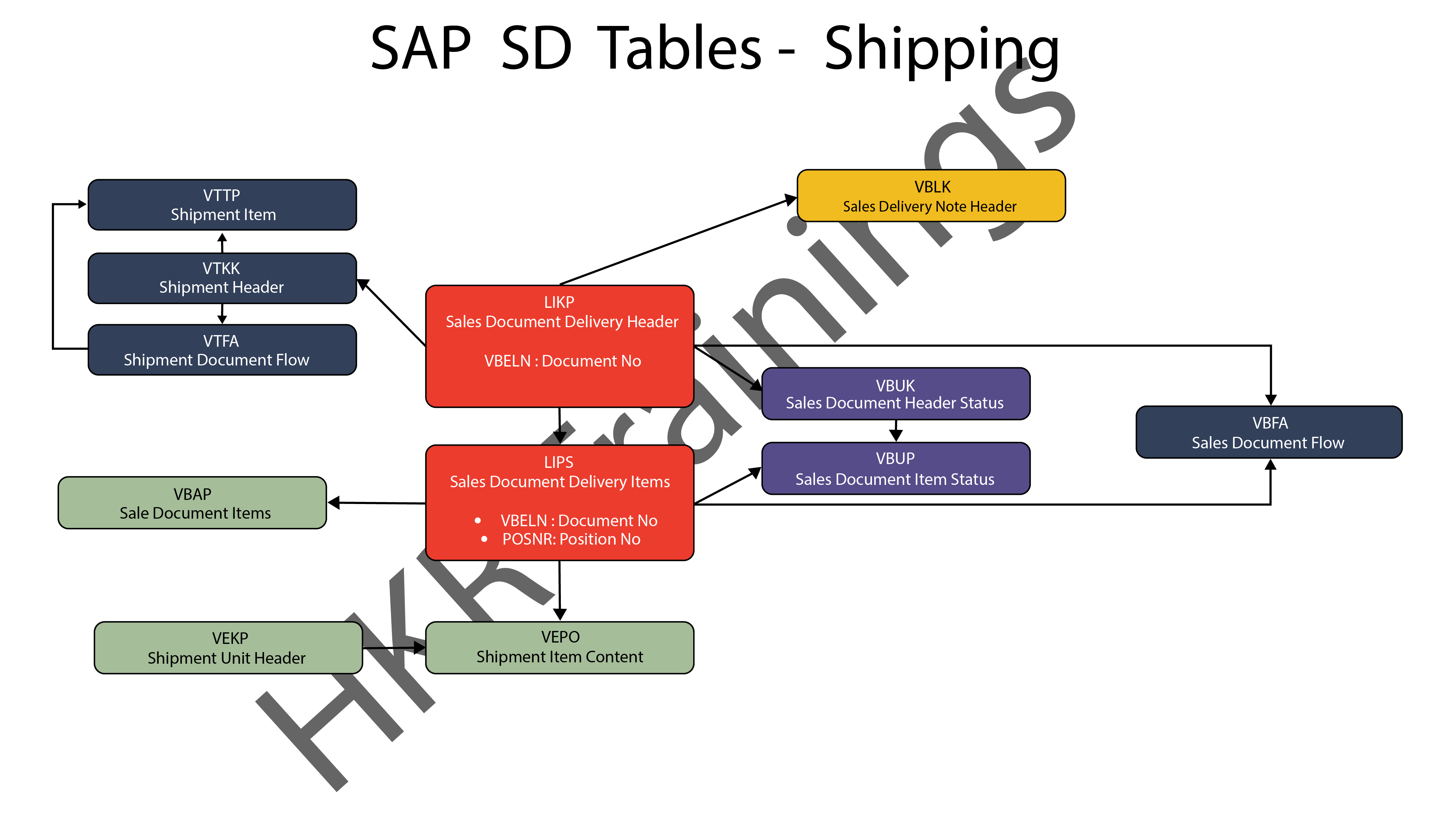
ThIs section is about SAP SD’s shipping processes. In this section, SAP SD tables deal with inbound and outbound deliveries, as well as shipments. Likewise, we’ve created a visual slide with links illustrating table relationships. 

SAP SD Shipping

SAP SD Training

  • Master Your Craft
  • Lifetime LMS & Faculty Access
  • 24/7 online expert support
  • Real-world & Project Based Learning
3) Billing

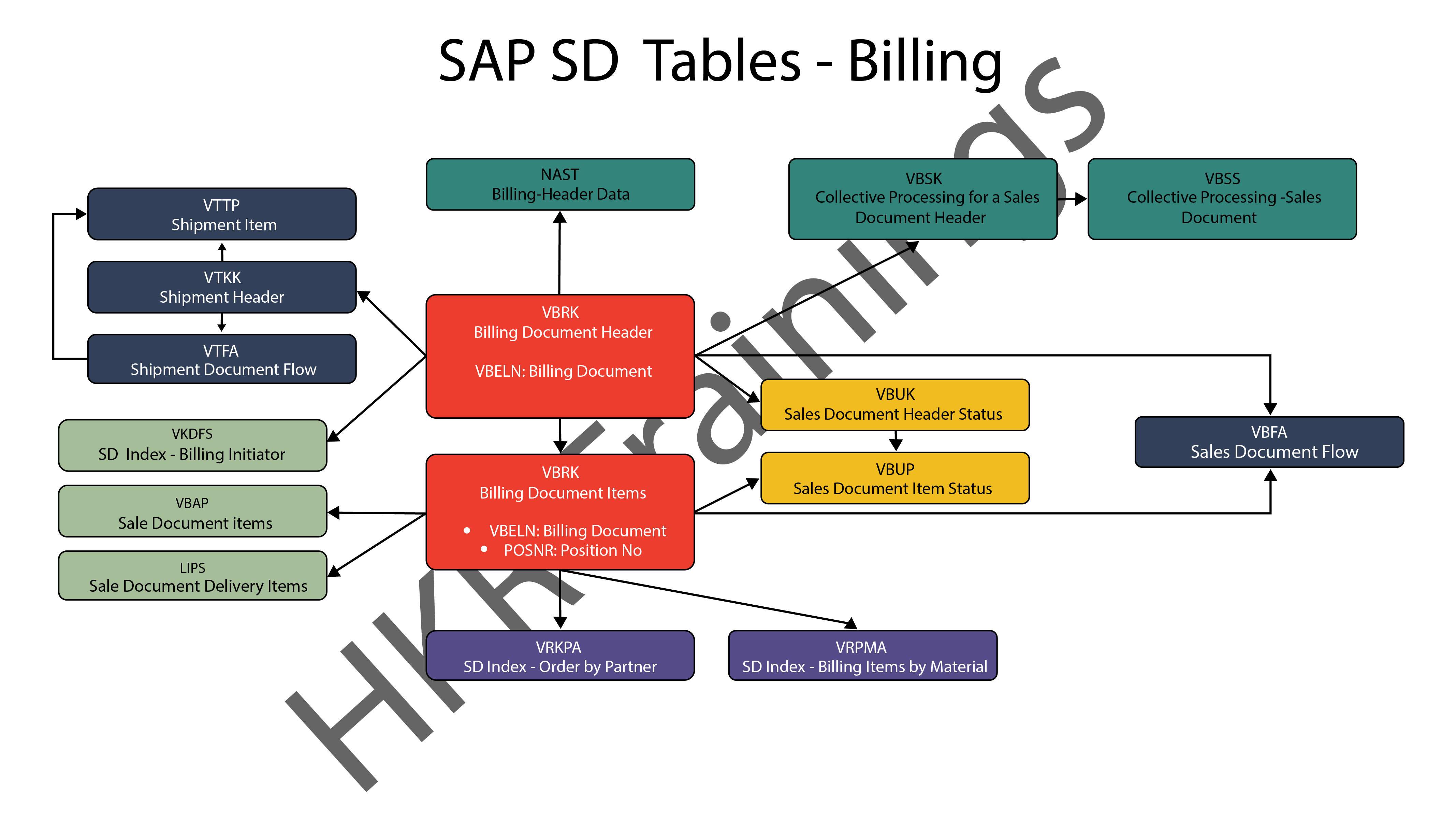
The billing feature of SAP SD is the last but not least. SAP has a variety of tables which are used to support a company’s billing procedures. Billing documents, as well as other related data, such as output conditions, are saved in these tables by SAP. 

SAP SD Billing

Want to know more about SAP SD,visit here SAP SD Tutorial !

SAP SD Significant Tables for Sales and Distribution

The following are the SAP SD tables for customers, sales documents, delivery documents, billing documents, shipping unit.

1) Customers

KNA1: General Data

KNB1: Customer Master – Co. Code Data (payment method, reconciliation acct)

KNB4: Customer Payment History

KNB5: Customer Master – Dunning info 

KNBK: Customer Master Bank Data

KNKA: Customer Master Credit Mgmt.

KNKK: Customer Master Credit Control Area Data (credit limits)

KNVV: Sales Area Data (terms, order probability)

KNVI: Customer Master Tax Indicator

KNVP: Partner Function key

KNVD: Output type

KNVS: Customer Master Ship Data

KLPA: Customer/Vendor Link

2) Sales Documents

VBAKUK: VBAK + VBUK

VBUK: Header Status and Administrative Data

VBAK: Sales Document – Header Data

VBKD: Sales Document – Business Data

VBUP: Item Status

VBAP: Sales Document – Item Data

VBPA: Partners

VBFA: Document Flow

VBEP: Sales Document Schedule Line

VBBE: Sales Requirements: Individual Records

Top 30 frequently asked SAP SD Interview Questions !

3) SD Delivery Document

LIPS: Delivery Document item data, includes referencing PO

LIKP: Delivery Document Header data

4) Billing Document

VBRK: Billing Document Header

VBRP: Billing Document Item

5) SD Shipping Unit

VEKP: Shipping Unit Item (Content)

VEPO: Shipping Unit Header

Acquire SAP Basis certification by enrolling in the HKR SAP Basis Training in Pune!

SAPS, sap-sd-tables-description-2, SAPS, sap-sd-tables-description-4

Subscribe to our YouTube channel to get new updates..!

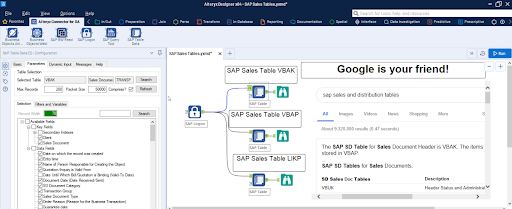
The most significant SAP Sales and Distribution (SD) tables for Alteryx users

For users of Alteryx and the DVW Alteryx Connector for SAP, we’ll now look at the most significant SAP Sales and Distribution (SD) tables 

SAP Sales and Distribution table

Related Articles SAP SD Modules !

The following SAP systems contain SAP Sales and Distribution tables:

  • SAP ECC 
  • SAP ERP
  • SAP S/4HANA

SAP Transaction Tables for Sales and Distribution (SD)

The SAP SD transaction tables for sales, delivery and billing process is as follows: 

1) Sales Document Tables

The documents of SAP Sales include:

  • Inquiries
  • Quotations
  • (Sales) Orders
  • Contracts
  • Credit Memo Requests
  • Debit Memo Requests 

The following are the most important tables in a sales document:

  • VBAK – Sales Document: Header Data
  • VBAP – Sales Document: Item Data 

SAP SD Training

Weekday / Weekend Batches


2) Delivery Document Tables

The documents of SAP Delivery include:

  • Delivery / Shipping Notifications
  • Deliveries

The key Delivery Document tables are:

  • LIKP – SD Document: Delivery Header Data
  • LIPS – SD document: Delivery: Item data 

Related Articles SAP SD Flow ! 

3) Billing Document Tables

The documents of SAP Billing include:

  • Invoices
  • Credit Memos
  • Debit Memos
  • Intercompany Invoices

The key Billing Document tables are:

  • VBRK – Billing Document: Header Data
  • VBRP – Billing Document: Item Data

Master Data Tables for SAP Sales and Distribution (SD)

  • KNA1 – General Data in Customer Master
  • KNB1 – Customer Master (Company Code)
  • KNKK – Customer master credit management: Control area data
  • KNVV – Customer Master Sales Data 

Data Tables for SAP Sales and Distribution (SD) Configuration

  • TVFK – Billing: Document Types
  • TVFKT – Billing: Document Types: Texts
  • TVKO – Organizational Unit: Sales Organizations
  • TVZB – Customers: Terms of payment 
  • TVZBT – Customers: Terms of Payment Texts

Conclusion:

We hope this blog is very helpful in knowing various tables discussed on SAP SD.   


Source link