BRB Risk Jobs Board — Conflicts Staff Attorney (Davis Wright Tremaine)


This week, I’m pleased to highlight an open role at Davis Wright Tremaine: “Conflicts Staff Attorney” —

  • This is an exciting opportunity to work for one of the top law firms in the U.S.! Davis Wright Tremaine LLP is looking for a Conflicts Staff Attorney to join our team in our Seattle, Portland, Los Angeles, Culver City, or San Francisco offices.
  • This position offers the flexibility to be fully remote while working within reasonable commuting distance from any of our offices.
  • This position is responsible for performing a variety of tasks related to the screening of potential client engagements in accordance with the firm’s risk management procedures and policies.
  • At Davis Wright Tremaine, you will find challenging assignments, opportunities for professional growth and community involvement, and a culture of inclusion. DWT fosters inclusiveness and authenticity. Regardless of position, everyone here has a voice and the support is unparalleled.


On a typical day you will:

  • Undertake and analyze conflicts database searches with respect to new matters for prospective and existing clients, to highlight potential conflict issues for attorneys initiating new clients and new matters for existing clients
  • Assist intake attorneys in clearing potential conflicts that may exist based on analysis of the firm’s conflict system through contact with firm attorneys who are responsible for prior matters identified as presenting potential conflict issues
  • Assist in identification of conflicts of interest, and assist in drafting waivers with respect to those conflicts that a client or a former client may waive under the applicable Rules of Professional Conduct
  • Participate in training sessions for attorneys and staff regarding the firm’s conflict screening and new client/new matter intake processes
  • Update department training materials on conflict and new business intake issues
  • Run special searches as needed (i.e. prior relations of new attorneys, potential merger, etc.) to identify potential conflict issues
  • Participate in special projects involving new business intake best practices and risk management initiatives
  • Assist with other administrative tasks, and/or support as assigned


Join us if you have:

  • 3+ years prior experience as an attorney conducting conflict analysis in a large law firm environment is highly desirable
    JD required
  • Demonstrated knowledge of conflict-of-interest rules under the Rule of Professional Conduct required; prior experience with conflict analysis in a large law firm environment is ideal
  • Strong communication skills, verbal and written
  • Ability to build relationships with other attorneys to gain confidence in the conflicts analysis and approval process
  • Attention to detail, analysis and organizational skills
  • Strong interpersonal skills, team player able to work in a fast-paced environment
  • Strong customer service skills, including understanding and responding quickly to a variety of inquiries
  • Ability to work under pressure and meet project deadlines
  • Experience with Microsoft Office is required; experience with Intapp Open or related products is preferred


About Davis Wright Tremaine

Davis Wright Tremaine LLP is an AmLaw 100 law firm with 9 offices nationwide. We are relentlessly committed to client service and look for candidates who share that commitment. At DWT, client service means having empathy for each client’s and each lawyer’s work and personal pressures, business objectives, and legal needs; anticipating their needs; and having the capabilities and commitment to deliver what matters most to them.

See their careers page for more on the company and work environment, see the complete job posting for more details on the position and to apply.


And if you’re interested in seeing your firm’s listings here, please feel free to reach out


Source link

Leave a Reply

Subscribe to Our Newsletter

Get our latest articles delivered straight to your inbox. No spam, we promise.

Recent Reviews


Using AI assistants to generate text, images, audio, and more is just a common task today. But have you considered generating an important percentage chart with the power of AI? Well, that’s now possible!

Anthropic has now announced an upgrade to its AI assistant Claude (Claude 3.5 Sonnet), following its immense popularity and ranking as the Top free app on the App Store. Claude can now create interactive charts, diagrams, and visuals within the conversation. It’s making the chatbot by explaining concepts. The AI assistant can generate visuals when asked or even decide whether visuals would be helpful to users.

To help you better understand the newly launched visualization feature, we have put down all the details in the blog. Let’s begin!

What is the New Visualization Feature?

The new visualization feature is Anthropic’s upgraded version of Claude, which marks a major shift from text-based content to interactive & visual-based communication. It can now generate graphs, charts, diagrams, and other visual outputs directly in the chat interface in real time.

This opens a new learning experience for users. The visuals support technologies such as HTML, JavaScript, CSS, and SVG, allowing them to perform certain actions. The visualization feature differs from the previous approach, Artifacts, which showcased the content in a separate side panel. However, users can now see everything in the chat interface or responses without downloading any external tools.

How to Generate Charts and Diagrams Using Claude AI?

There are two scenarios: you can either ask Anthropic Claude AI to generate the diagram, chart, etc., with a prompt. Or Claude may suggest the best visuals when it understands that sharing a diagram can help clarify the concept.

The following are some of the best prompts users can ask:

  • Draw this as a diagram to explain the concept
  • Visualize how it would look over time

After the results are created, users can ask:

  • Make changes such as zooming out, sharing follow-up prompts
  • The visualization evolves as the conversation keeps going
  • Claude refines the diagrams and charts accordingly.

Some Examples by Anthropic Claude AI:

The following are some of the examples mentioned by Anthropic Claude AI:

  • “You can ask Claude how CI works, and it will share a curve you can work with.”
  • Also, ask about the periodic table, and it builds an interactive visualization you can click for additional information.

Benefits of Claude AI Visualization Feature:

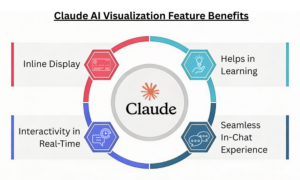
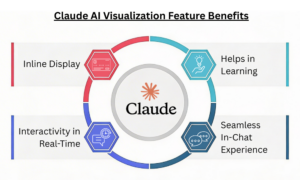
Inline Display: The visualizations are inline, not in the side panel. They are temporary and change as the conversation progresses.

Interactivity in Real-Time: In comparison to the static graphs, inputs can be changed, and results can be made more dynamic in real-time.

Benefits of Claude AI Visualization Feature

Helps in Learning: Visual representations have a greater impact than text and make it easier to explain a particular concept. Ideal for teachers, students, and more.

Seamless In-Chat Experience: Users get the desired results directly in the conversation, eliminating the need for additional design software.

Limitations to Know:

  • The feature is currently available in web versions but does not support mobile apps.
  • It’s still in development, which can lead to inaccuracies or rendering issues.
  • Although the visualization feature aids faster decision-making, it is not a replacement for tools and apps such as Tableau or Excel.

How About Availability?

The visualization feature is currently available to everyone across all the Claude plans. However, despite its availability, it’s in beta. So, users on free tiers can give it a try and generate charts, diagrams, or visuals with a simple prompt.

Summing it Up!

The new feature comes amid growing competition among AI players. This Tuesday, OpenAI launched dynamic visuals in ChatGPT, and Google unveiled interactive charts and simulations for Gemini Ultra subscribers.

Anthropic’s new update focuses on a significant push towards format-specific results. By introducing charts, diagrams, and maps directly into the conversation, Anthropic aims to make understanding easier with visuals rather than long-form text.

Don’t miss out on the recent technologies and innovations; check our blog section now!


FAQs

1. Does the feature work on mobile?
Answer: As of now, the feature is available in web versions but not in mobile applications.

2. Are the visualization capabilities available through the API?
Answer: Yes! The visualization capabilities can be accessed through the Claude API, Google Cloud’s Vertex A, and Amazon Bedrock.


You Might Like:

Introducing Voiceprint, A New Claude Code Plugin That Can Clone Your Writing Style


Source link