

Pros
- Fantastic application, AI performance
- Nearly 24 hours of battery life
- Trim, solid design
- OLED display delivers accurate, vivid colors and deep black levels
- Excellent high-res webcam
Cons
- Qualcomm Adreno can’t match Intel Arc B390 for integrated 3D graphics power
- Heavier than it looks
- Mechanical touchpad is just OK
- Fingerprint magnet
- Limited port selection
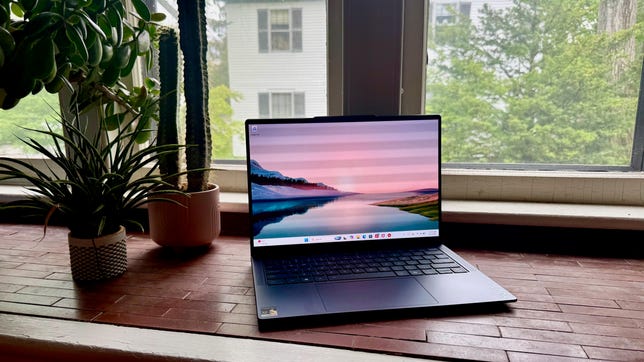
The Lenovo Yoga Slim 7x is a midrange OLED laptop that delivers strong application and AI performance and lengthy battery life inside a sleek, blue chassis. Now in its 11th generation, this year’s Yoga Slim 7x offers a choice of a second-gen Snapdragon X2 CPU and a mishmash of mainstream and premium features. Pricing starts at a very mainstream $1,200 but quickly escalates into premium territory; a trio of upgrades pushes the price of my test system to $1,700.
The premium bits are the all-metal design, OLED display, quad speakers and high-resolution webcam. Decidedly mainstream are the OLED’s resolution, the laptop’s average system weight, the standard mechanical touchpad and the extremely limited port selection that doesn’t even include a headphone jack.
The Yoga Slim 7x’s marginal 3D performance means it’s not the best pick as a compact content creation or gaming machine, and you’ll need to perform a Windows-on-Arm compatibility check — as you would with any Snapdragon X-based laptop — to verify all the software you rely on has native Arm versions. But if everything checks out and you don’t need 3D graphics muscle for gaming or content creation, there’s a lot to like about the Yoga Slim 7x Gen 11 as a well-rounded, long-lasting 14-inch laptop.
Lenovo Yoga Slim 7x Gen 11
| Price as reviewed | $1,700 |
|---|---|
| Display size/resolution | 14-inch 1,920×1,200 touch OLED |
| CPU | Snapdragon X2 Elite X2E-88-100 |
| Memory | 32GB LPDDR5X-9523 |
| Graphics | Qualcomm Adreno X2-90 |
| Storage | 1TB SSD |
| Ports | USB4 (x3) |
| Networking | Wi-Fi 7 and Bluetooth 5.4 |
| Operating system | Windows 11 Home 26H1 |
| Weight | 2.9 pounds (1.3 kilograms) |
Lenovo’s laptop offerings are so broad that I feel like you sometimes need a decoder ring to figure out what kind of laptop you’re looking at. For instance, don’t let the Yoga name fool you — this isn’t a two-in-one convertible like many Yoga models, but instead is a traditional clamshell laptop. It is quite slim, however, so it does live up to that part of its name. And the “7x” refers to its middle-of-the-road status, slotted between the budget IdeaPad Slim 5 series and premium Yoga 9 series, and having a Qualcomm Snapdragon X series processor.
Lenovo sells a number of fixed configurations of the Yoga Slim 7x Gen 11 as well as a couple of models you can customize to your specifications. The Yoga Slim 7x Gen 11 starts at $1,200 for a Snapdragon X2 Plus X2P-42-100, 16GB RAM, 512GB and a 14-inch OLED with a 1,920×1,200-pixel resolution. For another $100, you can double the storage to 1TB. Both of these models are on sale at Lenovo at the time of this writing: the entry-level model was discounted to $1,140, and the 1TB model was $100 off, dropping its price to $1,200.
The next model in the line is the one that Lenovo sent me. It bumps you up to the Snapdragon X2 Elite X2E-88-100 CPU and 32GB of RAM while also featuring a 1TB SSD and the base 1,920×1,200-pixel OLED display. It costs $1,700 at Lenovo and was discounted to $1,500 during the time I was working on this review. The same model is available from Best Buy for $1,850, so it definitely makes sense to purchase it from Lenovo unless you happen across a big price cut at Best Buy.
There’s one model above my test system in the Yoga Slim 7x Gen 11. It has the same specs as the one I tested but comes with a superior display: a 2.8K OLED with a faster 120Hz refresh rate that’s rated for 1,100 nits of brightness in HDR mode and 500 nits in SDR. It has a list price of $1,900 and was selling for $1,800.
The Yoga Slim 7x Gen 11 starts at £1,082 in the UK and AU$1,999 in Australia.
Lenovo Yoga Slim 7x Gen 11 performance
With its Snapdragon X2 Elite Extreme X2-E94-100 processor, featuring an 18-core CPU and an NPU capable of 80 TOPS, the Yoga Slim 7x Gen 11 achieved strong results across both our multicore and AI benchmarks. It’s one of the few Windows laptops to top the M5 MacBook Air on the multicore Geekbench 6 test, and did so with ease, with a score of more than 19,000. It also pulled off the same feat on the multicore Cinebench 2024 test. Its single-core results weren’t on the same level as its multicore scores but still above average.
It also outpaced the M5 MacBook Air on our Geekbench AI test, thanks to its 80 TOPS NPU. It’s well equipped to perform local AI tasks, but for 3D performance, its integrated Qualcomm Adreno GPU can’t compete with Intel models such as the Dell XPS 14 and MSI Prestige 14 Flip AI Plus that have integrated Intel Arc B390 graphics. Still, its score on 3Dmark Steel Nomad was close to that of the M5 MacBook Air’s.
The Yoga Slim 7x Gen 11 achieved this performance while also demonstrating strong efficiency, as we’ve seen from other Snapdragon X-series laptops. It lasted more than 22 hours in our YouTube streaming battery-drain test, providing around-the-clock mobility. Still, other laptops run even longer. The Intel Panther Lake-based MSI Prestige 14 Flip AI Plus lasted 3 hours longer on the test than the Yoga Slim 7x, and the Snapdragon X-based HP OmniBook 5 14 extends your time away from a power outlet to over 28 hours.
Compact and blue
The Yoga Slim 7x looks good and feels solid. The thin and compact, all-metal chassis is rigid with little flex, and it comes in a deep blue color that Lenovo calls Cosmic Blue. The color is a nice departure from basic silver, gray or black but isn’t so loud that it would look out of place in an office or boardroom. As much as I like the color of the chassis, I don’t like its ability to collect fingerprints and smudges.
While its trim dimensions make it easy to toss the Yoga Slim 7x into a backpack, it’s a tad heavier than it looks. Its nearly 3-pound weight is average for a 14-inch laptop. It weighs substantially more than the 2.2-pound Asus Zenbook A14 and 2.2-pound Acer Swift Edge 14 AI and is closer in weight to the 2.9-pound HP OmniBook 5 and 2.7-pound MacBook Air 13.
I love the Yoga Slim 7x’s keyboard, but am less enamored by its touchpad. The keyboard is excellent, in line with the company’s top-notch ThinkPads. The keys offer a firm yet snappy feedback with a bit more travel than I expected for such a thin laptop. The travel isn’t so deep that it’ll slow you down, but instead provides more of a plush feel than the shallow travel of a MacBook’s keyboard.
Meanwhile, the touchpad is merely serviceable. It’s a standard mechanical touchpad with clicks that are harder to perform on the top half than near the bottom. I’d be willing to accept this mainstream feature on one of the lower-end configurations, but for my $1,700 test system, I’d like to get a haptic touchpad with a consistent (and customizable) click response across its entire surface.
Flanking the keyboard are two speaker grilles. Beneath each is a 2-watt tweeter, and these speakers are complemented by a pair of 2-watt woofers that fire from a slit on each side of the laptop. The sound is fuller than that of a typical laptop, with some separation evident between high and low tones and even a hint of bass response.
Lenovo offers two OLED options for the Yoga Slim 7x, and I got the lower-end one. The 1,920×1,200-pixel resolution creates reasonably sharp images and text, but it might be worth upgrading to the higher-res 2,880×1,800-pixel panel if you plan to use the laptop to stare at text all day. There’s some slight text fuzziness and pixelation. Lenovo’s pricing for the display upgrade is inconsistent. It’s a no-brainer for the $60 Lenovo charges for the customizable model, but it’s a more difficult proposition when it costs $200 to go from the config I tested to the same fixed config with the 2.8K OLED.
Still, the display I tested has the standard OLED goodies of vivid color and infinite contrast with effective zero-nit black levels. And its color performance was great. On my tests with a Spyder X colorimeter, it showed 100% coverage of the sRGB and P3 spaces and 95% of AdobeRGB. It also achieved 393 nits of peak brightness, which is a solid number for an OLED that doesn’t need to get as bright as an LCD panel thanks to its aforementioned deep black level and stellar contrast.
The display’s resolution may be pedestrian, but the webcam’s is not. It’s a 9.2-megapixel camera that produces crisp 4K photos and 1440p video. It’s also an IR cam that you can use for Windows Hello facial recognition logins. Without a fingerprint reader on board, the webcam is the only method for secure biometric logins.
The port situation is grim. With just three USB4 ports, you’ll need an adapter to connect even headphones, let alone devices that require a USB-A or HDMI port. But, hey, at least the USB4 ports are faster with 40Gbps transfer speeds.
Is the Lenovo Yoga Slim 7x Gen 11 a good laptop?
The Lenovo Yoga Slim 7x is great if you want an easily portable OLED laptop with strong overall performance, but don’t plan to lean into any heavy lifting in terms of 3D graphics work or gaming. With its Snapdragon X2 Elite CPU and ample 32GB of RAM, the Yoga Slim 7x Gen 11 excels as a general-purpose laptop, and it will run all day and into the night without needing to recharge. I like the solid and compact, all-metal design and the two OLED display options. Just be sure to compare pricing between Lenovo and Best Buy to find the best deal.
The review process for laptops, desktops, tablets and other computerlike devices consists of two parts: performance testing under controlled conditions in the CNET Labs and extensive hands-on use by our expert reviewers. This includes evaluating a device’s aesthetics, ergonomics and features. A final review verdict is a combination of both objective and subjective judgments.
The list of benchmarking software we use changes over time as the devices we test evolve. The most important core tests we’re currently running on every compatible computer include Primate Labs Geekbench 6, Cinebench R23, PCMark 10 and 3DMark Fire Strike Ultra.
A more detailed description of each benchmark and how we use it can be found on our How We Test Computers page.
Geekbench 6 CPU (multi-core)
Lenovo Yoga Slim 7x Gen 11 19155M5 MacBook Air (13-inch) 16890MSI Prestige 14 Flip AI Plus 16607Dell XPS 14 (OLED) 16197Lenovo IdeaPad Slim 5x Gen 11 12268HP OmniBook 5 14 11379Dell XPS 14 11207Acer Swift Edge 14 AI 10977
Geekbench 6 CPU (single-core)
M5 MacBook Air (13-inch) 4148Lenovo IdeaPad Slim 5x Gen 11 3302Lenovo Yoga Slim 7x Gen 11 3075MSI Prestige 14 Flip AI Plus 2896Dell XPS 14 (OLED) 2813Acer Swift Edge 14 AI 2781Dell XPS 14 2599HP OmniBook 5 14 2395
Cinebench 2024 CPU (multi-core)
Lenovo Yoga Slim 7x Gen 11 1285M5 MacBook Air (13-inch) 926Lenovo IdeaPad Slim 5x Gen 11 702Dell XPS 14 (OLED) 700MSI Prestige 14 Flip AI Plus 692HP OmniBook 5 14 675Dell XPS 14 530Acer Swift Edge 14 AI 469
Cinebench 2024 CPU (single-core)
M5 MacBook Air (13-inch) 199Lenovo Yoga Slim 7x Gen 11 149Lenovo IdeaPad Slim 5x Gen 11 133Dell XPS 14 (OLED) 124Acer Swift Edge 14 AI 120Dell XPS 14 117MSI Prestige 14 Flip AI Plus 115HP OmniBook 5 14 110
Geekbench AI (Neural engine quantized score)
Lenovo IdeaPad Slim 5x Gen 11 84721Lenovo Yoga Slim 7x Gen 11 77105M5 MacBook Air (13-inch) 57775Dell XPS 14 (OLED) 55366MSI Prestige 14 Flip AI Plus 52450Dell XPS 14 51371Acer Swift Edge 14 AI 47901
3DMark Steel Nomad
MSI Prestige 14 Flip AI Plus 1527Dell XPS 14 (OLED) 1286M5 MacBook Air 1073Lenovo Yoga Slim 7x Gen 11 994Acer Swift Edge 14 AI 642Dell XPS 14 524Lenovo IdeaPad Slim 5x Gen 11 413HP OmniBook 5 14 228
Online streaming battery drain test
HP OmniBook 5 14 28 hr, 19 minMSI Prestige 14 Flip AI Plus 25 hr, 18 minLenovo Yoga Slim 7x Gen 11 22 hr, 10 minDell XPS 14 21 hr, 7 minLenovo IdeaPad Slim 5x Gen 11 20 hr, 37 minM5 MacBook Air (13-inch) 17 hr, 2 minDell XPS 14 (OLED) 14 hr, 42 minAcer Swift Edge 14 AI 13 hr, 2 min
System configurations
| Lenovo Yoga Slim 7x Gen 11 | Windows 11 Home; Qualcomm Snapdragon X2 Elite X2E-88-100; 32GB DDR5 RAM; Qualcomm Adreno X2-90 Graphics; 1TB SSD |
|---|---|
| Lenovo IdeaPad Slim 5x Gen 11 | Windows 11 Home; Qualcomm Snapdragon X2 Plus X2P-42-100; 16GB DDR5 RAM; Qualcomm Adreno X2-45 Graphics; 512GB SSD |
| HP OmniBook 5 14 | Windows 11 Home; Qualcomm Snapdragon X Plus X1P-42-100; 32GB DDR5 RAM; Qualcomm Adreno X1-45 Graphics; 1TB SSD |
| Dell XPS 14 | Windows 11 Home; Intel Core Ultra 7 355; 16GB DDR5 RAM; Intel Graphics; 512GB SSD |
| Dell XPS 14 (OLED) | Windows 11 Home; Intel Core Ultra X7 358H; 32GB DDR5 RAM; Intel Arc B390 Graphics; 1TB SSD |
| MSI Prestige 14 Flip AI Plus | Windows 11 Home; Intel Core Ultra X7 358H; 32GB DDR5 RAM; Intel Arc B390 Graphics; 1TB SSD |
| Acer Swift Edge 14 AI | Windows 11 Home; Intel Core Ultra 7 258V; 32GB DDR5 RAM; Intel Arc 140V Graphics; 1TB SSD |
| M5 MacBook Air (13-inch) | Apple MacOS Tahoe 26.3.1; Apple M5 (10‑core CPU, 10‑core GPU); 16GB LPDDR5; 1TB SSD |

Stephan is the sports journalist for the Maple Grove Report.